Original Industrial Spare Part
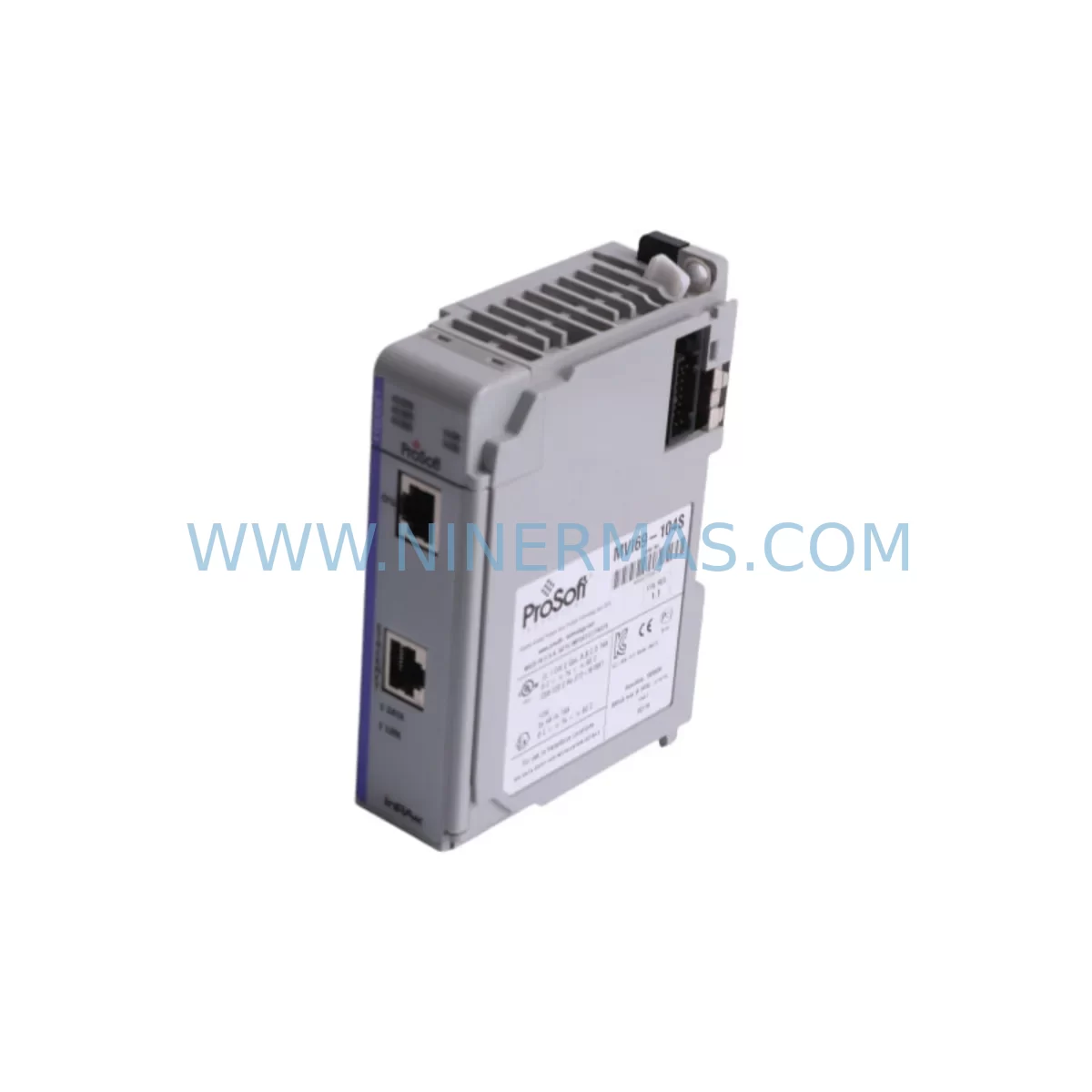
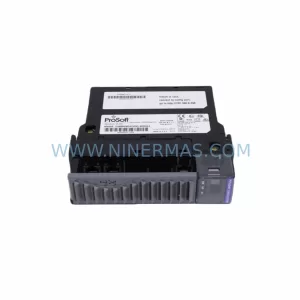
Prosoft MVI69-104S Service-Ready Spare Part for Industrial Maintenance
Verify the part, confirm the platform family, and move straight into quotation with the right commercial details.
RFQ Ready
- SKUMVI69-104S
- CategoryPLC & Industrial Automation Modules
- BrandProSoft Technology
- SupportAvailability, lead time, condition, and shipping coordination
How Buyers Usually Use This Page
- Confirm the exact part number and platform family before sending the quote request.
- Use direct email when quantity, condition, and destination are already defined internally.
- Switch to the broader brand or category archive when you need alternates nearby.
Series Navigation
Move through the most common platform families behind this part.
Product RFQ
Send this part directly for quotation.
Include quantity, required condition, destination country, and target delivery timing. Current reference: Prosoft MVI69-104S Service-Ready Spare Part for Industrial Maintenance with SKU MVI69-104S.
Prosoft MVI69-104S Service-Ready Spare Part for Industrial Maintenance
The Prosoft MVI69-104S is a serial communication module from Prosoft Technology’s MVI69 Series, engineered for seamless integration with Allen-Bradley ControlLogix and CompactLogix PLC platforms. As a service-ready spare part, the MVI69-104S supports Modbus RTU and ASCII protocols over RS-232/RS-422/RS-485 interfaces, making it a critical component in legacy and modern industrial control architectures. Whether you are managing a planned annual shutdown, responding to an unscheduled line stoppage, or building a resilient spare parts inventory, the MVI69-104S delivers the compatibility and reliability that maintenance and procurement engineers depend on.
Sourced as an original Prosoft Technology component, each unit undergoes pre-shipment functional testing to verify communication integrity, backplane connectivity, and firmware version alignment before dispatch. This ensures that field replacement is straightforward and that system restoration time is minimized. A 12-month warranty is included with every unit, covering manufacturing defects and operational failures under normal industrial conditions.
Spare Maintenance Table
| Parameter | Specification |
|---|---|
| Part Number / SKU | MVI69-104S |
| Brand | Prosoft Technology |
| Series | MVI69 |
| Module Type | Serial Communication Module |
| Supported Protocols | Modbus RTU, Modbus ASCII, Generic Serial |
| Serial Interfaces | RS-232 / RS-422 / RS-485 |
| Number of Serial Ports | 4 (isolated) |
| Compatible Platforms | Allen-Bradley ControlLogix, CompactLogix (1769 backplane) |
| Backplane Interface | 1769 CompactLogix I/O bus |
| Power Consumption | 800 mA @ 5 VDC (from backplane) |
| Operating Temperature | 0°C to 60°C (32°F to 140°F) |
| Storage Temperature | -40°C to 85°C |
| Relative Humidity | 5% to 95% non-condensing |
| Mounting | DIN rail / panel mount via 1769 bus connector |
| Firmware | Field-upgradeable via ProSoft Configuration Builder (PCB) |
| Configuration Tool | ProSoft Configuration Builder (PCB) software |
| Origin | USA (Prosoft Technology, Inc.) |
| Condition | Original, pre-shipment tested |
| Warranty | 12 Months — Manufacturing defects & operational failure coverage |
| Application Environment | Industrial automation, process control, SCADA, legacy system integration |
Maintenance Planning for Continuous Operation
When a Prosoft MVI69-104S is identified as a fault point during routine control cabinet inspection or fault isolation, experienced maintenance engineers know that a single module failure rarely occurs in isolation. A thorough site assessment should accompany any MVI69-104S replacement to prevent repeat downtime and ensure full system restoration.
Begin by inspecting the 1769 CompactLogix backplane and adjacent I/O modules. A degraded backplane connector or a faulty 1769-IQ16 digital input module can cause intermittent communication errors that are misdiagnosed as serial module failures. Verify that the 1769-PA2 or 1769-PB2 power supply module is delivering stable 5 VDC and 24 VDC rails; voltage sag under load is a common root cause of MVI69 series module resets and communication timeouts.
Check all RS-485 and RS-232 field wiring connected to the MVI69-104S port terminals. Shielding continuity, termination resistors (typically 120 Ω at each end of an RS-485 bus), and cable routing away from high-voltage conductors should all be verified. Damaged or improperly terminated serial cables are a leading cause of Modbus RTU communication failures in field environments.
For systems where the MVI69-104S interfaces with third-party instrumentation — such as flow meters, variable frequency drives, or remote I/O nodes — confirm that the connected devices’ baud rate, parity, stop bits, and Modbus slave addresses match the module’s ProSoft Configuration Builder (PCB) settings. A firmware mismatch or configuration drift after a power event can cause the module to fail to initialize correctly even after hardware replacement.
Procurement engineers building annual maintenance kits for CompactLogix-based control systems should also consider stocking the MVI69-MCM (Modbus master/slave module) and MVI69-DFNT (DeviceNet module) as complementary spares, particularly in mixed-protocol environments. For systems with remote I/O expansion, the 1769-SDN DeviceNet Scanner and associated 1769-ECR or 1769-ECL end caps should be included in the spare parts list to avoid extended lead times during emergency repairs.
Signal isolation is another area that warrants attention during MVI69-104S replacement. If the serial loop connects to field instruments in electrically noisy environments — such as motor control centers or variable speed drive panels — a DIN-rail mounted signal isolator (e.g., a 4–20 mA loop isolator or RS-485 repeater/isolator) should be inspected and replaced if degraded. These passive components are often overlooked during fault diagnosis but are critical for long-term communication stability.
Finally, verify the Allen-Bradley 1769-L3x or 1769-L2x CompactLogix processor firmware version and the ladder logic Add-On Instructions (AOI) associated with the MVI69-104S. Prosoft Technology periodically releases firmware updates that address protocol edge cases and improve module recovery behavior after power cycling. Keeping the processor and module firmware aligned is a low-cost, high-impact maintenance practice that reduces nuisance faults and simplifies future troubleshooting.
Site Replacement Workflow
Replacing the Prosoft MVI69-104S on a live CompactLogix system requires a structured approach to minimize downtime and avoid configuration loss. Follow this recommended workflow for safe and efficient field replacement:
- Pre-replacement backup: Use ProSoft Configuration Builder (PCB) to export the existing MVI69-104S configuration file (.mvi69cfg). Store a copy on a USB drive and in your site’s document management system. Also back up the CompactLogix processor program using Studio 5000 Logix Designer.
- Controlled shutdown: Place the CompactLogix processor in Program mode via the keyswitch or Studio 5000. Confirm that all field devices connected to the MVI69-104S serial ports are in a safe state before removing power from the 1769 backplane segment.
- Module removal: Disconnect all serial port cables from the MVI69-104S. Note the port assignments and cable labels before removal. Remove the module from the 1769 backplane by releasing the locking tab and sliding it out.
- Replacement installation: Insert the new MVI69-104S into the same backplane slot. Reconnect all serial cables to the correct ports as documented. Restore backplane power.
- Configuration restore: Launch ProSoft Configuration Builder and download the previously exported configuration file to the new module. Verify that baud rates, protocol settings, and Modbus address maps are correctly applied.
- Functional verification: Place the CompactLogix processor back in Run mode. Monitor the MVI69-104S status LEDs and the processor’s diagnostic tags to confirm that all serial ports are communicating correctly. Verify data exchange with connected field devices.
- Documentation update: Record the replacement date, new module serial number, and firmware version in the site maintenance log. Update the spare parts inventory to trigger reorder of a replacement MVI69-104S unit.
This workflow is compatible with both hot-standby and simplex CompactLogix architectures. For redundant systems, coordinate the replacement with the system integrator to ensure seamless switchover without production impact.
Spare Parts Support FAQ
Q1: Is the MVI69-104S a direct drop-in replacement for older MVI69 series serial modules?
Yes. The MVI69-104S is designed to fit the standard 1769 CompactLogix backplane and is compatible with existing ladder logic AOIs developed for the MVI69 platform. However, always verify the firmware version and re-download the configuration file using ProSoft Configuration Builder after installation to ensure protocol settings are correctly applied to the new hardware.
Q2: How is compatibility with my specific CompactLogix processor confirmed before shipment?
Compatibility is verified based on the 1769 backplane standard, which is consistent across the CompactLogix L1, L2, L3, L4, and L5 processor families. If your system uses a non-standard backplane configuration or a third-party 1769-compatible chassis, please provide your processor model number and system configuration details at the time of inquiry so our technical team can confirm compatibility before dispatch.
Q3: What does the 12-month warranty cover, and what is the process for a warranty claim?
The 12-month warranty covers manufacturing defects and operational failures under normal industrial operating conditions (0°C to 60°C, non-condensing humidity, correct backplane voltage). It does not cover damage caused by incorrect installation, overvoltage, physical impact, or unauthorized firmware modification. To initiate a warranty claim, contact our support team at sale@ninermas.com with the order number, module serial number, and a description of the fault. A replacement or repair will be arranged promptly.
Q4: Can you support long-term supply of the MVI69-104S for multi-year maintenance contracts?
Yes. We maintain dedicated stock of MVI69 series modules to support long-term maintenance agreements and annual inspection programs. For procurement engineers managing multi-site or multi-year spare parts contracts, we offer volume pricing, reserved stock allocation, and scheduled delivery programs. Contact sale@ninermas.com to discuss your long-term supply requirements.
| Product Series | Other series |
|---|---|
| Country of Origin | US |
Catalog Continuation
More ProSoft Technology modules in the catalog.
Use the brand lane to compare nearby part numbers, platform-adjacent modules, and other inquiry-ready listings before sending your final RFQ.
Catalog Continuation
Alternative parts within PLC & Industrial Automation Modules.
Stay inside the same system family when you need substitutes, adjacent modules, or a broader shortlist for procurement review.



SKU: HDD02.2-W040N-HS12-01-FW FWA-DIAX04-ELS-05VRS-MS
Rexroth HDD02.2-W040N-HS12-01-FW Service-Ready Spare Part

SKU: I5DAE375F10010000S
Lenze I5DAE375F10010000S Service-Ready Spare Part for Industrial Maintenance