
Original Industrial Spare Part
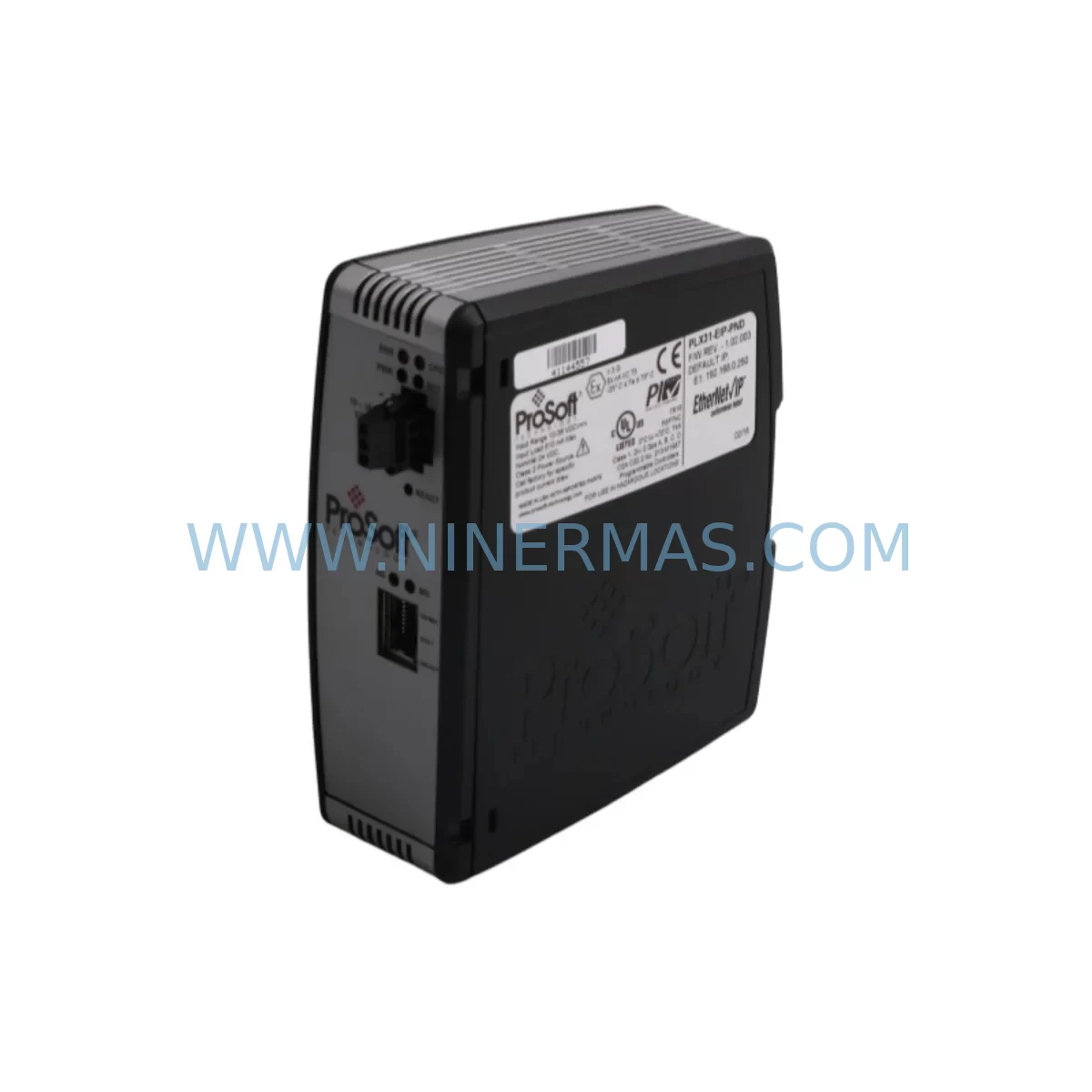
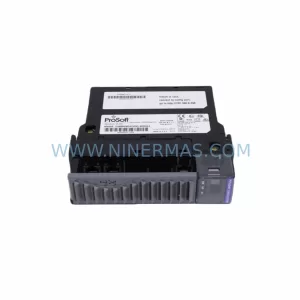
ProSoft PLX31-EIP-PND Retrofit EtherNet/IP–PROFINET Gateway
Verify the part, confirm the platform family, and move straight into quotation with the right commercial details.
RFQ Ready
- SKUPLX31-EIP-PND
- CategoryPLC & Industrial Automation Modules
- BrandProSoft Technology
- SupportAvailability, lead time, condition, and shipping coordination
How Buyers Usually Use This Page
- Confirm the exact part number and platform family before sending the quote request.
- Use direct email when quantity, condition, and destination are already defined internally.
- Switch to the broader brand or category archive when you need alternates nearby.
Series Navigation
Move through the most common platform families behind this part.
Product RFQ
Send this part directly for quotation.
Include quantity, required condition, destination country, and target delivery timing. Current reference: ProSoft PLX31-EIP-PND Retrofit EtherNet/IP–PROFINET Gateway with SKU PLX31-EIP-PND.
ProSoft PLX31-EIP-PND Retrofit EtherNet/IP–PROFINET Gateway: Legacy System Compatible Upgrade
The ProSoft PLX31-EIP-PND is a compact, DIN-rail-mounted protocol gateway that bridges EtherNet/IP (EIP) and PROFINET (PND) networks, enabling seamless communication between Allen-Bradley ControlLogix or CompactLogix controllers and PROFINET-based field devices such as Siemens ET 200 distributed I/O, PROFINET drives, and third-party sensors. As legacy automation systems age and original communication modules reach end-of-life, the PLX31-EIP-PND has become a critical retrofit component for engineers tasked with modernizing control cabinets without replacing the entire PLC platform.
In retrofit and upgrade projects, the PLX31-EIP-PND is typically deployed when a plant’s existing EtherNet/IP backbone must interface with PROFINET field devices added during a production line expansion, or when a Siemens S7-300 or S7-400 PROFINET segment must be integrated into a Rockwell Automation control architecture. The module supports up to 64 PROFINET I/O devices and handles cyclic data exchange with deterministic timing, making it suitable for motion-critical and process-critical applications where communication latency directly affects output quality.
Upgrade Compatibility Table
| Parameter | PLX31-EIP-PND Specification | Retrofit / Replacement Notes |
|---|---|---|
| EtherNet/IP Interface | 1 × RJ45, 10/100 Mbps | Compatible with ControlLogix L6x/L7x/L8x, CompactLogix L3x/L4x |
| PROFINET Interface | 2 × RJ45 (integrated switch), 100 Mbps | Supports PROFINET IO Controller and IO Device roles; replaces legacy CP343-1 or CP443-1 in mixed-network scenarios |
| Power Supply | 24 VDC, 200 mA typical | Verify existing 24 VDC rail capacity; add QUINT-PS or equivalent if budget is marginal |
| Mounting | 35 mm DIN rail | Confirm available DIN rail space in control cabinet; 45 mm width clearance required |
| Configuration Tool | ProSoft Configuration Builder (PCB) | Free download; replaces RSNetWorx or STEP 7 HW Config for gateway mapping |
| Max PROFINET IO Devices | 64 devices | Sufficient for most legacy line expansions; verify against existing GSD/GSDML device count |
| EDS File | Provided by ProSoft | Import into Studio 5000 Logix Designer for seamless tag mapping |
| Communication Mode | Cyclic + Acyclic (Class 1 & Class 3) | Supports both I/O and messaging; suitable for HMI read-back and diagnostic polling |
| Discontinued Model Replacement | Replaces PLX31-EIP-PND (EOL units) | Drop-in replacement; same PCB footprint and terminal layout |
| Warranty | 12 Months | Pre-shipment functional test included; certificate available on request |
Retrofit Planning for Existing Automation Systems
When planning a retrofit around the PLX31-EIP-PND, engineers must account for the full communication chain from the Rockwell controller backplane to the PROFINET field segment. In a typical ControlLogix rack, the gateway connects via the EtherNet/IP port to the same subnet as the 1756-EN2T or 1756-EN3TR Ethernet bridge module. The PLX31-EIP-PND then acts as a PROFINET IO Controller, polling field devices on the PROFINET ring. If the existing plant network uses a flat Layer 2 topology, a managed switch such as the Hirschmann RS20 or Phoenix Contact FL SWITCH 2005 should be inserted to segment PROFINET traffic and prevent EtherNet/IP broadcast storms from degrading cycle times.
On the PROFINET side, the gateway’s GSDML file must be imported into the engineering tool — whether that is TIA Portal V15/V16 or a third-party PROFINET configurator — so that each IO device’s slot and subslot assignments are correctly mapped. Legacy Siemens ET 200S or ET 200M distributed I/O stations that previously communicated with a CP343-1 Advanced can be re-homed to the PLX31-EIP-PND without changing field wiring, provided the GSDML module definitions match. Engineers should verify that the existing 24 VDC power supply feeding the ET 200 backplane has sufficient current headroom after adding the gateway’s 200 mA draw.
For projects involving CompactLogix L33ER or L36ERM controllers, the PLX31-EIP-PND is added as a Generic Ethernet Module (GENET) in Studio 5000 Logix Designer using the EDS file. Input and output assembly sizes must match the configured PROFINET data map in ProSoft Configuration Builder. A common migration path involves replacing a legacy 1761-NET-ENI serial-to-Ethernet adapter and a separate PROFIBUS DP master with a single PLX31-EIP-PND, consolidating two protocol boundaries into one device and reducing cabinet wiring complexity. In such projects, the 1756-L71 or 1756-L73 controller program typically requires only tag remapping rather than logic restructuring, significantly reducing commissioning time.
Signal isolation should be considered when the PROFINET segment spans multiple control cabinets or traverses areas with high electromagnetic interference. In these cases, a Phoenix Contact PSI-MOS-PROFIB/FO fiber optic repeater or equivalent device can be inserted between the PLX31-EIP-PND’s PROFINET port and the field segment. For I/O expansion within the same cabinet, Wago 750-352 PROFINET couplers or Beckhoff EK1100 EtherCAT couplers (bridged via a secondary gateway) are commonly used alongside the PLX31-EIP-PND to extend the I/O count without adding a second PLC CPU.
HMI integration is another key consideration. FactoryTalk View SE or ME panels connected to the ControlLogix controller will automatically reflect PROFINET device data once the PLX31-EIP-PND tags are mapped into the controller’s tag database. No additional OPC server or DDE bridge is required, which simplifies HMI screen migration from legacy Siemens WinCC or ProTool projects. Alarm and diagnostic data from PROFINET devices — such as module fault codes from a Siemens IM 151-3 PN interface module — are surfaced as controller tags and can be displayed directly on existing FactoryTalk alarm banners.
Downtime Control During System Migration
Minimizing unplanned downtime is the primary constraint in any live-plant retrofit. For PLX31-EIP-PND installations, the recommended approach is a staged cutover: configure and bench-test the gateway offline using ProSoft Configuration Builder before the maintenance window, validate all PROFINET device connections on a test rack, and pre-load the updated Studio 5000 project to a laptop ready for download. During the cutover window, the sequence is: power down the PROFINET segment, disconnect the legacy communication module (e.g., CP343-1 or 1761-NET-ENI), mount and wire the PLX31-EIP-PND, restore 24 VDC power, download the controller program, and verify cyclic data exchange before releasing the line.
To protect the original program logic, always create a full controller backup using RSLogix 5000 or Studio 5000 before beginning any hardware change. Export the existing I/O configuration as an L5X file and store it on a secure network share. If the PROFINET device list changes during the retrofit — for example, adding a new Siemens SINAMICS G120 drive to the segment — update only the GSDML mapping in ProSoft Configuration Builder and re-download the gateway configuration without touching the controller ladder logic. This approach preserves existing interlocks, safety routines, and HMI tag bindings, reducing the risk of introducing new faults during the migration window.
For critical processes where even a 30-minute outage is unacceptable, a parallel-run strategy can be employed: install the PLX31-EIP-PND alongside the existing communication module, configure it in IO Device (slave) mode temporarily, and validate data integrity before switching the controller to use the new gateway as the IO Controller. This technique is particularly effective in food and beverage or pharmaceutical lines where regulatory requirements mandate documented validation of each control system change.
Retrofit Support FAQ
Q1: Is the PLX31-EIP-PND a direct drop-in replacement for an existing ProSoft PLX31-EIP-PND unit that has failed?
Yes. The PLX31-EIP-PND uses the same physical form factor, DIN rail clip, and terminal block layout as previous production runs. The gateway configuration file created in ProSoft Configuration Builder is fully portable — copy the .pcc project file from the failed unit’s backup (or recreate it from the documented configuration) and download it to the replacement unit. No changes to the Studio 5000 project or PROFINET engineering tool are required if the IP addresses and device names are preserved.
Q2: What wiring checks are required before powering up the replacement unit?
Verify 24 VDC polarity on the power terminal block (V+ and GND), confirm that the EtherNet/IP RJ45 cable is connected to the correct switch port (same VLAN as the ControlLogix EN2T), and ensure the PROFINET RJ45 cables are connected in the correct port order if the existing network uses a daisy-chain topology. Check that the gateway’s IP address does not conflict with any existing device on the EtherNet/IP subnet before powering on.
Q3: How is compatibility with existing PROFINET IO devices verified before the cutover?
Import each field device’s GSDML file into ProSoft Configuration Builder and match the module slot assignments to the physical device configuration. Cross-reference the PROFINET device name and IP address assigned in TIA Portal or the legacy PROFINET configurator. Run a PROFINET topology scan using the PLX31-EIP-PND’s built-in web diagnostic page to confirm that all expected devices appear online before the controller program is downloaded.
Q4: What does the 12-month warranty cover, and is pre-shipment testing performed?
Every PLX31-EIP-PND unit supplied by Ninermas undergoes a pre-shipment functional test that verifies power-up behavior, EtherNet/IP connectivity, and PROFINET IO Controller initialization. The 12-month warranty covers manufacturing defects and functional failures under normal operating conditions. A test certificate is available upon request. For warranty claims or technical support, contact sale@ninermas.com or call +0086 187 5021 5667.
| Product Series | Other series |
|---|---|
| Country of Origin | US |
Catalog Continuation
More ProSoft Technology modules in the catalog.
Use the brand lane to compare nearby part numbers, platform-adjacent modules, and other inquiry-ready listings before sending your final RFQ.
Catalog Continuation
Alternative parts within PLC & Industrial Automation Modules.
Stay inside the same system family when you need substitutes, adjacent modules, or a broader shortlist for procurement review.



SKU: HDD02.2-W040N-HS12-01-FW FWA-DIAX04-ELS-05VRS-MS
Rexroth HDD02.2-W040N-HS12-01-FW Service-Ready Spare Part

SKU: I5DAE375F10010000S
Lenze I5DAE375F10010000S Service-Ready Spare Part for Industrial Maintenance



