Original Industrial Spare Part
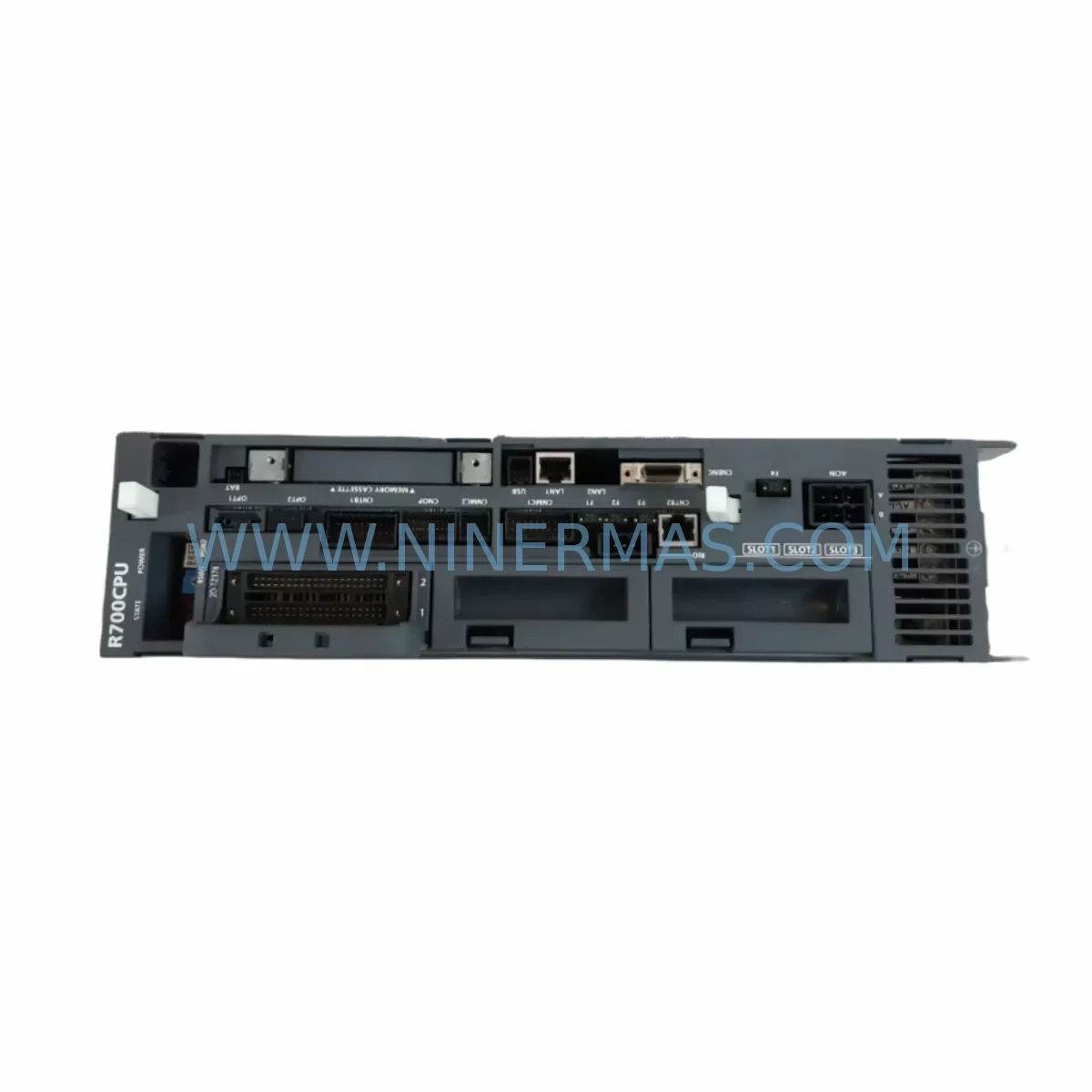
Mitsubishi R700CPU Retrofit-Compatible CPU Module for Legacy Systems
Verify the part, confirm the platform family, and move straight into quotation with the right commercial details.
RFQ Ready
- SKUR700CPU
- CategoryPLC & Industrial Automation Modules
- BrandMitsubishi
- SupportAvailability, lead time, condition, and shipping coordination
How Buyers Usually Use This Page
- Confirm the exact part number and platform family before sending the quote request.
- Use direct email when quantity, condition, and destination are already defined internally.
- Switch to the broader brand or category archive when you need alternates nearby.
Series Navigation
Move through the most common platform families behind this part.
Product RFQ
Send this part directly for quotation.
Include quantity, required condition, destination country, and target delivery timing. Current reference: Mitsubishi R700CPU Retrofit-Compatible CPU Module for Legacy Systems with SKU R700CPU.
Mitsubishi R700CPU Retrofit-Compatible CPU Module for Legacy Systems
The Mitsubishi R700CPU is a high-performance CPU module designed for seamless integration into existing MELSEC-R and iQ-R series control architectures. As legacy automation systems reach end-of-life and original Mitsubishi CPU modules become increasingly difficult to source, the R700CPU provides a reliable, retrofit-ready solution that preserves existing program logic, I/O mapping, and communication configurations without requiring a full system redesign. Whether you are managing a planned upgrade cycle or responding to an unplanned failure on a production line, the R700CPU is engineered to minimize engineering rework and reduce total downtime during the transition.
This module is particularly suited for facilities operating aging MELSEC-Q series or early iQ-R platform installations where the original CPU hardware is no longer available through standard distribution channels. The R700CPU supports the same rack-mount form factor used across the R-series backplane ecosystem, allowing direct installation into existing R35B, R38B, and R312B base units without mechanical modification. Engineers replacing a discontinued Q06UDEHCPU or Q13UDHCPU will find that the R700CPU offers a compatible migration path with updated processing speed and expanded program memory capacity.
Upgrade Compatibility Table
| Parameter | Detail |
|---|---|
| Model | Mitsubishi R700CPU |
| Series | MELSEC iQ-R |
| Backplane Compatibility | R35B, R38B, R312B base units |
| Communication Interfaces | Ethernet (built-in), USB programming port |
| Replaces / Compatible With | Q06UDEHCPU, Q13UDHCPU, R04CPU, R08CPU (program migration required) |
| Programming Software | GX Works3 (recommended), GX Works2 (with conversion) |
| I/O Points Supported | Up to 4,096 points (expandable via MELSECNET/H or CC-Link IE) |
| Installation Requirement | Slot 0 of main base unit; DIN rail or panel mount |
| Power Supply Compatibility | R61P, R62P, R63P power supply modules |
| Commissioning Tool | GX Works3 with iQ-R module configuration profile |
| Pre-Shipment Testing | Yes — functional burn-in and communication verification |
| Warranty | 12 Months from date of shipment |
Retrofit Planning for Existing Automation Systems
A successful R700CPU retrofit begins well before the module arrives on-site. Engineers should start by auditing the existing control cabinet to confirm available slot positions on the backplane, verify that the installed R61P or R62P power supply module can support the additional current draw of the new CPU, and document all existing terminal wiring assignments on connected I/O modules such as the RX40C7 digital input module and RY40NT5P digital output module. Any discrepancy between the old and new module’s I/O addressing scheme must be resolved in the GX Works3 project file before the physical swap takes place.
Communication continuity is a critical concern during migration. If the existing system relies on CC-Link IE Field Network for distributed I/O communication, the R700CPU’s built-in Ethernet port must be configured with the correct station number and network parameters to match the existing RJ71GF11-T2 master module settings. Similarly, if the legacy system uses MELSECNET/H for inter-PLC communication, the network module parameters stored in the original CPU must be exported and re-imported into the R700CPU configuration before going live. Facilities using GOT2000 series HMI panels — such as the GT2710-VTBA — should verify that the GT Designer3 project references the correct CPU model and communication driver to avoid screen navigation errors after the swap.
For systems that include analog signal conditioning, engineers should confirm that existing RD60P8-G analog input modules and RD75P4 positioning modules retain their parameter settings after the CPU replacement. These modules store configuration data internally, but a CPU swap can trigger a parameter mismatch alarm if the new CPU’s module configuration profile does not match the stored data. Running a module configuration auto-read in GX Works3 immediately after first power-up is strongly recommended to detect and resolve any such conflicts before resuming production.
Where the legacy system includes signal isolators or terminal relay blocks between field devices and the PLC I/O modules, no rewiring is typically required. However, the installer should verify that the existing RJ45 patch cables connecting the CPU to the Ethernet switch are rated for industrial environments and that the switch port speed settings are compatible with the R700CPU’s 100BASE-TX interface. If the control cabinet includes an RJ71C24 serial communication module for legacy RS-232C or RS-485 device connectivity, the module’s baud rate and protocol settings should be verified against the connected field devices before the system is returned to automatic mode.
Downtime Control During System Migration
Minimizing production downtime during a CPU module replacement requires a structured pre-outage preparation process. Before scheduling the maintenance window, the engineering team should export a full backup of the existing CPU program using GX Works3, including all device comments, label definitions, and network parameter files. This backup should be stored on at least two separate media — typically a USB drive and a network share — to protect against data loss during the physical swap.
The recommended sequence for an R700CPU hot-swap replacement is as follows: first, place the existing CPU in STOP mode and confirm that all output modules have de-energized their field devices; second, remove the original CPU module from slot 0 of the base unit while leaving all I/O modules, communication modules, and power supply modules in place; third, insert the R700CPU into slot 0 and secure the module latch; fourth, power up the base unit and allow the CPU to complete its self-diagnostic cycle; fifth, connect the programming laptop via USB or Ethernet and write the previously backed-up program to the new CPU; sixth, perform a forced output test on each I/O channel to verify correct wiring continuity before switching the CPU to RUN mode.
For facilities where even a brief interruption to the control loop is unacceptable, a parallel commissioning approach can be used: the R700CPU is pre-configured and tested on a bench rack using a spare R35B base unit and a set of RX and RY I/O modules before the scheduled outage. This approach allows the engineering team to verify program execution, HMI communication, and network connectivity in a controlled environment, reducing the on-site commissioning window to the time required for the physical module swap and final I/O verification — typically 30 to 90 minutes for a standard control cabinet.
All units supplied by NINERMAS COMPANY LIMITED undergo pre-shipment functional testing, including CPU self-diagnostic verification, Ethernet communication link confirmation, and program write/read cycle testing. This process ensures that the module arrives on-site in a known-good state, eliminating the risk of receiving a defective unit and further extending the maintenance window.
Retrofit Support FAQ
Q1: Is the R700CPU a direct drop-in replacement for the Q06UDEHCPU?
The R700CPU is not a pin-for-pin electrical replacement for Q-series CPU modules, as the MELSEC-Q and iQ-R series use different backplane connector standards. However, the R700CPU is the recommended migration target for Q-series systems being upgraded to the iQ-R platform. The program conversion process is supported by GX Works3’s built-in Q-to-R conversion wizard, which automates the majority of the instruction and device mapping translation. Manual review of motion control instructions and network parameter settings is required after conversion.
Q2: What commissioning steps are required after installing the R700CPU?
After physical installation, connect GX Works3 via USB or Ethernet and perform a module configuration auto-read to verify that all installed I/O and communication modules are recognized correctly. Write the converted program to the CPU, set the correct IP address and network parameters, and perform a forced output test on each I/O channel. If a GOT2000 HMI is connected, verify that the GT Designer3 project communicates correctly with the new CPU before switching to RUN mode.
Q3: Can the R700CPU operate with existing CC-Link IE and MELSECNET/H network modules?
Yes. The R700CPU supports CC-Link IE Field Network and CC-Link IE Control Network when used with compatible network modules such as the RJ71GF11-T2. MELSECNET/H connectivity requires the installation of a compatible network module in the base unit. All network parameters from the original CPU must be re-applied to the new CPU configuration using GX Works3 before the network is brought online.
Q4: What warranty and stock availability does NINERMAS offer for the R700CPU?
All R700CPU units supplied by NINERMAS COMPANY LIMITED carry a 12-month warranty from the date of shipment, covering manufacturing defects and functional failures under normal operating conditions. Units are pre-shipment tested prior to dispatch. Stock availability is maintained for immediate shipment; for volume orders or scheduled maintenance programs, please contact our sales team to confirm lead times and reserve inventory.
| Product Series | MELSEC |
|---|---|
| Country of Origin | JP |
Catalog Continuation
More Mitsubishi modules in the catalog.
Use the brand lane to compare nearby part numbers, platform-adjacent modules, and other inquiry-ready listings before sending your final RFQ.
Catalog Continuation
Alternative parts within PLC & Industrial Automation Modules.
Stay inside the same system family when you need substitutes, adjacent modules, or a broader shortlist for procurement review.
SKU: 16-167627-00 8122 410 05002, 4022.470.78191 8122 410 55702 16-273491-00
Novellus 16-167627-00 Service-Ready Industrial Spare Part
SKU: 2305451-C DT2000 0626 P2, OLE36-10632-02
Advanced Energy 2305451-C Service-Ready Industrial Spare Part