Original Industrial Spare Part
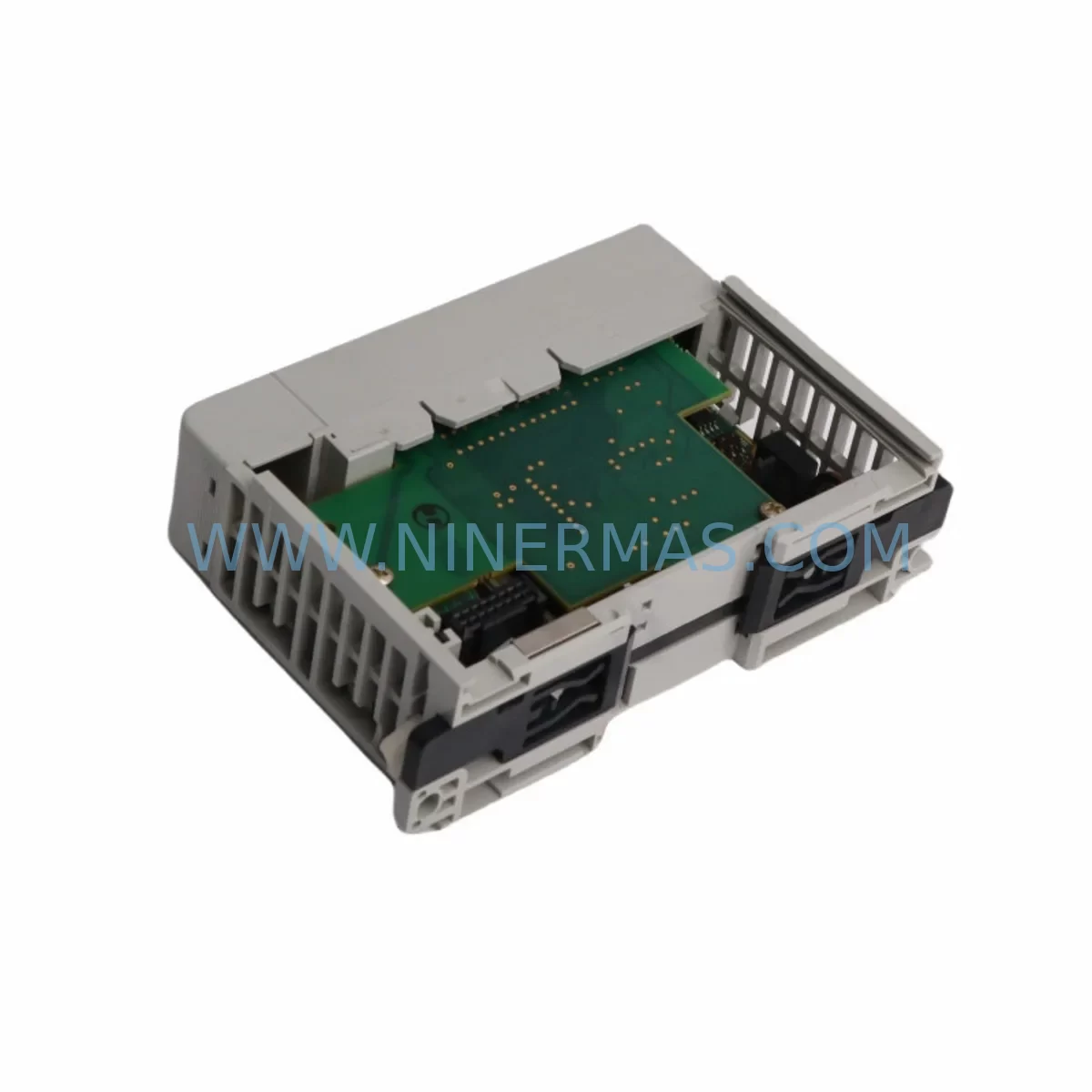
ProSoft MVI69-MNETC Service-Ready Spare Part
Verify the part, confirm the platform family, and move straight into quotation with the right commercial details.
RFQ Ready
- SKUMVI69-MNETC
- CategoryPLC & Industrial Automation Modules
- BrandProSoft Technology
- SupportAvailability, lead time, condition, and shipping coordination
How Buyers Usually Use This Page
- Confirm the exact part number and platform family before sending the quote request.
- Use direct email when quantity, condition, and destination are already defined internally.
- Switch to the broader brand or category archive when you need alternates nearby.
Series Navigation
Move through the most common platform families behind this part.
Product RFQ
Send this part directly for quotation.
Include quantity, required condition, destination country, and target delivery timing. Current reference: ProSoft MVI69-MNETC Service-Ready Spare Part with SKU MVI69-MNETC.
ProSoft MVI69-MNETC Service-Ready Spare Part for Industrial Maintenance
The ProSoft MVI69-MNETC is a Modbus TCP/IP Multi-Client communication module designed for Allen-Bradley CompactLogix and MicroLogix 1500 PLC platforms. As a critical communication bridge between field devices and the control system, this module plays an indispensable role in continuous production environments where unplanned downtime carries significant operational and financial consequences. For maintenance engineers managing aging automation systems, having a verified, tested spare unit of the MVI69-MNETC on hand is one of the most effective strategies for minimizing mean time to repair (MTTR) and sustaining production continuity.
The MVI69-MNETC supports up to 30 Modbus TCP/IP client connections simultaneously, enabling high-density data exchange between PLCs and field instruments, drives, meters, and remote I/O nodes. Its backplane-mounted form factor integrates directly into the CompactLogix chassis, sharing the local I/O bus for deterministic, low-latency communication. When this module fails or degrades — whether due to firmware corruption, hardware aging, surge damage, or connector wear — the entire Modbus TCP/IP communication layer can collapse, halting data acquisition, setpoint delivery, and interlock signaling across the affected control loop.
For procurement engineers, sourcing a genuine ProSoft MVI69-MNETC from a reliable distributor with documented stock, pre-shipment testing, and a 12-month warranty eliminates the risk of receiving counterfeit or refurbished units that may fail prematurely in critical applications. NINERMAS maintains long-term inventory of this module to support emergency replacement, annual maintenance planning, and multi-site spare parts standardization programs.
Spare Maintenance Table
| Parameter | Specification |
|---|---|
| Part Number | MVI69-MNETC |
| Brand | ProSoft Technology |
| Series | MVI69 (CompactLogix / MicroLogix 1500) |
| Protocol | Modbus TCP/IP (Multi-Client) |
| Max Client Connections | 30 simultaneous Modbus TCP/IP clients |
| Backplane Interface | Allen-Bradley CompactLogix local I/O bus |
| Power Consumption | 800 mA @ 5 VDC (from backplane) |
| Operating Temperature | 0°C to +60°C |
| Storage Temperature | -40°C to +85°C |
| Humidity | 5% to 95% non-condensing |
| Communication Port | RJ45 Ethernet (10/100 Mbps) |
| Configuration Interface | ProSoft Configuration Builder (PCB) software |
| Compatibility | 1769-L23, 1769-L24, 1769-L27, 1769-L30, 1769-L32, 1769-L35, 1769-L43, 1769-L45 |
| Mounting | CompactLogix chassis slot (right of controller) |
| Origin | USA |
| Warranty | 12 Months — Tested before shipment |
Maintenance Planning for Continuous Operation
When a maintenance engineer identifies a fault or degraded performance in the MVI69-MNETC, the replacement workflow should extend beyond the module itself. A thorough inspection of the surrounding control cabinet components is essential to prevent repeat failures and ensure the restored system operates reliably.
Begin by verifying the integrity of the CompactLogix power supply module (such as the 1769-PA2 or 1769-PB2) that feeds the chassis. A power supply with marginal output voltage or excessive ripple can cause communication modules to behave erratically, generate CRC errors, or drop TCP connections intermittently — symptoms that are often misdiagnosed as module failure. Replacing the MVI69-MNETC without addressing an unstable power supply will result in recurring faults.
Next, inspect the Ethernet switch or managed switch connected to the MVI69-MNETC’s RJ45 port. Industrial-grade switches such as those in the Hirschmann MICE or ProSoft PLX series should be checked for port errors, duplex mismatches, and VLAN configuration integrity. A faulty switch port can cause the module to lose TCP sessions and trigger false communication alarms in the PLC program.
The 1769-L32E or 1769-L43 CompactLogix controller itself should be inspected for firmware version compatibility with the MVI69-MNETC’s ladder logic Add-On Instruction (AOI). Mismatched firmware between the controller and the module’s configuration file is a common source of post-replacement communication failures. Ensure the ProSoft Configuration Builder project file is backed up and version-controlled before any replacement activity.
For systems where the MVI69-MNETC interfaces with Modbus TCP/IP slave devices such as variable frequency drives (e.g., ABB ACS880, Siemens SINAMICS G120), power meters, or remote I/O adapters, verify that the slave device IP addresses, unit IDs, and register maps remain consistent with the replacement module’s configuration. A single incorrect register offset can cause incorrect setpoint delivery or missed interlock signals.
Additionally, inspect the chassis backplane connector and the slot alignment of the module. Bent or oxidized backplane pins are a frequent cause of intermittent communication errors in high-vibration or high-humidity environments. Clean the connector with appropriate contact cleaner and verify seating torque before powering up the replacement unit.
For cabinets operating in dusty or humid environments, check the condition of cabinet door seals, filter mats, and thermostat-controlled cooling fans. Thermal stress and particulate contamination are leading causes of premature failure in communication modules. Replacing the MVI69-MNETC in a cabinet with inadequate thermal management will shorten the replacement unit’s service life.
Finally, review the surge protection devices (SPDs) installed on the Ethernet line and the 24 VDC control power rail. If the original module failed due to a lightning strike or switching transient, the SPD may have been sacrificed and requires replacement before the new module is installed. ProSoft also recommends verifying the grounding continuity of the chassis and DIN rail to ensure proper EMC protection for the communication module.
Site Replacement Workflow
Replacing the MVI69-MNETC on a live production site requires a structured approach to minimize downtime and avoid configuration errors. The following workflow is recommended for maintenance and commissioning engineers:
Step 1 — Pre-Replacement Preparation: Export the current ProSoft Configuration Builder (PCB) project file from the engineering workstation. Verify the firmware version of the existing module using RSLogix 5000 or Studio 5000. Document all active Modbus TCP/IP client connections, IP addresses, and polling rates. Back up the full PLC program including the MVI69-MNETC AOI and controller tags.
Step 2 — Safe Isolation: Place the PLC in Program mode to suspend all Modbus TCP/IP polling. Notify the process control room of the planned communication interruption. De-energize the CompactLogix chassis following the site’s lockout/tagout (LOTO) procedure. Remove the faulty MVI69-MNETC from its chassis slot, noting the slot number for reinstallation.
Step 3 — Module Installation: Insert the replacement MVI69-MNETC into the correct chassis slot. Verify backplane connector seating. Reconnect the Ethernet cable to the RJ45 port. Re-energize the chassis and allow the module to complete its boot sequence (indicated by the LED status pattern).
Step 4 — Configuration Download: Using ProSoft Configuration Builder, download the backed-up configuration file to the replacement module via the Ethernet port. Verify that all client connection parameters, IP addresses, and register maps are correctly loaded. Download the PLC program to the controller and switch to Run mode.
Step 5 — Verification: Monitor the MVI69-MNETC status LEDs and the AOI status tags in the PLC program to confirm all Modbus TCP/IP client connections are established. Verify data exchange with each slave device by checking live register values against expected process values. Document the replacement activity in the site maintenance log.
This structured workflow reduces average replacement time to under 2 hours for experienced maintenance engineers and eliminates the most common post-replacement commissioning errors.
Spare Parts Support FAQ
Q1: Does the MVI69-MNETC replacement unit come with a warranty?
Yes. Every MVI69-MNETC unit supplied by NINERMAS carries a 12-month warranty covering manufacturing defects and functional failures under normal operating conditions. Each unit undergoes functional testing before shipment to verify communication performance, backplane interface integrity, and firmware operation.
Q2: How do I verify compatibility between the replacement MVI69-MNETC and my existing CompactLogix system?
The MVI69-MNETC is compatible with all CompactLogix 1769-L2x, 1769-L3x, and 1769-L4x series controllers. Compatibility is determined by the chassis type (1769 series) and the ProSoft AOI version used in the PLC program. NINERMAS technical support can assist with compatibility verification based on your controller catalog number and Studio 5000 project version.
Q3: Can NINERMAS supply the MVI69-MNETC for long-term maintenance contracts and multi-site spare parts programs?
Yes. NINERMAS maintains dedicated stock of the MVI69-MNETC to support annual maintenance contracts, multi-site standardization programs, and emergency replacement orders. Long-term supply agreements with fixed pricing are available for customers managing large installed bases of ProSoft communication modules.
Q4: What should I do if the replacement MVI69-MNETC does not establish Modbus TCP/IP connections after installation?
First, verify that the PCB configuration file was correctly downloaded to the module and that the Ethernet IP address does not conflict with other devices on the network. Check the Ethernet switch port for link status and duplex settings. Review the AOI status tags in the PLC program for specific error codes. If the issue persists, contact NINERMAS technical support with the module’s LED status pattern and the AOI error code for remote diagnostic assistance.
| Product Series | Other series |
|---|---|
| Country of Origin | US |
Catalog Continuation
More ProSoft Technology modules in the catalog.
Use the brand lane to compare nearby part numbers, platform-adjacent modules, and other inquiry-ready listings before sending your final RFQ.

Catalog Continuation
Alternative parts within PLC & Industrial Automation Modules.
Stay inside the same system family when you need substitutes, adjacent modules, or a broader shortlist for procurement review.


SKU: 6FC5357-0BB12-0AE0
Siemens 6FC5357-0BB12-0AE0 Service-Ready Industrial Spare Part

SKU: 3BSE011790R1(PXHK401)
ABB 3BSE011790R1 PXHK401 Retrofit-Ready Communication Module