
Original Industrial Spare Part
Hirschmann MM3-4FLM4 Service-Ready Spare Part for Industrial Maintenance
Verify the part, confirm the platform family, and move straight into quotation with the right commercial details.
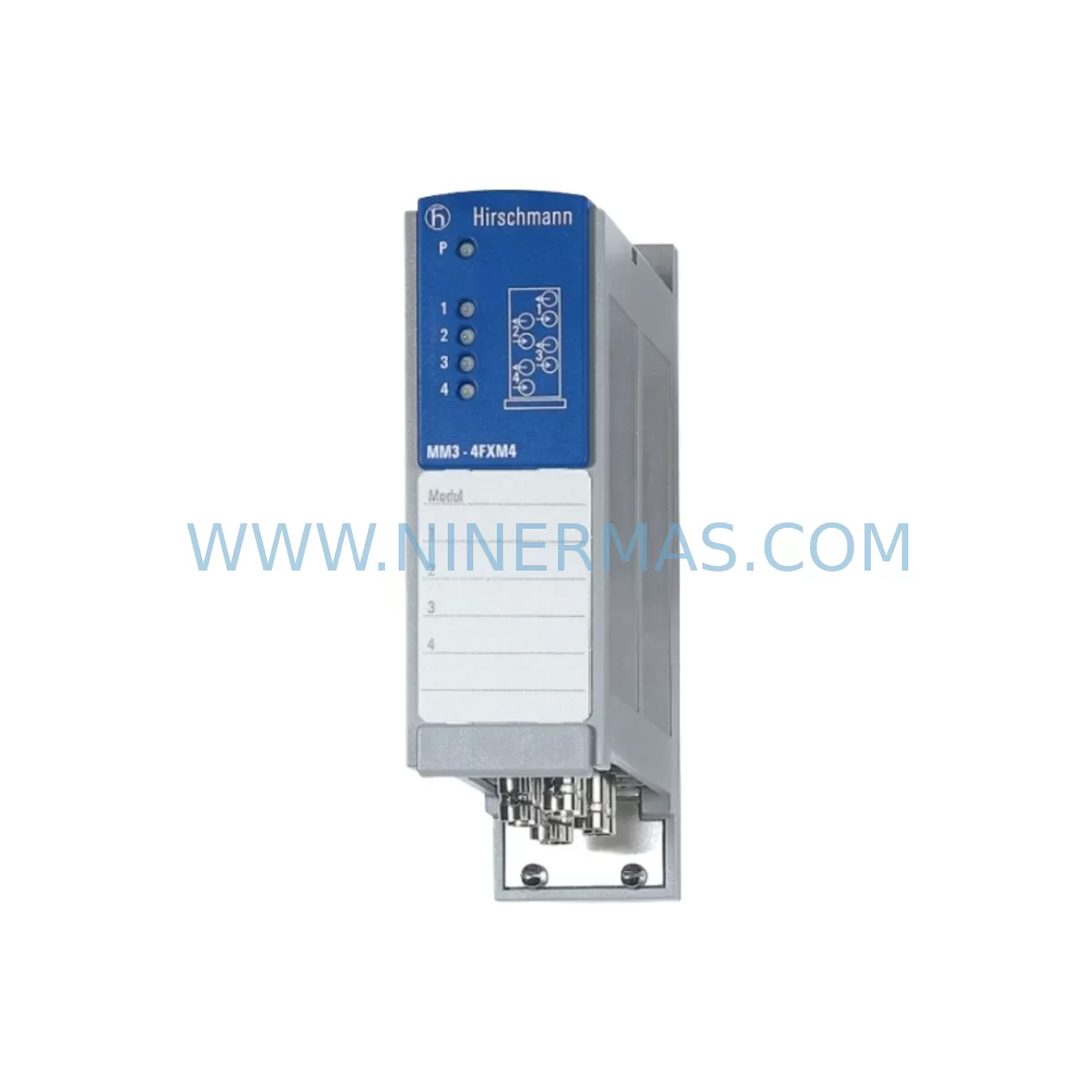
RFQ Ready
- SKUMM3-4FLM4
- CategoryPLC & Industrial Automation Modules
- BrandHirschmann
- SupportAvailability, lead time, condition, and shipping coordination
How Buyers Usually Use This Page
- Confirm the exact part number and platform family before sending the quote request.
- Use direct email when quantity, condition, and destination are already defined internally.
- Switch to the broader brand or category archive when you need alternates nearby.
Series Navigation
Move through the most common platform families behind this part.
Product RFQ
Send this part directly for quotation.
Include quantity, required condition, destination country, and target delivery timing. Current reference: Hirschmann MM3-4FLM4 Service-Ready Spare Part for Industrial Maintenance with SKU MM3-4FLM4.
Hirschmann MM3-4FLM4 Service-Ready Spare Part for Industrial Maintenance
The Hirschmann MM3-4FLM4 is a fiber optic link module designed for the Hirschmann MM3 series managed industrial Ethernet switches, widely deployed in process automation, manufacturing lines, power distribution substations, and transportation control networks. As a service-ready original spare part, the MM3-4FLM4 supports maintenance engineers in executing rapid in-cabinet replacements that minimize unplanned downtime and restore network communication integrity without requiring full switch chassis replacement. With a 12-month warranty and pre-shipment functional testing, this module is sourced and stocked specifically to support long-lifecycle industrial systems where original component availability is critical to operational continuity.
Industrial Ethernet infrastructure built around the Hirschmann MM3 platform is commonly found in legacy SCADA systems, DCS backbone rings, and PLC-controlled production cells. The MM3-4FLM4 fiber link module enables multi-mode fiber uplink connectivity within these environments, supporting ring redundancy protocols such as HIPER-Ring and RSTP that are essential for fault-tolerant network topologies. When this module fails or degrades, the entire ring segment may lose redundancy or drop communication entirely — making fast, verified spare part availability a procurement priority for any maintenance team managing these systems.
For maintenance engineers performing scheduled inspections or responding to unplanned faults, replacing the MM3-4FLM4 is a structured process. The module slots into the MM3 switch chassis without requiring firmware reconfiguration in most standard deployments, provided the replacement unit matches the original fiber specification. Before and after replacement, engineers should verify fiber patch cable integrity, SFP port cleanliness, and optical power levels using an optical power meter to confirm link establishment. Documenting the replacement in the site maintenance log and updating the spare parts inventory record ensures traceability for future audits and warranty claims.
Spare Maintenance Table
| Parameter | Specification / Detail |
|---|---|
| Part Number / SKU | MM3-4FLM4 |
| Brand | Hirschmann |
| Series | MM3 (Managed Industrial Ethernet Switch) |
| Module Type | Fiber Optic Link Module (Multi-Mode) |
| Fiber Type | Multi-Mode Fiber (MMF), 62.5/125 µm or 50/125 µm |
| Connector Type | SC Duplex (inferred from MM3 series standard) |
| Transmission Distance | Up to 4 km (multi-mode, typical) |
| Protocol Compatibility | HIPER-Ring, RSTP, Fast Ethernet (100 Mbps) |
| Operating Temperature | -10°C to +60°C (industrial grade) |
| Installation | Hot-swap capable slot insertion into MM3 chassis |
| Application Environment | SCADA, DCS, PLC networks, substation automation, manufacturing |
| Maintenance Recommendation | Inspect fiber connectors every 12 months; clean SC ports before insertion |
| Origin | Germany (Hirschmann / Belden brand) |
| Warranty | 12 Months — tested and verified before shipment |
Maintenance Planning for Continuous Operation
When the MM3-4FLM4 is identified as a replacement requirement during a control cabinet inspection or network fault diagnosis, maintenance engineers should treat the event as an opportunity to audit the broader communication and power infrastructure within the same cabinet or ring segment. The MM3 switch chassis itself — including its power supply module (e.g., Hirschmann MM3-2FXM2 or equivalent redundant PSU) — should be inspected for signs of thermal stress, capacitor aging, or fan degradation, particularly in systems that have been in continuous operation for more than five years.
Fiber patch cables connecting the MM3-4FLM4 to upstream switches, media converters, or ODF panels should be tested for insertion loss and contamination. Dirty or damaged SC connectors are a leading cause of intermittent link faults that are often misdiagnosed as module failure. Alongside the fiber infrastructure, the copper Ethernet ports on the MM3 chassis — typically RJ45 10/100 Mbps — should be verified for correct VLAN assignment and link status, especially if the switch serves as a ring node connecting PLCs, remote I/O stations, or HMI terminals.
In cabinets where the MM3 switch supports a Siemens S7-300 or S7-400 PLC rack, or a Schneider Electric Modicon Quantum or Premium DCS node, the associated PROFIBUS DP or Modbus TCP communication modules should be checked for error counters and communication timeouts that may have accumulated during the network outage. Terminal blocks and DIN rail-mounted power distribution components — including 24 VDC SITOP power supplies, Phoenix Contact QUINT series PSUs, or Weidmüller W-Series terminal strips — should be inspected for loose connections that could cause intermittent ground faults or voltage drops affecting switch operation.
For sites running redundant ring topologies, the HIPER-Ring manager configuration should be verified after module replacement to confirm that the ring has re-closed correctly and that no secondary fault is masking a latent open-ring condition. Signal isolators and surge protection devices installed on fiber or copper lines entering the cabinet from field devices should also be checked, as transient events that caused the original module failure may have degraded these protective components. Fuse holders and miniature circuit breakers on the 24 VDC bus feeding the MM3 switch should be tested for correct trip ratings and contact integrity.
Site Replacement Workflow
Step 1 — Fault Isolation: Confirm the MM3-4FLM4 as the failed component using the switch management interface (web GUI or CLI via RS-232 console port). Check port status LEDs and optical power readings. Log the fault with timestamp and affected ring segment.
Step 2 — Preparation: Retrieve the MM3-4FLM4 spare from the site spare parts cabinet. Verify the part number label matches the installed unit. Inspect SC fiber connectors on the replacement module and clean with an appropriate fiber optic cleaning tool before installation.
Step 3 — Safe Replacement: The MM3-4FLM4 is designed for hot-swap insertion in most MM3 chassis configurations. Disconnect fiber patch cables from the failed module, remove the module from the slot, and insert the replacement unit. Reconnect fiber cables, observing correct TX/RX polarity.
Step 4 — Verification: Confirm link establishment via port status LED and management interface. Verify ring closure status in the HIPER-Ring manager. Run a ping test from the network management station to all nodes in the affected segment. Document the replacement in the site maintenance record.
Step 5 — Inventory Update: Record the consumed spare in the site inventory system and initiate a replenishment order to maintain minimum stock levels. For critical ring nodes, a minimum of one MM3-4FLM4 spare per site is recommended, with two units for sites with more than three MM3 ring nodes.
Spare Parts Support FAQ
Q1: Is the MM3-4FLM4 compatible with all MM3 series switch chassis variants?
The MM3-4FLM4 is designed for the Hirschmann MM3 switch family. Compatibility depends on the specific chassis slot configuration. Engineers should verify the chassis model designation (e.g., MM3-2FXM2, MM3-4TX) and confirm that the fiber module slot accepts the 4FLM4 variant before ordering. Our team can assist with compatibility verification based on your chassis nameplate data.
Q2: What testing is performed before shipment?
Each MM3-4FLM4 unit is functionally tested prior to dispatch to verify optical transmitter and receiver performance. Units are inspected for physical integrity, connector cleanliness, and correct part number labeling. A 12-month warranty is provided from the date of shipment, covering manufacturing defects and functional failures under normal operating conditions.
Q3: Can you support long-term supply agreements for MM3-4FLM4 and related MM3 series components?
Yes. NINERMAS specializes in long-lifecycle spare parts programs for discontinued and legacy industrial automation components. We can establish blanket purchase agreements, consignment stock arrangements, or scheduled delivery programs to ensure your site maintains adequate MM3 series spare parts inventory without capital-intensive bulk purchases. Contact our procurement team to discuss your site’s annual consumption requirements.
Q4: What should I do if the replacement MM3-4FLM4 does not restore the link?
If link establishment fails after module replacement, the fault may reside in the fiber patch cable, SC connector contamination, fiber cable damage between cabinets, or a fault in the connected upstream switch port. Perform an optical power measurement at both ends of the fiber run using a calibrated optical power meter. If optical power is within specification but the link remains down, check the switch management interface for port configuration errors, VLAN mismatches, or auto-negotiation conflicts. Contact sale@ninermas.com with your chassis model, fiber run length, and optical power readings for technical support.
| Product Series | Other series |
|---|---|
| Country of Origin | DE |
Catalog Continuation
More Hirschmann modules in the catalog.
Use the brand lane to compare nearby part numbers, platform-adjacent modules, and other inquiry-ready listings before sending your final RFQ.

SKU: OZDPROFI12MG12
Hirschmann OZDPROFI12MG12 Spare Part for Industrial Maintenance
SKU: OYDE-S BF0C 943 178-101
Hirschmann OYDE-S BF0C 943 178-101 Retrofit-Compatible Transceiver
Catalog Continuation
Alternative parts within PLC & Industrial Automation Modules.
Stay inside the same system family when you need substitutes, adjacent modules, or a broader shortlist for procurement review.



SKU: 07025-0000-70-1-04
KONTRON 07025-0000-70-1-04 Service-Ready Spare Part
SKU: C4KR5R-1400 00-183-853
KUKA 00-183-853 Retrofit-Compatible Power Module for Legacy Systems



