
Original Industrial Spare Part
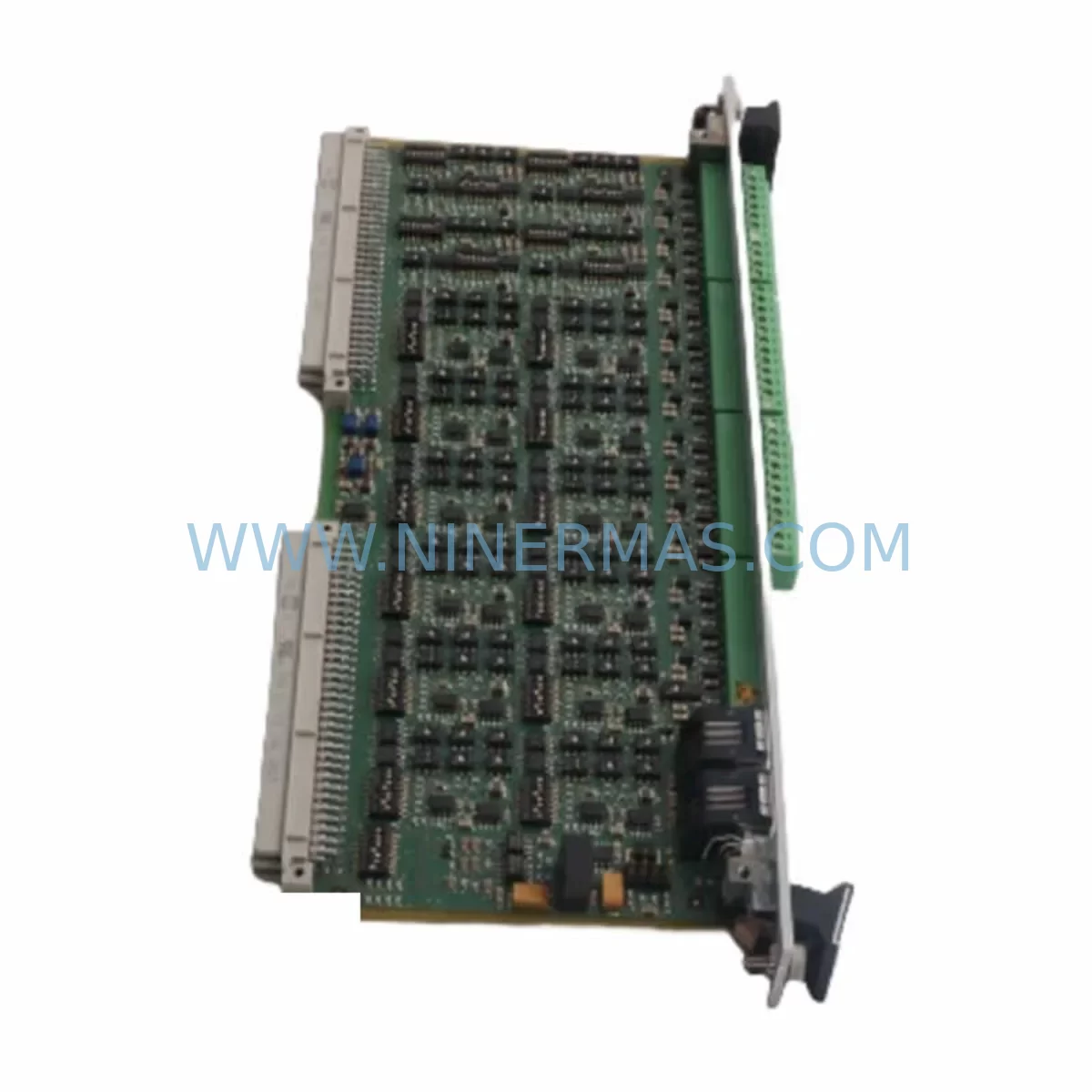
Hirschmann OYDE-S BF0C 943 178-101 Retrofit-Compatible Transceiver
Verify the part, confirm the platform family, and move straight into quotation with the right commercial details.
RFQ Ready
- SKUOYDE-S BF0C 943 178-101
- CategoryPLC & Industrial Automation Modules
- BrandHirschmann
- SupportAvailability, lead time, condition, and shipping coordination
How Buyers Usually Use This Page
- Confirm the exact part number and platform family before sending the quote request.
- Use direct email when quantity, condition, and destination are already defined internally.
- Switch to the broader brand or category archive when you need alternates nearby.
Series Navigation
Move through the most common platform families behind this part.
Product RFQ
Send this part directly for quotation.
Include quantity, required condition, destination country, and target delivery timing. Current reference: Hirschmann OYDE-S BF0C 943 178-101 Retrofit-Compatible Transceiver with SKU OYDE-S BF0C 943 178-101.
Hirschmann OYDE-S BF0C 943 178-101 Retrofit-Compatible Transceiver for Legacy Systems
The Hirschmann OYDE-S BF0C 943 178-101 is a retrofit-compatible industrial transceiver module engineered for seamless integration into aging automation architectures. As legacy Hirschmann OYDE-S series components reach end-of-life, plant engineers and procurement teams face the dual challenge of sourcing discontinued spare parts while maintaining uninterrupted production continuity. This module addresses both demands: it is a verified drop-in replacement for the original OYDE-S BF0C platform, stocked and dispatched with a 12-month warranty from NINERMAS COMPANY LIMITED.
Designed for industrial environments where downtime is measured in production losses rather than hours, the OYDE-S BF0C 943 178-101 supports the full signal integrity and communication link requirements of its predecessor. Whether you are executing a controlled migration from an obsolete Hirschmann rail-switch backbone to a modern managed-switch topology, or simply replacing a failed transceiver in a running line, this module delivers the mechanical fit, optical specification, and electrical compatibility your system demands.
Procurement engineers working on long-term spare-parts programs will find this SKU particularly relevant for multi-site deployments where standardization across control cabinets is critical. NINERMAS maintains buffer stock specifically for OYDE-S series components to support lifecycle extension contracts and emergency call-off orders alike.
Upgrade Compatibility Table
| Parameter | Original OYDE-S BF0C | 943 178-101 Retrofit Unit | Retrofit Notes |
|---|---|---|---|
| Form Factor | OYDE-S rail-mount | Identical rail-mount footprint | No mechanical modification required |
| Interface Type | Fibre-optic / copper hybrid | Matched to original specification | Verify SFP/connector type before installation |
| Communication Compatibility | Hirschmann MICE / RS series backbone | Compatible with MICE, RS20, RS30 platforms | Confirm firmware version on host switch |
| Power Supply Input | 24 VDC nominal | 24 VDC nominal | Verify PSU capacity before hot-swap |
| Terminal / Backplane Interface | Standard OYDE-S backplane connector | Direct backplane fit | Inspect backplane pins for corrosion on aged racks |
| Module Address / Configuration | Slot-based addressing | Slot-based addressing retained | Re-flash configuration if EEPROM is slot-bound |
| Installation Space | Standard DIN-rail / rack slot | Identical envelope | No cabinet re-layout needed |
| Commissioning Requirement | HiVision / CLI configuration | HiVision / CLI compatible | Export running config before replacement |
| Warranty | OEM (expired / discontinued) | 12 Months — NINERMAS | Covers DOA, early failure, and functional defects |
Retrofit Planning for Existing Automation Systems
A successful retrofit of the OYDE-S BF0C 943 178-101 begins well before the module arrives on site. The first step is a thorough audit of the existing control cabinet layout. Engineers should document the current rack configuration — including the positions of adjacent modules such as the Hirschmann RS20-0400M2M2SDAEHH managed switch and any MICE3-8TX/4SFP units sharing the same backplane segment — to confirm that removing the legacy transceiver will not disrupt ring redundancy or RSTP topology.
Power budget verification is equally critical. The 24 VDC rail feeding the OYDE-S slot must be assessed against the total load of co-installed modules. If the cabinet also houses a Hirschmann PS-24VDC/10A or equivalent DIN-rail power supply, confirm that the supply’s derating curve at ambient temperature still provides adequate headroom after the new module is inserted. Undersized power supplies are a leading cause of intermittent faults following transceiver replacements.
Terminal wiring and fibre-optic patch cord routing should be photographed and labelled before any module is removed. For sites where the OYDE-S BF0C interfaces with a Profibus DP segment or an Industrial Ethernet backbone running PROFINET IRT, the communication link must be validated end-to-end after replacement. Use a protocol analyser or the HiVision network management tool to confirm that cyclic data exchange resumes within the expected watchdog timeout window.
Where the legacy system includes Hirschmann SPIDER II unmanaged switches or older OCTOPUS 8TX units in the same network segment, the retrofit plan should account for potential VLAN or QoS mismatches introduced by the new transceiver’s default configuration. Export the running configuration from the host switch using the CLI copy running-config tftp command before the swap, and restore it immediately after the module initialises.
For I/O-intensive applications where the transceiver feeds data to a Siemens ET 200SP or Phoenix Contact Axioline F distributed I/O station, verify that the cyclic update rate and watchdog settings in the PLC program are compatible with the new module’s latency profile. Signal isolators — such as a Phoenix Contact MACX MCR-SL-RPSSI-I — may be required if analogue signal integrity is affected during the transition period.
Finally, if the retrofit is part of a broader migration from a legacy Hirschmann MICE backbone to a modern Hirschmann DRAGON Mach4000 or Mach1040 platform, the OYDE-S BF0C 943 178-101 can serve as a bridging component during the phased cutover, maintaining optical uplinks to legacy segments while the new managed-switch infrastructure is commissioned in parallel.
Downtime Control During System Migration
Minimising production downtime during a transceiver replacement requires a structured change-management approach. Begin by scheduling the swap during a planned maintenance window and communicating the expected outage duration — typically 15 to 45 minutes for a single-module replacement — to operations and safety teams.
Before powering down the affected cabinet section, place the PLC in a safe operating mode and confirm that all field devices connected downstream of the OYDE-S BF0C segment have reached a known safe state. For systems using Hirschmann HiOS firmware, the ring redundancy manager should be checked to ensure that the backup path is active and healthy before the primary transceiver is removed. This prevents a single-point failure from cascading into a full network outage.
Preserve the original PLC program logic by uploading a verified backup to an offline programming device — such as a laptop running STEP 7 or TIA Portal — immediately before the swap. Do not rely solely on the PLC’s internal memory, particularly on older Siemens S7-300 or S7-400 CPUs where battery-backed RAM may have degraded over years of continuous operation.
After installing the OYDE-S BF0C 943 178-101, restore the saved configuration, verify link-state LEDs, and perform a structured commissioning check: confirm IP connectivity, validate PROFINET or Modbus TCP cyclic data, check HMI screen updates for all affected process variables, and run a short functional test cycle before returning the line to production. Document the as-built configuration and update the site’s maintenance records accordingly.
Retrofit Support FAQ
Q1: Is the OYDE-S BF0C 943 178-101 a direct drop-in replacement for the original Hirschmann OYDE-S BF0C module?
Yes. The 943 178-101 is mechanically and electrically compatible with the original OYDE-S BF0C form factor. It fits the same DIN-rail or rack slot, uses the same backplane connector, and operates on 24 VDC. Minor firmware or configuration differences may apply depending on the host platform version — always export and restore the running configuration during the swap.
Q2: What commissioning steps are required after installation?
After seating the module, restore the previously exported switch configuration via HiVision or CLI. Verify ring redundancy status, confirm all optical links are active (check TX/RX power levels if SFP-based), and validate end-to-end communication with the connected PLC or DCS. For PROFINET environments, check the GSD/GSDML device record to ensure the module is recognised correctly by the engineering tool.
Q3: How does NINERMAS handle pre-shipment testing and quality assurance?
Every OYDE-S BF0C 943 178-101 unit dispatched by NINERMAS undergoes functional verification prior to shipment, including power-on self-test and interface continuity checks. Units are packed in anti-static, shock-resistant packaging. All shipments are covered by a 12-month warranty against manufacturing defects and early-life failures from the date of delivery.
Q4: Can NINERMAS support long-term spare-parts programs for the OYDE-S series?
Yes. NINERMAS maintains dedicated buffer stock for discontinued Hirschmann OYDE-S series components to support lifecycle extension and long-term procurement contracts. Contact our team to discuss call-off agreements, lead-time commitments, and volume pricing for multi-site or multi-year spare-parts programs.
| Product Series | Other series |
|---|---|
| Country of Origin | DE |
Catalog Continuation
More Hirschmann modules in the catalog.
Use the brand lane to compare nearby part numbers, platform-adjacent modules, and other inquiry-ready listings before sending your final RFQ.

Catalog Continuation
Alternative parts within PLC & Industrial Automation Modules.
Stay inside the same system family when you need substitutes, adjacent modules, or a broader shortlist for procurement review.



SKU: 07025-0000-70-1-04
KONTRON 07025-0000-70-1-04 Service-Ready Spare Part
SKU: C4KR5R-1400 00-183-853
KUKA 00-183-853 Retrofit-Compatible Power Module for Legacy Systems



