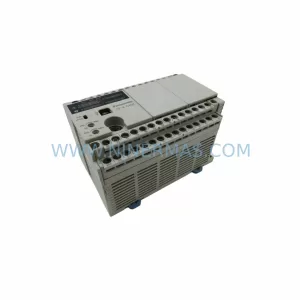
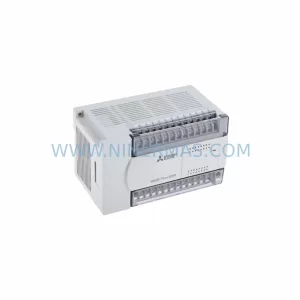
Original Industrial Spare Part
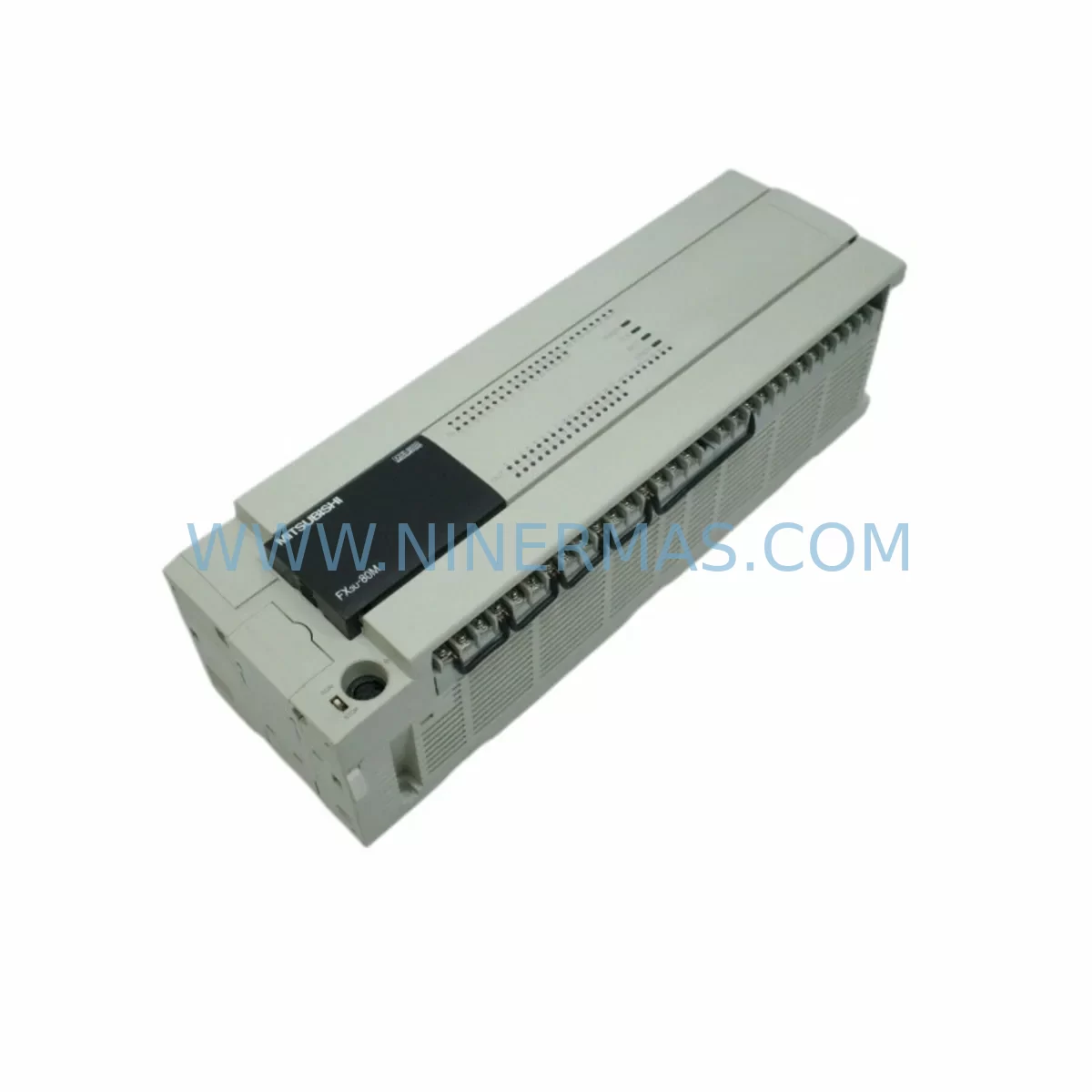
MITSUBISHI FX3U-80MR/ES Retrofit-Compatible PLC for Legacy Systems
Verify the part, confirm the platform family, and move straight into quotation with the right commercial details.
RFQ Ready
- SKUFX3U-80MR/ES
- CategoryPLC & Industrial Automation Modules
- BrandMitsubishi Electric
- SupportAvailability, lead time, condition, and shipping coordination
How Buyers Usually Use This Page
- Confirm the exact part number and platform family before sending the quote request.
- Use direct email when quantity, condition, and destination are already defined internally.
- Switch to the broader brand or category archive when you need alternates nearby.
Series Navigation
Move through the most common platform families behind this part.
Product RFQ
Send this part directly for quotation.
Include quantity, required condition, destination country, and target delivery timing. Current reference: MITSUBISHI FX3U-80MR/ES Retrofit-Compatible PLC for Legacy Systems with SKU FX3U-80MR/ES.
MITSUBISHI FX3U-80MR/ES Retrofit-Compatible PLC for Legacy Systems
The MITSUBISHI FX3U-80MR/ES is a high-performance compact programmable logic controller engineered for seamless integration into existing FX3U-series automation architectures. As industrial facilities face the growing challenge of maintaining aging control infrastructure, the FX3U-80MR/ES stands out as the definitive retrofit solution — purpose-built to replace discontinued relay-output PLC modules while preserving original program logic, terminal wiring layouts, and communication link integrity.
With 80 I/O points (48 inputs / 32 relay outputs), this unit delivers the processing capacity required for mid-scale machine control, conveyor systems, packaging lines, and process automation panels. Its AC power supply input (100–240V AC) and standard DIN-rail mounting profile make it a direct physical fit for most legacy control cabinets originally designed around the FX2N, FX2NC, or earlier FX3U variants. Engineers undertaking panel upgrades will find that the FX3U-80MR/ES requires minimal cabinet rework, significantly reducing both engineering hours and unplanned downtime during the changeover window.
NINERMAS maintains verified stock of the FX3U-80MR/ES with full factory testing, 12-month warranty coverage, and rapid dispatch to support time-critical production line restoration projects.
Upgrade Compatibility Table
| Parameter | FX3U-80MR/ES (This Unit) | Legacy FX2N-80MR / FX3U-80MR/DS | Retrofit Notes |
|---|---|---|---|
| I/O Points | 48 IN / 32 OUT (Relay) | 48 IN / 32 OUT (Relay) | Direct I/O count match; no rewiring required |
| Power Supply | 100–240V AC | 100–240V AC | Verify terminal block polarity before energizing |
| Output Type | Relay (MR) | Relay (MR) | Compatible with existing load wiring |
| Communication Port | RS-422 (built-in) | RS-422 / RS-232 (adapter) | Confirm FX3U-232ADP-MB or FX3U-485ADP-MB adapter compatibility |
| Expansion Backplane | FX3U left-side expansion bus | FX2N: separate bus connector | FX2N expansion modules require FX3U-CNV-BD bridge adapter |
| Program Memory | 64K steps | 16K / 32K steps | Existing programs upload directly; verify step count |
| HMI Interface | GOT2000 / GOT1000 series | GOT-A900 / F940 | Update GOT screen project for FX3U device addresses |
| Mounting | DIN rail / screw mount | DIN rail / screw mount | Same footprint; no panel cutout modification needed |
| Installation Space | 285mm (W) × 90mm (H) × 87mm (D) | 285mm (W) × 90mm (H) × 87mm (D) | Identical dimensions; direct panel swap |
| Warranty | 12 Months — NINERMAS Verified Stock | Includes pre-shipment functional test report | |
Retrofit Planning for Existing Automation Systems
A successful retrofit using the FX3U-80MR/ES begins well before the physical swap. The planning phase must account for every interface point between the PLC and the surrounding system — from the power distribution rail inside the control cabinet to the HMI screens on the operator panel and the field devices connected to each I/O terminal.
Power and Terminal Assessment: Before removal of the legacy unit, document the existing 24V DC supply rail feeding the input commons and verify that the FX3U-80MR/ES input specifications (5/24V DC sink/source selectable) match the field sensor wiring. If the original system used a dedicated FX3U-1PSU-5V power supply module for left-side expansion, confirm that the same unit can remain in service. For cabinets running multiple expansion modules — such as the FX3U-4AD analog input module or the FX3U-4DA analog output module — verify total current draw against the base unit’s 5V DC internal bus capacity (typically 690mA for the FX3U-80MR/ES).
Backplane and Expansion Module Compatibility: The FX3U-80MR/ES supports up to 8 special function modules on the right-side expansion bus and up to 10 FX3U-series extension modules. If the legacy system included FX2N-series I/O extension blocks, a FX3U-CNV-BD conversion adapter is required to bridge the bus interface. Similarly, any FX3U-32MT/ES or FX3U-16EX/ES-UL I/O extension units already installed in the panel can remain connected without modification, preserving the existing terminal wiring on those blocks.
Communication Protocol Migration: Many legacy FX3U installations rely on RS-232 or RS-485 links to SCADA systems, inverters, or remote I/O stations. The FX3U-80MR/ES includes a built-in RS-422 port; for RS-232 connectivity, the FX3U-232ADP-MB adapter mounts directly to the left-side expansion connector. For Modbus RTU or RS-485 multi-drop networks connecting to devices such as Mitsubishi FR-series inverters or third-party flow controllers, the FX3U-485ADP-MB provides the required interface without consuming a special function module slot. If the site uses PROFIBUS-DP or CC-Link, the FX3U-64CCL CC-Link module can be retained or added to the right-side bus.
Program Upload and Address Verification: Use GX Works2 or GX Works3 with a FX3U-USB-BD programming cable to upload the existing ladder program from the legacy CPU before disconnection. Verify that all device addresses (M, D, T, C registers) fall within the FX3U-80MR/ES supported range. Pay particular attention to extended data registers (D8000 and above) used for special function module communication, as these may require remapping if the module slot assignments change during the retrofit.
HMI Screen Update: If the control panel includes a GOT1000 series or older F940GOT HMI, the screen project must be reviewed for device address compatibility with the FX3U CPU. GOT2000 series panels connected via RS-422 or Ethernet require a communication driver update in GT Designer3 to confirm the FX3U protocol selection. This step is frequently overlooked and can cause HMI communication faults immediately after PLC replacement if not addressed during pre-commissioning.
Signal Isolation and Noise Considerations: In environments with significant electrical noise — such as panels containing large motor starters or VFDs — consider adding signal isolators on analog input channels feeding the FX3U-4AD module. Relay output contacts on the FX3U-80MR/ES are rated at 2A/point (resistive load), which is sufficient for most solenoid valve and contactor coil applications in legacy systems.
Downtime Control During System Migration
Minimizing production interruption is the primary concern for any control system retrofit. A structured migration approach for the FX3U-80MR/ES replacement can reduce total planned downtime to under four hours for a standard 80-point installation.
Pre-Shutdown Preparation: Complete all program uploads, terminal documentation, and module inventory checks during normal production hours. Prepare the replacement FX3U-80MR/ES with the verified program loaded and all parameter settings configured offline. If the system uses a FX3U-FLROM-1M flash ROM cassette for program backup, prepare a current backup image before the maintenance window begins.
Controlled Shutdown Sequence: Follow the established safe shutdown procedure for the controlled process — de-energize outputs in the correct sequence, confirm all field actuators are in their safe state, and isolate the control cabinet power before beginning physical work. Label all terminal connections with removable markers before disconnecting any wiring from the legacy CPU.
Physical Swap and Reconnection: The FX3U-80MR/ES mounts in the same DIN rail position as the legacy unit. Reconnect all terminal blocks in sequence, verify expansion module bus connections, and confirm that communication cable connectors are seated correctly on the RS-422 port and any installed adapter modules.
Commissioning and Verification: Power up the cabinet and verify the PLC enters RUN mode without error codes. Check all I/O points against the field device list, confirm HMI communication is established, and run a partial cycle test before returning the system to full production. NINERMAS provides a pre-shipment functional test report with each FX3U-80MR/ES unit, confirming that the module passed I/O point verification and communication port testing before dispatch.
Program Logic Protection: The FX3U-80MR/ES supports password protection for the uploaded program, preventing accidental modification during the commissioning phase. Enable this feature immediately after the verified program is loaded to protect the original control logic throughout the retrofit process.
Retrofit Support FAQ
Q1: Is the FX3U-80MR/ES a direct replacement for the FX2N-80MR/ES?
Yes, the FX3U-80MR/ES is the designated successor to the FX2N-80MR/ES. The I/O count, relay output type, AC power supply, and DIN rail mounting dimensions are identical. The primary differences are the expanded program memory (64K vs 16K steps), the built-in RS-422 port replacing the optional FX2N-232IF adapter, and the extended special function module support. Existing FX2N expansion I/O blocks require the FX3U-CNV-BD adapter for bus compatibility.
Q2: Can I reuse my existing GX Developer program files with the FX3U-80MR/ES?
GX Developer programs can be converted and uploaded to the FX3U-80MR/ES using GX Works2. The conversion process preserves all ladder logic, device assignments, and timer/counter settings. It is recommended to perform a full device address audit after conversion to confirm that any special function module communication routines reference the correct buffer memory addresses for the FX3U platform.
Q3: What communication adapters are compatible with the FX3U-80MR/ES left-side expansion port?
The left-side expansion port accepts the FX3U-232ADP-MB (RS-232), FX3U-485ADP-MB (RS-485/Modbus RTU), FX3U-422ADP (RS-422), and FX3U-USB-BD (USB programming interface). Up to two adapter modules can be installed simultaneously. These adapters are fully compatible with the FX3U-80MR/ES and do not require firmware updates when migrating from a legacy FX3U or FX2N installation.
Q4: Does NINERMAS provide a warranty and pre-shipment testing for the FX3U-80MR/ES?
Yes. Every FX3U-80MR/ES unit supplied by NINERMAS undergoes a pre-shipment functional test covering all I/O points, power supply verification, and communication port operation. A 12-month warranty is included from the date of dispatch. Units are shipped from verified stock with full traceability documentation. For urgent retrofit projects, expedited dispatch is available — contact our technical sales team to confirm lead time and stock availability.
| Product Series | FX3U |
|---|---|
| Country of Origin | JP |
Catalog Continuation
More Mitsubishi Electric modules in the catalog.
Use the brand lane to compare nearby part numbers, platform-adjacent modules, and other inquiry-ready listings before sending your final RFQ.
SKU: A50CA55C BC186A433G53
Mitsubishi A50CA55C BC186A433G53 Spare Part for Maintenance
SKU: MELSEC RD77MS16 D 0140-76929 GAS N2, 40 SLM UFC-1660
Mitsubishi RD77MS16 Safety-Reliable Motion for Critical Sites
Catalog Continuation
Alternative parts within PLC & Industrial Automation Modules.
Stay inside the same system family when you need substitutes, adjacent modules, or a broader shortlist for procurement review.

SKU: OZDPROFI12MG12
Hirschmann OZDPROFI12MG12 Spare Part for Industrial Maintenance



SKU: 07025-0000-70-1-04
KONTRON 07025-0000-70-1-04 Service-Ready Spare Part