
Original Industrial Spare Part
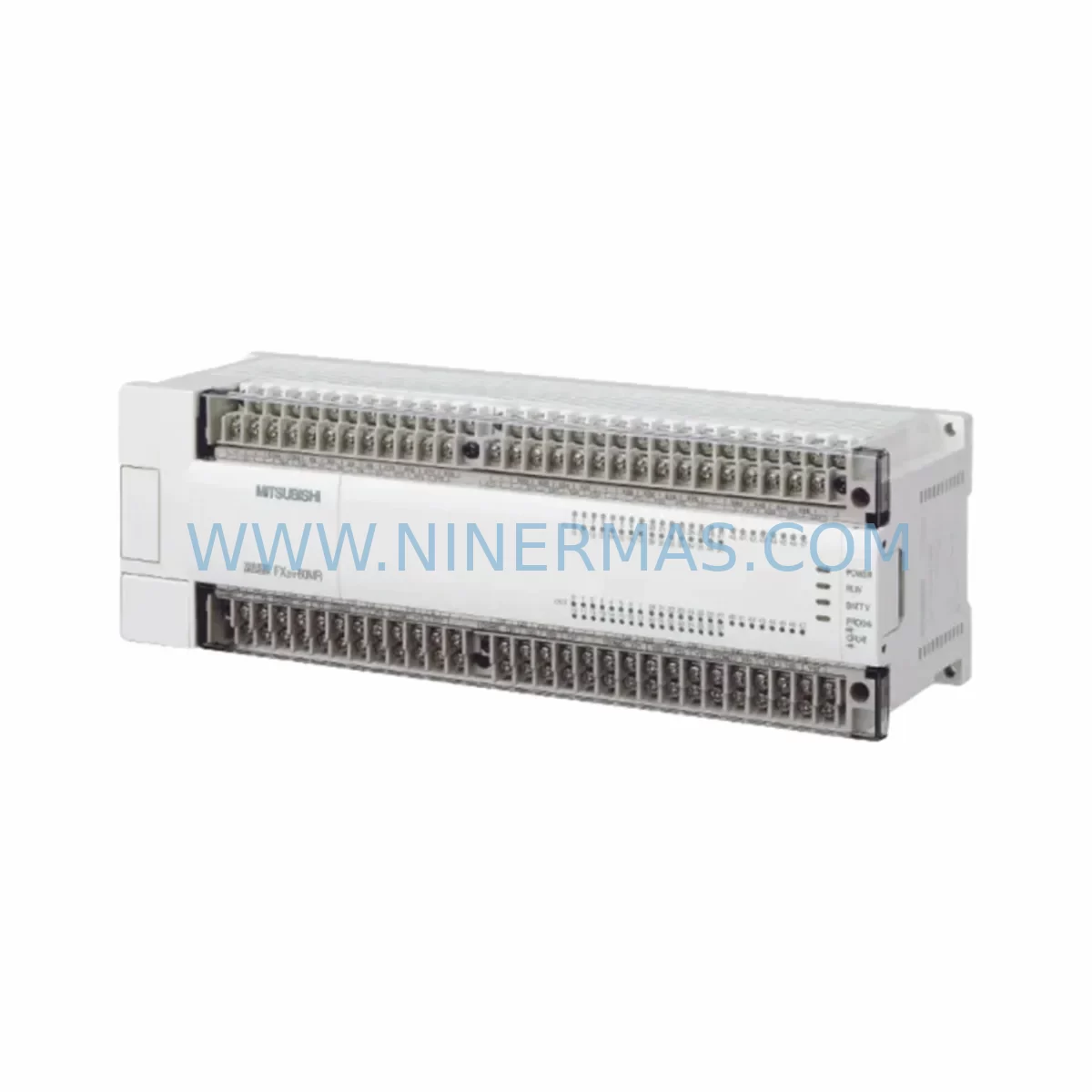
Mitsubishi FX2N-80MT-001 Service-Ready Spare Part
Verify the part, confirm the platform family, and move straight into quotation with the right commercial details.
RFQ Ready
- SKUFX2N-80MT-001
- CategoryPLC & Industrial Automation Modules
- BrandMitsubishi Electric
- SupportAvailability, lead time, condition, and shipping coordination
How Buyers Usually Use This Page
- Confirm the exact part number and platform family before sending the quote request.
- Use direct email when quantity, condition, and destination are already defined internally.
- Switch to the broader brand or category archive when you need alternates nearby.
Series Navigation
Move through the most common platform families behind this part.
Product RFQ
Send this part directly for quotation.
Include quantity, required condition, destination country, and target delivery timing. Current reference: Mitsubishi FX2N-80MT-001 Service-Ready Spare Part with SKU FX2N-80MT-001.
Mitsubishi FX2N-80MT-001 Service-Ready Spare Part for Industrial Maintenance
The Mitsubishi Electric FX2N-80MT-001 is a high-performance compact PLC base unit from the MELSEC FX2N series, widely deployed across discrete manufacturing, machine tool control, packaging lines, and process automation systems. As a service-ready spare part sourced and pre-tested by NINERMAS, this unit is positioned to support rapid replacement, minimize unplanned downtime, and extend the operational life of legacy FX2N-based control systems. With 80 I/O points (40 inputs / 40 transistor sink outputs), high-speed pulse output capability, and broad compatibility with the FX2N expansion ecosystem, the FX2N-80MT-001 remains one of the most critical spare components in any Mitsubishi-based maintenance inventory.
Maintenance engineers managing aging FX2N installations understand the risk of a single PLC failure cascading into hours or days of production loss. Keeping a verified, tested FX2N-80MT-001 on the shelf is the most direct mitigation strategy. NINERMAS supplies this unit with full pre-shipment functional testing, documented inspection records, and a 12-month warranty covering defects in materials and workmanship under normal operating conditions.
Spare Maintenance Table
| Parameter | Specification |
|---|---|
| Model / SKU | FX2N-80MT-001 |
| Brand | Mitsubishi Electric |
| Series | MELSEC FX2N |
| I/O Points | 80 (40 Inputs / 40 Transistor Sink Outputs) |
| Output Type | Transistor (Sink), NPN |
| Power Supply | 100–240 VAC, 50/60 Hz |
| Program Memory | 8,000 Steps (expandable to 16,000 with memory cassette) |
| High-Speed Counter | Up to 60 kHz (single-phase), 30 kHz (2-phase) |
| Pulse Output | Up to 100 kHz (Y000, Y001) |
| Communication Port | RS-422 (built-in programming port) |
| Operating Temperature | 0°C to 55°C |
| Storage Temperature | -25°C to 70°C |
| Humidity | 5% to 95% RH (non-condensing) |
| Protection Rating | IP20 |
| Dimensions (W×H×D) | Approx. 285 × 90 × 87 mm |
| Weight | Approx. 1.0 kg |
| Compatibility | FX2N expansion modules, FX2N-32CCL, FX2N-16EX, FX2N-16EYT, FX2N-4AD, FX2N-4DA |
| Application Environment | Machine tools, packaging, conveyor, discrete manufacturing, HVAC control |
| Maintenance Recommendation | Replace battery (FX-BATTERY) every 5 years; inspect terminal block torque annually |
| Pre-Shipment Testing | Full functional test, I/O verification, communication port check |
| Warranty | 12 Months from shipment date |
| Origin | Japan |
| Supply Program | Long-term availability; bulk and committed stock programs available |
Maintenance Planning for Continuous Operation
When replacing an FX2N-80MT-001 in the field, a thorough inspection of the surrounding control cabinet is essential to prevent repeat failures and ensure system stability. Maintenance engineers should begin by verifying the 24 VDC auxiliary power supply feeding the PLC input commons — a degraded or undersized power supply is a frequent root cause of intermittent I/O faults that are misdiagnosed as PLC failures. The FX2N-1PS-5V internal power supply module, if installed, should be checked for output voltage stability before the new unit is commissioned.
Input wiring integrity is the next priority. Inspect all terminal block connections on the FX2N-80MT-001’s 40-input side for loose screws, oxidized contacts, or damaged ferrules — particularly in high-vibration or high-humidity environments. If the installation uses FX2N-16EX or FX2N-32EX digital input expansion modules, verify that the expansion cable and connector are seated correctly and that the expansion bus is free of communication errors after the base unit swap.
On the output side, transistor output channels driving inductive loads (solenoids, relay coils, motor starters) should be protected by flyback diodes or surge suppressors. Inspect the FX2N-16EYT or FX2N-32EYT output expansion modules for signs of output transistor degradation — high cycle-count outputs are the first to fail. If the system uses analog I/O, the FX2N-4AD analog input module and FX2N-4DA analog output module should be re-calibrated after the base unit replacement to confirm signal accuracy.
Communication infrastructure deserves equal attention. If the FX2N-80MT-001 is networked via an FX2N-32CCL CC-Link slave module or an FX2N-485-BD RS-485 communication board, verify network termination resistors, cable shielding continuity, and station address settings after replacement. For systems using an FX2N-CNV-BD or FX2N-232-BD serial communication board, confirm baud rate and protocol settings match the upstream SCADA or HMI configuration.
Battery backup is a critical but often overlooked maintenance item. The FX-BATTERY lithium battery retains the PLC program and data registers during power loss. Always replace the battery when swapping the base unit, and document the replacement date. For sites with frequent power interruptions, consider adding an FX2N-32BL battery-backed memory cassette to extend program retention capacity.
Finally, if the control cabinet houses an GOT1000 or GOT2000 series HMI communicating with the FX2N over RS-422, verify the HMI communication parameters and screen project compatibility after the PLC swap. A mismatch in device addresses or communication timeout settings can cause the HMI to display false alarms or fail to update process values, leading to operator confusion during restart.
Site Replacement Workflow
The FX2N-80MT-001 is a direct replacement for earlier FX2N-80MT units and is backward-compatible with all FX2N-series expansion hardware. The replacement workflow should follow these steps to minimize downtime and ensure a clean handover:
Step 1 — Program Backup: Before powering down, use GX Developer or GX Works2 to upload and save the current ladder program, parameter settings, and device comments to a PC. Verify the backup file integrity before proceeding.
Step 2 — Power Isolation: Isolate the PLC power supply at the circuit breaker. Confirm zero voltage at the PLC power terminals with a calibrated multimeter before touching any wiring.
Step 3 — Wiring Documentation: Photograph or sketch the terminal block wiring layout. Label all I/O wires if not already tagged. This step is critical for multi-shift sites where the replacement may be completed by a different technician.
Step 4 — Module Removal and Installation: Disconnect all expansion modules from the base unit before removal. Install the new FX2N-80MT-001, reconnect expansion modules in the original order, and re-terminate all I/O wiring per the documented layout.
Step 5 — Program Download and Verification: Download the backed-up program to the new unit. Verify all parameters, including I/O assignments, high-speed counter settings, and communication port configuration. Perform a dry-run I/O test in STOP mode before switching to RUN.
Step 6 — Commissioning: Run the system through a full production cycle under supervision. Monitor for any I/O errors, communication faults, or unexpected output behavior. Document the replacement in the site maintenance log.
This workflow is applicable whether replacing a failed unit or performing a planned preventive swap as part of an annual overhaul. NINERMAS recommends maintaining at least one FX2N-80MT-001 as a cold standby spare for any site running more than two FX2N-based control panels.
Spare Parts Support FAQ
Q1: Is the FX2N-80MT-001 still available as a new or tested spare, given that the FX2N series is discontinued?
A: Yes. NINERMAS maintains dedicated stock of FX2N-80MT-001 units sourced from authorized channels and long-term supply programs. Each unit undergoes full functional testing before shipment. While Mitsubishi Electric has officially discontinued the FX2N series, demand for spare parts remains strong across installed base sites globally, and NINERMAS is committed to supporting long-term availability for lifecycle extension programs.
Q2: How do I verify compatibility between the FX2N-80MT-001 and my existing FX2N expansion modules?
A: The FX2N-80MT-001 is compatible with all standard FX2N-series expansion modules, including digital I/O extensions (FX2N-16EX, FX2N-32EX, FX2N-16EYT), analog modules (FX2N-4AD, FX2N-4DA), and communication adapters (FX2N-485-BD, FX2N-232-BD, FX2N-32CCL). Compatibility is determined by the FX2N expansion bus standard, not the specific base unit revision. If you are unsure about a specific module combination, contact NINERMAS with your full BOM for a pre-purchase compatibility review.
Q3: What does the 12-month warranty cover, and what is the claims process?
A: The 12-month warranty covers defects in materials and workmanship under normal operating conditions from the date of shipment. It does not cover damage caused by incorrect installation, overvoltage, environmental contamination, or unauthorized modification. To initiate a warranty claim, contact NINERMAS at sale@ninermas.com with your order number, a description of the fault, and any available diagnostic data. NINERMAS will arrange return shipping and provide a replacement or repair within the agreed service timeline.
Q4: Can NINERMAS support bulk or committed stock orders for multi-site maintenance programs?
A: Yes. NINERMAS offers bulk purchase agreements and committed stock reservation programs for customers managing multiple FX2N installations or planning annual overhaul cycles. These programs provide price stability, guaranteed availability, and priority shipment scheduling. Contact sale@ninermas.com or call +0086 187 5021 5667 to discuss your site’s spare parts requirements and establish a long-term supply arrangement.
| Product Series | MELSEC FX |
|---|---|
| Country of Origin | JP |
Catalog Continuation
More Mitsubishi Electric modules in the catalog.
Use the brand lane to compare nearby part numbers, platform-adjacent modules, and other inquiry-ready listings before sending your final RFQ.
SKU: A50CA55C BC186A433G53
Mitsubishi A50CA55C BC186A433G53 Spare Part for Maintenance
SKU: MELSEC RD77MS16 D 0140-76929 GAS N2, 40 SLM UFC-1660
Mitsubishi RD77MS16 Safety-Reliable Motion for Critical Sites
Catalog Continuation
Alternative parts within PLC & Industrial Automation Modules.
Stay inside the same system family when you need substitutes, adjacent modules, or a broader shortlist for procurement review.

SKU: OZDPROFI12MG12
Hirschmann OZDPROFI12MG12 Spare Part for Industrial Maintenance



SKU: 07025-0000-70-1-04
KONTRON 07025-0000-70-1-04 Service-Ready Spare Part



