Original Industrial Spare Part
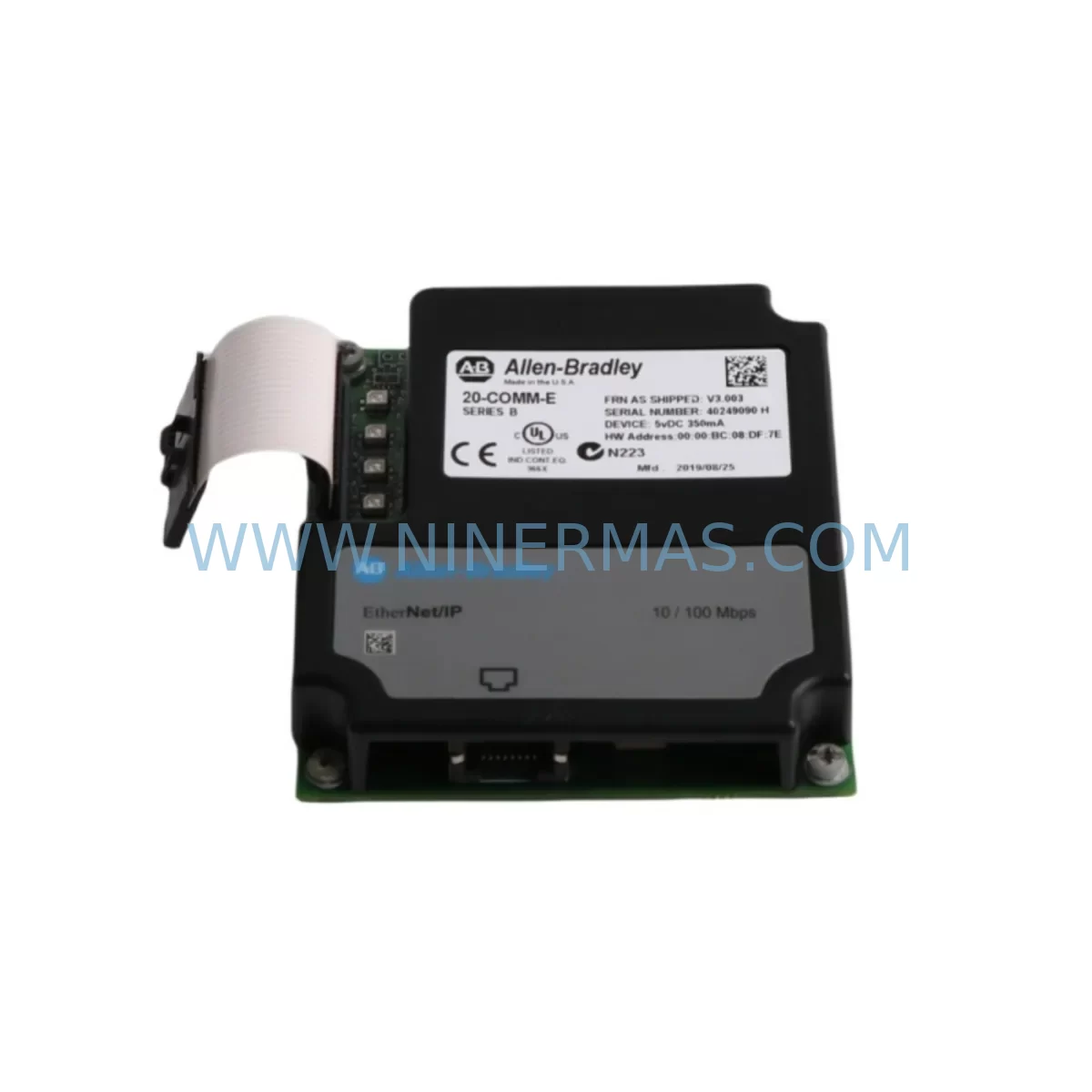
Allen-Bradley 20-COMM-E Service-Ready Spare Part for Industrial Maintenance
Verify the part, confirm the platform family, and move straight into quotation with the right commercial details.
RFQ Ready
- SKU20-COMM-E
- CategoryPLC & Industrial Automation Modules
- BrandAllen-Bradley
- SupportAvailability, lead time, condition, and shipping coordination
How Buyers Usually Use This Page
- Confirm the exact part number and platform family before sending the quote request.
- Use direct email when quantity, condition, and destination are already defined internally.
- Switch to the broader brand or category archive when you need alternates nearby.
Series Navigation
Move through the most common platform families behind this part.
Product RFQ
Send this part directly for quotation.
Include quantity, required condition, destination country, and target delivery timing. Current reference: Allen-Bradley 20-COMM-E Service-Ready Spare Part for Industrial Maintenance with SKU 20-COMM-E.
Allen-Bradley 20-COMM-E Service-Ready Spare Part for Industrial Maintenance
The Allen-Bradley 20-COMM-E is an Ethernet/IP communication adapter designed for integration with PowerFlex AC drives, enabling seamless network connectivity within industrial automation environments. As a genuine original spare part, the 20-COMM-E plays a critical role in maintaining uninterrupted drive communication across production lines, control cabinets, and distributed automation systems. For maintenance engineers managing aging drive infrastructure or executing planned shutdowns, having a verified replacement unit on the shelf is one of the most effective strategies for minimizing unplanned downtime and protecting operational continuity.
The 20-COMM-E mounts directly onto the peripheral interface of compatible PowerFlex drives — including the PowerFlex 70, PowerFlex 700, and PowerFlex 750 series — and provides a standard RJ-45 Ethernet/IP port for integration into plant-wide EtherNet/IP networks. It supports explicit and implicit messaging, enabling real-time parameter monitoring, fault diagnostics, and remote control from a PLC or DCS host. In facilities running Rockwell Automation ControlLogix or CompactLogix platforms, the 20-COMM-E is a foundational component that bridges drive-level intelligence with supervisory control systems.
From a maintenance planning perspective, the 20-COMM-E is frequently identified as a single point of failure in drive communication loops. A failed adapter can isolate an entire drive from the control network, triggering fault conditions that halt production even when the drive itself remains mechanically sound. Procurement engineers responsible for spare parts inventory should treat the 20-COMM-E as a Tier-1 critical spare — particularly in facilities where PowerFlex drives are deployed across multiple production zones or where network-based speed and torque references are essential to process control.
Spare Maintenance Table
| Parameter | Specification |
|---|---|
| Part Number | 20-COMM-E |
| Brand | Allen-Bradley / Rockwell Automation |
| Series | 20-COMM Communication Adapter Series |
| Compatible Drives | PowerFlex 70, PowerFlex 700, PowerFlex 750 |
| Network Protocol | EtherNet/IP (IEEE 802.3) |
| Interface | RJ-45, 10/100 Mbps |
| Mounting | Peripheral Interface Slot (Drive-mounted) |
| Supply Voltage | Powered via drive peripheral interface (no external supply required) |
| Operating Temperature | 0°C to 50°C (32°F to 122°F) |
| Storage Temperature | -40°C to 85°C (-40°F to 185°F) |
| Humidity | 5% to 95% non-condensing |
| Origin | United States |
| Product Type | Communication Adapter / Drive Accessory |
| Application | Industrial Drive Network Integration, PLC-Drive Communication |
| Warranty | 12 Months from date of shipment |
| Condition | Original, New or Tested Surplus |
| Shipping | Tested before dispatch; secure anti-static packaging |
Maintenance Planning for Continuous Operation
When replacing the 20-COMM-E in the field, a thorough inspection of the surrounding drive system is essential to ensure the root cause of the adapter failure is identified and that no secondary faults are introduced during the restoration process. Maintenance engineers should begin by verifying the integrity of the Ethernet cabling connected to the adapter — damaged RJ-45 connectors, excessive cable lengths, or improperly terminated runs can cause intermittent communication faults that mimic adapter hardware failure.
The drive’s internal power supply rail that feeds the peripheral interface should be checked for voltage stability. If the 20-COMM-E failed due to an overvoltage or transient event on the peripheral bus, the PowerFlex 70 or PowerFlex 700 main control board may also require inspection or replacement. In multi-drive control cabinets, it is advisable to inspect adjacent drives for similar communication faults, as network-level issues — such as IP address conflicts, switch port failures, or IGMP misconfiguration — can affect multiple nodes simultaneously.
For facilities using ControlLogix or CompactLogix PLCs as the network host, the EtherNet/IP scanner module (such as the 1756-EN2T or 1756-EN3TR) should be verified for firmware compatibility and connection table integrity after the 20-COMM-E is replaced. The drive’s I/O connection parameters — including the RPI (Requested Packet Interval), input and output assembly instances, and connection size — must be re-confirmed in the RSLogix 5000 or Studio 5000 project to restore full implicit messaging.
In control cabinets housing PowerFlex drives alongside other automation components, the replacement workflow should also include a visual inspection of terminal blocks, 24VDC control power supplies, and any signal isolation modules used in the analog reference or feedback circuits. If the drive is part of a coordinated motion or process control loop, the HMI (such as a PanelView Plus terminal) should be checked to confirm that drive status tags are updating correctly after the adapter is restored to service.
For older installations where the 20-COMM-E is being used to extend the service life of legacy PowerFlex 70 or PowerFlex 700 drives, procurement teams should also consider stocking related peripheral adapters such as the 20-COMM-D (DeviceNet) or 20-COMM-P (PROFIBUS DP) if the facility operates mixed-protocol networks. Additionally, the 20-XCOMM-DC-BASE2 peripheral expansion kit and compatible DriveGuard safety modules are worth including in the annual spare parts review for comprehensive drive system coverage.
Site Replacement Workflow
Replacing the 20-COMM-E on-site is a straightforward procedure when the correct spare is available and the replacement is performed by a qualified maintenance technician. The following workflow is recommended to minimize downtime and ensure a clean restoration:
Step 1 — Isolation and Lockout: De-energize the PowerFlex drive following site LOTO (Lockout/Tagout) procedures. Allow the drive’s DC bus to fully discharge before opening the enclosure. Verify zero energy state with a calibrated voltage tester.
Step 2 — Adapter Removal: Disconnect the Ethernet cable from the 20-COMM-E. Release the adapter from the drive’s peripheral interface slot by pressing the retention tab and sliding the module outward. Note the orientation and any DIP switch settings on the outgoing unit.
Step 3 — Replacement Unit Preparation: Inspect the replacement 20-COMM-E for physical damage. Confirm the firmware version if possible. Set DIP switches to match the outgoing unit’s configuration (or as required by the network design). If the drive uses DHCP for IP assignment, no additional configuration may be required; if using a static IP, configure the adapter via the drive’s HIM (Human Interface Module) or via RSLinx/Studio 5000 after installation.
Step 4 — Installation and Reconnection: Slide the new 20-COMM-E into the peripheral interface slot until it clicks into place. Reconnect the Ethernet cable. Re-energize the drive and observe the adapter’s status LEDs — a solid green NET LED indicates a healthy EtherNet/IP connection; a flashing red NET LED indicates a connection fault requiring further network diagnostics.
Step 5 — System Verification: From the PLC or DCS host, verify that the drive’s EtherNet/IP connection is re-established and that all I/O data is updating correctly. Confirm drive status, fault history, and parameter values via the HMI or engineering workstation. Document the replacement in the site maintenance log.
This workflow applies equally to emergency replacements during unplanned outages and to scheduled swap-outs during planned maintenance windows. Having a pre-configured spare 20-COMM-E — with IP address and DIP switch settings documented — can reduce the on-site replacement time to under 30 minutes, significantly limiting production impact.
Spare Parts Support FAQ
Q1: Is the 20-COMM-E compatible with all PowerFlex drive models?
The 20-COMM-E is compatible with PowerFlex drives that feature a peripheral interface slot, including the PowerFlex 70, PowerFlex 700, and PowerFlex 750 series. It is not compatible with PowerFlex 4, 4M, or 40 drives, which use a different communication interface architecture. Always verify the target drive’s catalog number and peripheral slot availability before ordering.
Q2: What is included in the 12-month warranty and how does it apply to spare parts?
All 20-COMM-E units supplied by NINERMAS carry a 12-month warranty from the date of shipment. This covers manufacturing defects and functional failures under normal operating conditions. Each unit is tested before dispatch using standard functional verification procedures. Warranty claims are supported by our technical team — contact sale@ninermas.com with the order reference and fault description.
Q3: How should the 20-COMM-E be stored as a long-term spare?
Store the 20-COMM-E in its original anti-static packaging in a clean, dry environment with a temperature range of -40°C to 85°C and humidity below 95% non-condensing. Avoid storing near strong electromagnetic fields or in environments with corrosive gases. Inspect the unit annually and verify firmware version against current drive requirements. Long-term storage of 2–5 years is feasible with proper conditions.
Q4: Can NINERMAS supply the 20-COMM-E on an ongoing basis for multi-site maintenance programs?
Yes. NINERMAS maintains stock of Allen-Bradley 20-COMM Series adapters and supports long-term supply agreements for maintenance programs, OEM integrators, and MRO procurement teams. We offer consolidated shipments, flexible lead times, and technical pre-sales support to help you confirm compatibility before purchase. Contact our team at sale@ninermas.com or +0086 187 5021 5667 to discuss your requirements.
| Product Series | PowerFlex |
|---|---|
| Country of Origin | US |
Catalog Continuation
More Allen-Bradley modules in the catalog.
Use the brand lane to compare nearby part numbers, platform-adjacent modules, and other inquiry-ready listings before sending your final RFQ.




Catalog Continuation
Alternative parts within PLC & Industrial Automation Modules.
Stay inside the same system family when you need substitutes, adjacent modules, or a broader shortlist for procurement review.


SKU: 00-176-037 00-176-037 00-262-652 00-262-652 00-178-888 00-178-888
KUKA 00-176-037 Retrofit Reducer Module for Legacy Systems

SKU: 6SE7027-2TD84-6HF3
SIEMENS 6SE7027-2TD84-6HF3 Service-Ready Spare Part