Original Industrial Spare Part
Mitsubishi A1SJ71AR2 Retrofit-Compatible Link Module
Verify the part, confirm the platform family, and move straight into quotation with the right commercial details.
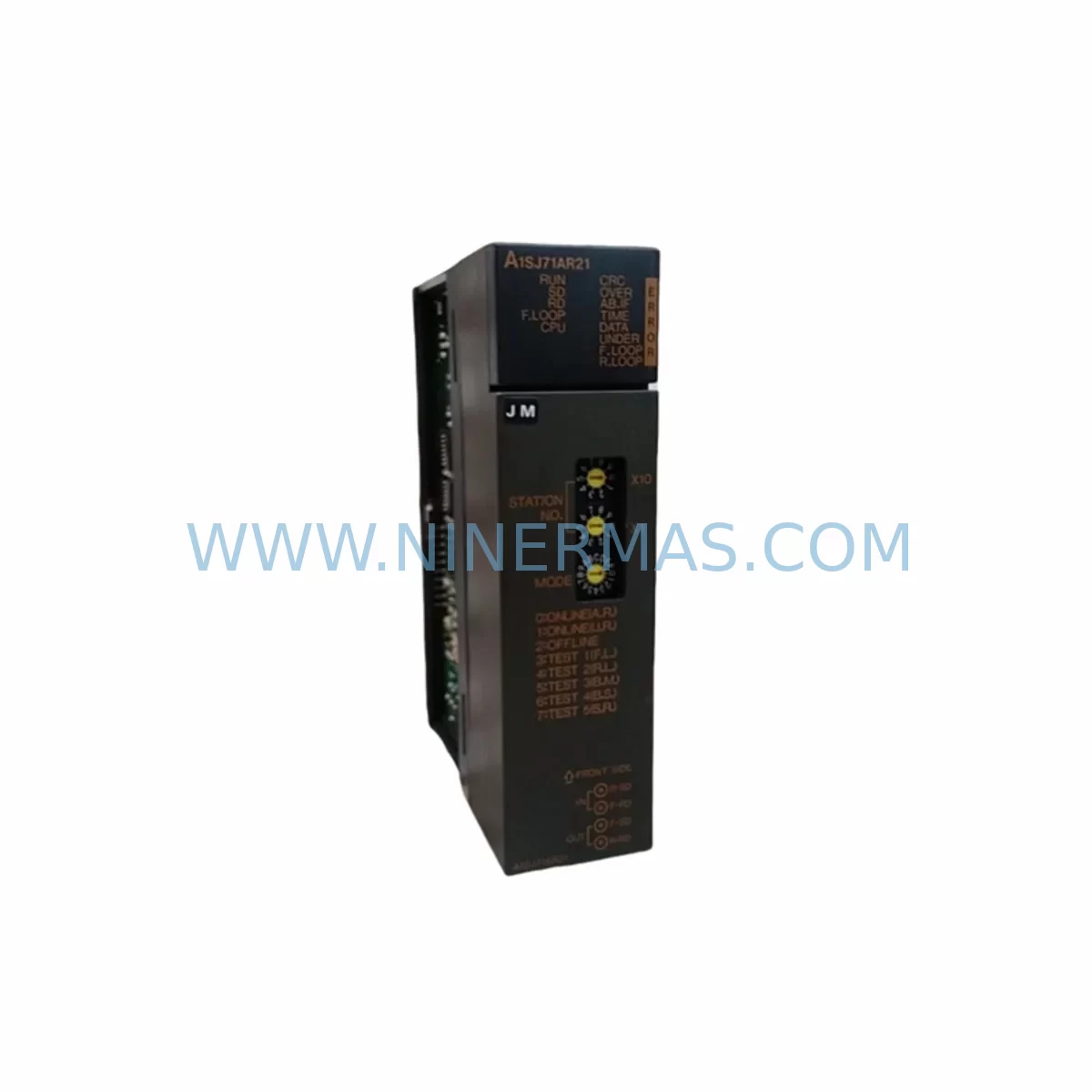
RFQ Ready
- SKUA1SJ71AR2
- CategoryPLC & Industrial Automation Modules
- BrandMitsubishi Electric
- SupportAvailability, lead time, condition, and shipping coordination
How Buyers Usually Use This Page
- Confirm the exact part number and platform family before sending the quote request.
- Use direct email when quantity, condition, and destination are already defined internally.
- Switch to the broader brand or category archive when you need alternates nearby.
Series Navigation
Move through the most common platform families behind this part.
Product RFQ
Send this part directly for quotation.
Include quantity, required condition, destination country, and target delivery timing. Current reference: Mitsubishi A1SJ71AR2 Retrofit-Compatible Link Module with SKU A1SJ71AR2.
Mitsubishi A1SJ71AR2 Retrofit-Compatible Link Module: Legacy System Compatibility & Smooth Upgrade
The Mitsubishi Electric A1SJ71AR2 is a MELSEC-A Series data link module designed for use in legacy AnS-series compact base units. As industrial facilities worldwide accelerate the modernization of aging automation infrastructure, the A1SJ71AR2 continues to serve as a critical component in retrofit projects, discontinued-model replacements, and control cabinet upgrades. NINERMAS maintains verified stock of the A1SJ71AR2 to support engineers and maintenance teams who require a reliable, tested replacement with a 12-month warranty and rapid dispatch.
Whether you are replacing a failed unit on a running production line, migrating a legacy MELSEC-A platform to a more maintainable architecture, or extending the service life of an existing control system, the A1SJ71AR2 provides the interface continuity and protocol compatibility that retrofit projects demand. Each unit shipped by NINERMAS undergoes pre-shipment functional testing to confirm communication integrity before leaving our facility.
Upgrade Compatibility Table
| Parameter | A1SJ71AR2 Specification | Retrofit Notes |
|---|---|---|
| Series | MELSEC-A (AnS) | Direct fit for A1S, A2S, A2SH, A2SHCPU base units |
| Communication Protocol | MELSEC Data Link (A-compatible) | Verify protocol compatibility before migrating to Q-series or iQ-R platforms |
| Mounting Interface | AnS compact backplane slot | Confirm slot count and slot position against existing rack layout |
| Power Consumption | Supplied via backplane 5 VDC bus | Verify A1S61PN or A1S62PN power supply capacity before installation |
| Terminal Wiring | Coaxial / dedicated link cable | Inspect existing cable condition; replace if shielding is degraded |
| Module Address Setting | Rotary switch on front panel | Record original address setting before removal; replicate on replacement unit |
| Program Compatibility | Compatible with GX Developer / SW series ladder logic | No program rewrite required for direct replacement; verify I/O map if slot position changes |
| HMI Screen Impact | Device address references unchanged | Confirm GOT1000 or GOT2000 HMI screen device tags remain valid after swap |
| Installation Space | Single AnS slot (compact form factor) | Measure available cabinet depth; confirm DIN rail or panel mount clearance |
| Warranty | 12-Month Warranty — all units tested prior to shipment by NINERMAS | |
Retrofit Planning for Existing Automation Systems
Successful integration of the A1SJ71AR2 into an existing control system requires a structured pre-installation review. Begin by auditing the current backplane configuration. In a typical AnS-series cabinet, the A1SJ71AR2 occupies one slot alongside the CPU module — commonly an A1SCPU, A2SCPU, or A2SHCPU — and shares the 5 VDC internal bus with I/O modules such as the A1SX40 digital input module and A1SY10 transistor output module. Before removing the existing link module, document the rotary switch address settings and photograph the front-panel indicators to capture the last known communication state.
Power budget verification is a mandatory step. The A1S61PN power supply module provides a defined 5 VDC output capacity, and adding or replacing communication modules can shift the total current draw. If the existing power supply is already operating near its rated limit, consider upgrading to the A1S62PN, which offers higher output current and better thermal headroom for densely populated racks. This is particularly relevant in retrofit scenarios where additional I/O expansion modules or a second A1SJ71AR2 for redundant link paths are being introduced simultaneously.
For facilities migrating from a pure MELSEC-A architecture toward a hybrid or fully Q-series environment, the A1SJ71AR2 often serves as a bridge component during the transition period. Engineers frequently retain the AnS rack and its associated A1SJ71AR2 link module while introducing a Q-series CPU in a separate rack connected via the QJ71BR11 MELSECNET/H module or a QJ71C24N serial communication module for protocol translation. This phased approach allows production to continue on the legacy MELSEC-A network while the new Q-series platform is commissioned and validated in parallel.
Communication link wiring deserves careful attention. The A1SJ71AR2 uses a dedicated coaxial cable topology. Inspect the existing cable runs for physical damage, connector corrosion, and impedance continuity before reusing them with the replacement module. In older installations, the coaxial termination resistors at each end of the data link network may have drifted from their rated values; replacing these resistors during the retrofit eliminates a common source of intermittent communication errors. If the facility is also upgrading its programming workstation, confirm that GX Developer or GX Works2 is available for online monitoring and parameter verification during commissioning.
Where the retrofit scope extends to HMI modernization, verify that the GOT1000 or GOT2000 panel’s communication driver is configured for the MELSEC-A data link protocol. Screen device tags referencing internal relays, data registers, and link registers must be cross-checked against the A1SJ71AR2’s assigned station number to prevent display errors after the module swap. If a signal isolator or A1S68DAI analog output module is present in the same rack, confirm that its I/O mapping in the CPU program is unaffected by any slot position changes introduced during the retrofit.
Downtime Control During System Migration
Minimizing unplanned downtime is the primary concern for any production facility undertaking a control system retrofit. When replacing the A1SJ71AR2 in a live environment, the recommended approach is to prepare the replacement module fully before the scheduled maintenance window. This includes setting the rotary address switches to match the original configuration, verifying the unit’s communication LED behavior on a test bench if possible, and staging all required tools, cables, and documentation at the work site in advance.
During the swap, power down the AnS rack in the correct sequence: disable field outputs first, then halt the CPU, then remove power from the A1S61PN or A1S62PN power supply. This sequence protects both the field devices and the backplane bus from transient voltage events. After installing the A1SJ71AR2 replacement, restore power and observe the module’s RUN and ERR indicators before reconnecting the data link cable. A clean RUN indication with no ERR flash confirms that the module has initialized correctly on the backplane.
Once the data link cable is reconnected, use GX Developer’s online diagnostics or the network parameter monitor to verify that all remote stations on the MELSEC data link network have re-established communication. Check that the CPU program’s link refresh parameters are executing correctly and that data registers mapped to the A1SJ71AR2’s link area are updating as expected. If the facility uses a GOT HMI, confirm that all monitored screens are displaying live data before releasing the line back to production. The entire swap procedure, when properly prepared, can typically be completed within a single planned maintenance window, keeping production interruption to a minimum.
Retrofit Support FAQ
Q1: Is the A1SJ71AR2 a direct drop-in replacement for other MELSEC-A link modules?
The A1SJ71AR2 is designed for AnS-series compact base units. It is not physically or electrically interchangeable with modules designed for the larger A-series main base units (such as the A1SJ71 variants for full-size racks). Always confirm the target base unit model — A1S, A2S, A2SH, or equivalent — before ordering. NINERMAS can assist with cross-reference verification prior to purchase.
Q2: What commissioning steps are required after installing the replacement module?
After physical installation, verify the rotary address switch matches the original setting, restore power in the correct sequence, and use GX Developer to perform an online network diagnostics check. Confirm that all link stations report normal status and that the CPU’s link refresh scan is completing without errors. If a GOT HMI is connected, validate all screen device tags before returning the system to automatic operation.
Q3: Can NINERMAS verify the unit before shipment?
Yes. All A1SJ71AR2 units supplied by NINERMAS undergo pre-shipment functional testing to confirm backplane communication integrity and module initialization behavior. A test report is available upon request. Each unit is covered by a 12-month warranty from the date of shipment.
Q4: What is the typical lead time and inventory availability?
NINERMAS maintains stock of the A1SJ71AR2 to support urgent retrofit and breakdown replacement requirements. Standard orders are processed and dispatched within 1–3 business days. For large-quantity or project-based procurement, contact our sales team to confirm availability and arrange priority allocation from our industrial spare parts inventory.
| Product Series | MELSEC-A |
|---|---|
| Country of Origin | JP |
Catalog Continuation
More Mitsubishi Electric modules in the catalog.
Use the brand lane to compare nearby part numbers, platform-adjacent modules, and other inquiry-ready listings before sending your final RFQ.
SKU: A50CA55C BC186A433G53
Mitsubishi A50CA55C BC186A433G53 Spare Part for Maintenance
SKU: MELSEC RD77MS16 D 0140-76929 GAS N2, 40 SLM UFC-1660
Mitsubishi RD77MS16 Safety-Reliable Motion for Critical Sites
Catalog Continuation
Alternative parts within PLC & Industrial Automation Modules.
Stay inside the same system family when you need substitutes, adjacent modules, or a broader shortlist for procurement review.

SKU: OZDPROFI12MG12
Hirschmann OZDPROFI12MG12 Spare Part for Industrial Maintenance



SKU: 07025-0000-70-1-04
KONTRON 07025-0000-70-1-04 Service-Ready Spare Part