Original Industrial Spare Part
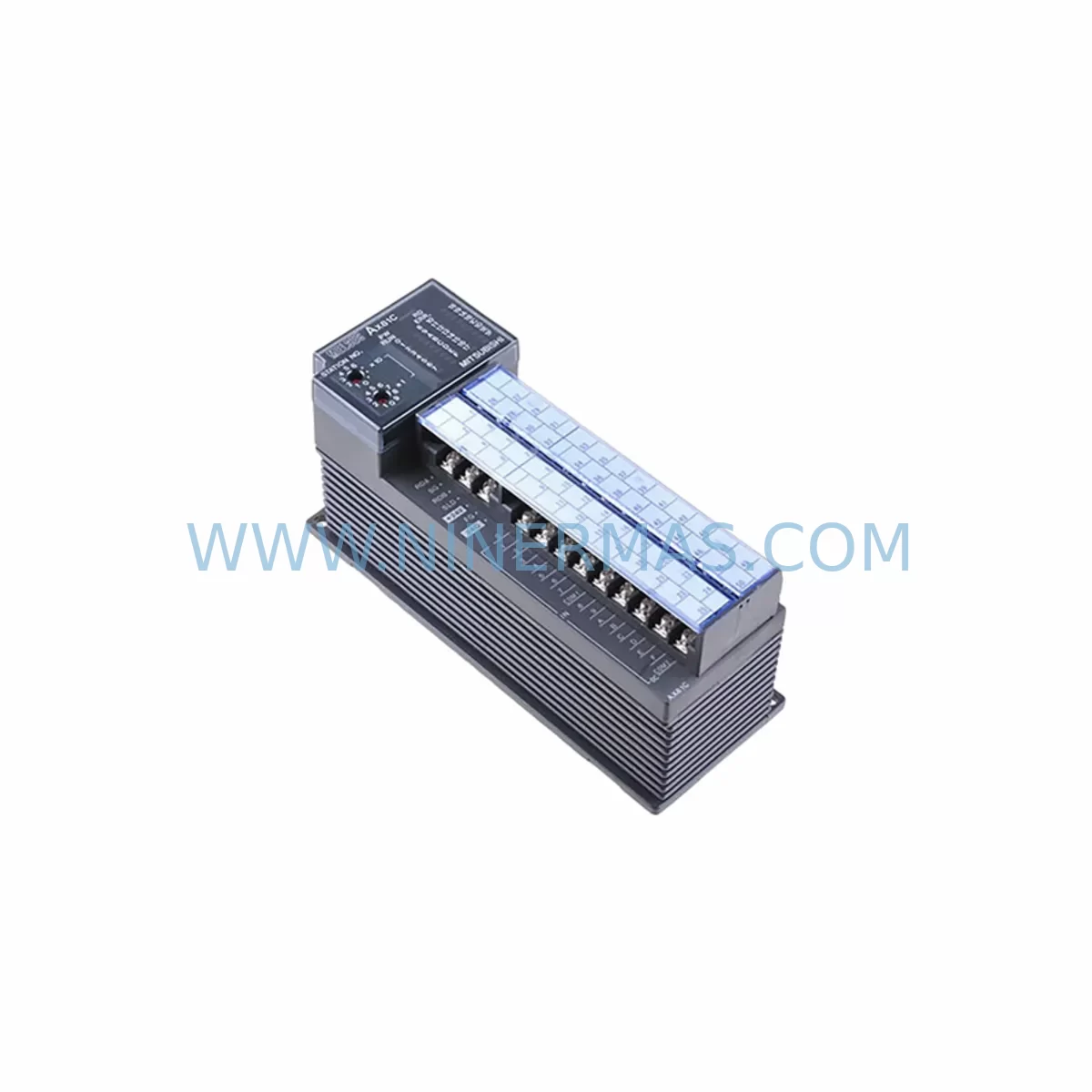
Mitsubishi AX81 Service-Ready Spare Part for Industrial Maintenance
Verify the part, confirm the platform family, and move straight into quotation with the right commercial details.
RFQ Ready
- SKUAX81
- CategoryDCS Distributed Control Systems
- BrandMitsubishi
- SupportAvailability, lead time, condition, and shipping coordination
How Buyers Usually Use This Page
- Confirm the exact part number and platform family before sending the quote request.
- Use direct email when quantity, condition, and destination are already defined internally.
- Switch to the broader brand or category archive when you need alternates nearby.
Series Navigation
Move through the most common platform families behind this part.
Product RFQ
Send this part directly for quotation.
Include quantity, required condition, destination country, and target delivery timing. Current reference: Mitsubishi AX81 Service-Ready Spare Part for Industrial Maintenance with SKU AX81.
Mitsubishi AX81 Service-Ready Spare Part for Industrial Maintenance
The Mitsubishi AX81 is a DC input module designed for the MELSEC A Series programmable logic controller platform — one of Mitsubishi Electric’s most widely deployed industrial automation architectures across discrete manufacturing, process control, and utility infrastructure. As production lines age and OEM support windows close, maintaining a verified stock of the AX81 becomes a critical element of any preventive maintenance and downtime-recovery strategy.
At NINERMAS, every AX81 unit is sourced, inspected, and pre-shipment tested to confirm electrical integrity before dispatch. Our supply chain is structured to support long-lifecycle industrial programs, with fixed lead times and a 12-month warranty covering all tested spare parts. Whether you are replacing a failed module during an emergency shutdown or building a strategic spare parts buffer for annual overhaul cycles, the AX81 is available for immediate quotation and rapid fulfillment.
Spare Maintenance Table
| Parameter | Specification |
|---|---|
| Part Number | AX81 |
| Brand | Mitsubishi Electric |
| Series | MELSEC A Series |
| Module Type | DC Input Module (Digital Input) |
| Input Points | 32 points (typical for AX81 configuration) |
| Input Voltage | DC 12/24V |
| Isolation Method | Photocoupler isolation |
| Connector Type | 40-pin connector (A Series backplane compatible) |
| Compatible Backplane | A Series base units (A32B, A52B, A62B, A68B, A98B) |
| Operating Temperature | 0°C to 55°C |
| Storage Temperature | -20°C to 75°C |
| Humidity | 5% to 95% RH (non-condensing) |
| Application Environment | Industrial control panels, discrete manufacturing, process automation |
| Maintenance Recommendation | Inspect input wiring and terminal blocks annually; replace on first sign of input signal loss or intermittent fault |
| Warranty | 12 Months (NINERMAS tested stock) |
| Condition | Original, pre-shipment tested |
| Lead Time | Contact for availability; long-term supply programs available |
Maintenance Planning for Continuous Operation
When scheduling replacement of the AX81 input module, a thorough site inspection of the surrounding control cabinet is essential to prevent repeat failures and ensure system stability after restoration. Maintenance engineers should treat the AX81 swap as an opportunity to audit the full I/O subsystem and associated power distribution components.
Begin by verifying the A Series backplane (such as the A32B, A52B, or A68B base unit) for any signs of corrosion, bent connector pins, or mechanical damage that could cause intermittent contact with the replacement module. A faulty backplane slot is a common root cause of recurring I/O module failures that goes undetected during single-module replacements.
Inspect the 24VDC field power supply feeding the AX81 input circuit — units such as the Mitsubishi A61P or A62P power supply modules should be checked for output voltage stability and ripple. An aging or undersized power supply can cause marginal input signal levels that lead to false reads or module faults. If the power supply is beyond its recommended service life, parallel replacement is strongly advised.
Review the terminal block wiring connected to the AX81’s 40-pin connector. Loose field wiring, oxidized terminals, or undersized conductors are frequent contributors to input signal degradation. This is also the right time to inspect any signal isolators or surge protection devices installed upstream of the input module, particularly in environments with variable-frequency drives, welding equipment, or high-inductive loads nearby.
For systems using the A Series CPU modules — such as the A2UCPU, A3UCPU, or A4UCPU — confirm that the CPU’s I/O assignment table and parameter settings remain consistent after the AX81 is replaced. In some configurations, a forced I/O refresh or parameter re-download via GX Developer or GX Works2 programming software may be required to restore normal scan cycle behavior.
If the control cabinet includes output modules such as the AY81 or AY82 (transistor output types) or relay output modules like the AY10 or AY13, inspect these in parallel — input and output modules in the same rack often share environmental stress and age at similar rates. Replacing only the failed input module while leaving degraded output modules in service increases the probability of a secondary failure within the same maintenance window.
Communications modules such as the A1SJ71UC24-R2 (RS-232C interface) or A1SJ71QBR11 (MELSECNET/B remote I/O) should also be checked for firmware version compatibility and connector integrity, especially if the AX81 is part of a remote I/O station rather than a local rack. Verify that the remote station address and baud rate settings are preserved after module replacement.
Finally, document the replacement event in your CMMS or maintenance log, including the module serial number, installation date, and pre-replacement fault code. This record supports warranty claims, future failure analysis, and procurement planning for the next scheduled overhaul.
Site Replacement Workflow
Replacing the Mitsubishi AX81 on a live production site requires a structured approach to minimize downtime and avoid configuration errors. Follow this recommended workflow:
1. Pre-Replacement Preparation: Obtain the replacement AX81 unit and verify the part number label against the installed module. Confirm the unit has passed pre-shipment testing (NINERMAS provides test documentation on request). Back up the current PLC program and I/O parameter file using GX Developer or GX Works2 before any hardware change.
2. Safe Isolation: Place the A Series CPU in STOP mode. De-energize the field power supply feeding the AX81 input circuit. Follow your site’s lockout/tagout (LOTO) procedure before opening the control cabinet. Do not remove the module while the backplane is energized.
3. Module Removal: Disconnect the 40-pin field wiring connector from the AX81. Release the module locking lever and slide the module out of the backplane slot. Inspect the slot connector on the backplane for damage before inserting the replacement.
4. Replacement Installation: Insert the new AX81 into the same backplane slot. Reconnect the 40-pin field wiring connector, ensuring all terminals are seated and torqued to specification. Restore field power and verify input LED indicators respond correctly to field signals before returning the CPU to RUN mode.
5. Functional Verification: Monitor the first 15–30 minutes of operation for any input fault flags or unexpected state changes in the SCADA or HMI display. Confirm that all 32 input points are reading correctly against known field device states. Log the replacement and update your spare parts inventory accordingly.
This workflow applies equally when upgrading from an older AX80 or AX40 input module to the AX81, where the higher point density and improved noise immunity of the AX81 provide a direct performance benefit without requiring backplane or wiring changes in most A Series configurations.
Spare Parts Support FAQ
Q1: Is the AX81 still available as a new original part, or only as refurbished stock?
NINERMAS supplies original Mitsubishi AX81 modules sourced through authorized industrial distribution channels. All units undergo pre-shipment electrical testing. Condition and test documentation are provided upon request. Contact our sales team for current stock status and lead time confirmation.
Q2: What is the warranty coverage for the AX81 supplied by NINERMAS?
All AX81 units supplied by NINERMAS carry a 12-month warranty from the date of shipment. The warranty covers manufacturing defects and electrical failures under normal operating conditions. Field damage, incorrect installation, or operation outside specified voltage and temperature ranges are excluded. Warranty claims are processed with return merchandise authorization (RMA) and test report documentation.
Q3: Can the AX81 be used as a direct replacement for the AX80 or AX40 in existing A Series racks?
In most A Series configurations, the AX81 is compatible with the same backplane slots as the AX80 and AX40, subject to CPU I/O assignment and parameter file verification. Compatibility should be confirmed against the specific CPU model and system configuration before installation. NINERMAS technical support can assist with compatibility verification for your system.
Q4: Does NINERMAS offer long-term supply agreements for the AX81 and other A Series spare parts?
Yes. NINERMAS operates long-term spare parts supply programs designed for industrial facilities managing aging Mitsubishi A Series systems. These programs include committed stock reservation, fixed pricing for contract periods, and priority fulfillment for emergency orders. Contact sale@ninermas.com to discuss a supply agreement tailored to your maintenance schedule and annual consumption forecast.
| Product Series | MELSEC |
|---|---|
| Country of Origin | JP |
Catalog Continuation
More Mitsubishi modules in the catalog.
Use the brand lane to compare nearby part numbers, platform-adjacent modules, and other inquiry-ready listings before sending your final RFQ.
Catalog Continuation
Alternative parts within DCS Distributed Control Systems.
Stay inside the same system family when you need substitutes, adjacent modules, or a broader shortlist for procurement review.