Original Industrial Spare Part
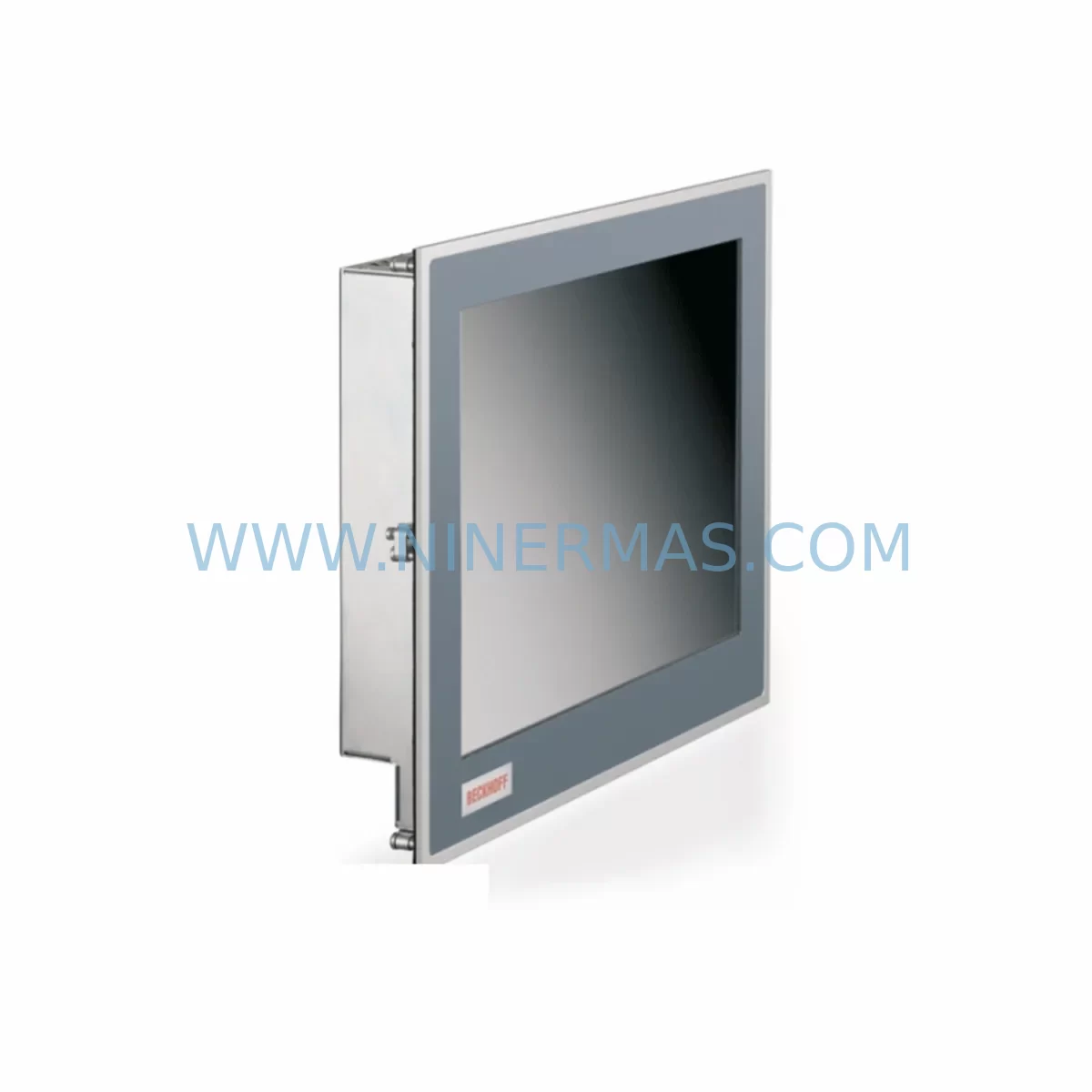
Bosch Rexroth CP6201-0001-0060 Retrofit Panel PC for Legacy Systems
Verify the part, confirm the platform family, and move straight into quotation with the right commercial details.
RFQ Ready
- SKUCP6201-0001-0060
- CategoryPLC & Industrial Automation Modules
- BrandBosch Rexroth
- SupportAvailability, lead time, condition, and shipping coordination
How Buyers Usually Use This Page
- Confirm the exact part number and platform family before sending the quote request.
- Use direct email when quantity, condition, and destination are already defined internally.
- Switch to the broader brand or category archive when you need alternates nearby.
Series Navigation
Move through the most common platform families behind this part.
Product RFQ
Send this part directly for quotation.
Include quantity, required condition, destination country, and target delivery timing. Current reference: Bosch Rexroth CP6201-0001-0060 Retrofit Panel PC for Legacy Systems with SKU CP6201-0001-0060.
Bosch Rexroth CP6201-0001-0060 Retrofit Panel PC for Legacy Systems
The Bosch Rexroth CP6201-0001-0060 is a CP6200 Series industrial Panel PC designed for seamless integration into existing automation environments. As legacy Bosch Rexroth HMI and control platforms approach end-of-life, the CP6201-0001-0060 provides a validated retrofit path that preserves existing program logic, operator interface layouts, and field wiring configurations. Whether you are replacing a discontinued CP6100 or CP6000 series panel, upgrading a control cabinet in a press line, packaging machine, or material handling system, or migrating from an older IndraControl platform, this unit delivers the processing performance and I/O compatibility required for a controlled, low-risk transition.
Each unit supplied by NINERMAS is sourced from verified industrial channels, subjected to pre-shipment functional testing, and covered by a 12-month warranty. Stock is maintained to support urgent retrofit and breakdown recovery scenarios, minimizing unplanned downtime on critical production lines.
Upgrade Compatibility Table
| Parameter | CP6201-0001-0060 (This Unit) | Typical Legacy Reference | Retrofit Notes |
|---|---|---|---|
| Series | CP6200 | CP6100 / CP6000 | Verify panel cutout dimensions before installation |
| Display Interface | DVI / VGA (model-dependent) | VGA / Composite | Confirm display cable type; adapter may be required |
| Communication Ports | Ethernet (RJ45), USB, COM | RS-232 / RS-485 / Profibus | Protocol converter or gateway may be needed for legacy fieldbus |
| Operating System | Windows Embedded / CE (variant-specific) | DOS / Windows CE 5.0 | Validate HMI runtime compatibility (WinCC, IndraWorks, etc.) |
| Mounting | Panel mount, front IP65 | Panel mount | Check rear clearance depth in existing control cabinet |
| Power Supply | 24 VDC nominal | 24 VDC | Verify PSU capacity; allow headroom for inrush current |
| Backplane / Rack | Standalone panel PC — no backplane required | N/A | No rack slot assignment needed |
| Module Address | Network IP-based addressing | DIP switch / rotary | Reassign IP address to match existing SCADA/PLC topology |
| Warranty | 12 Months — covers hardware defects under normal industrial operating conditions | ||
| Pre-Shipment Test | Power-on, display output, port communication, and boot sequence verified before dispatch | ||
Retrofit Planning for Existing Automation Systems
A successful retrofit using the CP6201-0001-0060 begins well before the unit arrives on site. Engineers should first audit the existing control cabinet layout to confirm available panel cutout dimensions, rear depth clearance, and cable routing space. The 24 VDC power supply feeding the legacy panel must be assessed for adequate capacity — the CP6200 series draws more current than older CP6000 units under peak processing load, and the existing PSU may require replacement or supplementation with an additional Bosch Rexroth power supply module.
Terminal wiring from the legacy panel to field devices — including operator pushbuttons, indicator lamps, and local I/O — must be documented and mapped to the new unit’s USB and COM port assignments. Where the original system used RS-232 or RS-485 serial communication to connect to a Rexroth IndraControl L or IndraControl XM controller, a serial-to-Ethernet gateway or protocol converter will be required to bridge the communication link. In systems where Profibus DP was used as the primary fieldbus, a Profibus master card or external Profibus-to-Ethernet gateway should be planned into the retrofit bill of materials.
The HMI application running on the legacy panel — whether developed in Bosch Rexroth IndraWorks, WinCC flexible, or a third-party SCADA package — must be validated for compatibility with the CP6201-0001-0060’s operating environment. In many cases, the existing project file can be transferred directly to the new panel via USB or network share, with only minor screen resolution adjustments required. Where the original project was compiled for an older runtime version, a runtime upgrade on the new panel may be necessary before the project will execute correctly.
For systems that include remote I/O expansion — such as Rexroth Inline I/O modules, Beckhoff EtherCAT terminals, or third-party Modbus RTU I/O blocks — the communication configuration on the CP6201-0001-0060 must be set to match the existing I/O map and module addresses. Changing module addresses during a retrofit introduces risk of incorrect signal assignment; wherever possible, the existing address scheme should be preserved. Signal isolators between the panel and field wiring should be inspected and replaced if they show signs of drift or degradation, as a new panel will expose latent signal quality issues that the legacy unit may have tolerated.
Where the control system includes a Rexroth IndraMotion MLC or IndraMotion MTX motion controller communicating with the HMI over Sercos III or EtherNet/IP, the network topology and IP addressing scheme must be documented before the old panel is removed. The CP6201-0001-0060 should be assigned the same IP address as the legacy unit to avoid reconfiguration of the motion controller’s communication parameters. A programming cable and laptop with IndraWorks or the appropriate engineering tool should be on hand during commissioning to verify drive parameters and axis configurations remain intact after the panel swap.
Downtime Control During System Migration
Minimizing production downtime during a CP6201-0001-0060 retrofit requires a structured pre-commissioning approach. Before the scheduled maintenance window, the existing HMI project, PLC program, and drive parameter sets should be backed up to an external storage device. A full backup of the legacy panel’s operating system image — where the platform supports it — provides an additional recovery option if commissioning encounters unexpected issues.
The physical swap of the panel unit should be planned as a discrete step, separate from software commissioning. With terminal wiring documented and the new unit pre-configured on the bench — including IP address assignment, runtime installation, and HMI project loading — the on-site installation time can be reduced to under two hours in most cases. This bench pre-commissioning approach is strongly recommended for systems where the control panel is integrated into a running production line with limited maintenance windows.
During the live commissioning phase, the original PLC program running on the IndraControl or third-party controller should not be modified. The panel swap is a hardware replacement, not a logic change, and maintaining the existing program integrity is essential for preserving field control continuity. If the HMI communicates with the PLC via OPC DA or OPC UA, the OPC server configuration on the new panel must be verified to match the tag database of the existing project before the system is returned to automatic mode.
Post-commissioning, a functional walkthrough of all operator screens, alarm displays, trend views, and manual control functions should be completed before the system is handed back to production. Any discrepancies in screen layout, tag values, or communication status should be resolved before the maintenance window closes. NINERMAS recommends retaining the legacy panel unit for a minimum of 30 days post-retrofit as a cold standby, in the event that an unforeseen compatibility issue requires a temporary rollback.
Retrofit Support FAQ
Q: Is the CP6201-0001-0060 a direct drop-in replacement for the CP6100 series panels?
A: The CP6201-0001-0060 shares the CP6200 platform architecture and is the designated upgrade path from CP6100 and CP6000 series panels. Panel cutout dimensions are compatible in most configurations, but rear depth and cable connector positions should be verified against the existing cabinet drawing before ordering. NINERMAS can provide dimensional data on request.
Q: Can the existing HMI project be transferred to the CP6201-0001-0060 without modification?
A: In most cases, yes. Projects developed in Bosch Rexroth IndraWorks or compatible HMI tools can be transferred via USB or network. Minor adjustments for screen resolution or runtime version may be required. NINERMAS recommends a bench test of the project on the new unit before the scheduled installation window.
Q: What communication protocols does the CP6201-0001-0060 support for connecting to legacy PLCs and controllers?
A: The unit supports Ethernet-based protocols including EtherNet/IP, Modbus TCP, OPC DA, and OPC UA natively. For legacy serial protocols such as RS-232, RS-485, or Profibus DP, an appropriate protocol gateway or converter should be included in the retrofit plan. NINERMAS can advise on compatible gateway options based on your existing fieldbus topology.
Q: Does the unit come with a warranty, and has it been tested before shipment?
A: Yes. Every CP6201-0001-0060 supplied by NINERMAS is covered by a 12-month warranty against hardware defects under normal industrial operating conditions. Each unit undergoes pre-shipment testing including power-on verification, display output check, port communication test, and boot sequence confirmation. Test records are available on request.
| Product Series | Legacy |
|---|---|
| Country of Origin | DE |
Catalog Continuation
More Bosch Rexroth modules in the catalog.
Use the brand lane to compare nearby part numbers, platform-adjacent modules, and other inquiry-ready listings before sending your final RFQ.
SKU: 3842547991 02112-AA44-0001 0190-24640
Rexroth 3842547991 Retrofit Drive Motor for Legacy Systems
SKU: R911329914 CSH01.3C-SE-EN2-NNN-CCD-S2-S-NN-FW
Bosch Rexroth R911329914 Retrofit Servo Drive for Legacy Systems
Catalog Continuation
Alternative parts within PLC & Industrial Automation Modules.
Stay inside the same system family when you need substitutes, adjacent modules, or a broader shortlist for procurement review.