
Original Industrial Spare Part
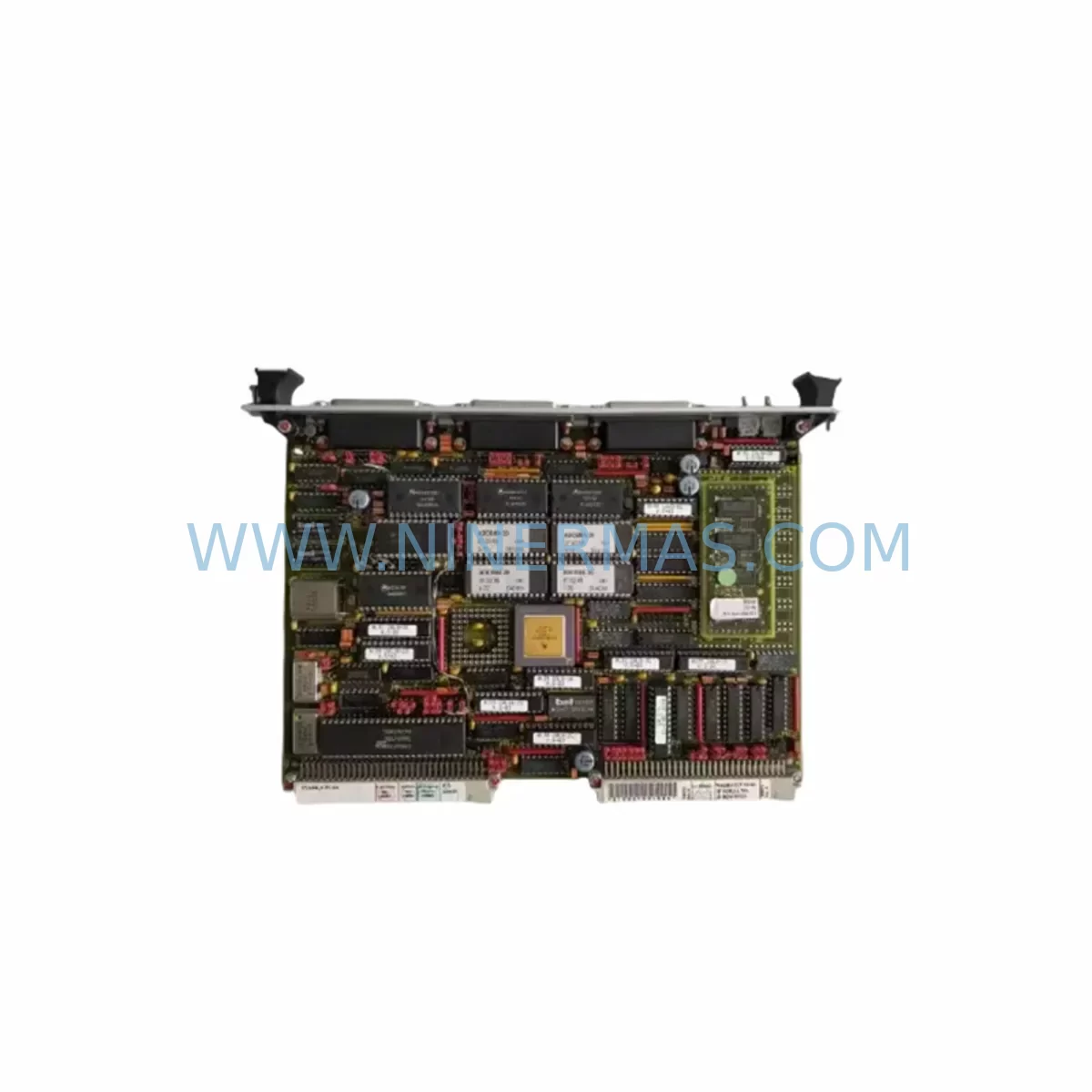
Force Computers SYS68K/CPU-6 REV. 4.1 Service-Ready Spare Part
Verify the part, confirm the platform family, and move straight into quotation with the right commercial details.
RFQ Ready
- SKUSYS68K/CPU-6 REV. 4.1
- CategoryPLC & Industrial Automation Modules
- BrandForce Computers
- SupportAvailability, lead time, condition, and shipping coordination
How Buyers Usually Use This Page
- Confirm the exact part number and platform family before sending the quote request.
- Use direct email when quantity, condition, and destination are already defined internally.
- Switch to the broader brand or category archive when you need alternates nearby.
Series Navigation
Move through the most common platform families behind this part.
Product RFQ
Send this part directly for quotation.
Include quantity, required condition, destination country, and target delivery timing. Current reference: Force Computers SYS68K/CPU-6 REV. 4.1 Service-Ready Spare Part with SKU SYS68K/CPU-6 REV. 4.1.
Force Computers SYS68K/CPU-6 REV. 4.1 Service-Ready Spare Part for Industrial Maintenance
The Force Computers SYS68K/CPU-6 REV. 4.1 is a VMEbus-compatible CPU board designed for mission-critical industrial control applications. As a direct service-ready replacement for aging SYS68K series installations, this board supports uninterrupted operation in manufacturing lines, process control cabinets, and legacy automation systems where downtime carries significant operational cost. Whether you are managing a scheduled annual overhaul or responding to an unplanned CPU failure, having a verified, pre-tested SYS68K/CPU-6 REV. 4.1 in your spare parts inventory is the most reliable way to restore system operation with minimal disruption.
This unit is sourced as an original Force Computers component, inspected prior to shipment, and backed by a 12-month warranty. It is suitable for maintenance engineers managing SYS68K-based control racks across automotive, semiconductor, energy, and heavy industrial environments.
Spare Maintenance Table
| Parameter | Specification / Detail |
|---|---|
| SKU / Part Number | SYS68K/CPU-6 REV. 4.1 |
| Brand | Force Computers |
| Series | SYS68K |
| Board Type | VMEbus CPU Board |
| Processor Architecture | Motorola 68000-series (68020/68030 class) |
| Bus Standard | VMEbus (IEEE 1014) |
| Form Factor | 6U VME Single-Board Computer |
| Operating Voltage | +5 VDC (via VME backplane) |
| Application Environment | Industrial control cabinets, process automation, legacy DCS/PLC racks |
| Compatibility | SYS68K series VMEbus chassis and backplanes |
| Condition | Original spare, pre-shipment tested |
| Warranty | 12 Months |
| Typical Replacement Scenario | CPU failure, board corruption, preventive overhaul, system upgrade |
| Lead Time | Subject to stock availability — contact for confirmation |
Maintenance Planning for Continuous Operation
When replacing the SYS68K/CPU-6 REV. 4.1 in a live control cabinet, maintenance engineers should treat the CPU board swap as part of a broader system health review. The CPU board interfaces directly with the VMEbus backplane, and any degradation in adjacent slots can cause intermittent faults that are difficult to isolate after the fact.
Begin by inspecting the SYS68K VMEbus backplane for bent pins, oxidized contacts, or mechanical stress from repeated board insertions. A compromised backplane can cause the replacement CPU to exhibit the same fault symptoms as the failed unit. Alongside the backplane, verify the condition of the SYS68K/MEM series memory boards installed in adjacent slots — corrupted or failing RAM modules are a common secondary cause of CPU instability in 68000-class systems.
Check the SYS68K/VME power supply module output rails. VMEbus systems are sensitive to voltage ripple on the +5 VDC rail; a power supply that is within nominal range under no-load conditions may still cause CPU resets under full rack load. Use a calibrated oscilloscope to verify ripple is within the board’s tolerance before completing the replacement.
For systems with active I/O, inspect the SYS68K/ISIO or SYS68K/FDIO I/O boards for signs of wear or communication errors. These boards share the VMEbus arbitration logic with the CPU and can generate spurious bus errors if their onboard firmware is outdated or their connectors are degraded. Similarly, review any installed SYS68K/SCSI or SYS68K/LAN communication modules — network or storage interface faults are frequently misdiagnosed as CPU failures in legacy VMEbus environments.
If the system includes a Force Computers SYS68K/FORCE-1 or SYS68K/FORCE-2 single-board computer in a multi-CPU configuration, confirm that the bus arbitration settings on the replacement CPU-6 board match the existing slot priority configuration. Mismatched arbitration levels can cause bus contention and system lockups immediately after restart.
For operator interface continuity, verify that any connected industrial HMI panel or operator terminal communicating via RS-232 or RS-422 serial ports is correctly mapped to the replacement board’s port assignments. Serial port configuration is stored in the CPU’s onboard NVRAM, and a factory-reset replacement board will require reconfiguration before the HMI can resume normal operation.
Finally, inspect all terminal blocks, DIN rail fuse holders, and signal isolation modules in the control cabinet. These passive components are often overlooked during CPU replacements but are a common source of intermittent faults that re-emerge after a board swap. Replacing the CPU without addressing degraded terminal connections or blown signal fuses will result in repeat failures and unnecessary downtime.
Site Replacement Workflow
Step 1 — Pre-Replacement Verification: Before powering down the system, document the current CPU board configuration, including DIP switch settings, jumper positions, and NVRAM parameters. Photograph the board in situ and record all cable and connector positions. This documentation is critical for restoring the replacement board to the correct operational state.
Step 2 — Safe Shutdown and Extraction: Follow the system’s lockout/tagout procedure. Power down the VMEbus rack in the correct sequence — peripheral boards before the CPU. Extract the SYS68K/CPU-6 REV. 4.1 using the board’s ejector levers to avoid backplane pin damage. Place the removed board in an ESD-safe bag immediately.
Step 3 — Replacement Board Preparation: Configure the replacement SYS68K/CPU-6 REV. 4.1 to match the documented switch and jumper settings before insertion. Do not insert the board with settings at factory defaults unless you have confirmed that factory defaults match your system’s requirements.
Step 4 — Insertion and Power-Up: Insert the replacement board firmly into the correct VMEbus slot. Verify that all edge connectors are fully seated. Power up the rack in the correct sequence — CPU first, then peripheral boards. Monitor the system’s boot sequence for error codes or fault indicators on the CPU board’s onboard LEDs.
Step 5 — Functional Verification: Restore NVRAM configuration from backup. Verify communication with all I/O boards, HMI panels, and network modules. Run a full I/O scan and confirm that all process signals are reading correctly before returning the system to production. Log the replacement in your maintenance management system with the board’s serial number and installation date.
Spare Parts Support FAQ
Q: Is this SYS68K/CPU-6 REV. 4.1 an original Force Computers board or a third-party substitute?
A: This is an original Force Computers SYS68K/CPU-6 REV. 4.1 board sourced from verified industrial supply channels. It is not a clone, reproduction, or third-party substitute. Each unit undergoes pre-shipment inspection and functional testing before dispatch.
Q: What warranty coverage is provided, and what does it include?
A: All units are covered by a 12-month warranty from the date of shipment. The warranty covers functional defects identified under normal operating conditions. It does not cover damage resulting from incorrect installation, overvoltage, or physical mishandling. Contact sale@ninermas.com for warranty claims and RMA procedures.
Q: How do I confirm compatibility with my existing SYS68K chassis before ordering?
A: Provide your chassis model number, backplane revision, and current CPU board part number when contacting us. Our technical team will verify slot compatibility, bus arbitration requirements, and firmware version alignment before confirming the order. This pre-order compatibility check is provided at no charge.
Q: Can you support long-term or repeat procurement for this part number?
A: Yes. We maintain ongoing sourcing relationships for Force Computers SYS68K series components and can support scheduled procurement programs for maintenance teams managing multiple installations. Contact us to discuss volume availability, lead times, and consignment stock arrangements.
—
| Product Series | Other series |
|---|
Catalog Continuation
Alternative parts within PLC & Industrial Automation Modules.
Stay inside the same system family when you need substitutes, adjacent modules, or a broader shortlist for procurement review.
SKU: 6ES5470-4UC12
Siemens 6ES5470-4UC12 Retrofit-Compatible Analog Output
SKU: ZCU-12L 3AXD50000794058
ABB ZCU-12L 3AXD50000794058 Service-Ready Spare Part




