
Original Industrial Spare Part
Schneider BMXDDI3202K Retrofit-Compatible Discrete Input Module
Verify the part, confirm the platform family, and move straight into quotation with the right commercial details.
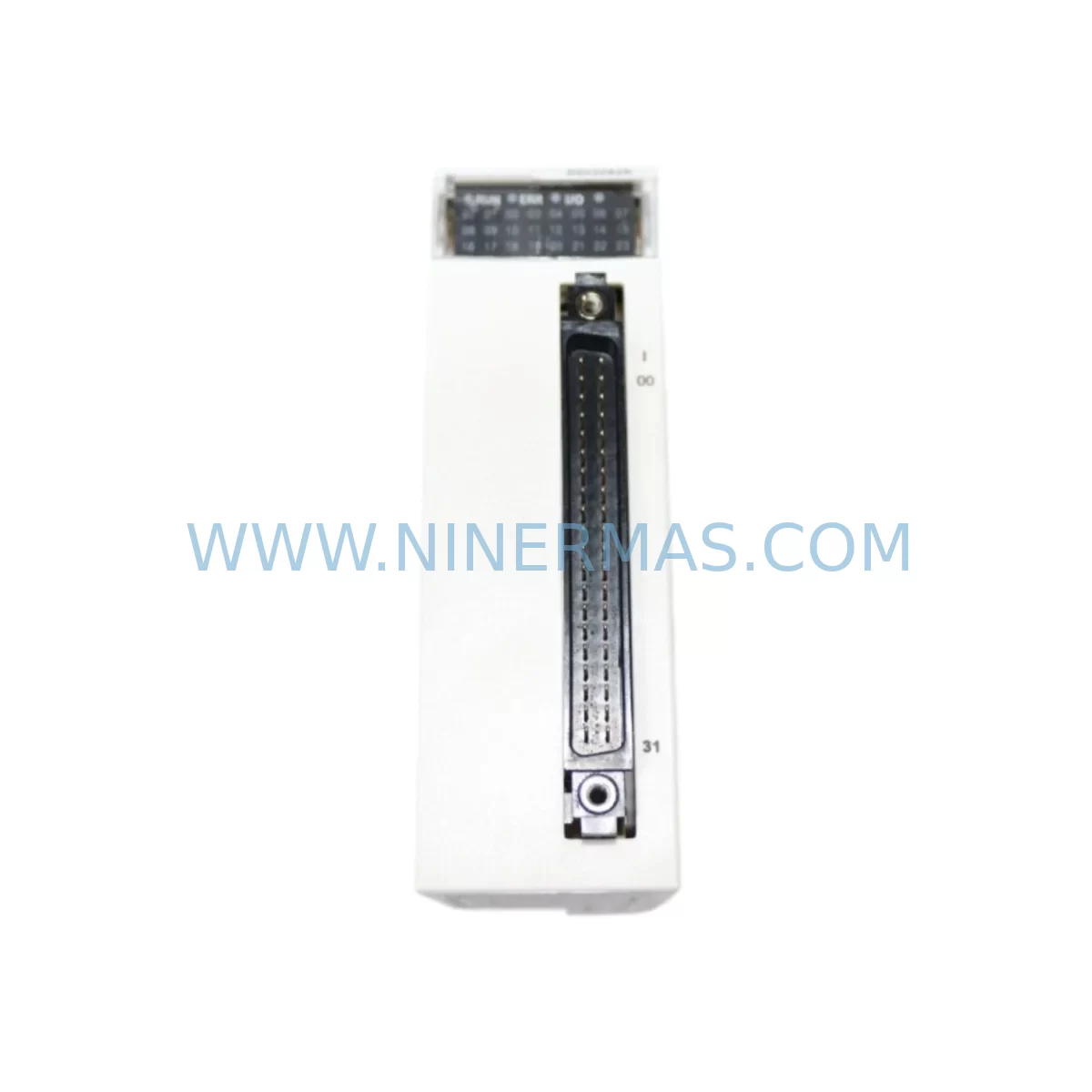
RFQ Ready
- SKUBMXDDI3202K
- CategoryPLC & Industrial Automation Modules
- BrandSchneider Electric
- SupportAvailability, lead time, condition, and shipping coordination
How Buyers Usually Use This Page
- Confirm the exact part number and platform family before sending the quote request.
- Use direct email when quantity, condition, and destination are already defined internally.
- Switch to the broader brand or category archive when you need alternates nearby.
Series Navigation
Move through the most common platform families behind this part.
Product RFQ
Send this part directly for quotation.
Include quantity, required condition, destination country, and target delivery timing. Current reference: Schneider BMXDDI3202K Retrofit-Compatible Discrete Input Module with SKU BMXDDI3202K.
Schneider BMXDDI3202K Retrofit-Compatible Discrete Input Module for Legacy Automation Systems
The Schneider Electric BMXDDI3202K is a 32-channel 24VDC discrete input module engineered for the Modicon M340 platform, and it stands as one of the most reliable retrofit solutions for aging industrial control systems operating in harsh or demanding environments. Whether you are replacing a discontinued input module, upgrading a legacy control cabinet, or migrating from an older Modicon Quantum or Premium platform, the BMXDDI3202K delivers the compatibility, ruggedness, and signal integrity that modern retrofit projects demand.
Designed with conformal coating for protection against humidity, dust, and corrosive atmospheres, this module is particularly well-suited for process industries, water treatment facilities, mining operations, and offshore automation environments where standard modules fail prematurely. Its ruggedized construction (the “K” suffix denoting the harsh-environment variant) makes it the preferred choice for engineers who cannot afford signal degradation or unexpected module failure mid-campaign.
Upgrade Compatibility Table
| Parameter | BMXDDI3202K Details |
|---|---|
| Platform | Modicon M340 (BMX series) |
| Channels | 32 discrete inputs |
| Input Voltage | 24VDC (IEC Type 1 / Type 2) |
| Backplane Interface | M340 BMX backplane (X-bus) |
| Rack Compatibility | BMXXBP0400 / BMXXBP0600 / BMXXBP0800 / BMXXBP1200 |
| Communication | X-bus (internal backplane); compatible with Ethernet, Modbus, CANopen via CPU |
| Replaces / Upgrades From | BMXDDI3202 (standard), legacy TSX Micro / Premium DI modules |
| Terminal Block | 40-pin HE10 connector (BMXFTB2000 or equivalent) |
| Installation Space | Single-slot M340 module format |
| Conformal Coating | Yes — harsh environment rated (“K” variant) |
| Debugging / Commissioning | Unity Pro / EcoStruxure Control Expert — I/O mapping, channel diagnostics, forcing |
| Warranty | 12 Months — tested and verified before shipment |
Retrofit Planning for Existing Automation Systems
When integrating the BMXDDI3202K into an existing control system, a structured retrofit plan is essential to avoid unplanned downtime and configuration errors. The first step is always a power budget audit of the target rack. The M340 backplane distributes 3.3V and 5V logic power across all installed modules; adding or replacing modules — including the BMXDDI3202K alongside power supply modules such as the BMXCPS2000 or BMXCPS3500A — requires confirming that the total current draw does not exceed the rack’s rated capacity.
Terminal wiring is the next critical checkpoint. The BMXDDI3202K uses a 40-pin HE10 connector, typically wired via a BMXFTB2000 terminal block or a pre-wired cable harness. Engineers migrating from older TSX Premium or Quantum platforms must re-map field wiring from the legacy terminal layout to the HE10 pinout. Labeling each wire before disconnection and using a wiring continuity tester before powering up the new module significantly reduces commissioning risk.
Backplane slot addressing must also be verified in the software configuration. In EcoStruxure Control Expert (formerly Unity Pro), each module slot in the rack — whether occupied by the BMXDDI3202K, an analog input module like the BMXAMI0410, a discrete output module such as the BMXDDO3202K, or a communication module like the BMXNOE0100 Ethernet module — must be declared and addressed correctly in the hardware configuration tree. Mismatched slot declarations will prevent the CPU from recognizing the module and will generate a configuration mismatch fault on the BMXP342020 or equivalent M340 CPU.
For systems that include HMI interfaces — such as a Magelis HMIGTO or HMISCU panel — the I/O variable bindings in the HMI project must be reviewed after any module replacement. If the BMXDDI3202K replaces a module at a different rack address or slot position, the associated HMI screen animations and alarm triggers linked to those input variables will need to be re-validated and, if necessary, re-mapped in Vijeo Designer or EcoStruxure Operator Terminal Expert.
Communication link integrity is another area that demands attention during retrofit. If the M340 system communicates upstream via Modbus TCP through a BMXNOE0100 or BMXNOE0110 Ethernet module, or via CANopen through a BMXCNO0100 fieldbus module, the addition or replacement of I/O modules does not inherently disrupt the communication layer — but the PLC program’s I/O table must be re-compiled and downloaded after any hardware configuration change. Always perform a full program backup before initiating any module swap.
Finally, installation space confirmation is mandatory before ordering. The BMXDDI3202K occupies a single slot in any standard M340 rack. If the target cabinet is already fully populated, a rack expansion using an additional BMXXBP0400 or BMXXBP0800 backplane — connected via a BMXXBE1000 extension cable — may be required. Confirm cabinet depth, DIN rail clearance, and cable routing space before finalizing the retrofit bill of materials.
Downtime Control During System Migration
Minimizing production downtime during a module replacement is a primary concern for any plant engineer or maintenance team. For the BMXDDI3202K retrofit, the recommended approach is a hot-swap preparation protocol: prepare the replacement module, pre-configure it in EcoStruxure Control Expert offline, and validate the hardware configuration in simulation mode before the scheduled maintenance window.
Before powering down the rack, export and archive the full PLC program — including all data blocks, I/O forcing tables, and communication parameters — using the project backup function in Control Expert. This ensures that if the new module triggers an unexpected configuration fault, the original program can be restored within minutes rather than hours.
During the physical swap, follow the M340 module removal procedure: power down the rack supply (BMXCPS2000 or equivalent), release the module locking tab, extract the old module, insert the BMXDDI3202K, and reconnect the HE10 terminal block. After power-up, use the Control Expert diagnostics panel to confirm that all 32 input channels are recognized and that no channel faults are reported. Use the I/O forcing function to verify each field signal individually before returning the system to automatic mode.
For systems where a full rack power-down is not acceptable, consider a phased migration approach: install the BMXDDI3202K in an adjacent available slot, re-route a subset of field signals to the new module, validate those channels in the live program, and then decommission the old module in a subsequent maintenance window. This approach keeps the control system operational throughout the migration and limits exposure to unplanned stops.
Retrofit Support FAQ
Q1: Is the BMXDDI3202K a direct drop-in replacement for the standard BMXDDI3202?
Yes. The BMXDDI3202K is functionally identical to the BMXDDI3202 and occupies the same single rack slot. The only difference is the conformal coating applied to the PCB for harsh-environment protection. No software changes, address remapping, or wiring modifications are required when substituting one for the other in an existing M340 configuration.
Q2: Can the BMXDDI3202K be used to replace discrete input modules from the TSX Premium or Modicon Quantum platforms?
Not as a direct plug-in replacement, as those platforms use different backplane architectures and rack formats. However, the BMXDDI3202K is the correct target module when migrating a TSX Premium or Quantum system to the M340 platform. The migration requires a new M340 rack, a compatible CPU such as the BMXP342020, and a full re-wiring of field terminals to the HE10 connector format. EcoStruxure Control Expert supports import of legacy Unity Pro projects to assist with program migration.
Q3: What pre-shipment testing is performed on the BMXDDI3202K?
Every BMXDDI3202K unit supplied by NINERMAS undergoes functional verification prior to dispatch, including channel continuity checks, input threshold validation, and backplane interface testing. Units are shipped with original manufacturer packaging where available, and each order is covered by a 12-month warranty from the date of shipment. Expedited delivery and in-stock availability can be confirmed by contacting our sales team directly.
Q4: What information should I provide when requesting a compatibility assessment for my retrofit project?
To provide an accurate retrofit recommendation, please share the existing rack model and slot layout, the CPU reference currently in use, the field signal voltage levels and wiring topology, and any communication protocols active on the system (Modbus, CANopen, Ethernet/IP, etc.). Our technical team will review your configuration and confirm compatibility, lead time, and any additional components — such as terminal blocks, extension cables, or power supply upgrades — required to complete the retrofit successfully.
| Product Series | Modicon M340 |
|---|---|
| Country of Origin | FR |
Catalog Continuation
More Schneider Electric modules in the catalog.
Use the brand lane to compare nearby part numbers, platform-adjacent modules, and other inquiry-ready listings before sending your final RFQ.
Catalog Continuation
Alternative parts within PLC & Industrial Automation Modules.
Stay inside the same system family when you need substitutes, adjacent modules, or a broader shortlist for procurement review.
SKU: 00-217-026 00217026D3236-K13 00-217-026
KUKA 00-217-026 Retrofit Power Supply for Legacy Systems
SKU: SGDS-01A32A LS2TR30-300Q8 6SL3120-1TE15-0AA4
Yaskawa SGDS-01A32A Retrofit Servo Drive for Legacy Systems



