Original Industrial Spare Part
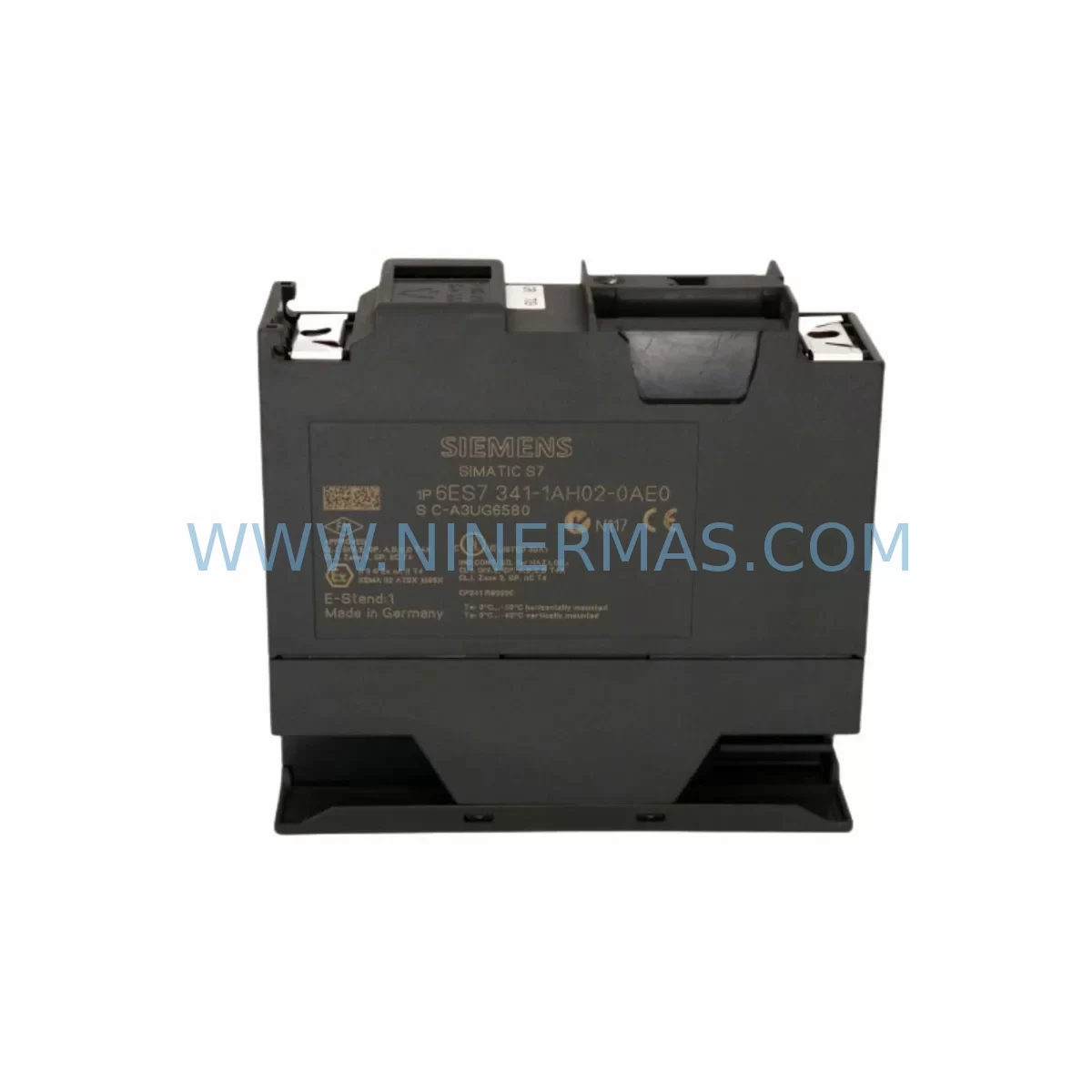
Siemens 6ES7341-1AH02-0AE0 Retrofit-Compatible CP for Legacy S7-300
Verify the part, confirm the platform family, and move straight into quotation with the right commercial details.
RFQ Ready
- SKU6ES7341-1AH02-0AE0
- CategoryPLC & Industrial Automation Modules
- BrandSiemens
- SupportAvailability, lead time, condition, and shipping coordination
How Buyers Usually Use This Page
- Confirm the exact part number and platform family before sending the quote request.
- Use direct email when quantity, condition, and destination are already defined internally.
- Switch to the broader brand or category archive when you need alternates nearby.
Series Navigation
Move through the most common platform families behind this part.
Product RFQ
Send this part directly for quotation.
Include quantity, required condition, destination country, and target delivery timing. Current reference: Siemens 6ES7341-1AH02-0AE0 Retrofit-Compatible CP for Legacy S7-300 with SKU 6ES7341-1AH02-0AE0.
Siemens 6ES7341-1AH02-0AE0 Retrofit-Compatible CP for Legacy S7-300: Seamless Upgrade for Aging Automation Systems
The Siemens 6ES7341-1AH02-0AE0 is a Communications Processor (CP 341) designed for the SIMATIC S7-300 series, providing point-to-point serial communication via RS-232C, RS-422, and RS-485 interfaces. As legacy S7-300 control systems approach end-of-life and original spare parts become increasingly scarce, the 6ES7341-1AH02-0AE0 remains one of the most sought-after retrofit-compatible modules for engineers tasked with sustaining aging production lines, upgrading control cabinets, and migrating serial communication links without a full system overhaul.
NINERMAS maintains verified stock of the 6ES7341-1AH02-0AE0, fully tested prior to shipment and backed by a 12-month warranty. Whether you are replacing a failed CP 341 on an active production line, extending the service life of a legacy S7-300 rack, or planning a phased migration toward a newer SIMATIC platform, this module provides the compatibility and reliability your retrofit project demands.
Upgrade Compatibility Table
| Parameter | 6ES7341-1AH02-0AE0 (CP 341) | Retrofit Notes |
|---|---|---|
| Compatible Rack | S7-300 standard rail (DIN 35mm) | Direct slot-in replacement; confirm rack slot availability |
| Communication Interface | RS-232C / RS-422 / RS-485 (serial point-to-point) | Verify existing cable pinout and baud rate settings before swap |
| Power Supply Requirement | Supplied via S7-300 backplane (5 VDC, 200 mA) | Confirm PS 307 or equivalent power module capacity before installation |
| Module Address / Slot | Configurable via STEP 7 / TIA Portal hardware configuration | Re-assign module address in HW Config to match original; download updated configuration |
| Program Compatibility | FB/FC driver blocks (CP_SEND, CP_RECV) in STEP 7 V5.x / TIA Portal | Retain original FB instance data blocks; re-link if module address changes |
| HMI Screen Impact | No direct HMI tag change if module address is preserved | Verify SIMATIC HMI (TP/OP panels) communication links post-swap |
| Communication Protocol | ASCII, 3964(R), RK 512 | Confirm protocol match with connected third-party device (e.g., barcode scanner, drive, meter) |
| Installation Space | Single S7-300 slot (40 mm width) | Measure available cabinet space; adjacent modules must not obstruct ventilation |
| Commissioning | STEP 7 HW Config download + online diagnostics | Use STEP 7 Module Information to verify communication status after replacement |
| Warranty | 12-Month Warranty — All units tested before shipment by NINERMAS | |
Retrofit Planning for Existing Automation Systems
Replacing the 6ES7341-1AH02-0AE0 in a live S7-300 system requires careful pre-planning to avoid unplanned downtime and configuration errors. The CP 341 typically sits within a multi-module S7-300 rack alongside a CPU — commonly a CPU 314 or CPU 315-2 DP — and a power supply module such as the PS 307 10A. Before pulling the failed module, engineers should document the existing slot assignment, the configured baud rate, data bits, stop bits, and parity settings, as well as the protocol variant (ASCII, 3964R, or RK 512) used to communicate with the connected peripheral device.
In many retrofit scenarios, the CP 341 is used to interface the S7-300 controller with legacy serial devices — weighing scales, barcode readers, variable frequency drives, or third-party meters — that do not support modern PROFIBUS DP or PROFINET IO. When the 6ES7341-1AH02-0AE0 is being replaced as part of a broader control cabinet upgrade, it is common to simultaneously review the SM 321 digital input module and SM 322 digital output module for wear, and to inspect the IM 360 / IM 361 interface modules if the system spans multiple racks. Signal isolators installed between the CP 341’s RS-485 port and field devices should also be tested, as degraded isolation can cause intermittent communication faults that mimic a failed CP module.
For systems where the S7-300 communicates upstream to a SCADA or DCS via CP 343-1 Lean or CP 343-1 Advanced Ethernet modules, the retrofit of the CP 341 serial port does not affect the Ethernet communication path, provided the CPU’s MPI/DP port and the Ethernet CP remain undisturbed. However, if the retrofit is part of a migration from MPI to PROFINET, engineers should plan for a CPU upgrade — such as moving to a CPU 315F-2 PN/DP — and reconfigure the network topology accordingly.
Programming cable access is essential during commissioning. A PC Adapter USB A2 or MPI/PROFIBUS adapter is required to connect a programming laptop running STEP 7 V5.6 or TIA Portal to the CPU’s MPI port for hardware configuration download and online diagnostics. After the new 6ES7341-1AH02-0AE0 is seated and the rack powered up, the STEP 7 Module Information dialog should confirm the CP’s operating state as “OK” before resuming production.
Where I/O expansion is part of the retrofit scope, SM 331 analog input and SM 332 analog output modules are frequently added to the same rack or an expansion rack connected via IM 360/361. Ensuring the PS 307 power supply has sufficient current headroom for all added modules is a critical pre-installation check that is often overlooked until commissioning.
Downtime Control During System Migration
Minimizing production downtime during a CP 341 replacement begins with preparation, not execution. Before the maintenance window opens, the engineer should export the complete STEP 7 project from the programming laptop, back up the CPU’s current program using the “Upload to PG” function, and print or photograph the existing terminal wiring on the CP 341’s sub-D connector. The serial cable should be labeled at both ends before disconnection.
The physical swap of the 6ES7341-1AH02-0AE0 takes only minutes — the module is removed by releasing the front panel screws, disconnecting the sub-D serial connector, and sliding the module off the DIN rail. The replacement module is installed in reverse order. The critical time investment is in the software: downloading the hardware configuration to the CPU, verifying the CP’s diagnostic buffer shows no faults, and running a communication test with the connected serial device before handing control back to the operators.
For systems where even a brief interruption is unacceptable, a parallel commissioning approach can be used: the replacement CP 341 is pre-configured on a bench using a spare CPU and PS 307, with the exact parameter set loaded and verified offline. This pre-tested module is then swapped into the live rack during a scheduled micro-stop, reducing the in-rack commissioning time to under 15 minutes in most cases.
Protecting the original program logic is non-negotiable. The CPU’s program must not be overwritten during the hardware configuration download — in STEP 7, this is controlled by selecting “Download to Module” for the hardware configuration only, leaving the OB/FB/FC/DB blocks intact. After the swap, a full online comparison between the PG project and the CPU’s loaded program confirms that no logic was inadvertently altered.
Retrofit Support FAQ
Q1: Is the 6ES7341-1AH02-0AE0 a direct replacement for earlier CP 341 variants such as the 6ES7341-1AH01-0AE0?
A: The 6ES7341-1AH02-0AE0 is the current production revision of the CP 341 RS-232C/RS-422/RS-485 module and is functionally compatible with earlier hardware revisions. The firmware and driver blocks (CP_SEND, CP_RECV) are backward compatible in STEP 7 V5.x. A hardware configuration download is required after replacement to register the new module with the CPU.
Q2: What wiring changes are needed when replacing the CP 341?
A: The sub-D connector pinout is identical across CP 341 revisions. If the existing serial cable was wired to the original module’s connector, it can be reconnected directly to the replacement 6ES7341-1AH02-0AE0 without modification. Always verify the RS-232C/RS-422/RS-485 mode switch position matches the original configuration before powering up.
Q3: Does NINERMAS test the 6ES7341-1AH02-0AE0 before shipment?
A: Yes. Every unit is powered on and functionally tested prior to dispatch. The module is shipped with a 12-month warranty covering manufacturing defects and functional failures. NINERMAS provides pre-sales technical consultation to confirm compatibility with your specific S7-300 configuration before purchase.
Q4: What is the typical lead time and stock availability?
A: NINERMAS maintains ready stock of the 6ES7341-1AH02-0AE0 to support urgent retrofit and breakdown replacement requirements. Standard orders are dispatched within 1–3 business days. For large-quantity or project-based procurement, contact our sales team to confirm allocation and delivery schedule.
| Product Series | SIMATIC |
|---|---|
| Country of Origin | DE |
Catalog Continuation
More Siemens modules in the catalog.
Use the brand lane to compare nearby part numbers, platform-adjacent modules, and other inquiry-ready listings before sending your final RFQ.
SKU: A5E03894525 PM240/340
Siemens A5E03894525 Service-Ready Spare Part for Industrial Maintenance
SKU: 4FD6303-0LA01-1A
Siemens 4FD6303-0LA01-1A Safety-Reliable Current Supply Module
SKU: 6ES7288-3AQ02-0AA0
SIEMENS 6ES7288-3AQ02-0AA0 Retrofit-Compatible Analog Output Module
Catalog Continuation
Alternative parts within PLC & Industrial Automation Modules.
Stay inside the same system family when you need substitutes, adjacent modules, or a broader shortlist for procurement review.
SKU: NA-1E221 1E-221.2
KONGSBERG NA-1E221 Service-Ready Spare Part for Maintenance
SKU: 023PLX0100 23 SGM-02U3B4L 10.004.22 RKH/W 500L 0040-99736
Yaskawa SGM-02U3B4L Retrofit AC Servo Motor for Legacy Systems