Original Industrial Spare Part
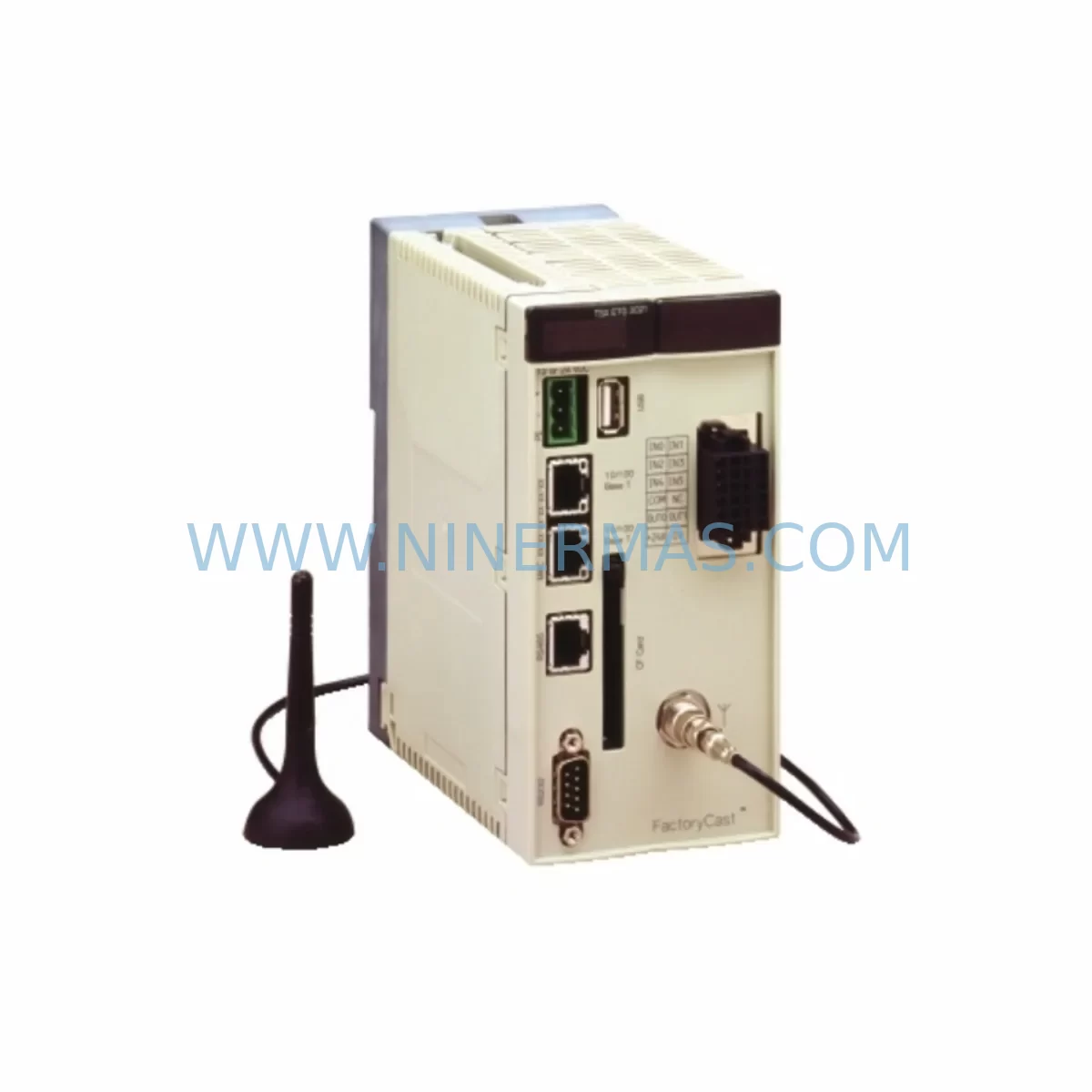
Schneider Electric TSXETG3000 Retrofit Ethernet Gateway
Verify the part, confirm the platform family, and move straight into quotation with the right commercial details.
RFQ Ready
- SKUTSXETG3000
- CategoryPLC & Industrial Automation Modules
- BrandSchneider Electric
- SupportAvailability, lead time, condition, and shipping coordination
How Buyers Usually Use This Page
- Confirm the exact part number and platform family before sending the quote request.
- Use direct email when quantity, condition, and destination are already defined internally.
- Switch to the broader brand or category archive when you need alternates nearby.
Series Navigation
Move through the most common platform families behind this part.
Product RFQ
Send this part directly for quotation.
Include quantity, required condition, destination country, and target delivery timing. Current reference: Schneider Electric TSXETG3000 Retrofit Ethernet Gateway with SKU TSXETG3000.
Schneider Electric TSXETG3000 Retrofit Ethernet Gateway: Legacy System Compatible Upgrade
The Schneider Electric TSXETG3000 is a ruggedized Ethernet gateway engineered for industrial environments where legacy Modicon and TSX Premium/Quantum control systems remain in active service. As automation engineers face increasing pressure to modernize aging control architectures without full system replacement, the TSXETG3000 provides a proven, cost-effective bridge between legacy serial fieldbus networks and modern Ethernet TCP/IP infrastructure. This unit supports Modbus TCP/IP, Uni-TE, and X-Way routing protocols, making it a direct retrofit candidate for plants running TSX Premium PLCs, Modicon Quantum racks, and associated I/O subsystems that were originally commissioned on Modbus Plus or Fipway networks.
For facilities managing long-lifecycle automation assets — including process lines, utilities, and discrete manufacturing cells — the TSXETG3000 eliminates the need for full controller replacement by enabling transparent protocol conversion at the network layer. Engineers can retain existing ladder logic, function block programs, and HMI screen configurations while migrating the communication backbone to standard Ethernet. This approach significantly reduces retrofit risk, shortens commissioning time, and protects the capital investment already embedded in the installed base of TSX and Modicon hardware.
Each unit supplied by NINERMAS undergoes pre-shipment functional testing covering power-up verification, port communication checks, and protocol handshake validation. A 12-month warranty is included with every shipment, covering manufacturing defects and component failure under normal operating conditions.
Upgrade Compatibility Table
| Parameter | TSXETG3000 Specification | Retrofit / Replacement Notes |
|---|---|---|
| Communication Protocols | Modbus TCP/IP, Uni-TE, X-Way, Modbus Serial (RTU/ASCII) | Replaces Modbus Plus (TSXMBP100) and Fipway (TSXFPP20) network heads in legacy racks |
| Ethernet Port | RJ45, 10/100 Mbps auto-negotiation | Direct connection to managed switches; no media converter required |
| Serial Port | RS-232 / RS-485 (configurable) | Retains wiring to existing Modbus RTU field devices and drives |
| Power Supply | 24 VDC (18–30 VDC range) | Verify existing panel PSU capacity; compatible with TSXPSY2600M and TSXPSY5500M power modules |
| Mounting | DIN rail or panel mount | Confirm available DIN rail space in existing control cabinet; 35 mm standard rail |
| Operating Temperature | 0°C to +60°C | Suitable for standard industrial enclosures; verify ambient temperature in retrofit cabinet |
| Configuration Interface | Web browser (HTTP) + Unity Pro / PL7 Pro compatible | No additional software license required for basic IP configuration |
| IP Address Assignment | Static or DHCP | Assign static IP to avoid address conflicts with existing SCADA/HMI nodes |
| Warranty | 12 Months | Covered from date of shipment; includes pre-shipment functional test certificate |
| Typical Replacement Path | TSXETG100 → TSXETG3000 | Direct functional upgrade; verify firmware version compatibility with host PLC |
Retrofit Planning for Existing Automation Systems
Integrating the TSXETG3000 into a running production environment requires systematic pre-work to avoid unplanned downtime and configuration errors. The following planning checklist reflects common retrofit scenarios encountered when upgrading TSX Premium and Modicon Quantum-based control systems.
Power Budget Verification: Before installation, audit the existing 24 VDC rail in the control cabinet. Systems running a TSXPSY2600M (26W) power supply alongside a full TSX Premium rack — including analog I/O modules such as the TSXAEY800 (8-channel analog input) and digital I/O modules such as the TSXDEY16D2 (16-channel 24 VDC input) — may have limited headroom. The TSXETG3000 draws approximately 3W; confirm the PSU can support the additional load before powering up.
Terminal and Wiring Adaptation: The serial port on the TSXETG3000 uses a standard DB9 connector for RS-232 or a terminal block for RS-485. When replacing an older TSXSCP114 PCMCIA communication card or a TSXMBP100 Modbus Plus head, the existing field wiring to downstream Modbus RTU devices — variable frequency drives, motor starters, and remote I/O drops — must be re-terminated to match the TSXETG3000 pinout. Document all existing wiring before disconnection.
Backplane and Rack Considerations: The TSXETG3000 is an external DIN-rail mounted device and does not occupy a backplane slot in the TSX Premium rack. This is an advantage when the rack is fully populated with modules such as the TSXDMZ28DTK (28 I/O mixed module) or TSXCAY33 (axis control module), as no slot reallocation is required. However, the gateway must be physically located within cable reach of both the PLC’s communication port and the Ethernet switch.
Module Addressing and PLC Program Compatibility: When migrating from a Modbus Plus network, the existing Unity Pro or PL7 Pro program will reference network station addresses and data table mappings. These references must be reviewed and updated to reflect the new Modbus TCP/IP addressing scheme. The TSXETG3000 supports address mapping tables that can be configured to preserve the logical data structure seen by the PLC, minimizing changes to the application program. Retain a backup of the original program on a TSXMCPC002M memory card or equivalent before making any modifications.
HMI Screen and SCADA Integration: Existing Magelis HMI terminals (such as the XBTGT5330 or XBTGT2330) connected via Uni-TE or Modbus serial will need their communication parameters updated to reflect the new Ethernet connection path through the TSXETG3000. SCADA systems polling the PLC via OFS (OPC Factory Server) or third-party OPC servers should be reconfigured to use the gateway’s IP address as the new data source. Verify that all HMI screens display correctly after the communication path change before returning the system to production.
Communication Link Validation: After physical installation and IP configuration, use the TSXETG3000’s built-in web diagnostic page to verify active connections, packet counts, and error rates. Ping tests from the SCADA workstation and HMI terminal confirm basic network reachability. A Modbus TCP read/write test using a tool such as Modscan or the Unity Pro communication test function should be performed before closing the cabinet.
Installation Space Confirmation: Measure available DIN rail space in the existing enclosure. The TSXETG3000 requires approximately 75 mm of rail width. In compact cabinets already housing a TSXRKY8EX rack extension, TSXPSY2600M power supply, and multiple I/O modules, space planning is critical. If space is constrained, consider relocating the gateway to an adjacent marshalling cabinet connected via a short Ethernet patch cable.
Downtime Control During System Migration
Minimizing production interruption is the primary concern during any live system retrofit. The TSXETG3000 migration can be structured to reduce planned downtime to a single controlled maintenance window, typically 4–8 hours for a standard TSX Premium installation.
Pre-Shutdown Preparation: Complete all configuration work — IP address assignment, Modbus mapping tables, and serial port parameters — on a bench unit before the maintenance window begins. Use the TSXETG3000’s web interface to pre-load the configuration file so that on-site commissioning is limited to physical connection and verification steps. Back up the PLC program from the TSX Premium CPU (TSXP574634M or equivalent) to both the programming terminal and a removable TSXMCPC002M memory card.
Parallel Operation Strategy: Where the production schedule permits, consider running the new Ethernet path in parallel with the existing Modbus Plus or serial link for a short validation period. The TSXETG3000 supports simultaneous Ethernet and serial connections, allowing the SCADA system to be switched to the new path while the legacy connection remains as a fallback. This approach is particularly effective in Modicon Quantum installations where the CRP (Communications Remote I/O) head can be temporarily retained alongside the new gateway.
Program Logic Protection: Do not modify the PLC application program during the communication migration phase. Isolate communication-related function blocks and data tables from the core control logic. If the program uses SEND/RECEIVE or READ_VAR function blocks for inter-PLC communication, update only the addressing parameters rather than the block structure. This preserves the validated control logic and reduces the risk of introducing new faults during the retrofit.
Field Control Continuity: For process lines where continuous control is required, coordinate the gateway switchover with the process team to identify a safe hold point — such as a batch end, shift change, or scheduled maintenance stop. Ensure that all field devices connected via the Modbus RTU serial chain (drives, soft starters, remote I/O modules) are in a safe state before disconnecting the existing communication head. Confirm that the TSXETG3000 is re-establishing Modbus RTU polling to all downstream devices before releasing the process back to automatic control.
Post-Commissioning Verification: After the switchover, monitor the TSXETG3000 diagnostic page for a minimum of 30 minutes under live production conditions. Check for communication timeouts, CRC errors on the serial port, and TCP connection drops on the Ethernet side. Verify that all HMI screens are updating correctly and that SCADA alarm and data logging functions are operating normally. Document the final configuration and retain the pre-shipment test certificate supplied with the unit for maintenance records.
Retrofit Support FAQ
Q1: Can the TSXETG3000 directly replace the TSXETG100 without program changes?
In most cases, yes. The TSXETG3000 is the functional successor to the TSXETG100 and supports the same Modbus TCP/IP and Uni-TE protocols. However, the IP configuration interface has changed from a dedicated software tool to a web browser, and the Modbus mapping table structure may differ. Review the existing TSXETG100 configuration export before migration and verify that all data table addresses are correctly reproduced in the TSXETG3000 configuration. A bench test with the PLC program is recommended before the live cutover.
Q2: What wiring changes are required when replacing a Modbus Plus head (TSXMBP100)?
The TSXMBP100 connects to the Modbus Plus network via a dedicated coaxial or twisted-pair bus. The TSXETG3000 does not support Modbus Plus as a network protocol; it converts between Modbus TCP/IP (Ethernet) and Modbus RTU/ASCII (serial). If the existing field devices communicate via Modbus Plus, a protocol migration plan is required — either replacing field device communication cards or retaining a Modbus Plus bridge. For devices that support both Modbus Plus and Modbus RTU (such as certain ATV drives), reconfigure the drive communication port to Modbus RTU and connect directly to the TSXETG3000 serial port.
Q3: Is the TSXETG3000 compatible with Unity Pro and PL7 Pro programming environments?
Yes. The TSXETG3000 can be used as a communication path for both Unity Pro (for TSX Premium and Modicon M340/Quantum) and PL7 Pro (for older TSX Premium CPUs). The gateway appears as a standard Modbus TCP/IP node on the network. For Unity Pro, configure the communication driver to use the TCPIP driver pointing to the gateway’s IP address. For PL7 Pro, use the XWAY or Uni-TE over TCP/IP driver. Confirm the CPU firmware version supports the selected driver before commissioning.
Q4: What does the 12-month warranty cover, and is a pre-shipment test certificate included?
Every TSXETG3000 unit supplied by NINERMAS includes a 12-month warranty covering manufacturing defects and component failure under normal industrial operating conditions. The warranty period begins from the date of shipment. A pre-shipment functional test certificate is included with each unit, documenting power-up verification, Ethernet port communication, serial port loopback, and protocol handshake results. Units that do not pass pre-shipment testing are not dispatched. For warranty claims or technical support, contact sale@ninermas.com or call +0086 187 5021 5667.
| Product Series | TSX |
|---|---|
| Country of Origin | FR |
Catalog Continuation
More Schneider Electric modules in the catalog.
Use the brand lane to compare nearby part numbers, platform-adjacent modules, and other inquiry-ready listings before sending your final RFQ.
Catalog Continuation
Alternative parts within PLC & Industrial Automation Modules.
Stay inside the same system family when you need substitutes, adjacent modules, or a broader shortlist for procurement review.
SKU: 00-217-026 00217026D3236-K13 00-217-026
KUKA 00-217-026 Retrofit Power Supply for Legacy Systems
SKU: SGDS-01A32A LS2TR30-300Q8 6SL3120-1TE15-0AA4
Yaskawa SGDS-01A32A Retrofit Servo Drive for Legacy Systems