
Original Industrial Spare Part
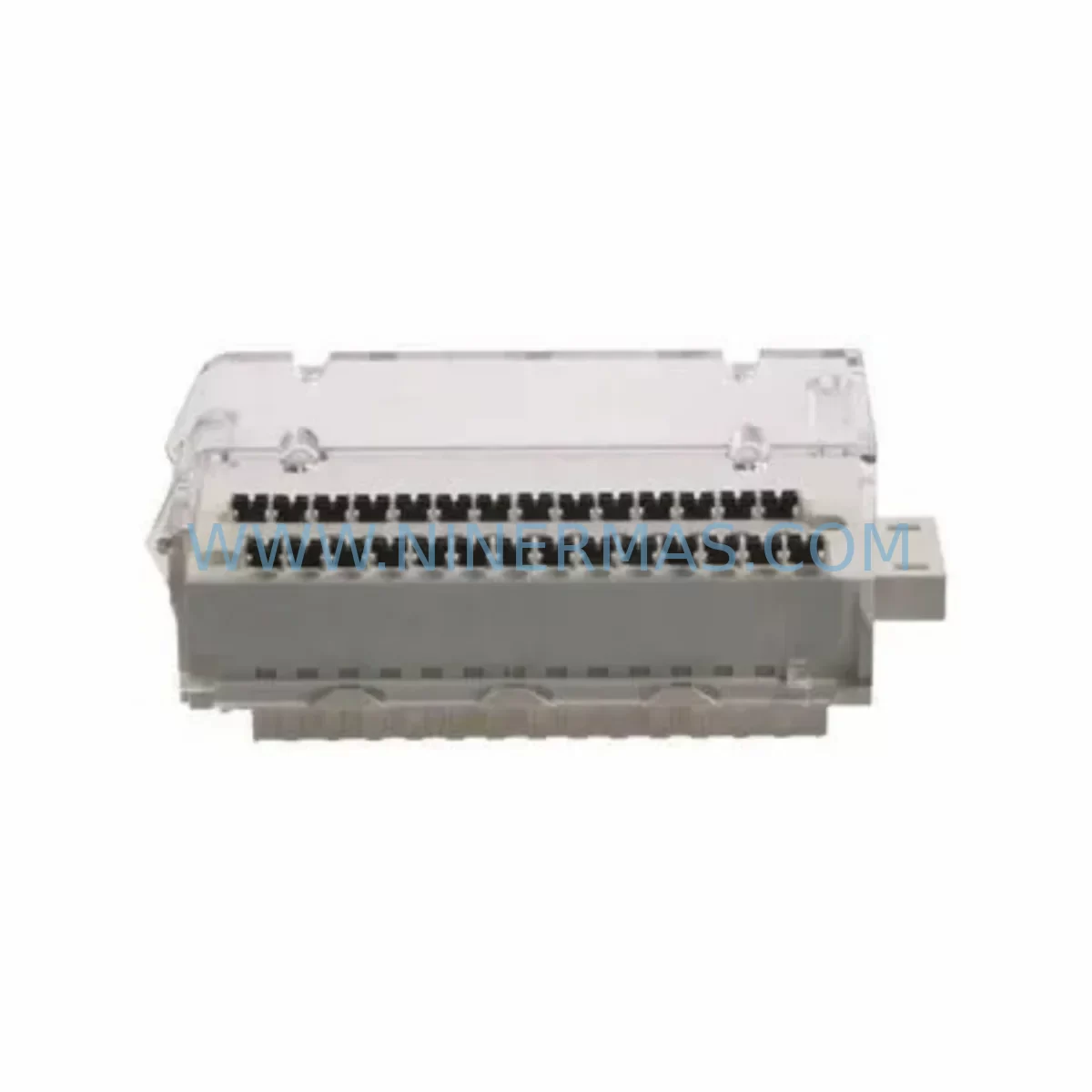
Schneider BMXFTB2820 Service-Ready Industrial Spare Part
Verify the part, confirm the platform family, and move straight into quotation with the right commercial details.
RFQ Ready
- SKUBMXFTB2820
- CategoryPLC & Industrial Automation Modules
- BrandSchneider Electric
- SupportAvailability, lead time, condition, and shipping coordination
How Buyers Usually Use This Page
- Confirm the exact part number and platform family before sending the quote request.
- Use direct email when quantity, condition, and destination are already defined internally.
- Switch to the broader brand or category archive when you need alternates nearby.
Series Navigation
Move through the most common platform families behind this part.
Product RFQ
Send this part directly for quotation.
Include quantity, required condition, destination country, and target delivery timing. Current reference: Schneider BMXFTB2820 Service-Ready Industrial Spare Part with SKU BMXFTB2820.
Schneider BMXFTB2820 Service-Ready Industrial Spare Part: Spare Replacement & Downtime Risk Control
The Schneider Electric BMXFTB2820 is a 28-point removable cage clamp terminal block designed for use with Schneider Modicon M340 series PLC I/O modules. As a service-ready original spare part, the BMXFTB2820 is a critical component in maintaining continuous operation of M340-based control systems across manufacturing, process automation, and machine control environments. Whether you are managing a scheduled annual overhaul, responding to an emergency fault, or building a proactive spare parts inventory, having a verified original BMXFTB2820 on hand eliminates the risk of extended downtime caused by wiring interface failures.
The BMXFTB2820 connects directly to compatible BMX digital and analog I/O modules, providing a robust, field-replaceable wiring interface that allows technicians to swap modules without disturbing field wiring. This plug-and-play design is essential for rapid fault isolation and module replacement in live production environments. Each unit supplied by NINERMAS is sourced from authorized channels, pre-shipment tested, and backed by a 12-month warranty — ensuring your maintenance team receives a part that performs to original Schneider Electric specifications from day one.
Spare Maintenance Table
| Parameter | Specification |
|---|---|
| Part Number | BMXFTB2820 |
| Brand | Schneider Electric |
| Series | Modicon M340 |
| Type | 28-Point Removable Cage Clamp Terminal Block |
| Compatible Modules | BMX DDI 1602, BMX DRA 1605, BMX AMI 0410, BMX DDO 1512, BMX DAI 1602 and compatible BMX I/O modules |
| Connection Type | Cage Clamp (Screw-free, tool-free wiring) |
| Number of Points | 28 |
| Mounting | Direct plug-in to M340 I/O module face connector |
| Wire Cross-Section | 0.34 – 1.5 mm² (AWG 22–16) |
| Operating Temperature | 0°C to +60°C |
| Application Environment | Industrial automation, process control, machine control, panel wiring |
| Origin | France |
| Condition | Original, New / Service-Ready |
| Pre-Shipment Testing | Yes — functional and continuity verified |
| Warranty | 12 Months |
Maintenance Planning for Continuous Operation
When replacing or inspecting the BMXFTB2820 terminal block during a scheduled maintenance window or emergency fault response, maintenance engineers should treat the event as an opportunity to audit the surrounding electrical circuit and control cabinet components. The BMXFTB2820 interfaces directly with the I/O module face, meaning any degradation in wiring termination quality, module power supply, or signal integrity can cascade into false readings, communication faults, or unplanned shutdowns.
During a BMXFTB2820 replacement, the following components in the same M340 control cabinet should be inspected or held as co-located spares:
- BMX CPS 2000 / BMX CPS 3500 Power Supply Module — Verify output voltage stability and check for capacitor aging. A degraded power supply is a common root cause of intermittent I/O faults that are misdiagnosed as terminal block failures.
- BMX XBP 0800 / BMX XBP 1200 Backplane — Inspect backplane connector pins for oxidation or mechanical damage. A faulty backplane can cause module communication errors that appear as wiring faults.
- BMX P34 2020 / BMX P34 2030 CPU Module — Confirm firmware version compatibility with installed I/O modules and check CPU diagnostic LEDs for any latent fault codes logged during the incident.
- BMX DDI 1602 Digital Input Module — If the BMXFTB2820 was connected to a digital input module, verify input channel status and check for blown input protection fuses or surge damage on individual channels.
- BMX DRA 1605 Relay Output Module — Relay output modules share the same terminal block form factor. Inspect relay contact wear and coil resistance if the module has been in service for more than 3 years.
- BMX AMI 0410 Analog Input Module — For analog signal circuits, check signal isolators and shielding continuity. Analog modules are sensitive to ground loops introduced by degraded terminal connections.
- BMXFCW503 / BMXFCW303 Extension Cable — If the I/O rack uses remote extension cables, inspect cable connectors for corrosion and verify cable routing is free from mechanical stress or heat exposure.
- BMX NOE 0100 / BMX NOR 0200 Ethernet/Serial Communication Module — After any I/O module swap, verify network communication is restored and no IP address conflicts or Modbus mapping errors have been introduced.
- Terminal Fuse Blocks and Miniature Circuit Breakers (MCBs) — Inspect upstream fusing for the I/O power rail. Overcurrent events that damaged the terminal block may have also stressed fuse elements or MCB contacts.
- Signal Isolators and Surge Protection Devices — For field-facing I/O circuits, check DIN-rail mounted signal isolators and surge arrestors. These components protect the M340 I/O from field-side transients and should be replaced on a 5-year cycle or after any lightning or surge event.
Maintaining a co-located spare kit that includes the BMXFTB2820 alongside the above components reduces mean time to repair (MTTR) and supports a zero-unplanned-downtime maintenance strategy for M340-based control systems.
Site Replacement Workflow
The BMXFTB2820 is designed for fast, tool-free field replacement, making it one of the most maintenance-friendly components in the Modicon M340 ecosystem. The following workflow is recommended for site replacement to minimize downtime and ensure system compatibility:
- Isolate and de-energize the affected I/O module circuit following your site LOTO (Lockout/Tagout) procedure. Confirm zero voltage at the terminal block using a calibrated multimeter.
- Label all field wiring before disconnection. Although the cage clamp design allows the terminal block to be removed as a single unit with wiring intact, labeling prevents errors if individual conductors must be re-terminated.
- Unplug the BMXFTB2820 from the I/O module face connector. The unit slides out without tools. Inspect the module face connector for bent pins or contamination before installing the replacement.
- Install the new BMXFTB2820. Confirm the unit is fully seated and the locking tab is engaged. Do not force the connector — misalignment can damage both the terminal block and the module face.
- Re-energize and verify I/O channel status in the PLC programming software (Unity Pro / EcoStruxure Control Expert). Confirm all input and output channels report correct status before returning the system to production.
- Document the replacement in your maintenance management system (CMMS), including the part number, serial number if applicable, date of replacement, and technician ID. This supports warranty claims and future failure analysis.
The BMXFTB2820 supplied by NINERMAS is compatible with all Modicon M340 I/O modules that use the 28-point cage clamp terminal block interface. No firmware changes or PLC reconfiguration are required for a like-for-like replacement. This ensures system compatibility is maintained and production can resume within minutes of the physical swap.
Spare Parts Support FAQ
Q1: Is the BMXFTB2820 supplied by NINERMAS an original Schneider Electric part?
Yes. All BMXFTB2820 units supplied by NINERMAS are original Schneider Electric components sourced from authorized distribution and verified manufacturing channels. Each unit undergoes pre-shipment functional and continuity testing before dispatch. A 12-month warranty is provided on all units, covering manufacturing defects and functional failures under normal operating conditions.
Q2: What is the long-term supply availability for the BMXFTB2820?
NINERMAS maintains dedicated stock of the BMXFTB2820 and other Modicon M340 spare parts to support customers operating legacy and end-of-life automation systems. We work with procurement engineers to establish reserved inventory agreements and long-term supply contracts, ensuring your maintenance team has access to critical spare parts even as the M340 platform approaches end-of-life status. Contact our team to discuss volume pricing and reserved stock arrangements.
Q3: How do I verify compatibility before ordering?
The BMXFTB2820 is compatible with all Schneider Electric Modicon M340 I/O modules that specify a 28-point cage clamp terminal block interface, including the BMX DDI 1602, BMX DRA 1605, BMX AMI 0410, BMX DDO 1512, and BMX DAI 1602. If you are unsure whether the BMXFTB2820 is the correct terminal block for your specific module, please provide your module part number to our technical team and we will confirm compatibility before shipment.
Q4: What testing is performed before shipment?
Every BMXFTB2820 unit is subject to pre-shipment inspection including visual inspection for physical damage, cage clamp mechanism function test, connector pin integrity check, and electrical continuity verification across all 28 points. Units that do not pass all inspection criteria are quarantined and not dispatched. This process ensures that every part received by your maintenance team is ready for immediate installation without additional on-site testing.
| Product Series | Modicon M340 |
|---|---|
| Country of Origin | FR |
Catalog Continuation
More Schneider Electric modules in the catalog.
Use the brand lane to compare nearby part numbers, platform-adjacent modules, and other inquiry-ready listings before sending your final RFQ.
Catalog Continuation
Alternative parts within PLC & Industrial Automation Modules.
Stay inside the same system family when you need substitutes, adjacent modules, or a broader shortlist for procurement review.
SKU: 00-217-026 00217026D3236-K13 00-217-026
KUKA 00-217-026 Retrofit Power Supply for Legacy Systems
SKU: SGDS-01A32A LS2TR30-300Q8 6SL3120-1TE15-0AA4
Yaskawa SGDS-01A32A Retrofit Servo Drive for Legacy Systems



