
Original Industrial Spare Part
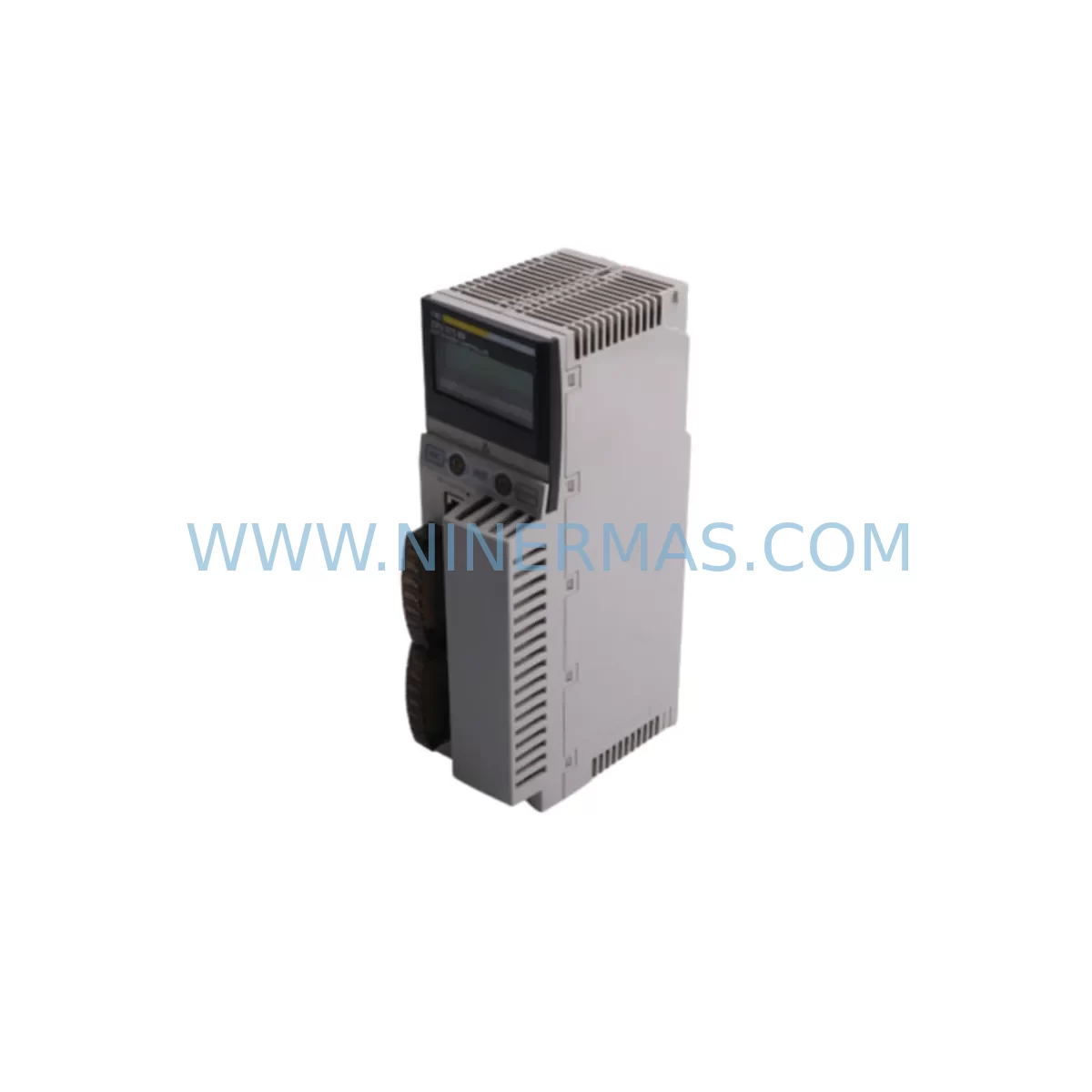
Schneider 140CPU67260 Retrofit-Compatible CPU for Legacy Systems
Verify the part, confirm the platform family, and move straight into quotation with the right commercial details.
RFQ Ready
- SKU140CPU67260
- CategoryPLC & Industrial Automation Modules
- BrandSchneider Electric
- SupportAvailability, lead time, condition, and shipping coordination
How Buyers Usually Use This Page
- Confirm the exact part number and platform family before sending the quote request.
- Use direct email when quantity, condition, and destination are already defined internally.
- Switch to the broader brand or category archive when you need alternates nearby.
Series Navigation
Move through the most common platform families behind this part.
Product RFQ
Send this part directly for quotation.
Include quantity, required condition, destination country, and target delivery timing. Current reference: Schneider 140CPU67260 Retrofit-Compatible CPU for Legacy Systems with SKU 140CPU67260.
Schneider 140CPU67260 Retrofit-Compatible CPU for Legacy Systems
The Schneider Electric 140CPU67260 is a high-performance CPU module designed for the Modicon Quantum automation platform — one of the most widely deployed large-scale PLC architectures in process industries, utilities, oil & gas, and discrete manufacturing. As the 140CPU67260 reaches end-of-life status in many regional markets, plant engineers and maintenance teams face the critical challenge of sourcing verified replacement units while preserving existing program logic, I/O wiring, and communication infrastructure. NINERMAS supplies the 140CPU67260 as a retrofit-compatible spare, fully tested and backed by a 12-month warranty, enabling seamless integration into existing Quantum racks without requiring a full platform migration.
Whether you are replacing a failed processor in an emergency shutdown scenario or executing a planned control cabinet upgrade, the 140CPU67260 provides a direct drop-in solution that maintains compatibility with the Modicon Quantum backplane architecture, Unity Pro / ProWORX programming environments, and the full range of Quantum I/O and communication modules already installed in your system.
Upgrade Compatibility Table
| Parameter | Details / Recommendation |
|---|---|
| Compatible Platform | Modicon Quantum (140-series) |
| Backplane Interface | Quantum local rack backplane — compatible with 140XBP01600 and other Quantum rack variants |
| Programming Environment | Unity Pro XL / ProWORX NxT — existing application programs transferable without recompilation in most configurations |
| Communication Protocols | Modbus, Modbus Plus, Ethernet/IP (via co-processor modules such as 140NOE77101) |
| Power Supply Compatibility | Requires Quantum-series power supply (e.g., 140CPS11420); verify input voltage and load capacity before replacement |
| I/O Module Compatibility | Compatible with all standard Quantum discrete and analog I/O modules including 140DDI35300, 140DDO35300, 140ACI03000, 140ACO02000 |
| Remote I/O Support | Supports Quantum RIO drops via 140CRA93200 remote I/O head adapters |
| Installation Space | Standard Quantum single-slot CPU position; verify rack slot assignment and address configuration |
| Commissioning Notes | Restore program from backup; verify I/O map, module addresses, and communication link parameters before restart |
| Warranty | 12 months from date of shipment — covers manufacturing defects and functional failures under normal operating conditions |
Retrofit Planning for Existing Automation Systems
Replacing the 140CPU67260 in an operational plant environment requires careful pre-engineering to avoid unplanned downtime and configuration errors. The retrofit process typically begins with a full audit of the existing control cabinet, including verification of the installed Quantum rack model (such as the 140XBP01600 local rack), the number of occupied I/O slots, and the current power budget drawn from the 140CPS11420 power supply module. Engineers must confirm that the replacement CPU’s memory capacity and scan time performance are sufficient to handle the existing application program without modification.
On the communication side, plants running Modbus Plus networks will need to verify that the 140NOM21200 Modbus Plus communication module is correctly addressed and that the network topology remains intact after the CPU swap. For sites that have migrated to Ethernet-based supervisory systems, the 140NOE77101 Ethernet communication module must be reconfigured with the correct IP address, subnet mask, and gateway settings to restore SCADA connectivity. In mixed-protocol environments, both modules may be present in the same rack, and their slot positions must be preserved to avoid address conflicts.
Discrete I/O wiring connected to modules such as the 140DDI35300 (32-point 24VDC discrete input) and 140DDO35300 (32-point discrete output) does not require modification during a CPU replacement, provided the I/O map in the application program remains unchanged. Similarly, analog signal loops wired to the 140ACI03000 analog input module and 140ACO02000 analog output module will continue to operate normally once the CPU is restored and the program is reloaded. Remote I/O drops managed through 140CRA93200 head adapters should be verified for communication status after CPU restart to confirm that all remote racks are online and responding correctly.
For plants operating Magelis HMI panels (such as the XBTZG935 or similar Quantum-era operator terminals), the HMI communication link to the CPU must be re-established after replacement. This typically involves verifying the Modbus or Modbus Plus driver configuration on the HMI side and confirming that the CPU node address has not changed. In cases where the HMI application references specific memory addresses in the CPU, a functional test of all HMI screens is recommended before returning the system to production.
Programming cable connections using the Modicon-compatible USB or serial programming cable should be tested prior to the maintenance window to ensure that the Unity Pro or ProWORX programming station can establish a live connection to the new CPU. Having a verified program backup stored offline is essential — the application program, I/O configuration, and communication parameters should all be archived before the old CPU is removed.
Downtime Control During System Migration
Minimizing production downtime during a CPU replacement on a Modicon Quantum system requires a structured approach that begins well before the physical swap. The most effective strategy is to prepare a complete offline backup of the existing application program, including all derived data types, function blocks, and I/O configuration tables, using Unity Pro XL or ProWORX NxT. This backup should be validated on a test bench or simulator if available, confirming that the program compiles and runs correctly on the replacement 140CPU67260 before it is installed in the live rack.
During the physical replacement, the sequence of operations should follow a defined procedure: power down the rack using the 140CPS11420 power supply switch, remove the failed CPU from its slot, install the replacement unit, and restore power before downloading the program. The entire CPU swap can typically be completed within 15 to 30 minutes for a prepared maintenance team, with an additional 30 to 60 minutes allocated for program download, I/O verification, and communication link confirmation. For critical processes, a hot-standby configuration using a redundant CPU pair can reduce the effective downtime to near zero, though this requires the existing system to have been configured for redundancy prior to the failure event.
Field commissioning should include a systematic check of all I/O points, confirmation that remote I/O drops via 140CRA93200 are communicating correctly, verification of analog signal scaling on 140ACI03000 and 140ACO02000 modules, and a functional test of all HMI screens and SCADA alarm points. Communication links to the 140NOE77101 Ethernet module and 140NOM21200 Modbus Plus module should be confirmed live before the system is released to operations. All commissioning steps should be documented and signed off by the responsible engineer before the maintenance window is closed.
Retrofit Support FAQ
Q1: Is the 140CPU67260 a direct replacement for other Modicon Quantum CPU models?
The 140CPU67260 is a specific model within the Quantum CPU family and is not a universal drop-in replacement for all Quantum processors. Compatibility depends on memory requirements, scan time performance, and the specific features used in the application program. NINERMAS recommends reviewing the existing CPU model number and application requirements before ordering. Our technical team can assist with compatibility verification based on your system configuration.
Q2: What commissioning steps are required after installing the replacement CPU?
After physical installation, the replacement 140CPU67260 requires a program download from a Unity Pro or ProWORX programming station. Following the download, engineers should verify I/O module addressing, confirm communication link status for all installed modules (including 140NOE77101 and 140NOM21200), and perform a functional test of all I/O points and HMI screens. A cold start of the CPU is recommended to ensure all configuration parameters are correctly initialized.
Q3: Does NINERMAS provide pre-shipment testing for the 140CPU67260?
Yes. All 140CPU67260 units supplied by NINERMAS undergo functional testing prior to shipment to verify that the module powers up correctly, passes internal diagnostics, and communicates via the backplane interface. Units are shipped with a test report and are covered by a 12-month warranty from the date of shipment. In-stock units are typically available for same-week dispatch to minimize your system downtime.
Q4: What is the warranty coverage and what does it include?
NINERMAS provides a 12-month warranty on all 140CPU67260 units covering manufacturing defects and functional failures under normal operating conditions. The warranty does not cover damage resulting from incorrect installation, overvoltage events, or physical mishandling. In the event of a warranty claim, NINERMAS will arrange for replacement or repair of the defective unit. Please contact our technical support team at sale@ninermas.com to initiate a warranty claim.
| Product Series | Modicon Quantum |
|---|---|
| Country of Origin | FR |
Catalog Continuation
Nearby part numbers around 140CPU67.
Use this lane when the buyer is comparing adjacent model numbers, revision-near items, or closely related spare variants within the same brand family.
Catalog Continuation
More Schneider Electric modules in the catalog.
Use the brand lane to compare nearby part numbers, platform-adjacent modules, and other inquiry-ready listings before sending your final RFQ.
Catalog Continuation
Alternative parts within PLC & Industrial Automation Modules.
Stay inside the same system family when you need substitutes, adjacent modules, or a broader shortlist for procurement review.
SKU: SGDS-01A32A LS2TR30-300Q8 6SL3120-1TE15-0AA4
Yaskawa SGDS-01A32A Retrofit Servo Drive for Legacy Systems
SKU: 6SE7041-8EK85-0HA0
Siemens 6SE7041-8EK85-0HA0 Service-Ready Spare Part



