Original Industrial Spare Part
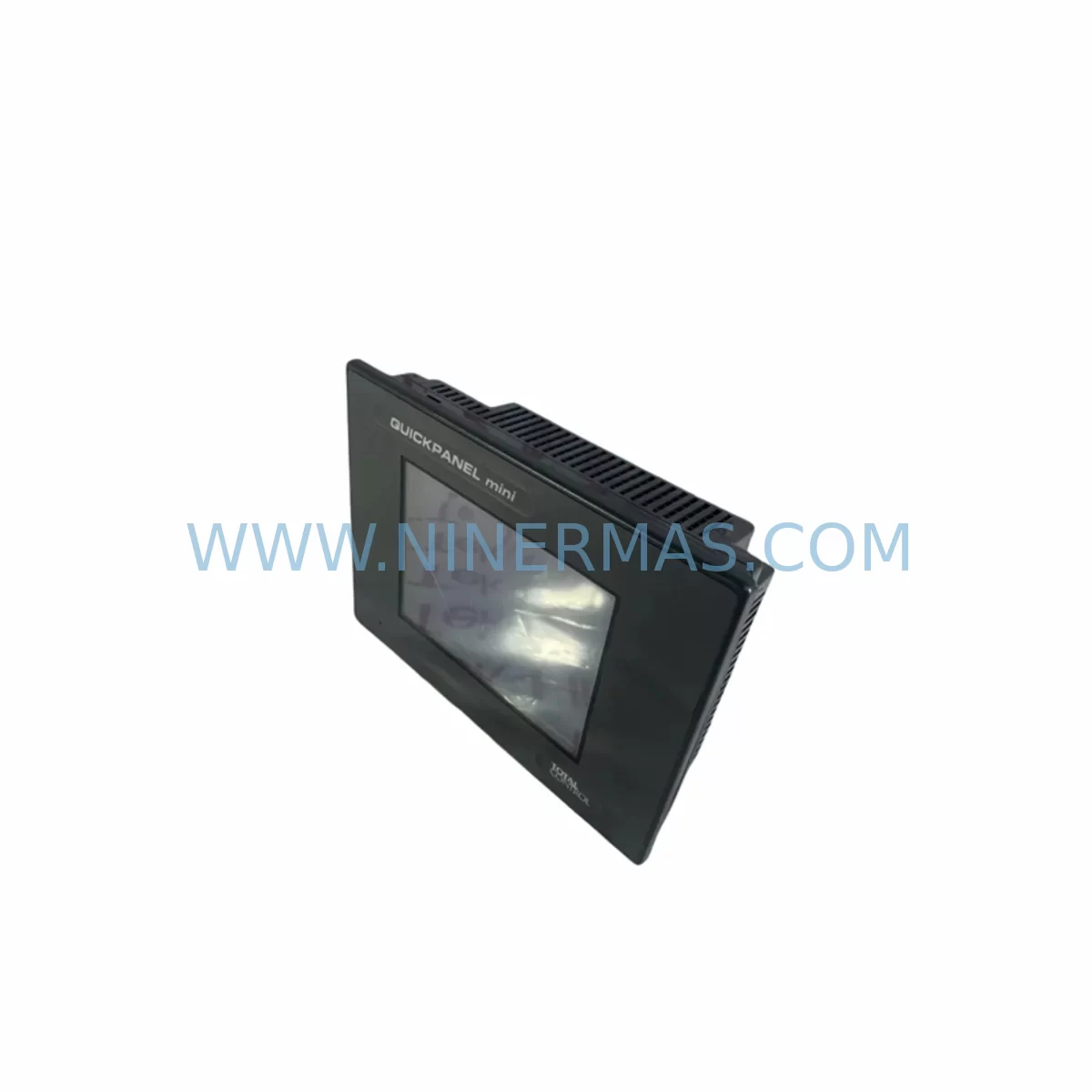
QuickPanel QPI3D200C2P Service-Ready Spare Part for Industrial Maintenance
Verify the part, confirm the platform family, and move straight into quotation with the right commercial details.
RFQ Ready
- SKUQPI3D200C2P
- CategoryPLC & Industrial Automation Modules
- BrandQuickPanel
- SupportAvailability, lead time, condition, and shipping coordination
How Buyers Usually Use This Page
- Confirm the exact part number and platform family before sending the quote request.
- Use direct email when quantity, condition, and destination are already defined internally.
- Switch to the broader brand or category archive when you need alternates nearby.
Series Navigation
Move through the most common platform families behind this part.
Product RFQ
Send this part directly for quotation.
Include quantity, required condition, destination country, and target delivery timing. Current reference: QuickPanel QPI3D200C2P Service-Ready Spare Part for Industrial Maintenance with SKU QPI3D200C2P.
QuickPanel QPI3D200C2P Service-Ready Spare Part for Industrial Maintenance
The QuickPanel QPI3D200C2P is a high-performance industrial HMI touchscreen display engineered for demanding process control environments. As a service-ready spare part, it is designed to deliver immediate drop-in replacement capability for aging or failed HMI panels within GE Automation and QuickPanel+ QPI3 Series control architectures. For maintenance engineers managing continuous production lines, power generation assets, or critical infrastructure, having a pre-tested QPI3D200C2P in your spare parts inventory is a proven strategy to minimize unplanned downtime and accelerate fault recovery.
The QPI3D200C2P operates as the operator interface layer in integrated PLC/DCS control cabinets, providing real-time visualization, alarm management, and process parameter adjustment. When this unit fails — whether due to touchscreen degradation, backlight failure, firmware corruption, or physical damage — the entire operator interface is lost, leaving field technicians unable to monitor or command the process. A pre-qualified replacement unit on the shelf converts a multi-day procurement delay into a same-shift restoration.
NINERMAS maintains verified stock of the QPI3D200C2P with pre-shipment functional testing, original-specification build quality, and a 12-month warranty covering hardware defects. Each unit is inspected for display integrity, touch calibration, communication port functionality, and power input compliance before dispatch. Long-term supply agreements are available for facilities managing multi-site maintenance programs or annual shutdown schedules.
Spare Maintenance Table
| Parameter | Specification |
|---|---|
| Part Number | QPI3D200C2P |
| Brand / Manufacturer | QuickPanel (GE Automation) |
| Series | QuickPanel+ QPI3 Series |
| Product Type | Industrial HMI Touchscreen Display |
| Display Size | Approx. 12″ (QPI3 D200 class) |
| Touch Technology | Resistive / Capacitive (model-dependent) |
| Communication Interfaces | Ethernet, RS-232/RS-485, USB |
| Operating Voltage | 24 VDC nominal |
| Operating Temperature | 0°C to 55°C |
| Protection Rating | IP65 front panel |
| Compatibility | GE QuickPanel+ QPI3 Series, PACSystems, VersaMax |
| Mounting | Panel cutout, rear-mount with gasket seal |
| Application Environment | Process control, utilities, oil & gas, manufacturing |
| Pre-Shipment Testing | Yes — display, touch, comms, power verified |
| Warranty | 12 Months from date of shipment |
| Origin | United States |
| Lead Time | In stock — ships within 3–5 business days |
Maintenance Planning for Continuous Operation
When replacing the QPI3D200C2P HMI display during a scheduled or emergency maintenance event, experienced maintenance engineers treat the HMI swap as a trigger for a broader control cabinet inspection. The HMI is the operator’s window into the control system — but its failure is rarely isolated. A systematic inspection of the surrounding components reduces the risk of repeat failures and ensures the restored system operates reliably through the next maintenance cycle.
Power Supply Verification: The QPI3D200C2P is powered by a 24 VDC rail shared with other panel devices. Inspect the 24 VDC SMPS power supply module for output ripple, voltage sag under load, and thermal stress. A degraded power supply is a common root cause of HMI resets and display corruption. Replace or parallel-test the power supply before commissioning the new HMI unit.
Communication Wiring and Connectors: Check all Ethernet patch cables and RS-485 twisted-pair signal cables connected to the HMI. Corroded RJ45 connectors, loose terminal screws on RS-485 ports, and damaged cable shielding are frequent contributors to intermittent HMI communication faults. Replace any suspect cabling during the same maintenance window.
I/O Module Inspection: If the QPI3D200C2P is integrated with a GE VersaMax I/O module or PACSystems RX3i I/O carrier, verify that all I/O modules are firmly seated, that no diagnostic LEDs indicate faults, and that terminal block wiring is secure. Loose I/O connections can cause false alarms that appear as HMI display errors.
Relay and Interlock Circuits: Inspect control relay modules and safety interlock relays in the same cabinet. HMI-driven relay outputs should be tested for contact resistance and coil voltage compliance. Worn relay contacts can cause erratic output behavior that is misdiagnosed as an HMI fault.
Communication Modules: If the system uses a GE PACSystems Ethernet communication module or a Profibus/Modbus gateway module, verify firmware version compatibility with the replacement QPI3D200C2P. Mismatched firmware between the HMI and the communication module is a known source of post-replacement connectivity issues.
Signal Isolation and Protection: Check signal isolator modules on analog input channels feeding the HMI display. Degraded isolators introduce noise into process variable readings, causing erratic trend displays. Also inspect surge protection devices (SPDs) on communication lines — these are sacrificial components that may have absorbed transient energy during the fault event that caused the original HMI failure.
Terminal Blocks and Fusing: Inspect DIN rail terminal blocks for discoloration, loose screws, and insulation damage. Verify that panel fuses and miniature circuit breakers (MCBs) protecting the HMI power circuit are within rated capacity and show no signs of thermal stress. Replace any fuse that shows discoloration or has tripped without a logged overcurrent event.
Backplane and Rack Integrity: For systems using a PACSystems RX3i backplane or VersaMax CPU carrier, inspect the backplane connectors for oxidation and confirm that all modules are locked into their slots. A loose CPU or communications module on the backplane can cause the HMI to lose its data source, producing blank screens or frozen displays that mimic a failed HMI unit.
Site Replacement Workflow
Replacing the QPI3D200C2P on-site follows a structured sequence that minimizes exposure time and ensures the restored system meets original performance specifications:
Step 1 — Isolation and Backup: Place the control system in a safe state. Export the current HMI project file from the existing unit if it is still partially functional, or retrieve the latest backup from the engineering workstation. Confirm the backup version matches the installed PLC/DCS firmware.
Step 2 — Physical Removal: De-energize the panel section. Disconnect all communication cables, power connectors, and USB peripherals from the existing QPI3D200C2P. Remove the panel mounting hardware and extract the unit from the cutout. Inspect the gasket and panel cutout for damage.
Step 3 — New Unit Preparation: Verify the replacement QPI3D200C2P part number, firmware version, and hardware revision against the system documentation. Load the HMI project file via USB or Ethernet prior to panel installation where possible — this reduces commissioning time after mounting.
Step 4 — Installation and Wiring: Install the replacement unit into the panel cutout. Reconnect all cables in the original configuration. Torque all terminal screws to specification. Restore power and verify 24 VDC supply at the HMI power input terminals.
Step 5 — Commissioning and Verification: Power up the HMI and confirm display initialization, touch calibration, and communication link establishment with the PLC/DCS. Verify all process screens, alarm pages, and trend displays are functioning correctly. Conduct a functional test of all HMI-driven outputs before returning the system to automatic operation.
Step 6 — Documentation: Record the replacement in the maintenance log, including the old unit serial number, new unit serial number, firmware version, and date of replacement. Update the spare parts inventory to trigger reorder of a replacement QPI3D200C2P unit.
Spare Parts Support FAQ
Q1: Is the QPI3D200C2P a direct drop-in replacement for the original unit?
Yes. The QPI3D200C2P supplied by NINERMAS is built to original GE QuickPanel+ QPI3 Series specifications. It is a direct hardware replacement requiring no panel cutout modification. Firmware loading and touch calibration are the only commissioning steps required after physical installation. Compatibility with PACSystems, VersaMax, and third-party Modbus/Ethernet devices is maintained.
Q2: What pre-shipment testing is performed on each unit?
Every QPI3D200C2P unit undergoes a multi-point inspection before dispatch: display panel illumination and uniformity check, touchscreen calibration and response verification, power input compliance test at 24 VDC, communication port continuity (Ethernet, RS-232/RS-485, USB), and visual inspection for physical damage. A test report is available upon request for quality-critical procurement processes.
Q3: Can NINERMAS support long-term supply of the QPI3D200C2P for multi-site maintenance programs?
Yes. NINERMAS offers long-term supply agreements for facilities managing multiple sites or annual shutdown schedules. Blanket order arrangements, reserved stock allocation, and priority dispatch are available. Contact our sales team to discuss volume requirements, lead time commitments, and pricing structures for ongoing spare parts programs.
Q4: What does the 12-month warranty cover?
The 12-month warranty covers hardware defects in materials and workmanship from the date of shipment. It includes display panel failures, touchscreen malfunction, communication port failure, and power input circuit defects under normal operating conditions. Warranty claims are supported by NINERMAS with replacement unit dispatch or repair, subject to fault verification. Physical damage caused by incorrect installation, overvoltage, or environmental exposure outside rated specifications is excluded.
| Product Series | Other series |
|---|
Catalog Continuation
Alternative parts within PLC & Industrial Automation Modules.
Stay inside the same system family when you need substitutes, adjacent modules, or a broader shortlist for procurement review.