
Original Industrial Spare Part
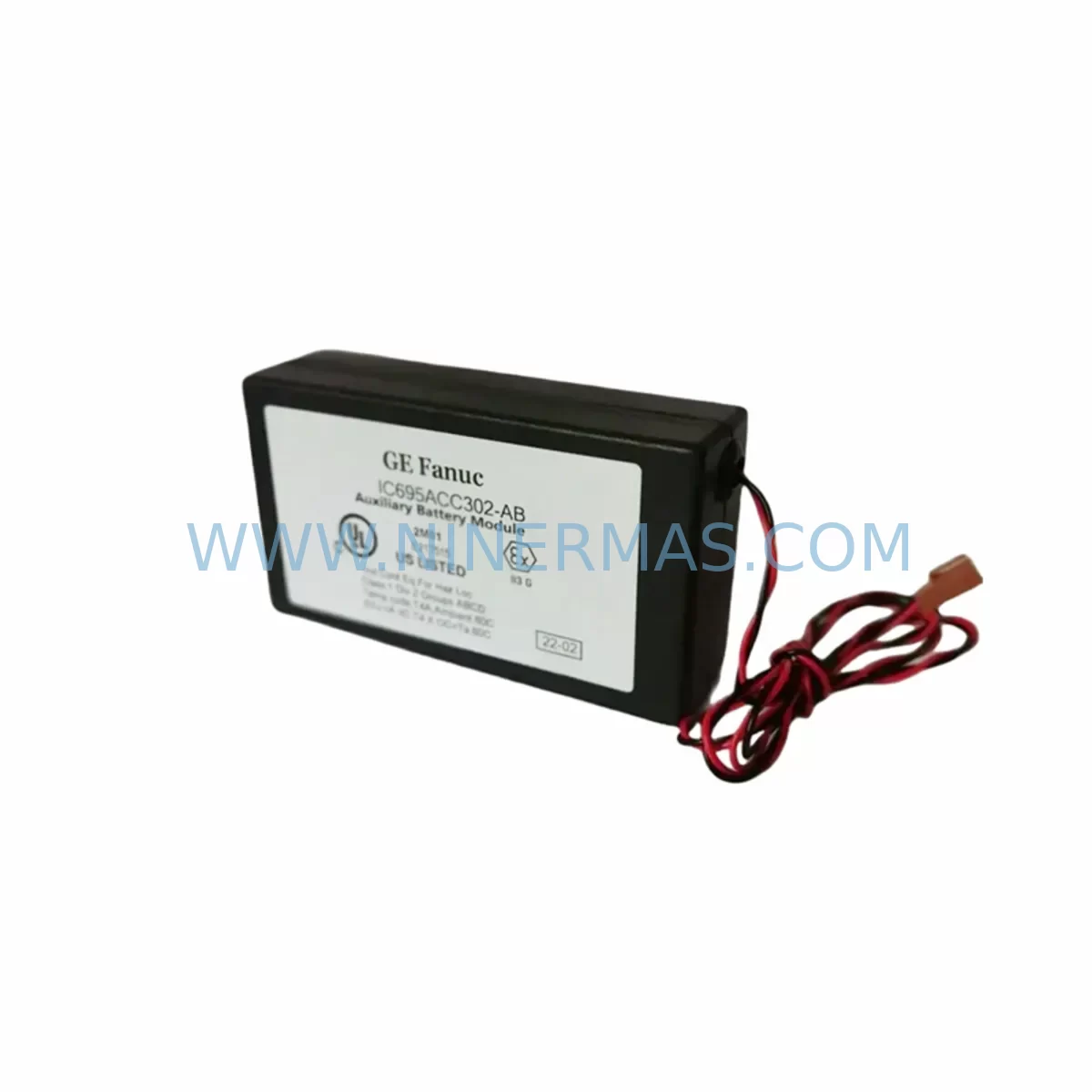
GE IC695ACC302-AB RX3i Spare Part for Industrial Maintenance
Verify the part, confirm the platform family, and move straight into quotation with the right commercial details.
RFQ Ready
- SKUIC695ACC302-AB
- CategoryPLC & Industrial Automation Modules
- BrandGE
- SupportAvailability, lead time, condition, and shipping coordination
How Buyers Usually Use This Page
- Confirm the exact part number and platform family before sending the quote request.
- Use direct email when quantity, condition, and destination are already defined internally.
- Switch to the broader brand or category archive when you need alternates nearby.
Series Navigation
Move through the most common platform families behind this part.
Product RFQ
Send this part directly for quotation.
Include quantity, required condition, destination country, and target delivery timing. Current reference: GE IC695ACC302-AB RX3i Spare Part for Industrial Maintenance with SKU IC695ACC302-AB.
GE IC695ACC302-AB RX3i Spare Part for Industrial Maintenance
The GE IC695ACC302-AB is an original PACSystems RX3i rack-to-rack expansion cable designed for multi-rack configurations in GE Automation control systems. Measuring approximately 302 mm (1 ft), this cable provides the physical and electrical link between the main RX3i CPU rack and expansion racks, enabling seamless I/O extension across distributed control cabinet architectures. As a service-ready spare part sourced and pre-shipment tested by NINERMAS, the IC695ACC302-AB is stocked to support emergency replacement, planned annual maintenance, and long-term lifecycle extension programs for PACSystems RX3i installations across process and discrete manufacturing environments.
Unplanned downtime caused by a failed or damaged expansion cable can isolate entire I/O racks from the CPU, triggering system faults, loss of field signal visibility, and production stoppages. Maintaining a certified spare IC695ACC302-AB in your on-site inventory is a low-cost, high-impact strategy for reducing mean time to repair (MTTR) and protecting production continuity in facilities running GE PACSystems RX3i platforms.
Spare Maintenance Table
| Parameter | Specification |
|---|---|
| Part Number | IC695ACC302-AB |
| Brand / Manufacturer | GE Automation & Controls (General Electric) |
| Series | PACSystems RX3i |
| Component Type | Rack-to-Rack Expansion Cable |
| Cable Length | Approx. 302 mm (1 ft) |
| Compatible Racks | IC695CHS012, IC695CHS016, IC695CHS007 (RX3i Universal Backplane series) |
| Compatible CPUs | IC695CPE302, IC695CPE305, IC695CPE310, IC695CPU320 |
| Connector Type | Proprietary RX3i rack expansion interface |
| Operating Temperature | 0°C to 60°C (32°F to 140°F) |
| Storage Temperature | -40°C to 85°C |
| Humidity | 5% to 95% non-condensing |
| Application Environment | Industrial control cabinets, PLC/DCS panels, process automation racks |
| Mounting | Direct rack-to-rack connection; no additional mounting hardware required |
| Origin | USA |
| Condition | Original / Tested Spare |
| Pre-Shipment Testing | Yes — functional continuity and connector integrity verified |
| Warranty | 12 Months from date of shipment |
| Long-Term Supply | Available through NINERMAS long-term spare parts program |
Maintenance Planning for Continuous Operation
When replacing or inspecting the IC695ACC302-AB expansion cable during scheduled or corrective maintenance, a thorough control cabinet audit is essential to prevent repeat failures and ensure full system restoration. Maintenance engineers should treat the expansion cable replacement as a trigger for a broader RX3i rack health check.
Begin by verifying the condition of the IC695CHS012 or IC695CHS016 universal backplane that the cable connects to. Backplane connector pins can suffer mechanical wear or oxidation over years of service, and a degraded backplane will cause recurring communication faults even after a cable swap. Simultaneously, inspect the IC695CPE302 or IC695CPE305 CPU module seated in the main rack — expansion cable faults can sometimes mask underlying CPU health issues, particularly in systems with high I/O polling rates.
On the I/O side, check all IC695MDL654 discrete input modules and IC695MDL764 discrete output modules installed in the expansion rack for loose seating or contamination on the module edge connectors. Analog I/O modules such as the IC695ALG600 analog input module should also be reseated and verified for signal accuracy after any rack expansion cable disturbance, as intermittent cable connections can introduce noise or offset errors in analog channels.
Power distribution across the expanded rack system deserves equal attention. Inspect the IC695PSA040 or IC695PSD040 power supply modules in both the main and expansion racks for output voltage stability and capacitor health. A marginal power supply operating near its load limit is a common root cause of intermittent expansion bus errors. If the system uses IC695ETM001 Ethernet communication modules for SRTP or Modbus TCP connectivity, verify their status LEDs and network link integrity after the cable replacement, as communication modules are sensitive to power transients during rack maintenance.
For facilities running mixed GE and third-party field devices, also inspect any IC695PBM300 PROFIBUS master modules or IC695CMM002 serial communication modules installed in the expansion rack. These modules maintain active field bus connections and should be confirmed operational before returning the system to production. Finally, review the terminal block wiring and field cable routing at the I/O module face plates — mechanical vibration during cable replacement can loosen field wiring terminations, particularly on high-density terminal strips adjacent to the expansion rack.
Site Replacement Workflow
Replacing the IC695ACC302-AB on-site is a straightforward procedure when the correct spare is available and the replacement follows a structured workflow to minimize downtime and avoid configuration errors.
Step 1 — Preparation & Safety Isolation: Before disconnecting the expansion cable, place the PACSystems RX3i CPU in STOP mode via the programming software (Proficy Machine Edition or equivalent) or the physical keyswitch on the CPU module. Document the current I/O rack configuration and note any active fault codes in the CPU diagnostic log. Isolate field power to the expansion rack if safe to do so without disrupting adjacent systems.
Step 2 — Cable Removal: Carefully disconnect the IC695ACC302-AB from both the main rack and expansion rack expansion ports. Inspect the connector housings and locking tabs on both ends for cracks or deformation. If connector damage is found on the rack backplane ports, escalate to a backplane replacement before proceeding.
Step 3 — Spare Installation: Connect the new IC695ACC302-AB expansion cable, ensuring both ends are fully seated and locking tabs are engaged. The cable should route without sharp bends or tension — use cable management clips if the rack layout requires routing around other components.
Step 4 — System Restart & Verification: Return the CPU to RUN mode and monitor the expansion rack status in the diagnostic display. Confirm that all I/O modules in the expansion rack report healthy status and that no expansion bus fault codes are active. Perform a functional I/O check by verifying field signal states against known process conditions before releasing the system to production.
Step 5 — Documentation: Record the replacement in the site maintenance log, including the date, technician name, old cable condition, and new spare part serial number. Update the site spare parts inventory to trigger reorder of a replacement IC695ACC302-AB to maintain minimum stock levels.
Spare Parts Support FAQ
Q1: Is the IC695ACC302-AB compatible with all PACSystems RX3i rack configurations?
The IC695ACC302-AB is designed for GE PACSystems RX3i universal backplane racks (IC695CHS series). It is compatible with main CPU racks and expansion racks in standard RX3i multi-rack configurations. Compatibility should be verified against the specific rack model and firmware revision of the CPU module in use. NINERMAS technical support can assist with compatibility confirmation prior to order.
Q2: What does the 12-month warranty cover?
All IC695ACC302-AB units shipped by NINERMAS carry a 12-month warranty from the date of shipment, covering manufacturing defects and functional failures under normal operating conditions. Each unit undergoes pre-shipment functional testing including connector integrity and cable continuity verification. Warranty claims are supported by NINERMAS after-sales service with replacement or refund options.
Q3: Can NINERMAS support long-term or bulk procurement of IC695ACC302-AB spares?
Yes. NINERMAS operates a long-term spare parts supply program for GE PACSystems RX3i components, including the IC695ACC302-AB. Bulk orders, annual blanket purchase agreements, and consignment stock arrangements are available for facilities with ongoing maintenance requirements. Contact our procurement team to discuss volume pricing and lead time commitments.
Q4: What should I do if the replacement cable does not resolve the expansion bus fault?
If installing a new IC695ACC302-AB does not clear the expansion bus fault, the issue may originate from the backplane expansion port connectors (IC695CHS012/016), the CPU module’s expansion bus controller, or a failed I/O module in the expansion rack causing a bus conflict. NINERMAS can supply replacement backplanes, CPU modules, and I/O modules to support systematic fault isolation. Our technical team is available to assist with remote diagnostic guidance.
| Product Series | PACSystems |
|---|---|
| Country of Origin | US |
Catalog Continuation
Nearby part numbers around IC695ACC.
Use this lane when the buyer is comparing adjacent model numbers, revision-near items, or closely related spare variants within the same brand family.
Catalog Continuation
More GE modules in the catalog.
Use the brand lane to compare nearby part numbers, platform-adjacent modules, and other inquiry-ready listings before sending your final RFQ.
Catalog Continuation
Alternative parts within PLC & Industrial Automation Modules.
Stay inside the same system family when you need substitutes, adjacent modules, or a broader shortlist for procurement review.

SKU: OZDPROFI12MG12
Hirschmann OZDPROFI12MG12 Spare Part for Industrial Maintenance



SKU: 07025-0000-70-1-04
KONTRON 07025-0000-70-1-04 Service-Ready Spare Part



