
Original Industrial Spare Part
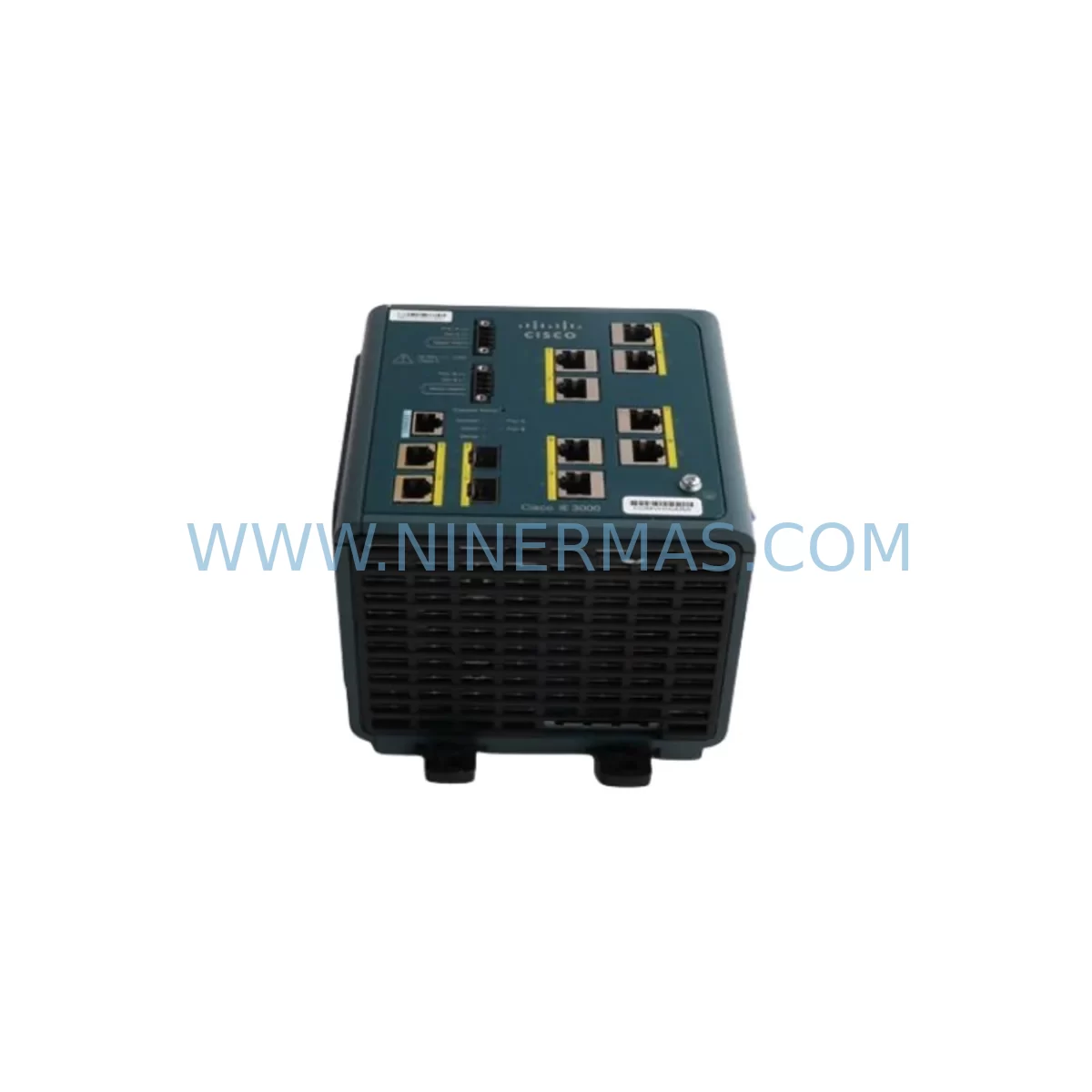
Cisco IE-3000-8TC-E Service-Ready Spare Part for Industrial Maintenance
Verify the part, confirm the platform family, and move straight into quotation with the right commercial details.
RFQ Ready
- SKUIE-3000-8TC-E
- CategoryPLC & Industrial Automation Modules
- BrandCisco
- SupportAvailability, lead time, condition, and shipping coordination
How Buyers Usually Use This Page
- Confirm the exact part number and platform family before sending the quote request.
- Use direct email when quantity, condition, and destination are already defined internally.
- Switch to the broader brand or category archive when you need alternates nearby.
Series Navigation
Move through the most common platform families behind this part.
Product RFQ
Send this part directly for quotation.
Include quantity, required condition, destination country, and target delivery timing. Current reference: Cisco IE-3000-8TC-E Service-Ready Spare Part for Industrial Maintenance with SKU IE-3000-8TC-E.
Cisco IE-3000-8TC-E Service-Ready Spare Part for Industrial Maintenance
The Cisco IE-3000-8TC-E is an 8-port industrial Ethernet switch engineered for demanding automation environments — including manufacturing floors, process control networks, utility substations, and transportation infrastructure. As a purpose-built component of the Cisco IE-3000 Series, this switch delivers Layer 2 managed switching with eight 10/100BASE-TX copper ports and two combo SFP uplink slots, supporting both fiber and copper uplinks for flexible topology design. When a unit fails in a live production environment, every minute of downtime translates directly into lost output and recovery cost. NINERMAS maintains verified stock of the IE-3000-8TC-E to support rapid spare-part replacement, emergency procurement, and planned annual maintenance cycles — backed by a 12-month warranty and pre-shipment functional testing.
Whether you are a maintenance engineer executing a fault-isolation procedure or a procurement engineer building a resilient spare-parts inventory, the IE-3000-8TC-E is a critical node in your industrial network architecture. Its DIN-rail mounting form factor, wide operating temperature range (−40°C to +70°C), and support for IEEE 1588 Precision Time Protocol make it a preferred choice for time-sensitive automation networks running PROFINET, EtherNet/IP, or Modbus TCP protocols.
Spare Maintenance Table
| Parameter | Specification |
|---|---|
| Part Number / SKU | IE-3000-8TC-E |
| Brand / Series | Cisco / IE-3000 Series |
| Product Type | Industrial Managed Ethernet Switch |
| Ports | 8 × 10/100BASE-TX + 2 × Combo SFP Uplinks |
| Switching Capacity | Up to 1 Gbps |
| Management | Layer 2 Managed (IOS-based CLI, Web UI, SNMP) |
| Protocol Support | PROFINET, EtherNet/IP, Modbus TCP, IEEE 1588 PTP |
| Mounting | DIN-Rail |
| Operating Temperature | −40°C to +70°C |
| Input Voltage | DC 18–60V (dual redundant power input) |
| Certifications | UL, CE, ATEX Zone 2 (model-dependent) |
| Compatibility | Cisco IE-3000-8TC, IE-3000-4TC, IE-3010 Series |
| Application Environment | Factory automation, utility SCADA, rail, oil & gas |
| Maintenance Recommendation | Inspect power connectors, SFP modules, and firmware version at each annual PM cycle |
| Warranty | 12 Months (NINERMAS) |
| Origin | United States |
| Condition | Original / Service-Ready |
Maintenance Planning for Continuous Operation
Replacing the IE-3000-8TC-E in a live control cabinet is rarely an isolated task. Maintenance engineers who have performed this replacement in the field consistently report that adjacent components should be inspected simultaneously to prevent secondary failures and avoid repeat downtime events within the same maintenance window.
Begin with the power supply infrastructure. The IE-3000-8TC-E accepts dual DC inputs in the 18–60V range, typically fed from a DIN-rail 24VDC power supply such as a Cisco PWR-IE65W-PC-AC or a third-party equivalent. Verify output voltage stability and check for ripple or voltage sag under load before connecting the replacement switch. A degraded power supply is a common root cause of repeated switch failures in industrial environments.
Next, inspect all SFP fiber uplink modules installed in the combo uplink slots. Cisco-compatible SFPs such as the GLC-SX-MMD (multimode, 850nm) or GLC-LH-SMD (single-mode, 1310nm) should be cleaned and tested with an optical power meter. Dirty or degraded SFP transceivers are a frequent cause of intermittent link loss that is often misdiagnosed as a switch fault.
Review the Ethernet patch cables and industrial-grade connectors on all eight copper ports. In high-vibration environments, M12 D-coded connectors or RJ45 locking connectors should be used. Replace any cables showing signs of insulation wear, connector corrosion, or intermittent continuity. This is also the appropriate time to verify cable shielding continuity and grounding integrity across the cabinet.
For sites running PROFINET or EtherNet/IP topologies, confirm that the replacement IE-3000-8TC-E is loaded with the correct IOS firmware version to maintain protocol compatibility with connected PLCs and I/O devices. Cisco IE-3000 series switches running outdated firmware may exhibit LLDP or MRP ring protocol issues after replacement. Coordinate with your network administrator to pre-stage the configuration file before the maintenance window.
Inspect the terminal block wiring on the power input connector. Loose or oxidized terminals are a common failure point in high-humidity or high-vibration installations. Re-torque all terminals to the manufacturer’s specified value and apply contact protection spray if corrosion is present. While the cabinet is open, also check the DIN-rail grounding bus and verify that the switch chassis ground is properly bonded.
If the IE-3000-8TC-E is part of a ring redundancy topology using Cisco’s REP (Resilient Ethernet Protocol) or IEC 62439-2 MRP, verify that the ring configuration is restored correctly after replacement. A misconfigured ring port can cause broadcast storms that affect the entire automation network segment, including connected Rockwell Automation 1756-EN2T EtherNet/IP bridge modules, Siemens SCALANCE X switches, or Moxa EDS series devices operating on the same network segment.
Finally, document the replacement event in your CMMS (Computerized Maintenance Management System), including the serial number of the failed unit, the replacement unit’s serial number, firmware version, and the date of installation. This record supports warranty claims, lifecycle tracking, and future procurement planning for your IE-3000 series spare-parts pool.
Site Replacement Workflow
Step 1 — Pre-Replacement Preparation: Download the running configuration from the existing IE-3000-8TC-E via TFTP or USB before powering down. Confirm the replacement unit’s firmware version matches or is compatible with your network’s IOS baseline. Prepare a labeled cable map of all port connections.
Step 2 — Safe Isolation: Notify the control room and place the affected network segment into maintenance mode. If the switch is part of a ring topology, verify that the redundant path is active and carrying traffic before disconnecting the failed unit. De-energize the DC power input at the terminal block — do not simply unplug the power connector under load.
Step 3 — Physical Replacement: Remove the failed IE-3000-8TC-E from the DIN rail. Install the replacement unit, reconnect all Ethernet cables in the documented port order, and reconnect the dual DC power inputs. Verify LED status indicators: PWR (green), LINK/ACT per port, and the alarm LED should be off.
Step 4 — Configuration Restore: Upload the saved configuration file to the replacement unit. Verify VLAN assignments, port security settings, QoS policies, and ring protocol configuration. For PROFINET environments, re-assign the device name using the PROFINET commissioning tool (e.g., Siemens TIA Portal or Rockwell Studio 5000 with PROFINET add-on).
Step 5 — Functional Verification: Ping all connected devices from the switch CLI. Verify that all I/O modules, PLCs, HMIs, and SCADA servers are reachable. Confirm ring redundancy is restored and the REP or MRP topology is in the expected state. Resume normal production and monitor for 30 minutes before closing the maintenance work order.
This structured workflow minimizes mean time to repair (MTTR) and ensures that the replacement IE-3000-8TC-E is fully integrated into the existing automation network without residual configuration errors that could cause delayed failures.
Spare Parts Support FAQ
Q1: Is the IE-3000-8TC-E still available as a new original spare part?
The Cisco IE-3000-8TC-E has reached end-of-sale status through Cisco’s standard channels, but NINERMAS maintains verified original stock sourced through authorized distribution channels. Each unit is inspected and tested prior to shipment. For long-term procurement planning, we recommend securing a buffer stock of 1–2 units per production line to avoid extended lead times during critical maintenance events.
Q2: How do I verify compatibility before ordering?
The IE-3000-8TC-E is directly compatible with the broader Cisco IE-3000 Series platform, including the IE-3000-8TC and IE-3000-4TC variants. Compatibility is determined by the IOS software version, port configuration, and network topology (ring vs. star). Share your existing switch’s show version output or configuration file with our technical team at sale@ninermas.com and we will confirm compatibility before shipment.
Q3: What pre-shipment testing is performed on each unit?
Every IE-3000-8TC-E shipped by NINERMAS undergoes a functional power-on test, port link verification on all 8 copper ports and both SFP uplink slots, and a firmware version check. Units are packaged in anti-static ESD bags with foam protection. A test report is available upon request. All units are covered by a 12-month warranty from the date of shipment.
Q4: Can NINERMAS support long-term supply agreements for the IE-3000-8TC-E?
Yes. NINERMAS offers long-term supply agreements (LTSAs) for critical spare parts including the IE-3000-8TC-E, designed for customers managing multi-site automation infrastructure with extended maintenance cycles. LTSAs include reserved stock allocation, priority shipment, fixed pricing for the agreement term, and dedicated account support. Contact sale@ninermas.com or call +0086 187 5021 5667 to discuss your requirements.
| Product Series | Other series |
|---|
Catalog Continuation
More Cisco modules in the catalog.
Use the brand lane to compare nearby part numbers, platform-adjacent modules, and other inquiry-ready listings before sending your final RFQ.
Catalog Continuation
Alternative parts within PLC & Industrial Automation Modules.
Stay inside the same system family when you need substitutes, adjacent modules, or a broader shortlist for procurement review.
SKU: PFXPP170CA66K00N00
Pro-face PFXPP170CA66K00N00 Service-Ready Spare Part
SKU: 6SL3224-0BE32-2UA0
Siemens 6SL3224-0BE32-2UA0 Retrofit PM240 Power Module



