
Original Industrial Spare Part
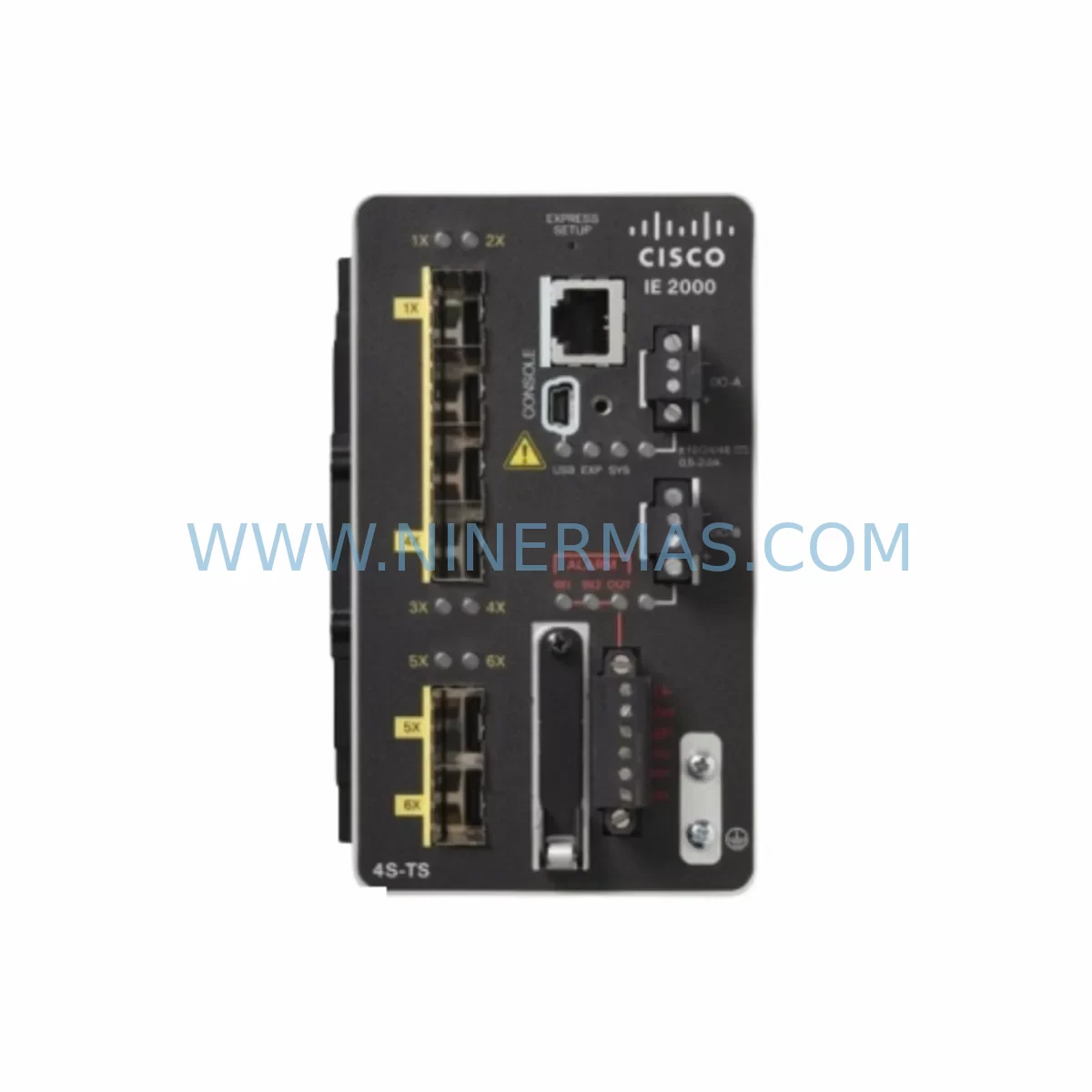
Cisco IE-2000-4TS-B Retrofit-Compatible Switch for Legacy Systems
Verify the part, confirm the platform family, and move straight into quotation with the right commercial details.
RFQ Ready
- SKUIE-2000-4TS-B
- CategoryPLC & Industrial Automation Modules
- BrandCisco
- SupportAvailability, lead time, condition, and shipping coordination
How Buyers Usually Use This Page
- Confirm the exact part number and platform family before sending the quote request.
- Use direct email when quantity, condition, and destination are already defined internally.
- Switch to the broader brand or category archive when you need alternates nearby.
Series Navigation
Move through the most common platform families behind this part.
Product RFQ
Send this part directly for quotation.
Include quantity, required condition, destination country, and target delivery timing. Current reference: Cisco IE-2000-4TS-B Retrofit-Compatible Switch for Legacy Systems with SKU IE-2000-4TS-B.
Cisco IE-2000-4TS-B Retrofit-Compatible Switch for Legacy Systems
The Cisco IE-2000-4TS-B is a rugged, DIN-rail-mountable industrial Ethernet switch engineered for deployment in harsh manufacturing, process control, and utility automation environments. As a direct retrofit-compatible replacement within the Cisco IE-2000 Series platform, this unit is purpose-built to support legacy system modernization without requiring a full control architecture overhaul. Whether you are managing a brownfield PLC network, upgrading a SCADA communication backbone, or extending the operational life of an aging control cabinet, the IE-2000-4TS-B delivers the port density, protocol support, and form factor required for a smooth, low-risk transition.
With four 10/100 copper Fast Ethernet ports and a compact footprint optimized for panel and cabinet integration, the IE-2000-4TS-B slots directly into existing IE-2000 Series rack positions. It supports IEEE 802.1Q VLAN segmentation, IGMP snooping for multicast traffic management, and Cisco’s IOS-based CLI — ensuring that engineers already familiar with the IE-2000 platform can configure, commission, and validate the unit without retraining. For sites running EtherNet/IP, PROFINET, or Modbus TCP over legacy copper infrastructure, this switch maintains full protocol transparency and does not introduce latency or compatibility breaks in the communication chain.
NINERMAS maintains verified in-stock inventory of the IE-2000-4TS-B with a 12-month warranty on all spare parts, supporting procurement teams that require confirmed lead times and long-term supply commitments for critical automation assets.
Upgrade Compatibility Table
| Parameter | IE-2000-4TS-B (This Unit) | Retrofit Notes |
|---|---|---|
| Port Configuration | 4 × 10/100 TX (RJ-45) | Verify existing copper cabling; Cat5e or better recommended |
| Power Input | 24 VDC (nominal), 12–24 VDC range | Confirm cabinet PSU output; compatible with Cisco PWR-IE50W-AC and equivalent 24 VDC rail supplies |
| Mounting | DIN-rail (35 mm) | Direct replacement for existing IE-2000 DIN-rail positions; no bracket modification required |
| Communication Protocols | EtherNet/IP, PROFINET, Modbus TCP, IGMP, 802.1Q | Full protocol pass-through; no gateway or converter required for most legacy topologies |
| Management Interface | Cisco IOS CLI, Web UI | Existing IOS configuration templates can be imported; verify IOS version compatibility |
| Operating Temperature | -40°C to +70°C | Suitable for outdoor enclosures and high-ambient industrial panels |
| Replacement Path | IE-2000-4TS-B → IE-2000-4TS-B (direct) or IE-4000 Series (upgrade) | For sites requiring PoE or fiber uplinks, evaluate IE-4000 or IE-5000 migration path |
| Warranty | 12-Month Warranty — all NINERMAS spare parts ship with documented warranty coverage | |
Retrofit Planning for Existing Automation Systems
Successful integration of the IE-2000-4TS-B into a brownfield automation environment requires a structured pre-installation assessment. Before removing the legacy switch, engineers should document the existing network topology: port assignments, VLAN IDs, IGMP group memberships, and any static IP or MAC-based configurations applied to connected PLCs, remote I/O nodes, or HMI terminals. In most IE-2000 Series deployments, the switch sits at the edge of a ring or star topology connecting Allen-Bradley ControlLogix or CompactLogix controllers to distributed I/O racks via EtherNet/IP. Preserving these address assignments during the swap is critical to avoiding PLC faults on restart.
Power supply compatibility is the first physical checkpoint. The IE-2000-4TS-B operates on 24 VDC, consistent with standard control cabinet rail supplies. If the existing cabinet uses a Cisco PWR-IE50W-AC or a third-party 24 VDC DIN-rail PSU, the power feed can typically be reused without modification. Verify terminal block torque ratings and wire gauge before reconnecting — undersized wiring on aging terminal strips is a common source of intermittent faults post-retrofit.
For sites running PROFINET IO, confirm that the IE-2000-4TS-B’s PROFINET-transparent forwarding behavior matches the expectations of the connected Siemens S7-300 or S7-400 CPU. In most cases, the switch operates as a transparent Layer 2 device and does not require PROFINET device configuration. However, if the legacy switch was configured as a PROFINET IO device with its own GSDML entry, this role must be reassigned or removed from the engineering station’s hardware configuration before the new unit is commissioned.
Communication module integrity should be verified across the full signal chain. In multi-drop Modbus TCP architectures, each node’s IP address and subnet mask must be confirmed against the master PLC’s routing table. If the control system includes a Cisco IE-2000-8TC-G-B or IE-2000-16TC-G-E as an aggregation switch upstream, ensure that the port connecting to the IE-2000-4TS-B is configured for the correct VLAN and that spanning tree port states are consistent with the original topology.
I/O expansion modules connected downstream — such as Allen-Bradley 1734 POINT I/O adapters, 1756 ControlNet bridge modules, or Wago 750-series Ethernet couplers — should be powered down before the switch replacement and brought back online sequentially after the new unit is confirmed active. This staged restart approach prevents address conflicts and allows the PLC to re-establish EtherNet/IP connections in a controlled sequence.
HMI panels connected to the network segment — whether running Rockwell FactoryTalk View SE, Siemens WinCC, or Weintek cMT series — should be verified for communication path continuity after the switch is replaced. In most cases, no HMI screen or tag reconfiguration is required, but communication timeout parameters may need adjustment if the new switch introduces any port initialization delay during startup.
For sites that include serial-to-Ethernet converters or protocol gateways — such as Moxa NPort units bridging legacy RS-485 Modbus RTU devices to the Ethernet backbone — confirm that the gateway’s Ethernet port is reconnected to the correct switch port and that the virtual COM port mapping on the SCADA server remains intact. Signal isolators on the RS-485 side should also be inspected for continuity before the system is returned to automatic mode.
Programming cables and engineering workstation connections used during commissioning — including Cisco console cables for IOS configuration and USB-to-serial adapters for PLC programming — should be staged and tested before the maintenance window begins. Having a pre-loaded IOS configuration file and a verified PLC program backup on the engineering laptop eliminates the most common sources of extended downtime during switch replacement.
Downtime Control During System Migration
Minimizing production downtime during a switch replacement in an active control system requires preparation that begins well before the maintenance window. The most effective approach is a parallel commissioning strategy: configure the IE-2000-4TS-B on the bench using the exported IOS configuration from the legacy unit, verify all VLAN, IGMP, and port settings, and confirm management access before the unit is installed in the cabinet.
During the physical swap, the sequence matters. Disconnect the legacy switch’s power feed first, then label and remove each Ethernet cable in port order, transferring them to the corresponding ports on the new unit. If the cabinet layout allows, use a temporary patch panel or labeled cable ties to maintain port-to-device mapping without relying on memory or handwritten notes. Reconnect power to the IE-2000-4TS-B and confirm link LEDs before releasing the PLC from its safe-state hold.
PLC program logic should not require modification for a like-for-like switch replacement. The controller’s EtherNet/IP connection parameters — including RPI rates, connection sizes, and target IP addresses — remain valid as long as the network addressing is preserved. If the legacy switch was performing any Layer 3 routing or inter-VLAN routing functions, these must be replicated or reassigned to an upstream router or Layer 3 switch before the replacement unit is brought online.
Post-installation, run a full I/O scan from the PLC programming terminal to confirm that all remote I/O modules, drives, and instruments are responding within normal scan time tolerances. Check the SCADA historian for any gap in data logging that exceeds the expected maintenance window duration — extended gaps may indicate a device that did not reconnect automatically and requires manual intervention. With proper preparation, a like-for-like IE-2000-4TS-B replacement can typically be completed within a 30–60 minute planned maintenance window.
Retrofit Support FAQ
Q1: Is the IE-2000-4TS-B a direct drop-in replacement for other IE-2000 Series 4-port models?
Yes. The IE-2000-4TS-B shares the same DIN-rail form factor, 24 VDC power input, and IOS-based management interface as other IE-2000 Series 4-port copper variants. Existing IOS configuration files can be imported with minor revision for hostname and interface descriptions. Verify the IOS version on the replacement unit matches or exceeds the feature set required by your network design.
Q2: What pre-shipment testing does NINERMAS perform on the IE-2000-4TS-B?
All units undergo functional power-on verification, port link testing, and management interface access confirmation before dispatch. Units are shipped with original or equivalent packaging and include documentation of the pre-shipment test result. The 12-month warranty covers hardware defects identified after installation.
Q3: Can the IE-2000-4TS-B be used in a PROFINET ring topology with MRP configured?
The IE-2000-4TS-B supports Media Redundancy Protocol (MRP) as a Media Redundancy Client (MRC). It can participate in an MRP ring managed by a Siemens S7 CPU or a dedicated MRP manager switch. Confirm that the MRP domain configuration on the engineering station includes the new unit’s MAC address if the legacy switch was registered as a named MRP participant.
Q4: What is the lead time and inventory availability for the IE-2000-4TS-B?
NINERMAS maintains in-stock inventory of the IE-2000-4TS-B to support urgent spare-parts requirements and planned retrofit projects. Standard dispatch is within 1–3 business days from order confirmation. For long-term procurement programs or multi-unit commitments, contact our sales team to discuss stock reservation and extended supply agreements. All units ship with a 12-month warranty.
| Product Series | Legacy |
|---|
Catalog Continuation
More Cisco modules in the catalog.
Use the brand lane to compare nearby part numbers, platform-adjacent modules, and other inquiry-ready listings before sending your final RFQ.
Catalog Continuation
Alternative parts within PLC & Industrial Automation Modules.
Stay inside the same system family when you need substitutes, adjacent modules, or a broader shortlist for procurement review.



SKU: HDD02.2-W040N-HS12-01-FW FWA-DIAX04-ELS-05VRS-MS
Rexroth HDD02.2-W040N-HS12-01-FW Service-Ready Spare Part

SKU: I5DAE375F10010000S
Lenze I5DAE375F10010000S Service-Ready Spare Part for Industrial Maintenance



