
Original Industrial Spare Part
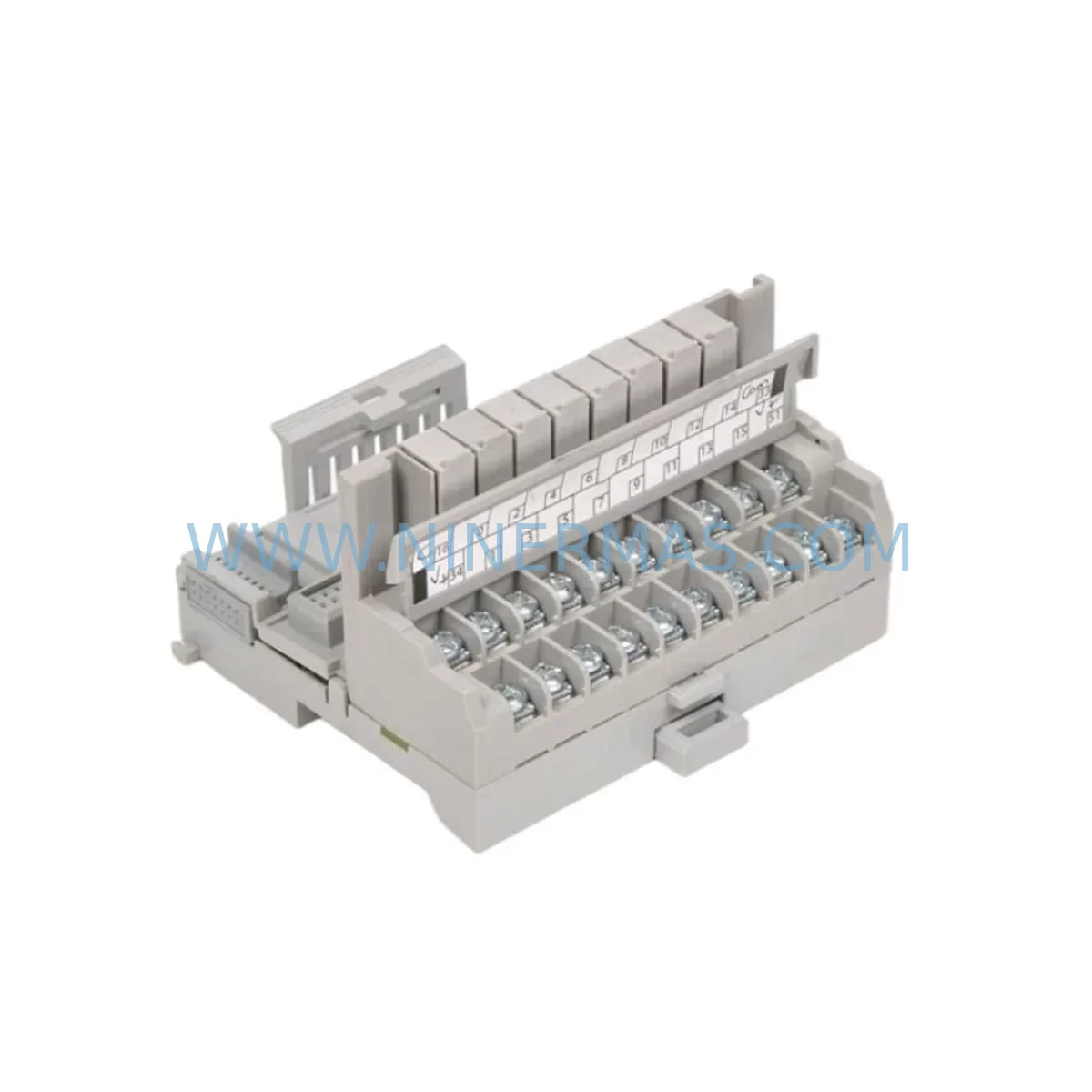
Allen-Bradley 1794-TBNF Retrofit-Compatible Fused Terminal Base
Verify the part, confirm the platform family, and move straight into quotation with the right commercial details.
RFQ Ready
- SKU1794-TBNF
- CategoryPLC & Industrial Automation Modules
- BrandAllen-Bradley
- SupportAvailability, lead time, condition, and shipping coordination
How Buyers Usually Use This Page
- Confirm the exact part number and platform family before sending the quote request.
- Use direct email when quantity, condition, and destination are already defined internally.
- Switch to the broader brand or category archive when you need alternates nearby.
Series Navigation
Move through the most common platform families behind this part.
Product RFQ
Send this part directly for quotation.
Include quantity, required condition, destination country, and target delivery timing. Current reference: Allen-Bradley 1794-TBNF Retrofit-Compatible Fused Terminal Base with SKU 1794-TBNF.
Allen-Bradley 1794-TBNF Retrofit-Compatible Fused Terminal Base for Legacy FLEX I/O Systems
The Allen-Bradley 1794-TBNF is a fused terminal base module designed for the Rockwell Automation FLEX I/O platform. As legacy distributed I/O architectures face end-of-life pressures, the 1794-TBNF remains a critical component for engineers managing brownfield upgrades, control cabinet retrofits, and discontinued spare part replacement programs. NINERMAS maintains verified stock of the 1794-TBNF with full functional testing, 12-month warranty coverage, and rapid global dispatch to minimize unplanned downtime on production lines still dependent on the FLEX I/O backplane infrastructure.
The 1794-TBNF provides a fused wiring interface for FLEX I/O adapter and I/O modules mounted on the 1794 series DIN-rail backplane. Its integrated fusing protects field wiring circuits and simplifies compliance with panel protection requirements. When planning a retrofit or spare part replacement, engineers must verify the terminal base variant — the 1794-TBNF is distinct from the unfused 1794-TB3 and the 1794-TB3S screw-clamp variant — to ensure correct field wiring compatibility and fuse rating alignment with the existing control cabinet design.
Upgrade Compatibility Table
| Parameter | 1794-TBNF Specification | Retrofit / Replacement Notes |
|---|---|---|
| Module Series | Allen-Bradley FLEX I/O (1794 Series) | Direct replacement for existing 1794-TBNF units on same backplane |
| Terminal Type | Fused screw-terminal wiring base | Verify fuse rating matches field circuit protection requirements |
| Backplane Interface | 1794 DIN-rail backplane connector | Compatible with 1794-ADN, 1794-AENT, 1794-ACN15 adapters |
| Installation | DIN-rail mount, snap-fit to backplane | Confirm available DIN-rail space; no additional mounting hardware required |
| Communication Compatibility | DeviceNet, EtherNet/IP, ControlNet (adapter-dependent) | Terminal base is protocol-agnostic; adapter module determines network |
| I/O Module Compatibility | All 1794 series I/O modules | Confirm I/O module keying matches terminal base slot assignment |
| Replacement Recommendation | 1794-TBNF (direct), 1794-TB3 (unfused alternative) | Use 1794-TBNF where fused field protection is required by design |
| Commissioning Notes | Module address set by adapter; no DIP switch on terminal base | Verify slot addressing in RSLogix 5000 / Studio 5000 I/O tree after swap |
| Warranty | 12-Month Warranty — All units tested prior to shipment | |
Retrofit Planning for Existing Automation Systems
When a production facility initiates a FLEX I/O retrofit or control cabinet upgrade, the 1794-TBNF is rarely replaced in isolation. A complete migration assessment typically begins at the adapter level: the 1794-AENT EtherNet/IP adapter or the legacy 1794-ADN DeviceNet adapter defines the communication backbone that all downstream terminal bases and I/O modules depend upon. If the retrofit involves a protocol migration — for example, moving from DeviceNet to EtherNet/IP — the adapter must be replaced first, and the 1794-TBNF terminal bases can often be retained in place, significantly reducing rewiring labor and panel downtime.
Beyond the adapter, engineers must audit the full I/O complement mounted on each 1794-TBNF. Common modules in legacy FLEX I/O installations include the 1794-IB16 16-point 24VDC digital input module, the 1794-OB16 16-point digital output module, and the 1794-IE8 8-channel analog input module. Each of these modules seats directly onto the terminal base, and their field wiring connections are made at the 1794-TBNF screw terminals. During a swap, technicians must document all terminal assignments before disconnecting field wiring, particularly for analog signal circuits where incorrect reconnection can damage transmitters or cause process upsets.
Power supply capacity is another critical checkpoint. The 1794 FLEX I/O backplane draws logic power from the system 24VDC supply, and the addition of new I/O modules or the replacement of a failed terminal base must be evaluated against the available current budget of the installed 1794-PS13 or equivalent power supply. Overloading the backplane power rail is a common cause of intermittent faults in aging FLEX I/O installations and must be resolved before commissioning replacement hardware.
For installations where the 1794-TBNF is part of a larger control system managed by a ControlLogix or CompactLogix controller, the I/O configuration in Studio 5000 Logix Designer must be verified after any hardware replacement. The software I/O tree must reflect the correct module type, slot number, and electronic keying setting. Mismatched keying will prevent the controller from establishing communication with the replaced module and will generate a fault in the controller’s diagnostic log. In many brownfield projects, the existing program logic and HMI screens built on FactoryTalk View SE or FactoryTalk View ME reference specific tag addresses tied to the FLEX I/O slot configuration — these must be validated to ensure no tag remapping is required after the retrofit.
Where the retrofit extends to the communication infrastructure, engineers may also need to evaluate the 1794-ACN15 ControlNet adapter for installations on legacy ControlNet networks, or consider the use of a 1794-AENTR redundant EtherNet/IP adapter for high-availability applications. Signal isolation requirements should also be reviewed: in mixed-signal environments, a signal isolator or barrier may be required between the 1794-TBNF field terminals and sensitive instrumentation to prevent ground loops or noise interference that can corrupt analog readings.
Downtime Control During System Migration
Minimizing production downtime during a FLEX I/O terminal base replacement requires careful pre-staging and a structured cutover plan. Before the maintenance window opens, the replacement 1794-TBNF should be pre-wired on a staging panel using the documented terminal assignment schedule, allowing the field wiring reconnection to be completed as a simple plug-in operation rather than a full rewiring exercise under time pressure.
The existing PLC program should be backed up from the ControlLogix or CompactLogix controller using Studio 5000 or RSLogix 5000 before any hardware is disturbed. This backup protects against accidental program loss and provides a reference for verifying that all I/O tag addresses remain valid after the hardware swap. If the retrofit involves replacing the adapter module in addition to the terminal base, the controller will lose communication with the entire FLEX I/O bank during the swap — this must be accounted for in the process safety analysis, and appropriate manual overrides or bypass procedures must be in place to maintain field control continuity.
Post-installation, the commissioning sequence should include a point-by-point I/O verification against the existing HMI display to confirm that all field signals are correctly mapped and that no tag addresses have shifted. Any discrepancies between the physical I/O state and the HMI indication must be resolved before returning the system to automatic control. NINERMAS recommends that all replacement 1794-TBNF units be subjected to a functional loop test at the field terminal level before the maintenance window closes, ensuring that the replacement hardware performs identically to the original unit and that no latent wiring faults have been introduced during the swap.
Retrofit Support FAQ
Q1: Is the 1794-TBNF a direct drop-in replacement for an existing fused terminal base on my FLEX I/O backplane?
Yes. The 1794-TBNF is a direct replacement for any existing 1794-TBNF unit on the same 1794 series DIN-rail backplane. No backplane modification or adapter reconfiguration is required. Verify that the replacement unit carries the same catalog number and series revision to ensure full compatibility with the installed I/O modules.
Q2: What pre-shipment testing does NINERMAS perform on the 1794-TBNF?
All 1794-TBNF units supplied by NINERMAS undergo functional verification testing prior to dispatch, including backplane connector integrity checks and terminal continuity verification. Each unit is shipped with a 12-month warranty covering manufacturing defects and functional failures under normal operating conditions.
Q3: Can the 1794-TBNF be used with both DeviceNet and EtherNet/IP adapters?
Yes. The 1794-TBNF terminal base is protocol-agnostic and is compatible with all 1794 series adapter modules, including the 1794-ADN (DeviceNet), 1794-AENT (EtherNet/IP), and 1794-ACN15 (ControlNet). The communication protocol is determined entirely by the adapter module, not the terminal base.
Q4: How quickly can NINERMAS supply the 1794-TBNF for an emergency breakdown situation?
NINERMAS maintains ready stock of the 1794-TBNF and can arrange priority dispatch for emergency breakdown orders. Contact our team directly at sale@ninermas.com or +0086 187 5021 5667 to confirm current inventory availability and lead time for your location.
| Product Series | Flex I/O |
|---|---|
| Country of Origin | US |
Catalog Continuation
More Allen-Bradley modules in the catalog.
Use the brand lane to compare nearby part numbers, platform-adjacent modules, and other inquiry-ready listings before sending your final RFQ.

Catalog Continuation
Alternative parts within PLC & Industrial Automation Modules.
Stay inside the same system family when you need substitutes, adjacent modules, or a broader shortlist for procurement review.
SKU: 14L41-RS0B0-B24R-ST5S00N-R0SU
LENZE 14L41-RS0B0-B24R-ST5S00N-R0SU Retrofit for Legacy Systems
SKU: CI540 3BSE001077R1
ABB CI540 3BSE001077R1 Spare Part for Industrial Maintenance

SKU: ZINT-541 3AUA00000658960
ABB ZINT-541 3AUA00000658960 Retrofit-Compatible Inverter Power Module
SKU: DSQC633 3HAC022286-001
ABB DSQC633 3HAC022286-001 Service-Ready Spare Part



