Original Industrial Spare Part
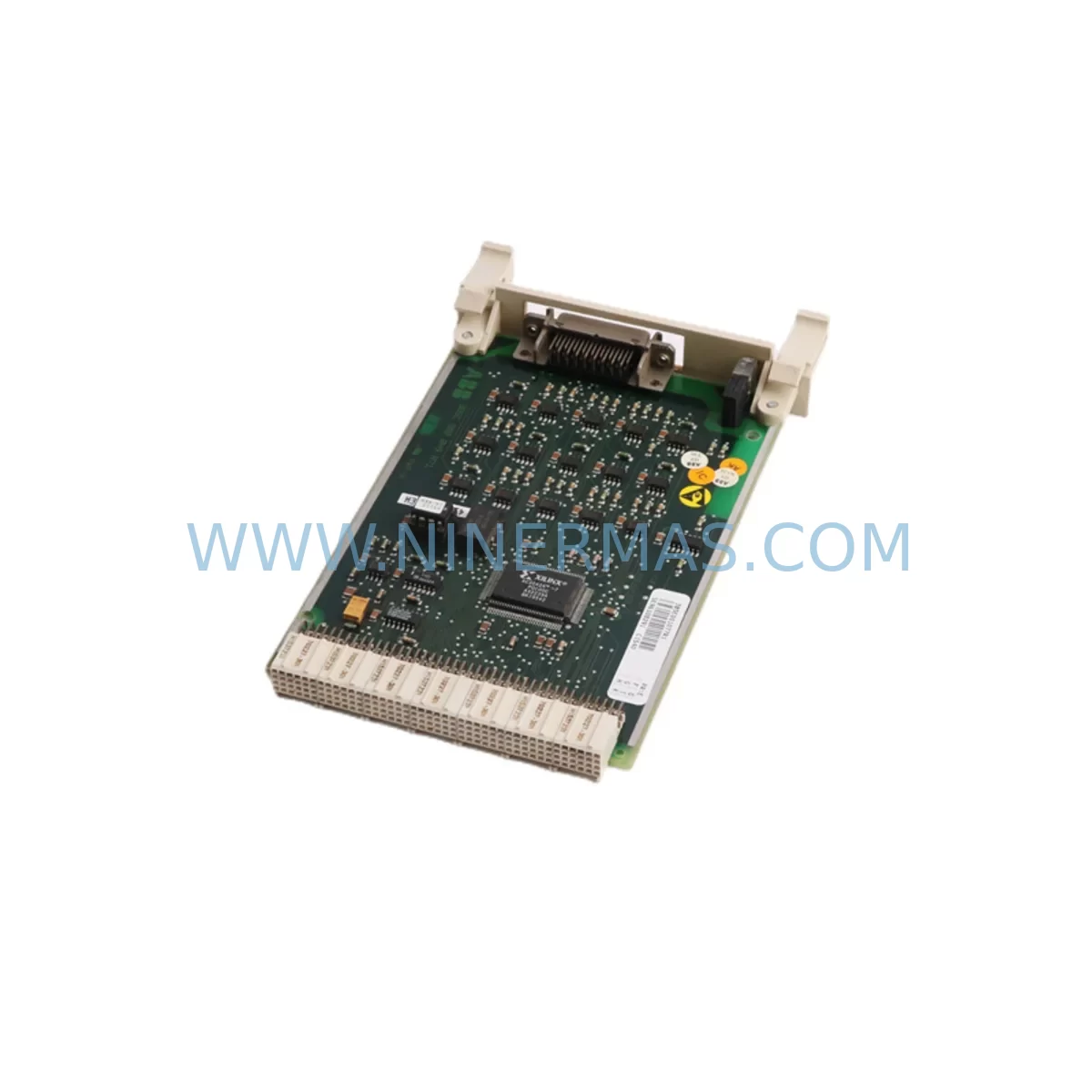
ABB CI540 3BSE001077R1 Spare Part for Industrial Maintenance
Verify the part, confirm the platform family, and move straight into quotation with the right commercial details.
RFQ Ready
- SKUCI540 3BSE001077R1
- CategoryPLC & Industrial Automation Modules
- BrandABB
- SupportAvailability, lead time, condition, and shipping coordination
How Buyers Usually Use This Page
- Confirm the exact part number and platform family before sending the quote request.
- Use direct email when quantity, condition, and destination are already defined internally.
- Switch to the broader brand or category archive when you need alternates nearby.
Series Navigation
Move through the most common platform families behind this part.
Product RFQ
Send this part directly for quotation.
Include quantity, required condition, destination country, and target delivery timing. Current reference: ABB CI540 3BSE001077R1 Spare Part for Industrial Maintenance with SKU CI540 3BSE001077R1.
ABB CI540 3BSE001077R1 Spare Part for Industrial Maintenance: Minimizing Downtime Risk in AC500 PLC Systems
The ABB CI540 (3BSE001077R1) is a ruggedized I/O bus extension module designed for use within ABB’s AC500 PLC platform — one of the most widely deployed programmable logic controller families in process automation, power distribution, and heavy industrial environments. When this module fails or reaches end-of-service life, the consequences can be immediate and severe: loss of I/O communication across the bus, unresponsive field devices, and full production line stoppage. Maintaining a verified, service-ready replacement unit of the CI540 3BSE001077R1 in your spare parts inventory is not optional — it is a fundamental requirement of any responsible industrial maintenance strategy.
At NINERMAS, we supply the ABB CI540 3BSE001077R1 as an original, tested spare part with full 12-month warranty coverage. Each unit undergoes pre-shipment functional verification to ensure it meets ABB’s original electrical and communication specifications before leaving our facility. Whether you are managing a planned annual overhaul, responding to an unscheduled fault, or building out a strategic spare parts buffer for aging AC500 installations, the CI540 3BSE001077R1 is available for immediate dispatch.
Spare Maintenance Table
| Parameter | Specification |
|---|---|
| Part Number / SKU | CI540 / 3BSE001077R1 |
| Brand | ABB |
| Series | AC500 PLC Series |
| Module Type | Ruggedized I/O Bus Extension Module |
| Bus Interface | S500 I/O Bus (ABB proprietary) |
| Operating Temperature | -25°C to +70°C (ruggedized grade) |
| Supply Voltage | 24 VDC (via backplane / CPU module) |
| Mounting | DIN rail, compatible with AC500 backplane TB5xx series |
| Communication | Extends I/O bus for remote S500 I/O stations |
| Protection Class | IP20 (panel-mounted installation) |
| Compatibility | AC500 CPU modules: PM571, PM581, PM591, PM595 series |
| Application Environment | Industrial automation, power utilities, water treatment, rail, oil & gas |
| Origin | Germany (ABB Automation Products GmbH) |
| Condition | Original spare, pre-shipment tested |
| Warranty | 12 Months — covers manufacturing defects and functional failure |
| Lead Time | In stock — ships within 1–3 business days |
Maintenance Planning for Continuous Operation
The CI540 3BSE001077R1 sits at the heart of the AC500 I/O bus architecture. When maintenance engineers plan a replacement or inspection of this module, the surrounding system components must be evaluated simultaneously to avoid repeat failures and ensure a clean restoration of bus communication.
Begin with the AC500 CPU module — typically a PM571, PM581, or PM591 — which drives the I/O bus that the CI540 extends. A degraded CPU module can cause intermittent bus faults that are incorrectly attributed to the extension module itself. Inspect the CPU’s diagnostic LEDs and event log before condemning the CI540. Alongside the CPU, verify the condition of the TB511 or TB521 backplane terminal base, as mechanical wear or oxidized contacts on the backplane can disrupt the module seating and cause communication dropout even with a new CI540 installed.
On the power side, the 24 VDC system power supply feeding the AC500 rack must be within specification. Voltage sag or ripple — often caused by aging ABB CP-E or CP-S series power supply modules — can cause the I/O bus to reset intermittently, producing fault codes that mimic a failed CI540. A calibrated multimeter check at the backplane power terminals is a mandatory step before module replacement.
For installations where the CI540 is used to extend the bus to remote I/O stations, inspect the S500 I/O modules at the remote end — including digital input modules (DI524, DI572), digital output modules (DO524), and analog I/O modules (AI523, AO523). A shorted output channel on a remote DO module can load the bus and cause the CI540 to report communication errors. Replacing the CI540 without identifying a faulty downstream I/O module will result in repeat failure.
Communication integrity should also be verified at the fieldbus coupler level. If the AC500 system uses PROFIBUS, Modbus TCP, or EtherNet/IP communication modules (such as the CI590-CS31-HA or CI501-PNIO), confirm that these modules are not generating bus conflicts that propagate back through the I/O extension path. In control cabinets with mixed communication architectures, signal isolators between the PLC rack and field wiring terminals are recommended to prevent ground loop interference from corrupting I/O bus signals.
Finally, inspect the 24 VDC field wiring terminal blocks and any miniature circuit breakers (MCBs) or fuse terminals protecting the I/O circuits. Loose terminal connections or a blown fuse on a field circuit can cause an I/O module to report a fault that cascades into a bus error at the CI540 level. A systematic terminal inspection with a torque screwdriver and continuity tester is a low-cost step that prevents unnecessary module replacement.
For sites running legacy AC500 installations — particularly those with PM571 CPUs and first-generation S500 I/O racks — we recommend maintaining at minimum one CI540 3BSE001077R1, one spare CPU module, and one spare 24 VDC power supply as a core emergency kit. This three-component buffer covers the majority of unplanned downtime scenarios in AC500-based control systems.
Site Replacement Workflow
Step 1 — Fault Isolation: Before removing the CI540, use the AC500 programming environment (Automation Builder or PS501 Control Builder) to read the diagnostic buffer. Confirm that the fault is isolated to the I/O bus extension and not to a downstream I/O module or CPU communication error. Document the current I/O bus configuration and module addressing.
Step 2 — Safe De-energization: Isolate the control cabinet using the main disconnect. Follow your site’s lockout/tagout (LOTO) procedure. Verify zero voltage at the backplane power terminals before touching any module. The CI540 is not hot-swappable in standard AC500 configurations — the bus must be de-energized before removal.
Step 3 — Module Removal: Release the CI540 from the terminal base by pressing the release lever and sliding the module upward. Inspect the backplane connector pins for damage or corrosion. Clean the connector area with isopropyl alcohol if contamination is present.
Step 4 — Replacement Installation: Insert the new CI540 3BSE001077R1 into the terminal base, ensuring full engagement with the backplane connector. The module should click into place without excessive force. Verify that the module’s DIP switch settings (if applicable for bus termination) match the original configuration documented in Step 1.
Step 5 — Power-Up and Verification: Re-energize the cabinet and observe the CI540’s status LEDs. A solid green RUN LED indicates successful bus initialization. Use Automation Builder to confirm that all remote I/O stations are communicating correctly. Run a full I/O test cycle before returning the system to production.
Step 6 — Documentation: Record the replacement in your maintenance management system (CMMS), including the date, replaced part number, and post-replacement test results. Update your spare parts inventory to trigger reorder of a replacement CI540 unit to restore your buffer stock.
Spare Parts Support FAQ
Q1: Is the CI540 3BSE001077R1 still in production, and can NINERMAS guarantee long-term supply?
The CI540 is part of ABB’s AC500 platform, which has an extended product lifecycle. NINERMAS maintains stock of the CI540 3BSE001077R1 and monitors ABB’s product lifecycle announcements. For customers managing long-term maintenance contracts or multi-site AC500 installations, we offer volume reservation agreements to secure supply over 12–36 month horizons. Contact our sales team to discuss your long-term procurement requirements.
Q2: How does NINERMAS verify the CI540 3BSE001077R1 before shipment?
Every CI540 unit supplied by NINERMAS undergoes a pre-shipment inspection that includes visual inspection for physical damage, connector pin integrity check, and functional power-up test. Units that fail any inspection criterion are quarantined and not shipped. Each unit is shipped with a test record and is covered by our 12-month warranty against manufacturing defects and functional failure under normal operating conditions.
Q3: Can the CI540 3BSE001077R1 replace older or alternative ABB I/O bus extension modules?
The CI540 is designed specifically for the AC500 S500 I/O bus architecture. It is not directly interchangeable with modules from the AC31 or S800 I/O families. Before ordering, confirm that your system uses the AC500 platform with S500 I/O modules and a compatible terminal base (TB511 or TB521 series). If you are unsure of compatibility, provide your CPU part number and existing I/O configuration to our technical team for verification before purchase.
Q4: What is covered under the 12-month warranty, and what is the claims process?
Our 12-month warranty covers functional failure and manufacturing defects under normal industrial operating conditions. It does not cover damage caused by incorrect installation, overvoltage, physical impact, or use outside the module’s rated environmental specifications. To initiate a warranty claim, contact sale@ninermas.com with your order number, a description of the fault, and any available diagnostic data from the AC500 system. We will arrange return shipping and provide a replacement or refund within the agreed service timeline.
| Product Series | AC500 |
|---|---|
| Country of Origin | SE |
Catalog Continuation
More ABB modules in the catalog.
Use the brand lane to compare nearby part numbers, platform-adjacent modules, and other inquiry-ready listings before sending your final RFQ.
SKU: APMXB03 E-32215
ABB APMXB03-E 32215 Safety-Reliable MUX for Control Sites

SKU: ZINT-541 3AUA00000658960
ABB ZINT-541 3AUA00000658960 Retrofit-Compatible Inverter Power Module
SKU: DSQC633 3HAC022286-001
ABB DSQC633 3HAC022286-001 Service-Ready Spare Part
SKU: HENF331395R0001 P4LDA
ABB HENF331395R0001 Service-Ready Industrial Spare Part
Catalog Continuation
Alternative parts within PLC & Industrial Automation Modules.
Stay inside the same system family when you need substitutes, adjacent modules, or a broader shortlist for procurement review.
SKU: 14L41-RS0B0-B24R-ST5S00N-R0SU
LENZE 14L41-RS0B0-B24R-ST5S00N-R0SU Retrofit for Legacy Systems

SKU: 6SL3224-0BE33-7UA0
Siemens 6SL3224-0BE33-7UA0 Service-Ready Spare Part