Original Industrial Spare Part
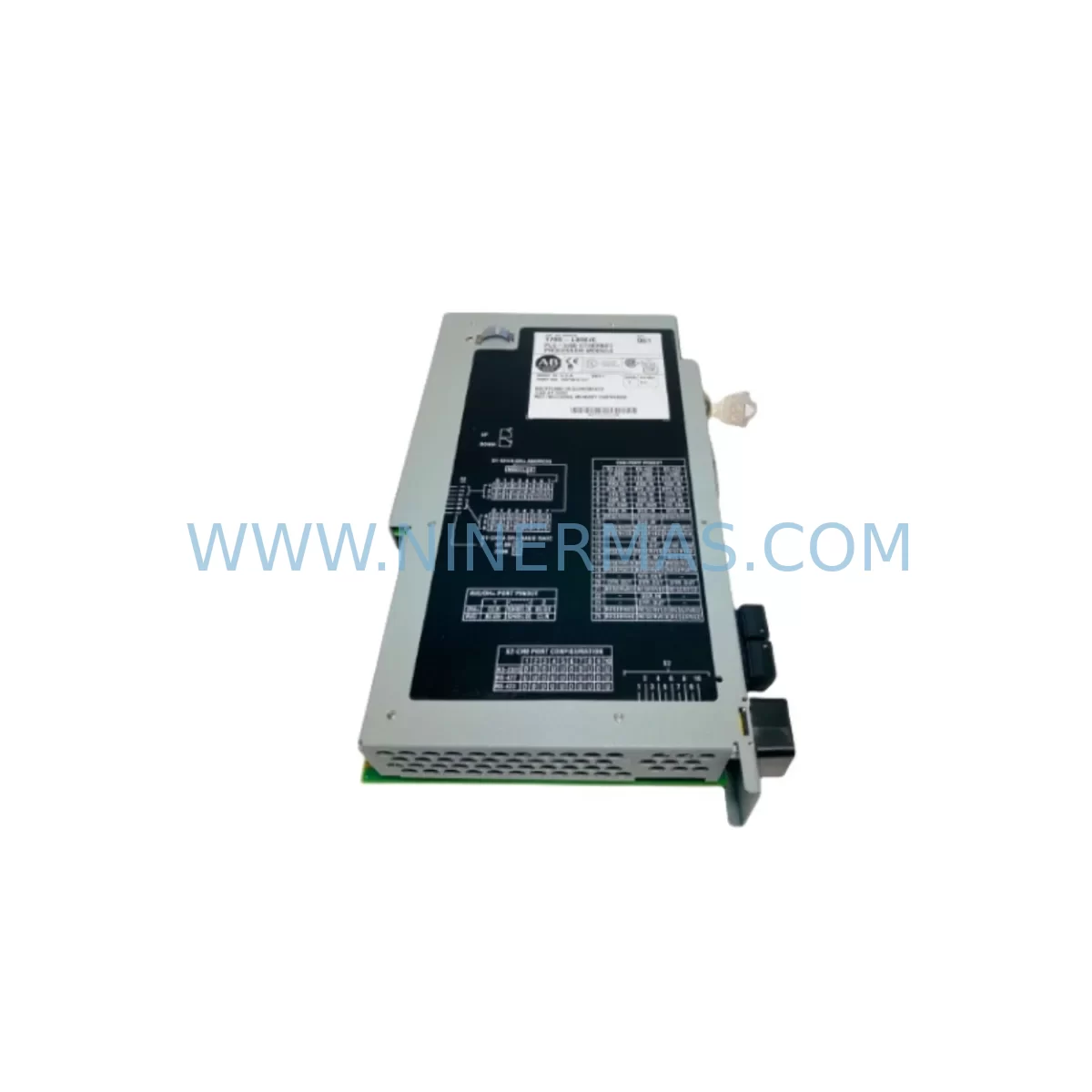
Allen-Bradley 1785-L80E ST0WO1WX Spare Part for Maintenance
Verify the part, confirm the platform family, and move straight into quotation with the right commercial details.
RFQ Ready
- SKU1785-L80E ST0WO1WX
- CategoryPLC & Industrial Automation Modules
- BrandAllen-Bradley
- SupportAvailability, lead time, condition, and shipping coordination
How Buyers Usually Use This Page
- Confirm the exact part number and platform family before sending the quote request.
- Use direct email when quantity, condition, and destination are already defined internally.
- Switch to the broader brand or category archive when you need alternates nearby.
Series Navigation
Move through the most common platform families behind this part.
Product RFQ
Send this part directly for quotation.
Include quantity, required condition, destination country, and target delivery timing. Current reference: Allen-Bradley 1785-L80E ST0WO1WX Spare Part for Maintenance with SKU 1785-L80E ST0WO1WX.
Allen-Bradley 1785-L80E ST0WO1WX Spare Part for Maintenance: PLC-5 Processor Replacement & Downtime Risk Control
The Allen-Bradley 1785-L80E ST0WO1WX is an Enhanced PLC-5/80 processor module with integrated Ethernet communication, designed for high-density industrial control applications in continuous manufacturing, utilities, and process automation environments. As a service-ready spare part, this unit supports rapid replacement of aging or failed PLC-5 processors without requiring full system redesign, making it a critical component in any maintenance engineer’s spare parts inventory strategy.
Sourced as an original Allen-Bradley unit, the 1785-L80E ST0WO1WX is pre-shipment tested and supplied with a 12-month warranty, ensuring confidence in both immediate deployment and long-term system reliability. Whether you are managing a scheduled annual overhaul, responding to an unplanned processor fault, or building a strategic spare parts buffer for legacy PLC-5 infrastructure, this module delivers the compatibility and performance required to restore operations with minimal downtime.
Spare Maintenance Table
| Parameter | Specification |
|---|---|
| Part Number | 1785-L80E ST0WO1WX |
| Series | Allen-Bradley PLC-5 (1785 Series) |
| Processor Type | Enhanced PLC-5/80 with Ethernet (1785-L80E) |
| Communication | Ethernet (10/100 Mbps), DH+, Remote I/O |
| Memory | Up to 100K words user program memory |
| I/O Capacity | Up to 3,072 digital I/O points |
| Backplane Compatibility | 1771 I/O chassis (A–J series) |
| Power Supply Compatibility | 1771-P4S, 1771-P6S, 1771-P7 series |
| Operating Voltage | 5 VDC (supplied via backplane) |
| Operating Temperature | 0°C to 60°C |
| Humidity | 5% to 95% non-condensing |
| Mounting | 1771 I/O chassis slot (leftmost processor slot) |
| Programming Software | RSLogix 5 (v7.x and above recommended) |
| Firmware Option | ST0WO1WX (factory-configured option string) |
| Origin | United States |
| Condition | Original, pre-shipment tested |
| Warranty | 12 Months |
Maintenance Planning for Continuous Operation
When replacing the 1785-L80E ST0WO1WX in a live production environment, maintenance engineers should treat the processor swap as an opportunity to audit the surrounding control cabinet and associated electrical circuits. A processor fault in a PLC-5 system rarely occurs in isolation — thermal stress, power quality issues, and aging peripheral modules are common contributing factors that must be addressed to prevent repeat failures.
Begin by inspecting the 1771-P4S or 1771-P6S power supply module that feeds the 1771 I/O chassis. Verify output voltage stability under load; a degraded power supply is one of the most common root causes of intermittent processor resets and memory corruption in PLC-5 systems. If the power supply is more than seven years old or shows signs of capacitor aging, plan for concurrent replacement.
Next, audit the 1771 I/O chassis backplane itself. Inspect the backplane connector pins for oxidation or mechanical damage, particularly in high-vibration environments. Chassis models such as the 1771-A1B, 1771-A2B, and 1771-A4B should be checked for slot integrity before the new processor is seated.
Review all 1771-series analog and digital I/O modules installed in the chassis. Modules such as the 1771-OBD digital output module and 1771-IFE analog input module should be inspected for fault indicators and verified against the I/O configuration stored in the replacement processor’s program. Mismatched I/O configurations are a leading cause of post-replacement startup failures.
For systems using Remote I/O (RIO) communication, verify the integrity of the RIO cable and termination resistors. RIO adapter modules such as the 1771-ASB should be confirmed as operational before the new processor is brought online. Communication faults on the RIO network can prevent the processor from entering run mode.
If the system uses Data Highway Plus (DH+) for inter-PLC or HMI communication, inspect the 1784-KTX or 1784-PKTX communication interface cards and verify DH+ network termination. Faulty DH+ termination is a common source of communication timeouts that can be misdiagnosed as processor faults.
For facilities using PanelView HMI terminals (such as the PanelView 1400e or PanelView Plus series) connected to the PLC-5 via Ethernet or DH+, confirm that the HMI program tag database is compatible with the replacement processor’s program revision. An HMI configuration mismatch can cause operator screen faults immediately after processor replacement.
Additionally, inspect signal isolation modules and surge protection devices on analog input circuits. In process environments with variable-frequency drives or high-current switching loads, signal isolators protect the PLC analog inputs from common-mode noise. Replacing the processor without addressing signal quality issues will result in recurring analog input errors.
Finally, review the terminal block wiring and field device connections on all I/O modules. Loose terminations, corroded conductors, and undersized fusing are maintenance risks that should be corrected during any planned processor replacement window to maximize the value of the maintenance intervention.
Site Replacement Workflow
Step 1 — Program Backup: Before removing the existing 1785-L80E processor, use RSLogix 5 to upload and save the current ladder logic program, including all data files, PID configurations, and communication settings. Store the backup on a secure engineering workstation and verify the file integrity before proceeding.
Step 2 — Power Down Sequence: Follow the site-specific lockout/tagout (LOTO) procedure. De-energize the 1771 I/O chassis via the main disconnect. Confirm zero-energy state on the power supply output terminals before handling any modules.
Step 3 — Module Removal: Unlatch and carefully extract the existing 1785-L80E processor from the leftmost chassis slot. Note the slot position and any jumper or DIP switch settings on the module for reference during installation of the replacement unit.
Step 4 — Replacement Installation: Insert the 1785-L80E ST0WO1WX into the processor slot. Ensure the module is fully seated and the latch is engaged. Verify that the Ethernet port is connected to the plant network switch using a shielded Cat5e or Cat6 cable.
Step 5 — Program Download & Verification: Power up the chassis and connect RSLogix 5 to the new processor via Ethernet or DH+. Download the verified program backup. Confirm all I/O modules are recognized, all data files are intact, and the processor transitions to RUN mode without faults.
Step 6 — Functional Test: Perform a controlled functional test of all critical I/O points, communication links, and HMI screens before returning the system to production. Document the replacement in the site maintenance log with the new module’s serial number and firmware revision.
This workflow minimizes downtime, preserves system compatibility, and ensures the replacement 1785-L80E ST0WO1WX is fully validated before resuming production operations.
Spare Parts Support FAQ
Q1: Is the 1785-L80E ST0WO1WX compatible with all 1771 I/O chassis configurations?
The 1785-L80E is designed for use in the 1771 I/O chassis family (A through J series). It occupies the leftmost processor slot and is compatible with all standard 1771-series I/O modules. Verify that your chassis power supply (1771-P4S, P6S, or P7) provides sufficient current capacity for the processor and all installed I/O modules before installation.
Q2: What is the recommended spare parts inventory strategy for PLC-5 systems?
For facilities operating legacy PLC-5 infrastructure, maintaining at least one spare 1785-L80E processor per production line is strongly recommended. Given that Allen-Bradley has announced end-of-life for the PLC-5 platform, sourcing and stocking original spare processors now reduces procurement risk and protects against extended lead times. Complement the processor spare with backup power supply modules and critical I/O modules to ensure full system recovery capability.
Q3: How is the 1785-L80E ST0WO1WX tested before shipment?
Each unit undergoes pre-shipment functional testing to verify processor initialization, communication port operation, and memory integrity. Units are inspected for physical condition and confirmed against the part number and firmware option string before packaging. A 12-month warranty is provided from the date of shipment, covering manufacturing defects and functional failures under normal operating conditions.
Q4: Can this unit replace older 1785-L80 (non-Enhanced) processors?
The 1785-L80E (Enhanced) is the successor to the standard 1785-L80 and is generally backward-compatible at the program and I/O level. However, the Enhanced series adds Ethernet communication capability not present on the standard L80. If your existing program does not use Ethernet messaging, the L80E will operate correctly in standard mode. Confirm your RSLogix 5 software version supports the Enhanced processor series (v7.0 or later recommended) before deployment.
| Product Series | PLC-5 |
|---|---|
| Country of Origin | US |
Catalog Continuation
More Allen-Bradley modules in the catalog.
Use the brand lane to compare nearby part numbers, platform-adjacent modules, and other inquiry-ready listings before sending your final RFQ.




Catalog Continuation
Alternative parts within PLC & Industrial Automation Modules.
Stay inside the same system family when you need substitutes, adjacent modules, or a broader shortlist for procurement review.



SKU: HDD02.2-W040N-HS12-01-FW FWA-DIAX04-ELS-05VRS-MS
Rexroth HDD02.2-W040N-HS12-01-FW Service-Ready Spare Part

SKU: I5DAE375F10010000S
Lenze I5DAE375F10010000S Service-Ready Spare Part for Industrial Maintenance