
Original Industrial Spare Part
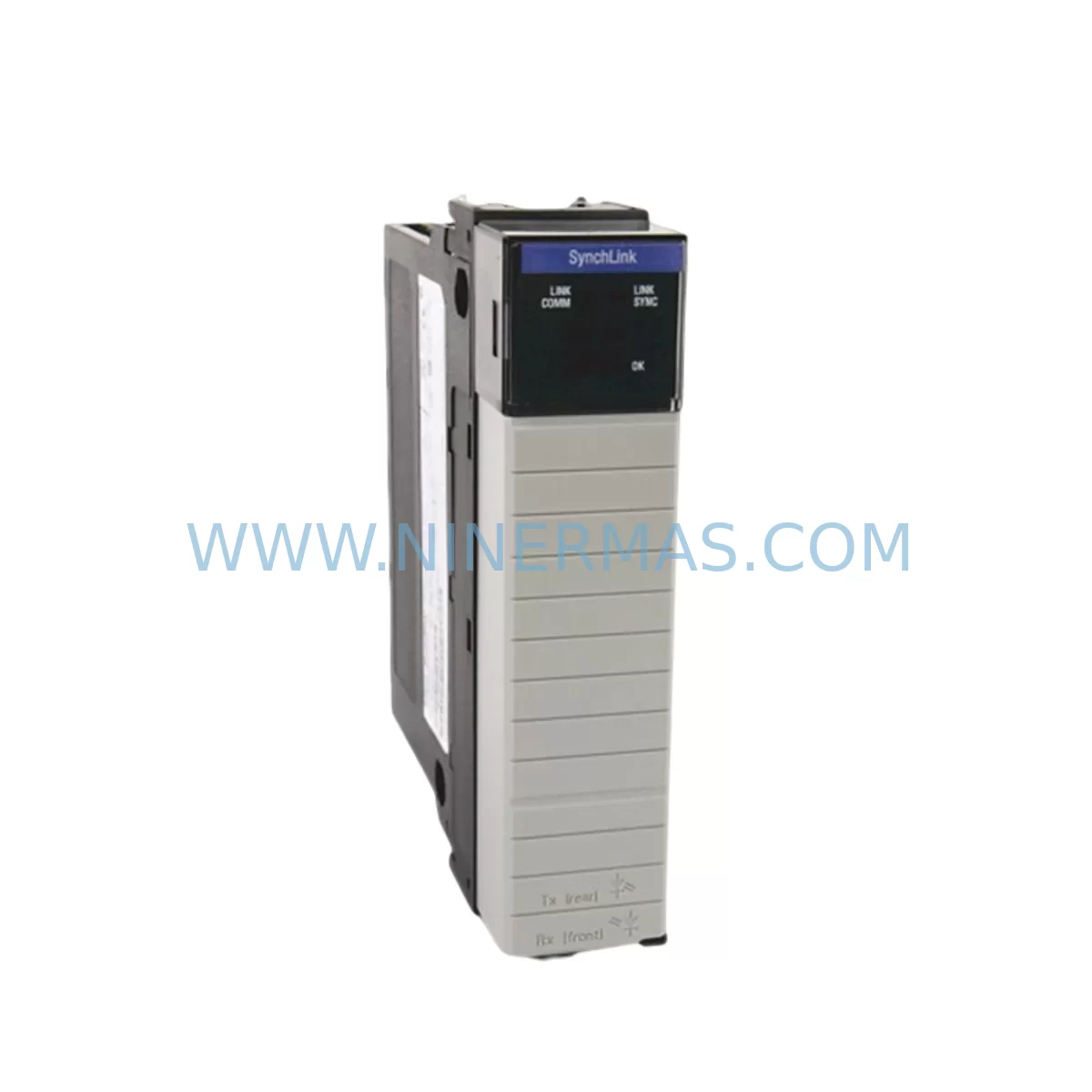
Allen-Bradley 1756-SYNCH ControlLogix SynchLink Retrofit Module
Verify the part, confirm the platform family, and move straight into quotation with the right commercial details.
RFQ Ready
- SKU1756-SYNCH
- CategoryPLC & Industrial Automation Modules
- BrandAllen-Bradley
- SupportAvailability, lead time, condition, and shipping coordination
How Buyers Usually Use This Page
- Confirm the exact part number and platform family before sending the quote request.
- Use direct email when quantity, condition, and destination are already defined internally.
- Switch to the broader brand or category archive when you need alternates nearby.
Series Navigation
Move through the most common platform families behind this part.
Product RFQ
Send this part directly for quotation.
Include quantity, required condition, destination country, and target delivery timing. Current reference: Allen-Bradley 1756-SYNCH ControlLogix SynchLink Retrofit Module with SKU 1756-SYNCH.
Allen-Bradley 1756-SYNCH ControlLogix SynchLink Retrofit Module: Legacy System Compatibility & Smooth Upgrade Path
The Allen-Bradley 1756-SYNCH is a SynchLink communication module designed for the ControlLogix platform, enabling high-speed synchronization between motion control axes across a fiber-optic ring network. As legacy automation systems age and original spare parts become increasingly difficult to source, the 1756-SYNCH has become a critical component in retrofit projects where engineers must maintain coordinated multi-axis motion without replacing the entire control architecture. NINERMAS maintains verified stock of the 1756-SYNCH to support planned upgrades, emergency replacements, and long-term spare parts programs for facilities running legacy ControlLogix motion systems.
Upgrade Compatibility Table
| Parameter | Details |
|---|---|
| SKU / Part Number | 1756-SYNCH |
| Series | ControlLogix 1756 |
| Communication Protocol | SynchLink (fiber-optic ring) |
| Backplane Interface | ControlLogix 1756 backplane compatible |
| Chassis Compatibility | 1756-A4, 1756-A7, 1756-A10, 1756-A13, 1756-A17 |
| Power Supply Requirement | Supplied via ControlLogix backplane (1756-PA72 / 1756-PB72) |
| Installation Slot | Any available ControlLogix chassis slot |
| Firmware Compatibility | RSLogix 5000 / Studio 5000 Logix Designer |
| Replacement Recommendation | Direct slot-for-slot replacement; verify fiber cable routing and ring topology |
| Commissioning Notes | Confirm module address, SynchLink ring membership, and axis synchronization parameters in controller project |
| Warranty | 12-Month Warranty from NINERMAS |
Retrofit Planning for Existing Automation Systems
When integrating the 1756-SYNCH into an existing or aging ControlLogix motion system, a structured retrofit plan is essential to avoid unplanned downtime and protect the integrity of the original control logic. The SynchLink network operates as a fiber-optic ring, meaning that any interruption to the ring — including module removal — can affect all connected axes simultaneously. Before removing the legacy 1756-SYNCH, engineers should document the current ring topology, including the number of nodes, fiber port assignments (TX/RX), and the module’s position within the ring sequence.
The ControlLogix chassis housing the 1756-SYNCH must be assessed for available slot capacity. In dense control cabinets running 1756-A10 or 1756-A17 chassis, slot allocation may be shared with motion modules such as the 1756-M02AE or 1756-M03SE, digital I/O modules like the 1756-IB16 and 1756-OB16E, and analog input modules such as the 1756-IF8. Confirming that the replacement 1756-SYNCH occupies the same slot number as the original is critical, as the module address is referenced directly in the RSLogix 5000 or Studio 5000 project file. Changing the slot assignment without updating the controller configuration will result in a module fault and loss of synchronization across all linked axes.
Power budget verification is another mandatory step. The 1756-SYNCH draws power from the ControlLogix backplane, supplied by modules such as the 1756-PA72 (120/240VAC) or 1756-PB72 (24VDC). Before installation, calculate the total backplane current draw across all installed modules to confirm the power supply is not operating near its rated capacity. Adding a replacement module to an already-loaded chassis without this check risks nuisance trips or power supply degradation over time.
For systems that also rely on a 1756-ENBT or 1756-EN2T EtherNet/IP communication module for supervisory SCADA or historian connectivity, the retrofit window should be coordinated with the network team to avoid data loss during the changeover. Similarly, if the control cabinet includes a PanelView Plus HMI communicating over EtherNet/IP, the HMI screens referencing axis status tags should be verified post-commissioning to confirm that all SynchLink-derived tags are updating correctly. In some legacy installations, a 1756-DNB DeviceNet bridge module or a 1756-RIO Remote I/O adapter may also be present in the same chassis, and their operation should be confirmed unaffected after the 1756-SYNCH swap.
Where the retrofit involves migrating from an older SLC 500 or PLC-5 motion platform to ControlLogix, the 1756-SYNCH becomes part of a broader system modernization that may also include replacing 1771 I/O racks with 1756 I/O modules, converting legacy DH+ communications to EtherNet/IP via a 1756-DHRIO module, and re-engineering the motion program in Studio 5000. In these cases, NINERMAS can supply the 1756-SYNCH alongside other ControlLogix components to support a phased migration strategy that minimizes production impact.
Downtime Control During System Migration
Minimizing downtime during a SynchLink module replacement requires careful pre-staging and a clear commissioning sequence. The replacement 1756-SYNCH should be bench-tested and confirmed functional before the maintenance window begins. Where possible, the Studio 5000 project file should be backed up and the current module configuration exported, including the SynchLink ring parameters and axis synchronization settings, so that these can be restored quickly if the replacement module requires reconfiguration.
During the physical swap, the fiber-optic ring will be temporarily broken. To protect the original program logic, the controller should be placed in Program mode before the module is removed, preventing any motion commands from executing during the changeover. Once the replacement 1756-SYNCH is seated and the fiber connections are restored, the ring should be allowed to re-establish before the controller is returned to Run mode. The commissioning engineer should verify that all axes report synchronized status in the Studio 5000 Motion Group configuration and that no SynchLink faults are present in the controller’s fault log.
For facilities where continuous production is critical, a hot-standby ControlLogix redundancy configuration using a 1756-RM2 redundancy module can provide automatic controller failover, though SynchLink ring restoration still requires a brief interruption. In all cases, NINERMAS recommends performing the swap during a scheduled maintenance window with the machine in a safe, de-energized state, and conducting a full motion test cycle before returning the line to production.
Retrofit Support FAQ
Q: Is the replacement 1756-SYNCH a direct drop-in for the original module?
A: Yes. The 1756-SYNCH is a slot-compatible replacement for the ControlLogix 1756 chassis. The module occupies a standard ControlLogix slot and connects to the SynchLink fiber-optic ring using the same TX/RX port configuration. No hardware modifications to the chassis or backplane are required. However, the slot number in the Studio 5000 project must match the physical installation position.
Q: Does NINERMAS test the 1756-SYNCH before shipment?
A: Yes. All 1756-SYNCH modules supplied by NINERMAS undergo functional verification prior to shipment, including backplane communication checks and fiber port integrity testing. Each unit is shipped with a test report and is covered by a 12-month warranty from the date of delivery.
Q: What should I verify regarding wiring and fiber connections during the retrofit?
A: The 1756-SYNCH uses fiber-optic connections rather than copper wiring. Before installation, inspect the fiber cables for damage, contamination, or excessive bend radius. Clean the fiber connectors using an appropriate fiber optic cleaning tool. Confirm that the TX port of each module connects to the RX port of the next module in the ring sequence, maintaining the correct ring direction as documented in the original system layout.
Q: How quickly can NINERMAS supply the 1756-SYNCH for an emergency replacement?
A: NINERMAS maintains inventory of the 1756-SYNCH to support both planned retrofit projects and emergency breakdown situations. Standard lead times and expedited shipping options are available. Contact our team at sale@ninermas.com or +0086 187 5021 5667 to confirm current stock availability and arrange urgent delivery.
| Product Series | ControlLogix |
|---|---|
| Country of Origin | US |
Catalog Continuation
Likely ControlLogix 1756 platform matches.
These parts are closer to the same platform family signaled by the current SKU and title, so buyers can validate continuity before sending a final RFQ.




Catalog Continuation
More Allen-Bradley modules in the catalog.
Use the brand lane to compare nearby part numbers, platform-adjacent modules, and other inquiry-ready listings before sending your final RFQ.
SKU: 2711P-B10C15A2/A
Allen-Bradley 2711P-B10C15A2 Service-Ready Spare Part
SKU: 2711P-T19C22A9P
Allen-Bradley 2711P-T19C22A9P Service-Ready Spare Part
Catalog Continuation
Alternative parts within PLC & Industrial Automation Modules.
Stay inside the same system family when you need substitutes, adjacent modules, or a broader shortlist for procurement review.



SKU: HDD02.2-W040N-HS12-01-FW FWA-DIAX04-ELS-05VRS-MS
Rexroth HDD02.2-W040N-HS12-01-FW Service-Ready Spare Part

SKU: I5DAE375F10010000S
Lenze I5DAE375F10010000S Service-Ready Spare Part for Industrial Maintenance



