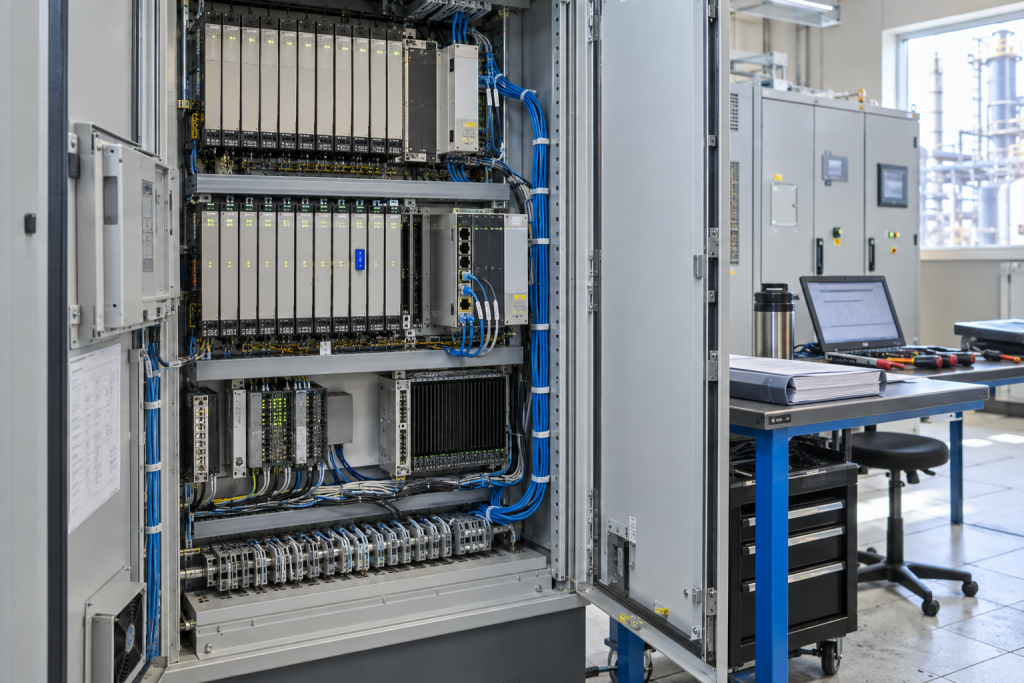
A DCS node can disappear from the operator display for a surprisingly small reason. The controller may be healthy while a power module is sagging, a bus interface is losing frames, or a connector has become intermittent after years of heat and vibration. Yokogawa CENTUM VP installations are often kept in service because the process knowledge and proven control strategy are valuable. The maintenance challenge is to recover the node without replacing the wrong part or losing evidence that will be needed during the next outage.
The practical answer is to treat the DCS node as a chain. Power, bus interface, controller, field I/O and engineering configuration must be checked in order. A spare should be selected only after the chain has been narrowed down. That approach also supports the wider industry move toward lifecycle services and stepwise modernization: the plant can preserve a reliable operating base while it decides when a larger migration is justified.
Record the CENTUM baseline
Before a failure, record the node name, cabinet, station address, controller type, power arrangement, bus connections and normal diagnostic state. Export the approved engineering data and store it with a date and checksum. Photograph the rack, terminal side, cable routing and indicator LEDs. Note whether the node is part of a redundant pair, a remote I/O station or a single control segment.
When the fault occurs, add the first alarm time, process state, operator symptoms and any recent maintenance work. A node that failed after a cabinet cleaning, power disturbance or network change should not be treated the same as a module that failed with no external event. This short history is often more useful than a generic request for a “CENTUM spare.”
Check power under the real load
Measure the supply at the node while the cabinet is active and during a representative load change. Check the input voltage, output voltage, fuse, terminals and common reference. Look for heat marks, loose conductors and aged capacitors. If a power supply recovers after a reset, record the exact behavior; an intermittent recovery can be more dangerous than a complete failure because it may return during a process upset.
The Yokogawa CENTUM VP retrofit power supply should be matched to the installed node, voltage requirement, mounting arrangement and site acceptance procedure. A label match is only the first step. Ask for the condition statement, test scope and any limitation related to the retrofit design.
Prove the bus before replacing the interface
When a node disappears, compare the local diagnostic state with the neighboring nodes. Check cable seating, shield termination, connectors, termination components and the network path. Review whether the error is local to one node or follows a segment. A bus interface can appear defective when the actual cause is a damaged cable or a disturbed connector.
The Yokogawa SNT501-13 bus interface module should be ordered only after the bus topology and module role are confirmed. Record the address, connected segment, indicator pattern and the expected recovery sequence. If the site uses a redundant interface, identify the active and standby paths before isolation.
Make the replacement repeatable
A recovery procedure should state who authorizes the node isolation, how the configuration is protected, which cables are labeled and how the first restart is checked. Bench-test a critical spare for power-up and diagnostics where practical. For used or repaired equipment, require a report that names the test conditions. “Tested” without a scope is not an acceptance criterion.
After installation, verify the node status, controller communication, field values, alarms, historian updates and engineering access. Confirm that no bypass or inhibited alarm remains. Keep the removed module tagged until the root-cause review is closed. It may contain useful evidence, and it may be the fastest rollback option if the replacement exposes a configuration problem.
For a plant with several CENTUM cabinets, rank the nodes by process consequence rather than by module price. A unique power supply or bus interface supporting a shutdown, compressor or critical utility deserves a different stock decision from a low-consequence monitoring node. Add lead-time risk, test availability and recovery skill to the register.
Review the spare record after every intervention. Note whether the replacement restored the symptom, whether the original module was repaired, and whether the bus or power measurements changed. This turns individual troubleshooting into useful lifecycle history for the next reliability review.
Questions maintenance teams usually ask
Should a missing CENTUM node be blamed on the bus interface?
Not automatically. Check power, connectors, cable condition, neighboring nodes and segment behavior before declaring the interface defective.
Is a retrofit power supply equivalent to an original spare?
It may be suitable, but the plant must verify voltage, mounting, wiring, heat dissipation and the supplier’s test evidence against the installed node.
What should be saved before a CENTUM replacement?
Save the approved configuration, node identity, address, alarm history, diagnostic state, rack photographs and the last known-good process condition.
How should an urgent RFQ describe the DCS node?
Include the exact part number, node role, cabinet location, bus segment, voltage, quantity, condition expectation, destination and photographs of labels and connectors.
Turn a node fault into better lifecycle evidence
Yokogawa CENTUM VP systems remain manageable when the plant records the complete recovery path rather than only the failed module. That evidence supports an immediate repair, a better spare level and a more rational future migration decision.
Send the node photographs, part numbers, diagnostic details and required date to NINERMAS. We can help identify the relevant CENTUM spare, clarify condition and prepare a focused quotation for the outage window.
© 2026 NINERMAS. All rights reserved. Official Website: https://NINERMAS.com Inquiry: sale@NINERMAS.com | WhatsApp/Tel: +86 187 5021 5667
Next Step
Move the research into a cleaner RFQ.
Send the part number, quantity, condition expectation, destination, and timing details so the sourcing team can reply with better availability and lead-time context.