Original Industrial Spare Part
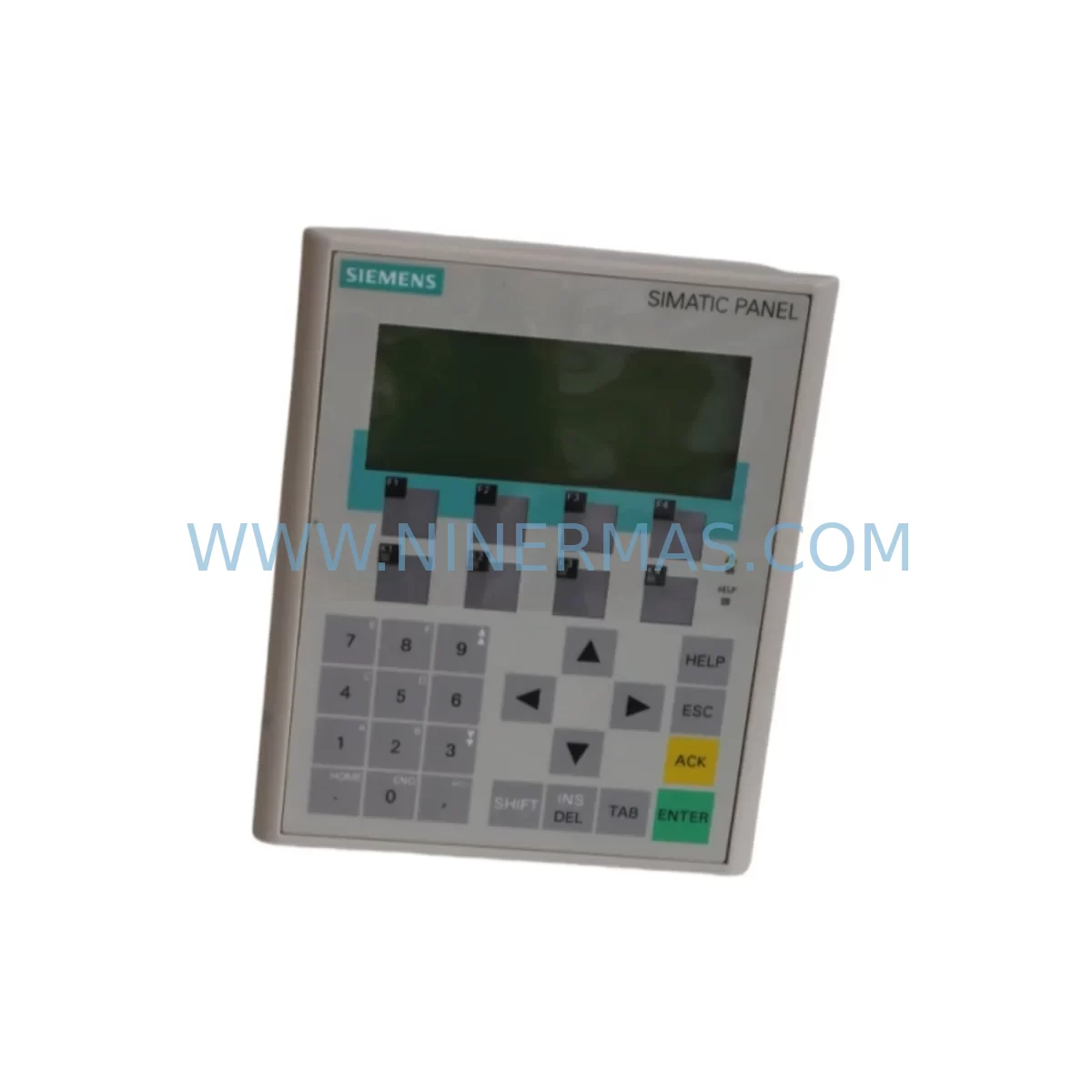
Siemens 6AV6641-0CA01-0AX1 Service-Ready Spare Part for Industrial Maintenance
Verify the part, confirm the platform family, and move straight into quotation with the right commercial details.
RFQ Ready
- SKU6AV6641-0CA01-0AX1
- CategoryPLC & Industrial Automation Modules
- BrandSiemens
- SupportAvailability, lead time, condition, and shipping coordination
How Buyers Usually Use This Page
- Confirm the exact part number and platform family before sending the quote request.
- Use direct email when quantity, condition, and destination are already defined internally.
- Switch to the broader brand or category archive when you need alternates nearby.
Series Navigation
Move through the most common platform families behind this part.
Product RFQ
Send this part directly for quotation.
Include quantity, required condition, destination country, and target delivery timing. Current reference: Siemens 6AV6641-0CA01-0AX1 Service-Ready Spare Part for Industrial Maintenance with SKU 6AV6641-0CA01-0AX1.
Siemens 6AV6641-0CA01-0AX1 Service-Ready Spare Part for Industrial Maintenance
The Siemens 6AV6641-0CA01-0AX1 is an original SIMATIC OP 77B operator panel — a compact, monochrome HMI unit widely deployed across SIMATIC S7-200, S7-300, and S7-400 PLC systems in manufacturing, process control, energy distribution, and machine automation environments. As a service-ready spare part, this unit is sourced, inspected, and dispatched to support rapid field replacement, minimizing unplanned downtime and restoring production continuity with confidence.
For maintenance engineers managing aging SIMATIC installations, the 6AV6641-0CA01-0AX1 represents a critical line-of-defense component. The OP 77B panel provides local operator control, alarm acknowledgment, parameter visualization, and process status monitoring at the machine level. When this unit fails — whether due to display degradation, membrane keypad wear, communication faults, or power supply issues — the entire operator interface for that control station is lost, often halting production until a verified replacement is installed.
Procurement engineers sourcing this part should prioritize original Siemens hardware over third-party alternatives. Counterfeit or refurbished panels may introduce firmware incompatibilities, communication instability with the MPI/PROFIBUS network, or premature failure under industrial thermal cycling. Every unit shipped by NINERMAS is tested for power-on functionality, display integrity, and communication readiness before dispatch, backed by a 12-month warranty.
Spare Maintenance Table
| SKU / Part Number | 6AV6641-0CA01-0AX1 |
| Brand | Siemens |
| Series | SIMATIC OP 77B |
| Product Type | Operator Panel (HMI) |
| Display | Monochrome LCD, 4-line text display |
| Supply Voltage | 24 V DC (20.4 – 28.8 V DC) |
| Communication Interface | MPI / PROFIBUS DP (RS-485) |
| Compatible PLC Systems | SIMATIC S7-200, S7-300, S7-400, S7-1200 (via adapter) |
| Protection Rating | IP65 (front panel) |
| Operating Temperature | 0 °C to +50 °C |
| Storage Temperature | -20 °C to +60 °C |
| Mounting | Panel cutout installation, snap-in clips |
| Weight | Approx. 1.54 kg |
| Origin | Germany |
| Condition | Original Siemens, Service-Ready |
| Pre-Shipment Test | Power-on, display, keypad, and communication verified |
| Warranty | 12 Months |
| Lead Time | In-stock units ship within 1–3 business days |
Maintenance Planning for Continuous Operation
Replacing the 6AV6641-0CA01-0AX1 in a live SIMATIC control cabinet is rarely an isolated task. Experienced maintenance engineers understand that an HMI fault is often a symptom of broader electrical stress in the control loop. Before or during replacement of the OP 77B panel, a thorough inspection of the surrounding components is strongly recommended to prevent repeat failures and ensure system stability.
Begin with the 24 V DC power supply feeding the panel — units such as the Siemens SITOP PSU100S or equivalent 6EP-series power supplies should be checked for output voltage stability, ripple, and thermal condition. A degraded power supply is a common root cause of HMI panel failures and display anomalies. Inspect the MPI/PROFIBUS communication cable and its termination resistors; a damaged or improperly terminated RS-485 bus can cause the replacement panel to exhibit the same communication errors as the failed unit.
Check the SIMATIC S7-300 CPU module (such as the 6ES7315 or 6ES7317 series) for active fault codes and verify that the MPI address configuration matches the replacement panel’s settings. If the control cabinet includes a SIMATIC ET 200 distributed I/O rack or SM 321/SM 322 digital I/O modules, inspect their status LEDs and wiring terminals for signs of loose connections or insulation breakdown that may have contributed to the HMI fault.
For cabinets with relay output modules — such as the Siemens SM 322 relay variant — verify coil voltages and contact integrity, as relay chatter or voltage spikes can propagate back through the control bus. Inspect terminal blocks and DIN rail wiring for corrosion, especially in humid or chemically aggressive environments. Signal isolators or SITRANS signal conditioners in the analog loop should also be checked if the OP 77B was displaying erratic process values prior to failure.
If the installation includes a SIMATIC S7-200 CPU (such as the CPU 224 or CPU 226) communicating via PPI protocol, confirm that the protocol bridge or PC/PPI adapter is functioning correctly before commissioning the replacement panel. In multi-panel installations, also verify that the PROFIBUS DP network topology — including repeaters and segment terminators — remains intact. Fuse holders and miniature circuit breakers protecting the 24 V DC rail should be tested for correct trip ratings and replaced if showing signs of thermal stress.
Maintaining a minimum stock of one spare 6AV6641-0CA01-0AX1 per production line is a widely adopted strategy among maintenance teams operating SIMATIC-based systems. Given that this model is in the mature phase of its product lifecycle, long-term supply availability from the open market is the most reliable procurement path. NINERMAS maintains ongoing inventory of this and related SIMATIC HMI spare parts to support annual maintenance contracts and emergency procurement requirements.
Site Replacement Workflow
Step 1 — Isolation and Safety: De-energize the control cabinet following your site LOTO (Lockout/Tagout) procedure. Confirm 24 V DC supply is isolated before disconnecting the OP 77B panel.
Step 2 — Document Existing Configuration: If accessible, record the MPI address, baud rate, and any project-specific settings stored on the panel. For OP 77B units, configuration is typically stored in the connected PLC project rather than the panel itself, but confirm with your STEP 7 or WinCC flexible project documentation.
Step 3 — Physical Removal: Release the panel mounting clips from the rear of the cutout. Disconnect the MPI/PROFIBUS connector and the 24 V DC power terminals. Note cable routing and labeling before removal.
Step 4 — Inspect and Clean: Clean the panel cutout area. Inspect the gasket seating surface for damage that could compromise the IP65 front-panel seal of the replacement unit.
Step 5 — Install Replacement Unit: Insert the 6AV6641-0CA01-0AX1 replacement into the cutout, reconnect power and communication cables, and secure the mounting clips. Verify correct MPI address assignment via the panel’s startup menu.
Step 6 — Commission and Test: Re-energize the cabinet. Confirm the panel establishes communication with the PLC, displays correct process values, and responds to operator inputs. Acknowledge any pending alarms and verify alarm history integrity.
Step 7 — Update Maintenance Records: Log the replacement date, serial number of the removed unit, and the replacement unit’s details in your CMMS or maintenance logbook. Update spare parts inventory accordingly.
This workflow is applicable whether replacing a failed unit on an emergency basis or performing a scheduled swap during planned maintenance windows. The 6AV6641-0CA01-0AX1’s panel-mount design allows a skilled technician to complete the physical replacement in under 30 minutes, making it well-suited for rapid recovery scenarios.
Spare Parts Support FAQ
Q1: Is the 6AV6641-0CA01-0AX1 still available as a new original part, and what is its supply outlook?
The SIMATIC OP 77B series has reached the mature/end-of-active-production phase in Siemens’ product lifecycle. While Siemens may no longer manufacture new units, original service-ready stock remains available through authorized spare parts distributors and industrial MRO suppliers. NINERMAS maintains verified inventory of this part and can support both immediate emergency orders and long-term blanket purchase agreements for maintenance teams requiring guaranteed supply continuity.
Q2: How is the unit tested before shipment, and what does the 12-month warranty cover?
Every 6AV6641-0CA01-0AX1 unit dispatched by NINERMAS undergoes a pre-shipment functional test covering power-on initialization, display panel integrity, membrane keypad response, and MPI communication readiness. The 12-month warranty covers hardware defects and functional failures under normal operating conditions. Units that fail within the warranty period are replaced or refunded subject to inspection. Warranty does not cover damage resulting from incorrect installation, overvoltage, or environmental conditions outside the specified operating range.
Q3: Can this panel replace older OP 77A or OP 7 units in existing SIMATIC installations?
The OP 77B (6AV6641-0CA01-0AX1) is a functional successor to earlier SIMATIC operator panels including the OP 77A and OP 7 in many applications. However, direct mechanical and electrical compatibility must be verified against your specific panel cutout dimensions, communication protocol (MPI vs. PPI vs. PROFIBUS DP), and WinCC flexible project version. In most S7-300 and S7-400 installations, the OP 77B can be configured as a drop-in replacement with minor project adaptation. Consult your STEP 7 or WinCC flexible documentation before committing to a cross-model substitution.
Q4: What is the recommended spare parts stocking strategy for facilities running multiple SIMATIC OP 77B panels?
For facilities operating three or more OP 77B panels, maintaining a minimum of one spare unit per five installed panels is a commonly recommended baseline. For critical production lines where HMI downtime directly halts output, a 1:1 or 1:2 spare ratio is advisable. Combine this with periodic inspection of power supply modules, communication cables, and terminal connections to extend the service life of installed panels and reduce unplanned replacement frequency. NINERMAS can support scheduled annual procurement programs to ensure your spare parts inventory remains current without overstocking.
| Product Series | SIMATIC |
|---|---|
| Country of Origin | DE |
Catalog Continuation
More Siemens modules in the catalog.
Use the brand lane to compare nearby part numbers, platform-adjacent modules, and other inquiry-ready listings before sending your final RFQ.
SKU: 6SE7037-0EK84-1JC2
SIEMENS 6SE7037-0EK84-1JC2 Retrofit AC Drive Legacy Systems
SKU: 6GK5216-0BA00-2AA3
Siemens 6GK5216-0BA00-2AA3 Service-Ready Spare Part for Industrial Maintenance
Catalog Continuation
Alternative parts within PLC & Industrial Automation Modules.
Stay inside the same system family when you need substitutes, adjacent modules, or a broader shortlist for procurement review.