Original Industrial Spare Part
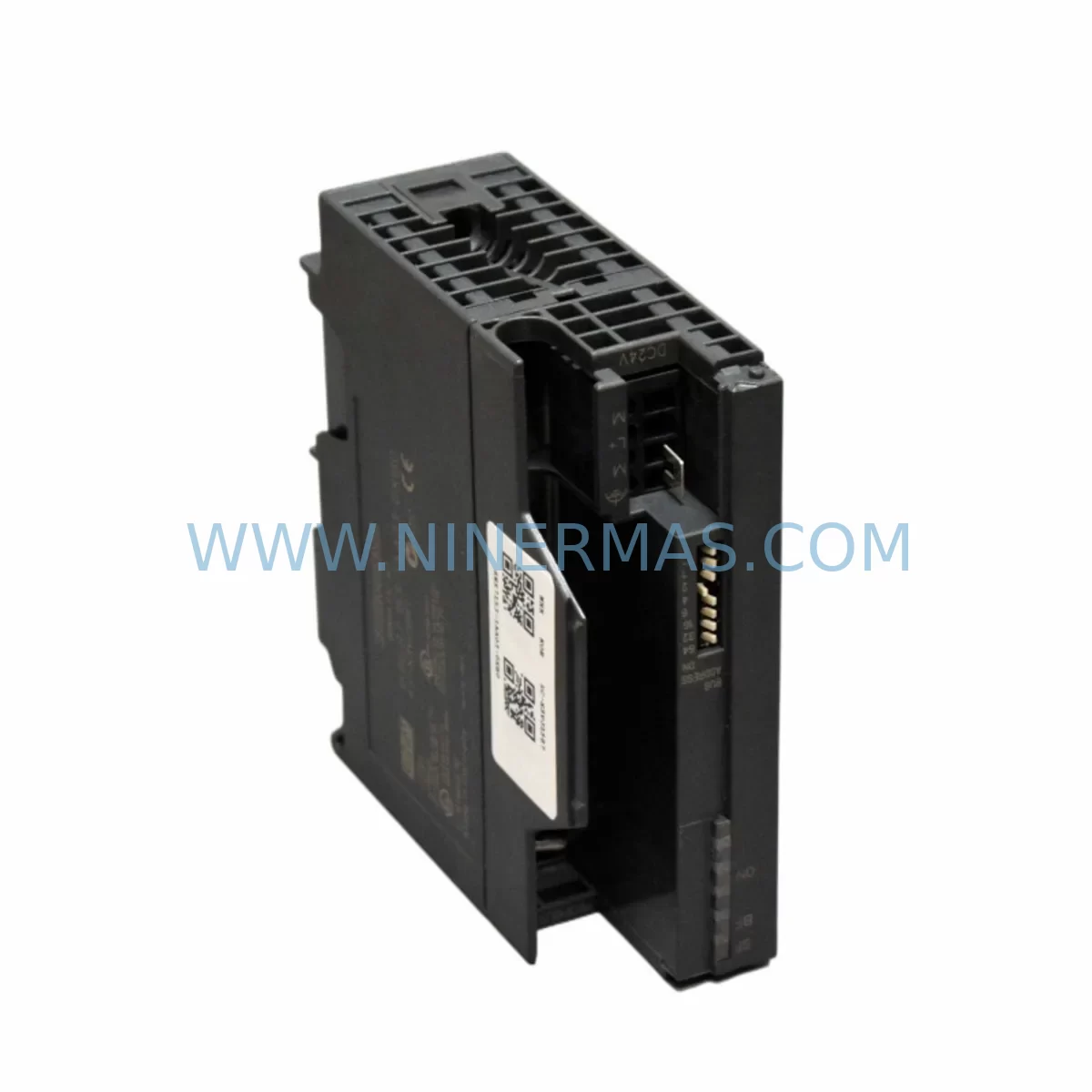
Siemens 6ES7153-1AA03-0XB0 Retrofit IM153-1 for Legacy Systems
Verify the part, confirm the platform family, and move straight into quotation with the right commercial details.
RFQ Ready
- SKU6ES7153-1AA03-0XB0
- CategoryPLC & Industrial Automation Modules
- BrandSiemens
- SupportAvailability, lead time, condition, and shipping coordination
How Buyers Usually Use This Page
- Confirm the exact part number and platform family before sending the quote request.
- Use direct email when quantity, condition, and destination are already defined internally.
- Switch to the broader brand or category archive when you need alternates nearby.
Series Navigation
Move through the most common platform families behind this part.
Product RFQ
Send this part directly for quotation.
Include quantity, required condition, destination country, and target delivery timing. Current reference: Siemens 6ES7153-1AA03-0XB0 Retrofit IM153-1 for Legacy Systems with SKU 6ES7153-1AA03-0XB0.
Siemens 6ES7153-1AA03-0XB0 Retrofit IM153-1 for Legacy ET 200M Systems
The Siemens 6ES7153-1AA03-0XB0 is an IM153-1 interface module designed for the ET 200M distributed I/O station, operating over a PROFIBUS-DP network. As a retrofit-compatible replacement for aging or discontinued interface modules in legacy automation lines, this unit enables engineers to restore or extend the service life of existing control architectures without requiring a full system overhaul. Whether you are managing a brownfield plant upgrade, replacing a failed module in a running production line, or consolidating spare parts inventory for long-term maintenance, the 6ES7153-1AA03-0XB0 delivers a reliable, drop-in solution backed by a 12-month warranty.
This module connects the ET 200M station to the PROFIBUS-DP master — typically a Siemens S7-300 or S7-400 CPU — and manages all communication between the backplane-mounted I/O modules and the controller. It supports up to 8 signal modules per station, making it a practical backbone for distributed I/O expansion in both new installations and retrofit projects. Its ruggedized design allows deployment in environments with elevated vibration, temperature variation, and electrical noise, which are common conditions in legacy control cabinets that were not originally designed for modern EMC standards.
Upgrade Compatibility Table
| Parameter | 6ES7153-1AA03-0XB0 (This Unit) | Typical Legacy Predecessor | Retrofit Notes |
|---|---|---|---|
| Communication Protocol | PROFIBUS-DP (up to 12 Mbit/s) | PROFIBUS-DP | Direct protocol compatibility; no gateway required |
| Backplane Interface | ET 200M standard backplane bus | ET 200M standard backplane bus | Mechanically and electrically compatible with existing racks |
| Max. Signal Modules | Up to 8 modules per station | Up to 8 modules per station | No I/O reconfiguration required in most cases |
| Power Supply Requirement | 24 V DC (via backplane) | 24 V DC | Verify PS307 or PS305 power supply capacity before swap |
| PROFIBUS Address Setting | DIP switch on module face | DIP switch | Match existing station address; document before removal |
| GSD File Compatibility | Standard Siemens GSD | Standard Siemens GSD | Re-download GSD if STEP 7 project was created with older version |
| Installation Form Factor | DIN rail / ET 200M rack slot 0 | DIN rail / ET 200M rack slot 0 | No mechanical modification needed |
| Diagnostic LED Indicators | SF, BF, ON | SF, BF, ON | Same diagnostic logic; existing maintenance procedures apply |
| Warranty | 12 Months — Covered by NINERMAS COMPANY LIMITED | ||
Retrofit Planning for Existing Automation Systems
Successful integration of the 6ES7153-1AA03-0XB0 into a legacy system begins well before the module arrives on site. A structured retrofit plan reduces risk, shortens commissioning time, and protects the integrity of the existing control program.
Power Budget Verification: Before removing the old IM153-1, audit the 24 V DC supply rail feeding the ET 200M rack. If the existing Siemens PS307 5A or PS307 10A power supply is already operating near capacity due to additional SM321 digital input modules, SM322 digital output modules, or SM331 analog input modules added over the years, a power margin check is essential. Overloaded supply rails are a common cause of intermittent communication faults that are often misdiagnosed as IM module failures.
Terminal and Wiring Documentation: The ET 200M rack’s field wiring connects to the signal modules, not directly to the IM153-1. However, before any work begins, photograph and document all terminal assignments on the SM modules in the rack. If the rack includes SM374 simulation modules used for testing, note their positions. Any wiring disturbed during module extraction must be restored exactly to avoid I/O mapping errors after restart.
Backplane and Rack Inspection: Inspect the ET 200M active bus module (ABM) connectors on the backplane. Corroded or mechanically stressed bus connectors are a frequent source of post-retrofit communication errors. If the rack has been in service for more than ten years, consider replacing the active bus modules alongside the IM153-1 to eliminate latent failure points. The 6ES7195-7HD10-0XA0 active bus module is the standard replacement component for this purpose.
PROFIBUS Address and GSD Configuration: Record the existing PROFIBUS station address from the DIP switches on the old module before removal. The replacement 6ES7153-1AA03-0XB0 must be set to the identical address. In STEP 7 or TIA Portal, verify that the hardware configuration reflects the correct GSD file version. If the project was originally configured with an older GSD, re-importing the current Siemens GSD file and comparing the module parameters will prevent configuration mismatch errors during online download.
Program and HMI Compatibility: The IM153-1 does not store user program logic — all PLC code resides in the S7-300 or S7-400 CPU, such as a CPU 315-2 DP or CPU 416-3 DP. However, if the existing STEP 7 project uses symbolic addressing tied to specific I/O module slot positions, verify that no slot reassignment has occurred. HMI screens built in WinCC or SIMATIC HMI panels referencing specific I/O tags will continue to function correctly as long as the I/O module configuration in the rack remains unchanged.
Communication Link Verification: After installation, use a PROFIBUS diagnostic tool or the online diagnostics in STEP 7 to confirm that the new IM153-1 is recognized by the DP master at the correct station address. Check the BF (Bus Fault) LED — it should extinguish within seconds of the CPU entering RUN mode. If the BF LED remains lit, verify cable termination resistors at both ends of the PROFIBUS segment, particularly if the ET 200M station is at the physical end of the bus.
Signal Isolation and Noise Considerations: In older control cabinets where analog signals from SM331 or SM332 modules share cable trays with power wiring, consider adding signal isolators or shielded cable extensions as part of the retrofit. This is especially relevant when the legacy installation predates modern EMC cable segregation standards and analog measurement drift has been reported.
Programming Cable and Firmware Access: Ensure a PC Adapter USB A2 or CP5711 PROFIBUS programming cable is available on site during commissioning. Direct online access to the CPU allows real-time monitoring of the ET 200M station status, I/O force functions for loop checks, and immediate fault diagnosis without relying solely on LED indicators.
Downtime Control During System Migration
Minimizing production downtime during an IM153-1 swap requires a disciplined pre-outage preparation process. The physical module exchange itself typically takes under 15 minutes; the majority of retrofit time is consumed by pre-work and post-installation verification.
Pre-Outage Preparation: Before the planned maintenance window, perform a full online backup of the STEP 7 or TIA Portal project, including hardware configuration and all program blocks (OB, FB, FC, DB). Store the backup on a local engineering laptop and a network share. If the CPU supports memory card backup, create a current copy on the SIMATIC Micro Memory Card. This ensures that if any unexpected configuration issue arises during commissioning, the original program state can be restored within minutes.
Controlled CPU Stop Sequence: Coordinate the CPU STOP command with the process control team to ensure all field actuators are in a safe state before communication to the ET 200M station is interrupted. For processes with interlock logic, verify that the safety PLC or safety relay system — if present — will hold the safe state independently during the IM module swap. Do not rely on the standard CPU watchdog alone for safety-critical outputs.
Module Exchange and Address Verification: With the rack de-energized, remove the old IM153-1 by releasing the DIN rail latch and disconnecting the PROFIBUS connector. Install the 6ES7153-1AA03-0XB0, confirm the DIP switch address matches the documented station address, and reconnect the PROFIBUS plug. Re-energize the rack and observe the ON LED — it should illuminate steadily. Transition the CPU to RUN mode and monitor the BF LED for clearance.
I/O Loop Check and HMI Verification: After the CPU enters RUN mode, perform a structured I/O loop check using the STEP 7 variable table or TIA Portal watch table. Force individual digital outputs and confirm field device response. For analog channels on SM331 or SM332 modules, verify live process values against field instrumentation readings. Confirm that all HMI screens display correct tag values and that no alarm states are falsely triggered by the module replacement.
Post-Retrofit Documentation: Update the as-built documentation to reflect the new module serial number, installation date, and firmware version. Record the PROFIBUS address setting and the power supply load measurement taken after restart. This documentation supports future maintenance cycles and reduces diagnostic time if a fault occurs later in the system’s service life.
Retrofit Support FAQ
Q1: Is the 6ES7153-1AA03-0XB0 a direct drop-in replacement for earlier IM153-1 variants?
In most ET 200M installations, yes. The 6ES7153-1AA03-0XB0 is mechanically and electrically compatible with the standard ET 200M rack and uses the same PROFIBUS-DP interface. Verify the GSD file version in your STEP 7 or TIA Portal hardware configuration matches the replacement module’s GSD to avoid parameter mismatch errors during download. No wiring changes to field terminals are required.
Q2: What pre-shipment testing does NINERMAS perform on this module?
Every 6ES7153-1AA03-0XB0 unit supplied by NINERMAS undergoes functional power-on testing and PROFIBUS communication verification before dispatch. Units are inspected for physical condition, connector integrity, and DIP switch operability. A 12-month warranty is provided from the date of shipment, covering manufacturing defects and functional failures under normal operating conditions.
Q3: Can this module be used in a system where the PROFIBUS master is a third-party controller rather than a Siemens CPU?
Yes. The 6ES7153-1AA03-0XB0 communicates via standard PROFIBUS-DP protocol and is compatible with any DP master that supports the module’s GSD file. Import the Siemens GSD file into your master configuration tool, assign the station address, and configure the I/O modules in the rack according to the GSD slot definitions. Commissioning steps are the same as with a Siemens S7 master.
Q4: What is the lead time and stock availability?
NINERMAS maintains inventory of the 6ES7153-1AA03-0XB0 to support urgent retrofit and breakdown replacement requirements. Standard orders are processed and dispatched within 1–3 business days. For large-quantity orders or scheduled maintenance projects requiring multiple units, contact our sales team at sale@ninermas.com or +0086 187 5021 5667 to confirm stock levels and arrange priority dispatch.
| Product Series | SIMATIC |
|---|---|
| Country of Origin | DE |
Catalog Continuation
More Siemens modules in the catalog.
Use the brand lane to compare nearby part numbers, platform-adjacent modules, and other inquiry-ready listings before sending your final RFQ.

SKU: 6FC5357-0BB12-0AE0
Siemens 6FC5357-0BB12-0AE0 Service-Ready Industrial Spare Part
SKU: 6SL3224-0BE32-2UA0
Siemens 6SL3224-0BE32-2UA0 Retrofit PM240 Power Module
Catalog Continuation
Alternative parts within PLC & Industrial Automation Modules.
Stay inside the same system family when you need substitutes, adjacent modules, or a broader shortlist for procurement review.