Original Industrial Spare Part
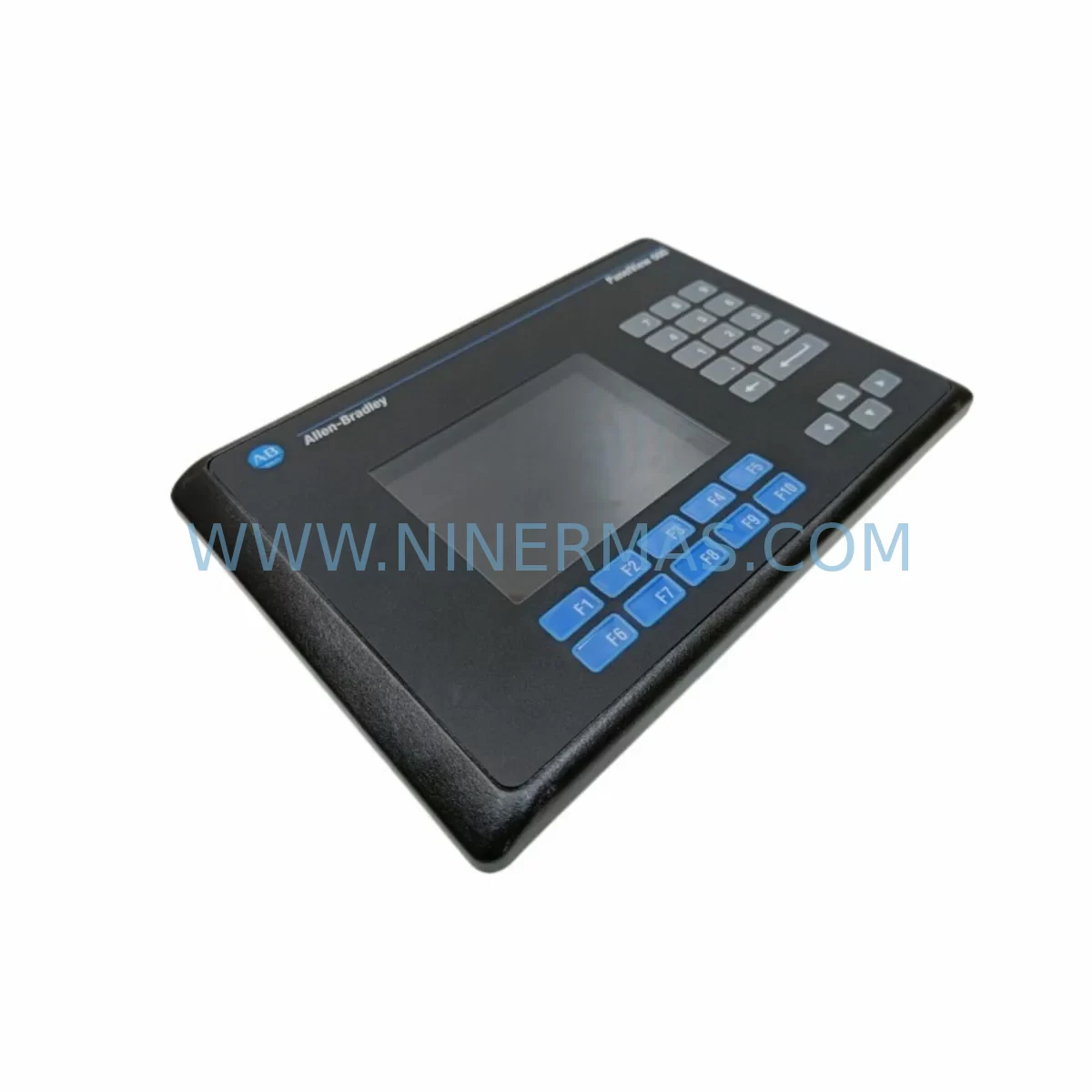
Allen-Bradley 2711-K6C8 Retrofit-Compatible HMI for Legacy Systems
Verify the part, confirm the platform family, and move straight into quotation with the right commercial details.
RFQ Ready
- SKU2711-K6C8
- CategoryPLC & Industrial Automation Modules
- BrandAllen-Bradley
- SupportAvailability, lead time, condition, and shipping coordination
How Buyers Usually Use This Page
- Confirm the exact part number and platform family before sending the quote request.
- Use direct email when quantity, condition, and destination are already defined internally.
- Switch to the broader brand or category archive when you need alternates nearby.
Series Navigation
Move through the most common platform families behind this part.
Product RFQ
Send this part directly for quotation.
Include quantity, required condition, destination country, and target delivery timing. Current reference: Allen-Bradley 2711-K6C8 Retrofit-Compatible HMI for Legacy Systems with SKU 2711-K6C8.
Allen-Bradley 2711-K6C8 Retrofit-Compatible HMI for Legacy Systems: Seamless Upgrade for Aging Automation Infrastructure
The Allen-Bradley 2711-K6C8 is a 6-inch monochrome keypad operator terminal from the PanelView 600 series, designed for human-machine interface (HMI) applications in industrial control environments. As legacy automation systems age and original equipment manufacturers discontinue support for older HMI platforms, the 2711-K6C8 remains a critical retrofit and replacement component for facilities that rely on Rockwell Automation’s DH-485 and RS-232 communication infrastructure. NINERMAS COMPANY LIMITED maintains verified inventory of the 2711-K6C8 to support plant engineers, system integrators, and maintenance teams managing aging control panels, production lines, and control cabinet upgrades across manufacturing, utilities, and process industries.
Whether you are replacing a failed unit on an active production line, sourcing a spare for a scheduled shutdown, or planning a phased migration from an older PanelView 300 or PanelView 550 platform, the 2711-K6C8 provides a direct form-factor and communication-compatible solution that minimizes engineering rework and reduces total downtime exposure.
Upgrade Compatibility Table
| Parameter | Details |
|---|---|
| SKU / Part Number | 2711-K6C8 |
| Series | PanelView 600 |
| Display Size | 6-inch Monochrome |
| Interface Type | Keypad (Non-Touch) |
| Communication Ports | DH-485, RS-232 |
| Power Supply Requirement | 24V DC |
| Panel Cutout Compatibility | Standard PanelView 600 cutout — no modification required for direct replacement |
| Compatible Controllers | SLC 500 series (SLC 5/03, SLC 5/04), MicroLogix 1000, MicroLogix 1100, MicroLogix 1500 |
| Programming Software | PanelBuilder 1400e (legacy); PanelBuilder32 for application transfer |
| Common Replacement Paths | Replaces 2711-K6C1, 2711-K6C5; upgrade path from PanelView 300 (2711-B6C8) and PanelView 550 (2711-K5A8) |
| Commissioning Focus | Node address verification, DH-485 baud rate matching, terminal block wiring, application file transfer and screen validation |
| Warranty | 12-Month Warranty — all units tested prior to shipment |
Retrofit Planning for Existing Automation Systems
Integrating the 2711-K6C8 into an existing control system requires a structured pre-installation review to ensure compatibility across power, communication, and mechanical dimensions. The following planning considerations apply to the most common retrofit and upgrade scenarios encountered in the field.
Power Supply Capacity: Confirm that the existing 24V DC power supply within the control cabinet can support the 2711-K6C8’s current draw. In older panels where the power supply module — such as a 1746-P2 or 1746-P4 from the SLC 500 rack — is already operating near capacity due to additional I/O modules or communication adapters, a load calculation should be performed before installation. Undersized power supplies are a common cause of intermittent HMI faults during retrofit projects.
Terminal Block Wiring and Cable Routing: The 2711-K6C8 uses a standard DB-9 or terminal block connection for RS-232 and DH-485 communication. When replacing an older unit, verify that existing cable lengths and routing paths are compatible with the replacement unit’s port locations. In tight control cabinet installations, cable management and bend radius must be confirmed before the new unit is mounted. If the existing wiring uses a 1747-PIC (Personal Interface Converter) or AIC+ (Advanced Interface Converter) for DH-485 network bridging, these components should be inspected and tested as part of the retrofit process.
Backplane and Rack Interface: The 2711-K6C8 is a standalone panel-mount HMI and does not occupy a rack slot in the SLC 500 or 1746 backplane. However, the controller it communicates with — typically an SLC 5/03 or SLC 5/04 installed in a 1746-A4 or 1746-A7 chassis — must have its DH-485 port available and correctly configured. If the DH-485 network includes multiple nodes (such as additional PanelView terminals, a 1747-SDN DeviceNet Scanner, or a 1747-KE communication module), the node address of the replacement 2711-K6C8 must be set to match the original unit’s address to avoid network conflicts.
Application File Transfer and HMI Screen Validation: Before decommissioning the failed unit, retrieve the application file from the original 2711-K6C8 using PanelBuilder32 or from a backup archive. If no backup exists, the application may need to be reconstructed from the original PanelBuilder 1400e project files or re-engineered from HMI screen photographs and I/O tag lists. After loading the application onto the replacement unit, all screen navigation, data display tags, alarm messages, and operator input functions must be validated against the live controller program. This step is critical in processes where HMI screens control setpoint entry, batch sequencing, or safety interlock acknowledgment.
Communication Protocol Migration: For facilities planning a longer-term migration from DH-485 to EtherNet/IP, the 2711-K6C8 replacement provides an opportunity to evaluate the migration path. While the 2711-K6C8 itself does not support EtherNet/IP natively, its installation can serve as a stable interim solution while the broader migration — which may involve replacing the SLC 500 controller with a CompactLogix L16ER or MicroLogix 1400, and eventually transitioning to a PanelView Plus 600 (2711P-B6C20D) — is planned and budgeted. This phased approach allows production to continue without a full system cutover.
I/O Expansion and Signal Isolation: In retrofit projects where additional I/O capacity is being added alongside the HMI replacement, confirm that new 1746-IB16 digital input modules or 1746-OB16 digital output modules do not alter the existing I/O addressing in the SLC 500 program. Address conflicts between new and existing modules can cause unexpected output behavior during commissioning. Where analog signals are involved, signal isolators should be used to protect the controller’s 1746-NI4 or 1746-NO4I analog modules from ground loops introduced during wiring modifications.
Installation Space Confirmation: The PanelView 600 series requires a standard panel cutout of approximately 192mm × 141mm. Before ordering, confirm the existing cutout dimensions in the control cabinet door or enclosure. In older installations where the panel has been modified or repaired, the cutout may have been altered. Gasket condition and NEMA rating of the enclosure should also be verified to maintain the environmental protection rating of the installation.
Downtime Control During System Migration
Minimizing unplanned downtime is the primary operational concern when replacing a failed or end-of-life HMI in an active production environment. The following practices are recommended to protect program logic, maintain field control continuity, and reduce retrofit risk during the transition to the 2711-K6C8.
Pre-Shutdown Preparation: All replacement work should be planned during a scheduled maintenance window. Prior to shutdown, back up the SLC 500 controller program using RSLogix 500 and save the PanelView application file. Document all DH-485 node addresses, baud rate settings, and communication cable connections with photographs and written records. Prepare the replacement 2711-K6C8 with the application file pre-loaded and tested on a bench setup if possible, so that the on-site installation is limited to mechanical mounting, wiring connection, and final communication verification.
Controller Program Protection: During the HMI replacement, the SLC 500 controller should remain in Run mode where process safety permits, so that field outputs and control logic continue to execute. The HMI is a display and input device only — its disconnection does not interrupt the controller’s scan cycle. However, if the process relies on operator input from the HMI for setpoint changes or mode selection, a temporary manual control procedure should be established for the duration of the replacement.
Communication Link Verification: After mounting and wiring the replacement 2711-K6C8, verify the DH-485 communication link by confirming that the HMI successfully reads data tags from the SLC 500 controller. Use the diagnostic screens available in the PanelView application to confirm communication status before returning the system to normal operation. If a 1747-PIC or AIC+ is used as the network interface, verify that the converter is powered and that the DH-485 termination resistors are correctly installed at the network endpoints.
Post-Installation Functional Test: Conduct a full functional test of all HMI screens, operator inputs, alarm displays, and data readbacks before releasing the system to production. Document the test results and retain them as part of the maintenance record for the installation. All 2711-K6C8 units supplied by NINERMAS COMPANY LIMITED are tested prior to shipment to confirm display function, keypad response, and communication port integrity, reducing the risk of receiving a non-functional unit on-site.
Retrofit Support FAQ
Q: Is the 2711-K6C8 a direct replacement for the 2711-K6C1 or 2711-K6C5?
A: Yes. The 2711-K6C8 is functionally compatible with other PanelView 600 keypad variants including the 2711-K6C1 and 2711-K6C5. The primary difference between variants is the communication port configuration. Confirm the communication protocol (DH-485 or RS-232) used in your installation before ordering to ensure the correct variant is selected. NINERMAS can assist with variant cross-reference verification prior to shipment.
Q: Can the existing PanelView application file be transferred to the replacement unit without reprogramming?
A: In most cases, yes. If the original application file is available in PanelBuilder32 format, it can be transferred directly to the replacement 2711-K6C8 using a standard programming cable (1747-PIC or USB-to-DH485 adapter). If the original file is not available, NINERMAS can advise on recovery options. A full screen and tag validation test is always recommended after transfer to confirm correct operation before returning the system to production.
Q: What is the lead time and warranty coverage for the 2711-K6C8?
A: NINERMAS COMPANY LIMITED maintains in-stock inventory of the 2711-K6C8 to support urgent replacement requirements. Standard lead time for in-stock units is 3–7 business days depending on destination. All units are covered by a 12-month warranty from the date of shipment and are tested prior to dispatch to verify display, keypad, and communication port functionality.
Q: Is the 2711-K6C8 compatible with MicroLogix controllers as well as SLC 500?
A: Yes. The 2711-K6C8 supports DH-485 communication, which is compatible with MicroLogix 1000, MicroLogix 1100, MicroLogix 1200, and MicroLogix 1500 controllers, in addition to SLC 5/03 and SLC 5/04 processors. Confirm the DH-485 port availability and node address configuration on your specific controller model before installation. For MicroLogix controllers using the built-in RS-232 port in DF1 mode, the RS-232 variant of the PanelView 600 should be selected instead.
—
| Product Series | 2711 |
|---|---|
| Country of Origin | US |
Catalog Continuation
More Allen-Bradley modules in the catalog.
Use the brand lane to compare nearby part numbers, platform-adjacent modules, and other inquiry-ready listings before sending your final RFQ.




Catalog Continuation
Alternative parts within PLC & Industrial Automation Modules.
Stay inside the same system family when you need substitutes, adjacent modules, or a broader shortlist for procurement review.



SKU: HDD02.2-W040N-HS12-01-FW FWA-DIAX04-ELS-05VRS-MS
Rexroth HDD02.2-W040N-HS12-01-FW Service-Ready Spare Part

SKU: I5DAE375F10010000S
Lenze I5DAE375F10010000S Service-Ready Spare Part for Industrial Maintenance