Original Industrial Spare Part
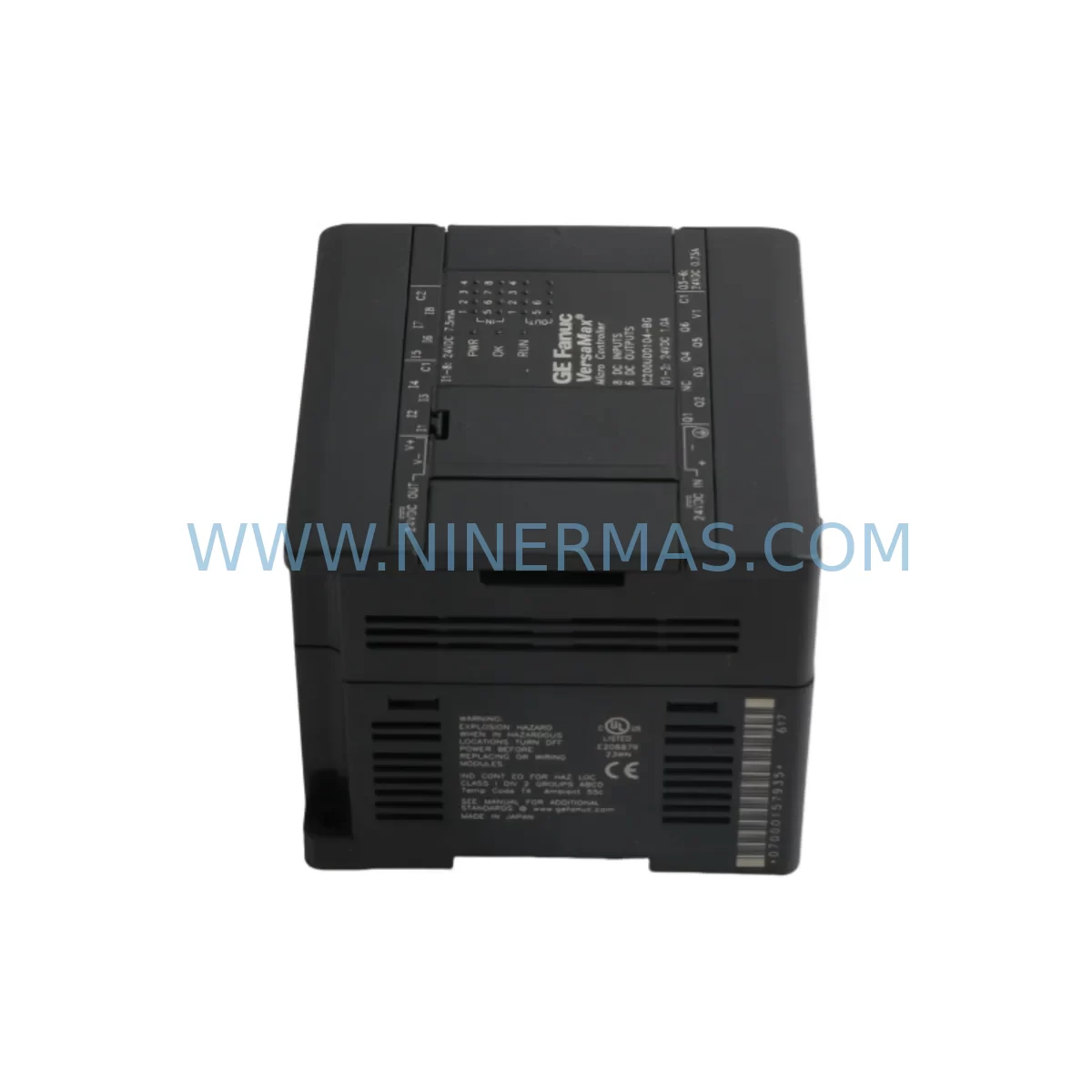
GE IC200UDD104 Retrofit Discrete Input for Legacy Systems
Verify the part, confirm the platform family, and move straight into quotation with the right commercial details.
RFQ Ready
- SKUIC200UDD104-BG IC200UDD104
- CategoryPLC & Industrial Automation Modules
- BrandGE Fanuc
- SupportAvailability, lead time, condition, and shipping coordination
How Buyers Usually Use This Page
- Confirm the exact part number and platform family before sending the quote request.
- Use direct email when quantity, condition, and destination are already defined internally.
- Switch to the broader brand or category archive when you need alternates nearby.
Series Navigation
Move through the most common platform families behind this part.
Product RFQ
Send this part directly for quotation.
Include quantity, required condition, destination country, and target delivery timing. Current reference: GE IC200UDD104 Retrofit Discrete Input for Legacy Systems with SKU IC200UDD104-BG IC200UDD104.
GE IC200UDD104 Retrofit Discrete Input for Legacy Systems
The GE IC200UDD104 is a 16-point 24VDC discrete input module designed for the GE VersaMax modular PLC platform. As a retrofit-compatible replacement for legacy automation systems, the IC200UDD104 supports both positive and negative logic configurations, making it a versatile solution for engineers managing aging control infrastructure. Whether you are replacing a failed module in an existing VersaMax rack or upgrading a legacy discrete I/O subsystem to extend operational life, the IC200UDD104 delivers reliable field-proven performance with full backward compatibility across the VersaMax I/O carrier and backplane ecosystem.
NINERMAS maintains ready inventory of the IC200UDD104 with pre-shipment functional testing and a 12-month warranty, ensuring your retrofit project proceeds without supply chain delays. Each unit is verified against GE Fanuc specifications before dispatch, supporting maintenance engineers and system integrators who require traceable, tested spare parts for critical production environments.
Upgrade Compatibility Table
| Parameter | IC200UDD104 Specification | Retrofit Notes |
|---|---|---|
| Input Points | 16 x 24VDC Discrete Inputs | Direct replacement for same-point-count legacy modules |
| Logic Type | Positive / Negative Logic Selectable | Verify field wiring polarity before installation |
| Carrier Interface | VersaMax I/O Carrier (IC200CHS022 compatible) | Confirm carrier slot assignment and module address |
| Backplane Communication | VersaMax Local I/O Bus | Compatible with IC200CPU005 and IC200PNS002 scanners |
| Power Consumption | Supplied via carrier — no separate power connector | Verify IC200PWR002 power budget before adding modules |
| Installation Space | Single-slot VersaMax carrier | Confirm available slot in existing rack layout |
| Communication Protocol | VersaMax local bus; Profibus/Profinet via scanner | No protocol migration required for same-platform upgrades |
| Programming Compatibility | GE Proficy Machine Edition / Logicmaster | Existing ladder logic and I/O mapping remain valid |
| Warranty | 12-Month Warranty — All units pre-shipment tested by NINERMAS | |
Retrofit Planning for Existing Automation Systems
Successful integration of the IC200UDD104 into a legacy VersaMax system requires a structured pre-retrofit assessment. Begin by auditing the existing rack configuration: identify the carrier model (typically IC200CHS022 or a compatible variant), confirm available slot positions, and document the current module address assignments used in the PLC program. Incorrect module addressing is one of the most common causes of I/O faults following a module swap, and it must be resolved before the replacement unit is powered on.
Power budget verification is a critical step that is frequently overlooked. The IC200PWR002 power supply module provides a defined current budget across the VersaMax backplane. When adding or replacing discrete input modules such as the IC200UDD104, calculate the cumulative current draw of all installed modules — including any IC200MDL740 discrete output modules, IC200MDL750 discrete input modules, IC200ALG260 analog input modules, and IC200UDR001 relay output modules — to confirm the power supply is not operating near its rated limit. Exceeding the power budget will cause intermittent faults that are difficult to diagnose under production conditions.
Terminal wiring adaptation is the next consideration. The IC200UDD104 uses the standard VersaMax field wiring terminal block on the carrier. If the legacy module being replaced used a different terminal layout or a different carrier generation, verify that the existing field cable terminations align with the IC200UDD104 input channel assignments. In some retrofit scenarios, a wiring adapter or re-termination of the field cable may be required to maintain correct signal mapping.
For systems where the VersaMax rack communicates over Profibus DP or Profinet IO via a network scanner such as the IC200PNS002, confirm that the GSD or GSDML device description file loaded in the master controller still reflects the correct I/O configuration after the module replacement. If the IC200UDD104 is replacing a module with a different I/O count or type, the network configuration in the master — whether a Siemens S7 series controller, an ABB AC500, or another Profibus master — must be updated to match the new module’s I/O footprint before the system is restarted.
Programming compatibility should be validated using GE Proficy Machine Edition or the legacy Logicmaster 90 programming environment. The IC200UDD104 is fully recognized by both toolsets. If the existing program references the replaced module’s I/O addresses symbolically, no program changes are required. If absolute addressing is used, verify that the slot-based address of the IC200UDD104 matches the address previously assigned to the failed module. An IC200CBL602 programming cable or equivalent USB-to-serial adapter will be needed to connect a laptop to the IC200CPU005 CPU module for online program verification and forced I/O testing during commissioning.
HMI screen validation is the final pre-restart check. If the system includes an operator panel or SCADA interface that displays discrete input states sourced from the VersaMax rack, confirm that the tag addresses mapped to the IC200UDD104 input channels are correctly reflected in the HMI configuration. Discrepancies between the PLC I/O map and the HMI tag database will result in incorrect status displays that can mislead operators during the post-retrofit startup phase.
Downtime Control During System Migration
Minimizing unplanned downtime during a VersaMax module replacement requires preparation before the maintenance window begins. The IC200UDD104 is a hot-swap-capable module on supported VersaMax carrier configurations, but this capability must be confirmed against the specific CPU firmware version and carrier model in use. Where hot-swap is not supported, a controlled shutdown sequence must be planned to protect the integrity of the running PLC program and prevent uncontrolled outputs during the power-down cycle.
Before removing the failed module, use the programming software to force all input channels associated with the IC200UDD104 to a safe state. This prevents the control program from reacting to spurious input transitions during the physical module swap. Document the forced values and the original I/O states so that the commissioning engineer can verify correct signal restoration after the replacement module is seated and powered.
Backup the PLC program and I/O configuration to an offline file before beginning any hardware change. This ensures that if the replacement module triggers an unexpected configuration fault — for example, due to a firmware version mismatch between the IC200UDD104 and the IC200CPU005 CPU — the original program can be restored without data loss. Keep the backup file accessible on the commissioning laptop throughout the retrofit window.
After seating the IC200UDD104 and restoring power, perform a structured online verification: check module status LEDs, confirm I/O fault flags are clear in the PLC diagnostics, and perform a point-by-point input signal test using a field signal source or the programming software’s forced I/O function. Only after all 16 input channels have been verified should the system be returned to automatic mode. This structured commissioning approach typically limits the active intervention window to under two hours for a single-module replacement, even in complex multi-rack VersaMax installations.
Retrofit Support FAQ
Q1: Is the IC200UDD104 a direct drop-in replacement for other VersaMax 16-point discrete input modules?
The IC200UDD104 is mechanically and electrically compatible with VersaMax carriers that support 16-point discrete input modules. However, confirm the carrier model and slot assignment before installation. Modules with different I/O counts or logic types (e.g., IC200UDD020 with a different point configuration) are not direct replacements and will require program address updates.
Q2: What commissioning steps are required after installing the IC200UDD104?
After seating the module, verify that the CPU recognizes the IC200UDD104 without I/O faults, confirm module address alignment with the PLC program, perform a point-by-point input signal test, and validate HMI tag mapping. Use an IC200CBL602 or compatible programming cable to connect to the CPU for online diagnostics. Do not return the system to automatic mode until all 16 channels have been verified.
Q3: Does NINERMAS provide pre-shipment testing and warranty coverage for the IC200UDD104?
Yes. Every IC200UDD104 unit shipped by NINERMAS undergoes functional pre-shipment testing against GE Fanuc specifications. All units are covered by a 12-month warranty from the date of shipment. Warranty claims are supported by NINERMAS technical staff and include replacement or repair of confirmed defective units.
Q4: What is the typical lead time and stock availability for the IC200UDD104?
NINERMAS maintains ready inventory of the IC200UDD104 to support urgent maintenance and retrofit requirements. Standard orders are processed and dispatched within 1–3 business days. For large-quantity or long-term supply agreements, contact NINERMAS to discuss reserved inventory arrangements and extended supply commitments.
| Product Series | Fanuc |
|---|---|
| Country of Origin | US |
Catalog Continuation
Nearby part numbers around IC200UDD.
Use this lane when the buyer is comparing adjacent model numbers, revision-near items, or closely related spare variants within the same brand family.
Catalog Continuation
More GE Fanuc modules in the catalog.
Use the brand lane to compare nearby part numbers, platform-adjacent modules, and other inquiry-ready listings before sending your final RFQ.
Catalog Continuation
Alternative parts within PLC & Industrial Automation Modules.
Stay inside the same system family when you need substitutes, adjacent modules, or a broader shortlist for procurement review.
SKU: SC34.0300.0011.0000.0-JW1 SC34.0300.0011.0000.0
LUST SC34.0300.0011.0000.0-JW1 Service-Ready Spare Part
SKU: LSC-096-2-30-560-P5B0H2MM0
LTi Motion LSC-096-2-30-560-P5B0H2MM0 Retrofit Servo Drive
SKU: DS200SHVMG1AFE
GE DS200SHVMG1AFE Retrofit-Compatible Interface Module