
Original Industrial Spare Part
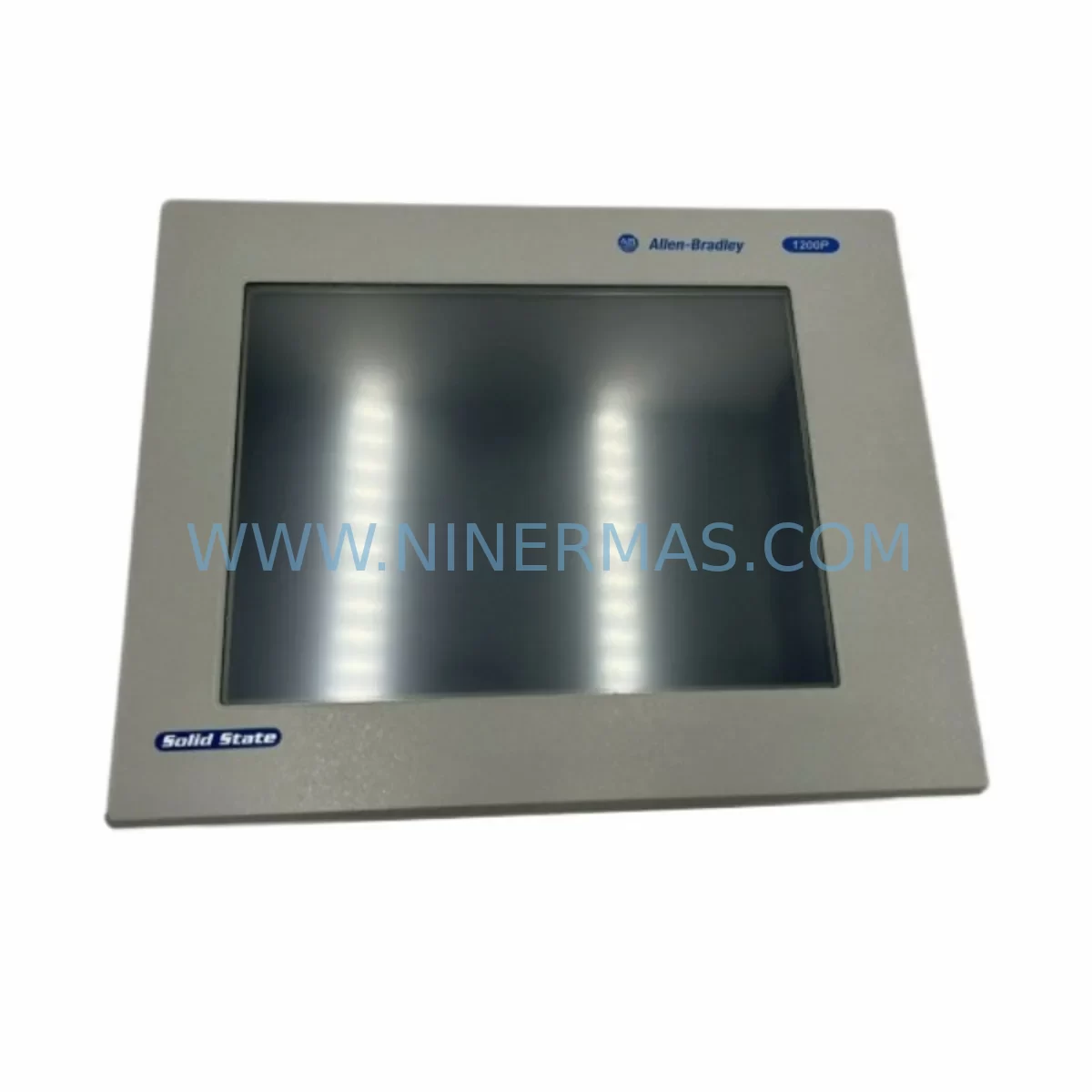
AB 6181F-15TSXP Service-Ready Spare Part for Industrial Maintenance
Verify the part, confirm the platform family, and move straight into quotation with the right commercial details.
RFQ Ready
- SKU6181F-15TSXP
- CategoryPLC & Industrial Automation Modules
- BrandAllen-Bradley
- SupportAvailability, lead time, condition, and shipping coordination
How Buyers Usually Use This Page
- Confirm the exact part number and platform family before sending the quote request.
- Use direct email when quantity, condition, and destination are already defined internally.
- Switch to the broader brand or category archive when you need alternates nearby.
Series Navigation
Move through the most common platform families behind this part.
Product RFQ
Send this part directly for quotation.
Include quantity, required condition, destination country, and target delivery timing. Current reference: AB 6181F-15TSXP Service-Ready Spare Part for Industrial Maintenance with SKU 6181F-15TSXP.
AB 6181F-15TSXP Service-Ready Spare Part for Industrial Maintenance
The Allen-Bradley 6181F-15TSXP is a ruggedized industrial display computer engineered for demanding automation environments. As a service-ready spare part, it is stocked and tested to support rapid replacement in the event of HMI failure, control cabinet downtime, or scheduled system overhaul. Sourced from verified supply channels and backed by a 12-month warranty, this unit is designed to minimize production interruption and restore system operation with confidence.
For maintenance engineers managing aging Allen-Bradley control systems, the 6181F-15TSXP represents a critical node in the operator interface layer. Its 15-inch touchscreen display, sealed front panel, and compatibility with FactoryTalk View Site Edition make it a direct fit for existing 6181F Series installations without requiring software reconfiguration or panel modification. Procurement engineers will appreciate the availability of tested stock, documented compatibility, and a clear warranty policy that reduces sourcing risk for long-term maintenance contracts.
When planning a replacement of the 6181F-15TSXP in the field, it is essential to treat the swap as part of a broader control cabinet inspection. A single HMI failure often signals stress across adjacent components. Before commissioning the replacement unit, technicians should verify the integrity of the 24VDC power supply feeding the display computer — units in the 1606-XLP or 1606-XLS series are commonly paired in these cabinets and should be checked for output stability and ripple. Loose or corroded terminal connections on the power input block can cause intermittent resets that are misdiagnosed as HMI faults.
The communication backbone connecting the 6181F-15TSXP to the PLC or DCS layer deserves equal attention. EtherNet/IP cabling, managed switches, and any 1783-series stratix network components in the same panel should be inspected for physical damage, port errors, and firmware currency. If the system uses a ControlLogix or CompactLogix backplane, verify that the 1756 or 1769 communication modules are operating without fault codes before bringing the replacement HMI online. A clean network handshake at startup confirms that the issue was isolated to the display unit and not a deeper infrastructure problem.
I/O integrity is another checkpoint that should not be skipped. If the 6181F-15TSXP was connected to local I/O or acting as a data concentrator, inspect the associated 1734 POINT I/O modules or 1756 I/O cards for blown fuses, tripped protection circuits, or wiring faults. Signal isolators used to condition analog inputs — particularly in environments with high electrical noise from variable frequency drives or servo amplifiers — should be tested for output accuracy. A faulty signal isolator can corrupt process data displayed on the HMI and lead to incorrect operator decisions even after the display unit is replaced.
Relay outputs and interlock circuits tied to the HMI’s discrete outputs should be verified for continuity and correct operation. In many installations, the 6181F-15TSXP controls relay modules or safety relay units that govern motor starters, valve actuators, or conveyor interlocks. These should be exercised through a controlled test sequence before returning the line to production. Terminal blocks and DIN rail mounted components in the same cabinet — including surge protection devices and fuse holders — are often overlooked during HMI replacements but are common sources of latent faults.
For facilities running a preventive maintenance program, the replacement of a 6181F-15TSXP is an ideal trigger point to audit the broader HMI and SCADA infrastructure. Other display computers in the same series, such as the 6181F-12TSXP or 6181F-17TSXP, should be assessed for screen wear, touch calibration drift, and fan filter condition. PanelView Plus 7 terminals sharing the same FactoryTalk View application should be checked for runtime version alignment. Keeping spare units of these models in inventory alongside the 6181F-15TSXP ensures that a single-unit failure does not cascade into a multi-day outage.
From a procurement standpoint, maintaining a minimum stock level of one tested spare 6181F-15TSXP per production line is a widely adopted strategy in automotive, food processing, and discrete manufacturing facilities. The unit’s long service life and broad compatibility with existing Allen-Bradley control architectures make it a cost-effective inventory investment compared to the downtime cost of an unplanned outage. All units shipped by NINERMAS are pre-tested, serialized, and accompanied by inspection documentation to support incoming quality control procedures.
Spare Maintenance Table
| Parameter | Specification |
|---|---|
| SKU / Part Number | 6181F-15TSXP |
| Brand | Allen-Bradley (Rockwell Automation) |
| Series | 6181F Industrial Display Computer |
| Display Size | 15-inch TFT LCD Touchscreen |
| Operating System | Windows Embedded Standard 7 / Windows 10 IoT (model dependent) |
| Input Voltage | 24VDC Nominal |
| Communication | EtherNet/IP, USB, Serial (RS-232) |
| Protection Rating | NEMA 4 / IP65 Front Panel |
| Operating Temperature | 0°C to 50°C |
| Compatibility | FactoryTalk View SE/ME, ControlLogix, CompactLogix, PLC-5 (via gateway) |
| Mounting | Panel Mount, VESA Compatible |
| Warranty | 12 Months from date of shipment |
| Condition | New / Tested Surplus / Refurbished (as specified at order) |
| Origin | USA |
Maintenance Planning for Continuous Operation
A structured maintenance plan around the 6181F-15TSXP should account for the full electrical and communication ecosystem in which it operates. During annual shutdowns or control cabinet inspections, the following components should be evaluated alongside the display computer:
The 1606-XLP power supply providing 24VDC to the HMI should be load-tested and inspected for capacitor aging. A degraded power supply is one of the most common root causes of intermittent HMI lockups. The 1783-BMS10CGP Stratix managed switch handling EtherNet/IP traffic should be checked for port utilization, error counters, and firmware version. In cabinets using 1756-EN2T or 1756-EN3TR communication modules, verify that the module firmware is current and that no CIP connection faults are logged.
If the system includes 1734 POINT I/O modules on the same network segment, inspect each module for diagnostic faults and verify that analog input modules are reading within calibrated range. Signal isolators — particularly those conditioning 4–20mA loops from field transmitters — should be verified for zero and span accuracy. 1492 terminal blocks and fuse holders in the power distribution section of the cabinet should be inspected for discoloration, loose screws, and blown fuses.
For systems with safety functions, 440R safety relay modules tied to the HMI’s emergency stop or gate interlock outputs should be function-tested. PanelView Plus 7 terminals used as secondary operator stations should be checked for touch accuracy and application version alignment with the primary 6181F-15TSXP. Finally, any 1747-SDN DeviceNet scanner modules or legacy communication adapters bridging older field devices to the modern EtherNet/IP backbone should be inspected for connection health and replaced proactively if end-of-life status has been reached.
Site Replacement Workflow
Replacing the 6181F-15TSXP in the field follows a structured sequence designed to minimize downtime and ensure system compatibility. Begin by documenting the existing unit’s IP address, subnet mask, gateway, and FactoryTalk View application version before powering down. Photograph all cable connections and label each connector to prevent miswiring during reinstallation.
Power down the cabinet following the site lockout/tagout procedure. Disconnect the 24VDC power input, EtherNet/IP cable, USB peripherals, and any serial connections. Remove the mounting hardware and extract the unit from the panel cutout. Install the replacement 6181F-15TSXP, reconnect all cables in the documented sequence, and restore power. Verify that the unit boots to the Windows desktop without fault and that the FactoryTalk View runtime application launches correctly.
Configure the replacement unit with the documented IP address and verify EtherNet/IP communication with the ControlLogix or CompactLogix controller. Confirm that all HMI screens display correct process data and that operator inputs are reflected in the PLC I/O. Perform a touch calibration check and verify that alarm acknowledgment functions operate correctly before releasing the system to production. Log the replacement in the site maintenance record with the serial number of the removed unit and the replacement unit.
This workflow is compatible with direct replacement of older 6181F-12TSXP or 6181F-17TSXP units where screen size constraints permit, and supports migration from legacy PanelView 1000e or PanelView Plus 6 terminals with appropriate application conversion. The standardized form factor and communication protocol support of the 6181F series reduce integration time and eliminate the need for panel cutout modification in most installations.
Spare Parts Support FAQ
Q1: Is the 6181F-15TSXP compatible with my existing FactoryTalk View SE application?
Yes. The 6181F-15TSXP is designed to run FactoryTalk View Site Edition and Machine Edition applications. Compatibility depends on the installed operating system and FactoryTalk View runtime version. NINERMAS recommends confirming the OS version and runtime version of your existing installation before ordering to ensure a direct drop-in replacement. Our technical team can assist with compatibility verification prior to shipment.
Q2: What is the warranty policy and what does it cover?
All 6181F-15TSXP units supplied by NINERMAS carry a 12-month warranty from the date of shipment. The warranty covers hardware defects and functional failures under normal operating conditions. Units are tested prior to shipment and accompanied by inspection documentation. Warranty claims are processed with priority support to minimize impact on production operations.
Q3: Can NINERMAS support long-term supply for multiple units across a maintenance contract?
Yes. NINERMAS maintains ongoing sourcing relationships to support long-term spare parts programs. For facilities managing multiple production lines or multi-site maintenance contracts, we offer reserved stock arrangements, scheduled delivery programs, and volume pricing. Contact our sales team to discuss a supply agreement tailored to your maintenance planning cycle.
Q4: How should I verify the unit before installation to reduce commissioning risk?
Upon receipt, inspect the unit for physical damage and verify the serial number against the shipping documentation. Power the unit using a bench 24VDC supply and confirm that it boots to the operating system desktop. If a FactoryTalk View runtime license is pre-installed, verify that the application launches without error. NINERMAS performs a functional power-on test before shipment, and the inspection report included with each unit documents the test results. If any discrepancy is found, contact NINERMAS before installation.
—
| Product Series | PanelView |
|---|---|
| Country of Origin | US |
Catalog Continuation
More Allen-Bradley modules in the catalog.
Use the brand lane to compare nearby part numbers, platform-adjacent modules, and other inquiry-ready listings before sending your final RFQ.




Catalog Continuation
Alternative parts within PLC & Industrial Automation Modules.
Stay inside the same system family when you need substitutes, adjacent modules, or a broader shortlist for procurement review.



SKU: HDD02.2-W040N-HS12-01-FW FWA-DIAX04-ELS-05VRS-MS
Rexroth HDD02.2-W040N-HS12-01-FW Service-Ready Spare Part

SKU: I5DAE375F10010000S
Lenze I5DAE375F10010000S Service-Ready Spare Part for Industrial Maintenance



