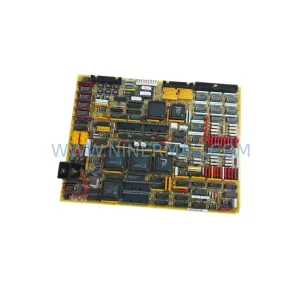
Original Industrial Spare Part
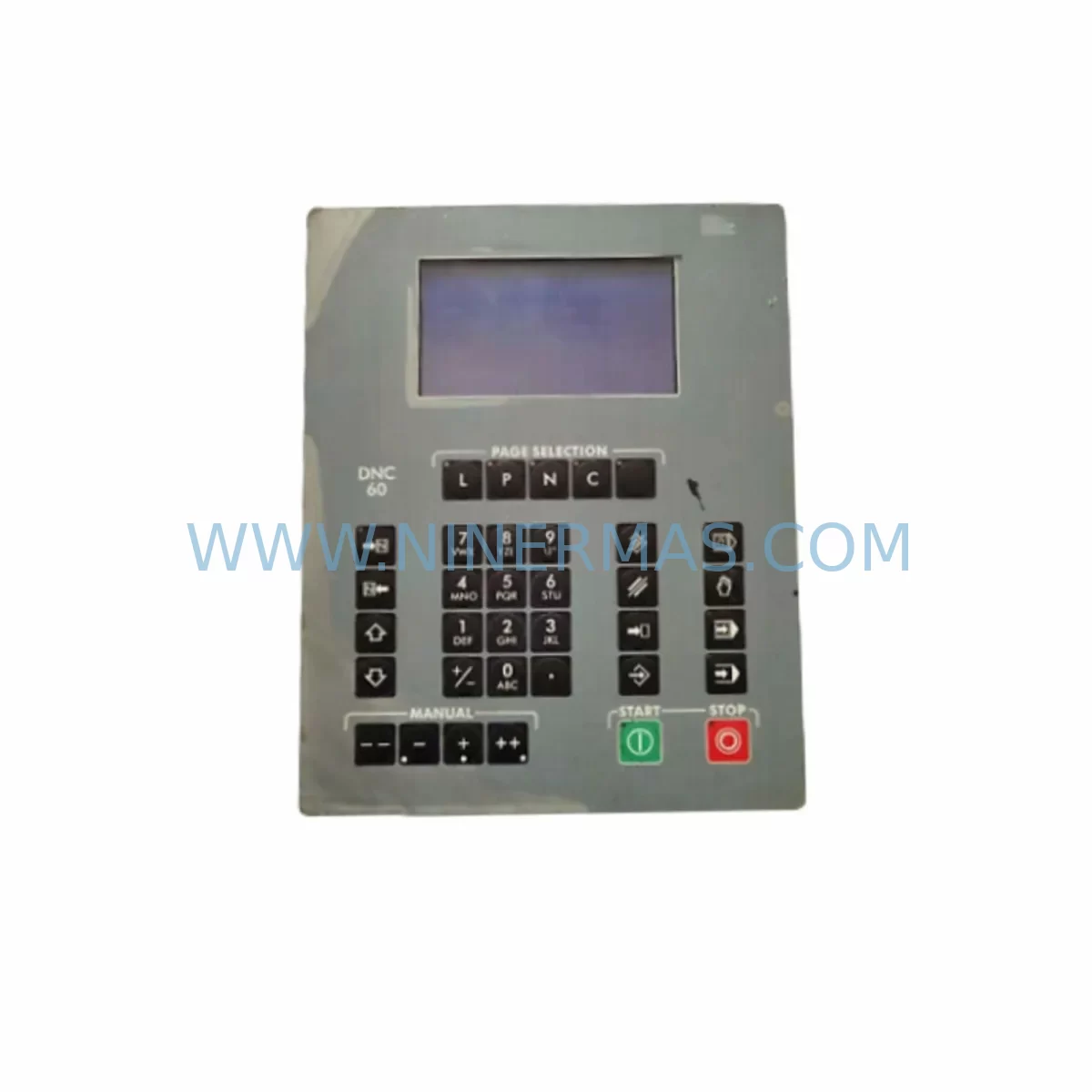
Cybelec S-DNC-61G/CUT V-DNC-61G/16 Spare Part for Maintenance
Verify the part, confirm the platform family, and move straight into quotation with the right commercial details.
RFQ Ready
- SKUS-DNC-61G/CUT V-DNC-61G/16
- CategoryPLC & Industrial Automation Modules
- BrandCYBELEC
- SupportAvailability, lead time, condition, and shipping coordination
How Buyers Usually Use This Page
- Confirm the exact part number and platform family before sending the quote request.
- Use direct email when quantity, condition, and destination are already defined internally.
- Switch to the broader brand or category archive when you need alternates nearby.
Series Navigation
Move through the most common platform families behind this part.
Product RFQ
Send this part directly for quotation.
Include quantity, required condition, destination country, and target delivery timing. Current reference: Cybelec S-DNC-61G/CUT V-DNC-61G/16 Spare Part for Maintenance with SKU S-DNC-61G/CUT V-DNC-61G/16.
Cybelec S-DNC-61G/CUT V-DNC-61G/16 Spare Part for Maintenance: Minimizing Downtime in Press Brake Control Systems
The Cybelec S-DNC-61G/CUT V-DNC-61G/16 is a ruggedized HMI display module engineered for demanding press brake and sheet metal forming environments. As a direct original spare part for the Cybelec DNC 60 and V-DNC series CNC controllers, this unit serves as a critical interface between the machine operator and the bending control system. When this display module fails or degrades — whether through screen delamination, backlight failure, touch input loss, or communication dropout — production halts immediately. Sourcing a verified original replacement is the fastest path to restoring full press brake operation without compromising program integrity or axis calibration data.
For maintenance engineers managing legacy Cybelec-equipped press brakes, the S-DNC-61G/CUT V-DNC-61G/16 represents a non-negotiable stock item. Its role in displaying bending sequences, angle corrections, material parameters, and real-time axis feedback makes it indispensable to both automated and manual bending workflows. Procurement engineers sourcing this module should prioritize original-specification units to avoid compatibility issues with the DNC 60 controller’s proprietary display bus and firmware handshake protocols.
Spare Maintenance Table
| Parameter | Specification / Detail |
|---|---|
| Part Number | S-DNC-61G/CUT V-DNC-61G/16 |
| Brand | Cybelec |
| Series | DNC 60 / V-DNC Series |
| Module Type | Ruggedized HMI Display Module |
| Application | Press Brake CNC Controller Interface |
| Display Interface | Proprietary Cybelec DNC display bus |
| Operating Environment | Industrial shop floor, vibration-resistant, ruggedized enclosure |
| Compatibility | Cybelec DNC 60, V-DNC series press brake controllers |
| Origin | Switzerland (CH) |
| Condition | Original spare part, tested before shipment |
| Warranty | 12 Months |
| Lead Time | Subject to stock availability — contact for confirmation |
| Shipping | Global export, secure industrial packaging |
| Maintenance Recommendation | Inspect display integrity and touch response during scheduled press brake PM cycles |
Maintenance Planning for Continuous Operation
Replacing the S-DNC-61G/CUT V-DNC-61G/16 HMI display module is rarely an isolated task. In a well-structured press brake maintenance workflow, this replacement should trigger a broader inspection of the surrounding control architecture. Maintenance engineers should simultaneously verify the condition of the Cybelec DNC 60 main CPU board, which drives all axis interpolation and program execution — a degraded CPU can cause display errors that mimic HMI hardware failure. The axis drive interface cards and servo amplifier feedback signals should also be checked, as display anomalies are sometimes caused by upstream signal noise rather than the display module itself.
The 24VDC power supply module feeding the controller cabinet deserves close attention. Voltage ripple or brownout conditions are a leading cause of premature HMI display failure in press brake environments. Alongside the power supply, inspect the cabinet’s terminal blocks and wiring harnesses for corrosion or loose connections that could introduce intermittent faults. The backplane or controller motherboard connector seating should be verified, as vibration from the press brake ram can loosen edge connectors over time.
For facilities running Cybelec DNC 60 systems with networked DNC file transfer, the RS-232 or Ethernet communication module should be tested after any HMI replacement to confirm that program upload and download functions are restored. If the system includes a Cybelec ModEva or similar angle measurement module, recalibration of the display feedback loop is recommended post-replacement. Facilities that also operate Cybelec CybTouch or PC-based HMI variants should maintain cross-compatible spare display assemblies where possible to reduce SKU proliferation in the spare parts cabinet.
Procurement engineers building annual maintenance budgets for press brake fleets should consider stocking at least one S-DNC-61G/CUT V-DNC-61G/16 unit per three to five machines of the same DNC 60 series. Pairing this with a spare Cybelec I/O expansion module and a set of replacement fuses for the controller power rail ensures that the most common failure points are covered without requiring emergency international sourcing during production shutdowns.
Site Replacement Workflow
When replacing the S-DNC-61G/CUT V-DNC-61G/16 on-site, begin by documenting all active bending programs stored on the existing controller before powering down. If the DNC 60 system supports program backup via RS-232 or USB, execute a full program export to a maintenance laptop before disconnecting the display module. This protects against data loss in the event that the replacement procedure requires a controller reset.
Power down the press brake at the main isolator and discharge any residual capacitance in the servo drive section before opening the control cabinet. Disconnect the display module’s ribbon cable or connector harness carefully, noting the orientation and locking tab position. Install the replacement S-DNC-61G/CUT V-DNC-61G/16 using the original mounting hardware, ensuring the connector is fully seated before applying power. On first power-up, verify that the display initializes correctly, that the Cybelec DNC 60 firmware version is recognized, and that all axis position readouts are accurate.
If the replacement unit is being used to substitute an older or end-of-life display variant, confirm firmware compatibility with the controller’s current software revision before installation. In cases where the original display was running a legacy firmware version, a firmware update may be required to ensure full feature parity. This step is particularly important for facilities that have previously upgraded their DNC 60 controller software but retained the original display hardware.
Post-replacement, conduct a full dry-run bending cycle without material to verify that all axis movements, angle corrections, and safety interlocks are functioning correctly. Log the replacement in the machine’s maintenance record, including the date, part number, and technician details, to support warranty claims and future maintenance planning.
Spare Parts Support FAQ
Q1: Is the S-DNC-61G/CUT V-DNC-61G/16 compatible with all Cybelec DNC 60 series controllers?
The S-DNC-61G/CUT V-DNC-61G/16 is designed for the Cybelec DNC 60 and V-DNC series press brake controllers. Compatibility depends on the specific controller firmware revision and hardware generation. We recommend providing your full machine serial number and controller software version when ordering to confirm direct compatibility before shipment.
Q2: What testing is performed before shipment?
All units are functionally tested prior to dispatch to verify display initialization, connector integrity, and basic communication response. Each unit ships with a test report. Our 12-month warranty covers manufacturing defects and functional failures under normal operating conditions from the date of delivery.
Q3: How should we manage long-term spare parts supply for end-of-life Cybelec DNC 60 systems?
For facilities committed to operating DNC 60-equipped press brakes beyond the original manufacturer’s support window, we recommend a structured spare parts inventory strategy. Identify the top five failure-prone components — typically the HMI display module, CPU board, power supply, I/O cards, and communication modules — and maintain at least one spare of each. We offer long-term supply agreements and can source original or equivalent-specification units to support multi-year maintenance contracts.
Q4: What is the lead time and what happens if the part is not in stock?
Lead times vary based on current inventory levels. In-stock units typically ship within 1–3 business days. For out-of-stock items, we provide a sourcing timeline estimate at the time of inquiry. We maintain an active global sourcing network for Cybelec spare parts and can often locate units faster than standard distribution channels. Contact us directly at sale@ninermas.com or +0086 187 5021 5667 for urgent requirements.
| Product Series | Other series |
|---|
Catalog Continuation
More CYBELEC modules in the catalog.
Use the brand lane to compare nearby part numbers, platform-adjacent modules, and other inquiry-ready listings before sending your final RFQ.
SKU: S-DNC-61-G16 S-DNC-60/A
Cybelec S-DNC-61-G16 Safety-Reliable CNC for Critical Sites
SKU: V-SAC-CYB2020 V-SMC-BLS112
CYBELEC V-SAC-CYB2020 V-SMC-BLS112 Retrofit-Compatible Servo Driver
Catalog Continuation
Alternative parts within PLC & Industrial Automation Modules.
Stay inside the same system family when you need substitutes, adjacent modules, or a broader shortlist for procurement review.