
Original Industrial Spare Part
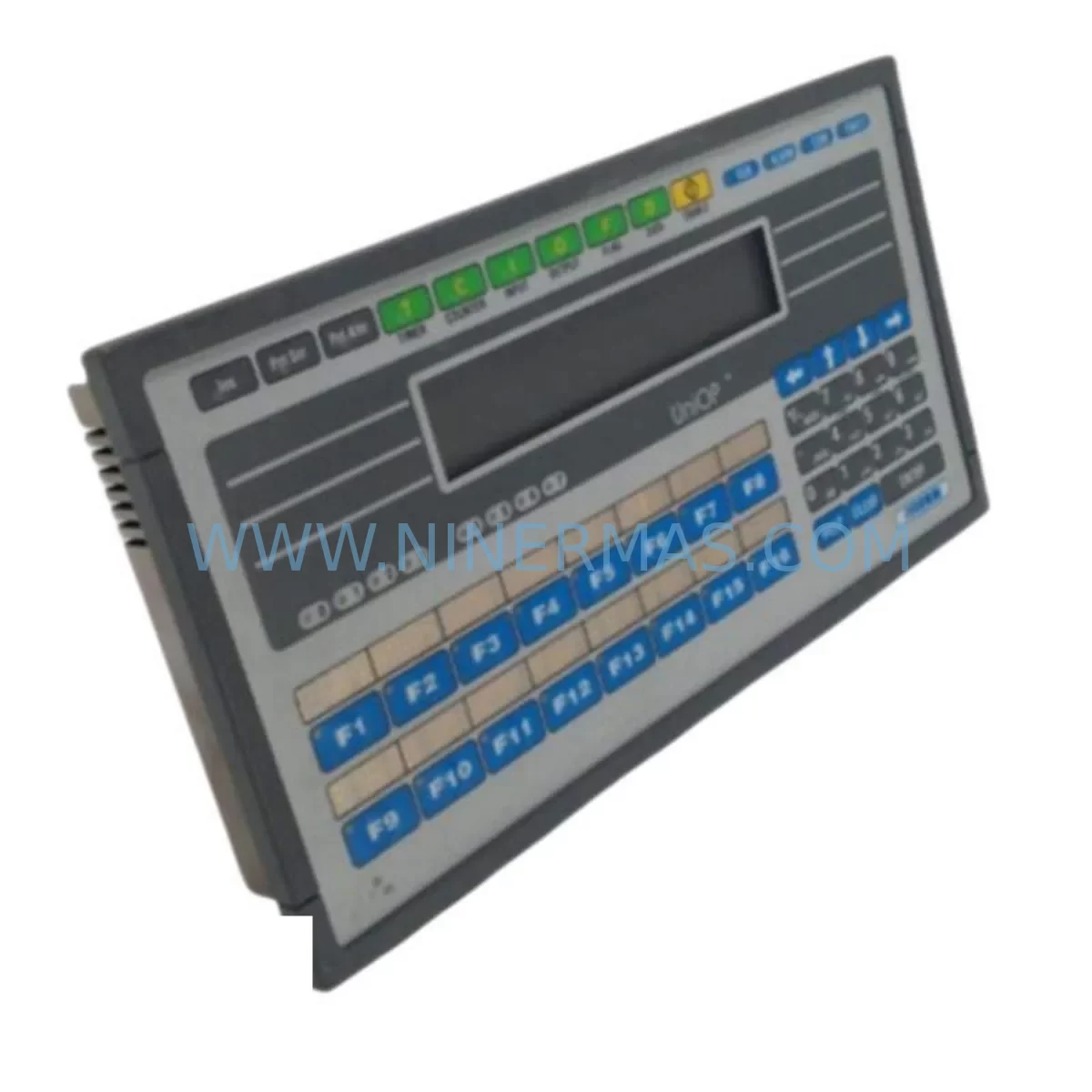
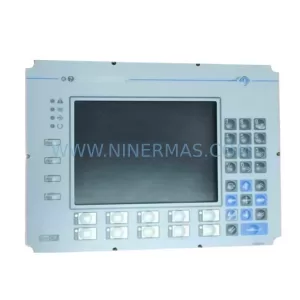
UNIOP EK-04 6ZA983-7 Service-Ready Spare Part
Verify the part, confirm the platform family, and move straight into quotation with the right commercial details.
RFQ Ready
- SKUEK-04 6ZA983-7
- CategoryPLC & Industrial Automation Modules
- BrandUNIOP
- SupportAvailability, lead time, condition, and shipping coordination
How Buyers Usually Use This Page
- Confirm the exact part number and platform family before sending the quote request.
- Use direct email when quantity, condition, and destination are already defined internally.
- Switch to the broader brand or category archive when you need alternates nearby.
Series Navigation
Move through the most common platform families behind this part.
Product RFQ
Send this part directly for quotation.
Include quantity, required condition, destination country, and target delivery timing. Current reference: UNIOP EK-04 6ZA983-7 Service-Ready Spare Part with SKU EK-04 6ZA983-7.
UNIOP EK-04 6ZA983-7 Service-Ready Spare Part for Industrial Maintenance
The UNIOP EK-04 6ZA983-7 is an original operator panel (HMI) from UNIOP’s EK Series, purpose-built for demanding industrial automation environments. As production lines age and OEM support windows close, maintaining a verified stock of service-ready spare parts like the EK-04 6ZA983-7 becomes a critical pillar of any maintenance engineer’s downtime-prevention strategy. This unit is sourced, inspected, and dispatched with a 12-month warranty, giving procurement teams the confidence to commit to long-term spare parts programs without sacrificing quality assurance.
Whether you are managing a scheduled annual overhaul, responding to an unplanned panel failure, or building a resilient spare parts inventory for a legacy UNIOP-based control system, the EK-04 6ZA983-7 delivers a direct, compatible replacement that preserves your existing wiring, communication architecture, and operator interface logic — minimising re-engineering time and accelerating line recovery.
Spare Maintenance Table
| SKU / Part Number | EK-04 6ZA983-7 |
| Brand | UNIOP |
| Series | EK Series |
| Product Type | Operator Panel / HMI |
| Display | Monochrome / Backlit LCD (EK Series standard) |
| Communication Interface | RS-232 / RS-485 serial; PLC multi-protocol support |
| Supply Voltage | 24 V DC (nominal); compatible with standard 24 V panel power rails |
| Operating Temperature | 0 °C to +50 °C |
| Protection Rating | IP65 front panel (typical EK Series) |
| Mounting | Panel cut-out, rear-mount with retaining clips |
| Compatibility | UNIOP EK Series control cabinets; Siemens S5/S7, Allen-Bradley, Mitsubishi, Modbus RTU PLCs via serial driver |
| Application Environment | Manufacturing, process control, machine tool, packaging, water treatment |
| Condition | Original spare — new or fully refurbished to OEM specification |
| Pre-shipment Testing | Power-on, display, keypad, and communication port verification |
| Warranty | 12 Months — covers manufacturing defects and functional failure under normal operating conditions |
| Lead Time | In-stock units ship within 2–5 business days; long-term supply agreements available |
Maintenance Planning for Continuous Operation
When a maintenance or procurement engineer schedules replacement of the UNIOP EK-04 6ZA983-7, the panel itself is rarely the only component that warrants attention. A structured cabinet inspection at the time of HMI replacement significantly reduces the risk of secondary failures and repeat downtime events. The following components should be evaluated in parallel:
24 V DC Power Supply: The EK-04 draws power from the cabinet’s 24 V DC rail. Verify that the panel power supply — such as a SITOP PSU100S or equivalent DIN-rail unit — is within its rated output tolerance and shows no signs of capacitor aging or output ripple. A degraded power supply is a common root cause of intermittent HMI resets and display corruption that can be misdiagnosed as a panel fault.
Serial Communication Cable and Connectors: The EK Series communicates via RS-232 or RS-485. Inspect the communication cable between the EK-04 and the connected PLC for insulation damage, connector corrosion, and secure termination. Loose DB9 or terminal block connections are a frequent source of communication timeouts that surface after a panel swap.
PLC CPU Module: If the EK-04 6ZA983-7 is connected to a Siemens S7-300 CPU (e.g., CPU 315-2 DP) or a comparable Allen-Bradley or Mitsubishi controller, confirm that the CPU firmware and communication driver settings are compatible with the replacement panel’s protocol configuration. A driver mismatch will prevent the new panel from establishing a connection even if the hardware is fully functional.
I/O Modules and Signal Wiring: During the cabinet inspection, check adjacent digital and analogue I/O modules for blown fuses, loose terminal screws, and LED fault indicators. Modules such as Siemens SM 321 digital input cards or SM 332 analogue output cards that share the same backplane or rack as the HMI power circuit should be verified for correct operation.
Relay and Contactor Bank: Control relays — including intermediate relays on the 24 V coil circuit — should be checked for contact wear, coil resistance, and correct switching. A welded relay contact can cause unexpected machine states that operators may incorrectly attribute to an HMI fault.
Terminal Blocks and Grounding: Inspect all terminal blocks on the HMI wiring circuit, including Phoenix Contact or Weidmüller-type push-in terminals, for loose conductors and oxidation. Verify that the HMI chassis ground is bonded to the cabinet earth bar with a low-impedance connection — poor grounding is a leading cause of display noise and communication errors on operator panels.
Backplane and Rack Assembly: Where the EK-04 is installed in a rack alongside other UNIOP modules or a PLC backplane, inspect the backplane connectors for bent pins and confirm that all modules are fully seated. A partially inserted module can cause intermittent bus errors that are difficult to diagnose without a systematic inspection.
Signal Isolators: If the control system uses analogue signal isolators between field instruments and the PLC I/O, verify that these devices — such as Phoenix Contact MINI MCR or Pepperl+Fuchs KFD series isolators — are within calibration and showing no fault LEDs. Drift in signal isolation can cause incorrect process values to be displayed on the HMI, leading to operator errors.
Fuse Protection: Check all fuse holders on the 24 V DC distribution circuit, including blade fuses and cylindrical glass fuses on the HMI supply branch. Replace any fuses that show signs of heat discolouration or that measure outside their rated resistance, even if they have not blown — thermal stress indicates an underlying overcurrent condition.
Ethernet or Fieldbus Communication Module: If the system includes a PROFIBUS DP or PROFINET communication module connected to the same control network as the HMI, verify that the module’s diagnostic LEDs show no bus errors and that the network termination resistors are correctly installed at both ends of the bus segment.
Site Replacement Workflow
Replacing the UNIOP EK-04 6ZA983-7 on-site follows a structured sequence that minimises downtime and eliminates the risk of configuration loss:
Step 1 — Pre-replacement backup: Before powering down, use the UNIOP DesignerPro or compatible configuration software to upload and save the existing project file from the panel’s internal memory. Store the backup on a local engineering laptop and a network share. This step is critical for legacy panels where the original project file may no longer exist in the engineering office archive.
Step 2 — Isolation and labelling: Isolate the cabinet supply, apply a lockout/tagout (LOTO) device, and photograph the existing wiring before disconnection. Label all connectors and cables with numbered tags corresponding to the wiring diagram. This prevents mis-wiring during reinstallation, which is the most common cause of post-replacement faults.
Step 3 — Physical replacement: Remove the retaining clips, disconnect the power and communication connectors, and extract the old panel from the cut-out. Install the EK-04 6ZA983-7 replacement unit, reconnect all cables in the labelled sequence, and secure the retaining clips to the specified torque.
Step 4 — Project download and commissioning: Power up the cabinet, connect the engineering laptop via the serial programming port, and download the backed-up project file to the new panel. Verify that all screens, function keys, and PLC communication tags are operating correctly before returning the machine to production.
Step 5 — Functional test and sign-off: Run a full functional test covering all HMI screens, alarm acknowledgements, and operator inputs. Document the replacement in the maintenance log with the date, technician name, and new panel serial number. Update the spare parts inventory to reflect the consumed unit and initiate a replenishment order to maintain minimum stock levels.
This workflow applies equally to emergency replacements following an unplanned failure and to planned replacements during scheduled maintenance windows. Having a pre-tested, service-ready EK-04 6ZA983-7 on the shelf reduces the critical-path duration of an emergency replacement to under two hours in most installations.
Spare Parts Support FAQ
Q1: Is the UNIOP EK-04 6ZA983-7 a direct drop-in replacement for the original panel?
Yes. The EK-04 6ZA983-7 is supplied to original UNIOP specification and is dimensionally and electrically compatible with the standard EK Series panel cut-out. No cabinet modifications are required. Communication driver settings and project files from the original panel are fully transferable to the replacement unit, provided the firmware version is matched during commissioning.
Q2: What does the 12-month warranty cover, and how is a warranty claim processed?
The 12-month warranty covers manufacturing defects and functional failure under normal operating conditions, including display failure, keypad malfunction, and communication port failure. Warranty claims are initiated by contacting our support team at sale@ninermas.com with the order reference, fault description, and photographic evidence. Replacement units are dispatched after fault verification, and defective units are returned for inspection at our cost.
Q3: Can you support long-term supply agreements for the EK-04 6ZA983-7 across multiple sites?
Yes. We offer long-term supply agreements for maintenance teams managing multiple installations of UNIOP EK Series panels. These agreements include reserved stock allocation, priority dispatch, fixed pricing for the agreement term, and quarterly stock reporting. Contact our procurement team to discuss minimum quantity commitments and lead-time guarantees tailored to your maintenance schedule.
Q4: How do you verify compatibility before shipment, and what testing is performed on each unit?
Each EK-04 6ZA983-7 unit undergoes a pre-shipment test protocol that includes power-on verification, display and backlight check, full keypad scan, and RS-232/RS-485 communication port loopback test. Units that do not pass all test criteria are quarantined and not dispatched. A test report is available on request for units supplied under maintenance contracts or critical infrastructure projects.
—
| Product Series | Other series |
|---|
Catalog Continuation
More UNIOP modules in the catalog.
Use the brand lane to compare nearby part numbers, platform-adjacent modules, and other inquiry-ready listings before sending your final RFQ.
Catalog Continuation
Alternative parts within PLC & Industrial Automation Modules.
Stay inside the same system family when you need substitutes, adjacent modules, or a broader shortlist for procurement review.



SKU: HDD02.2-W040N-HS12-01-FW FWA-DIAX04-ELS-05VRS-MS
Rexroth HDD02.2-W040N-HS12-01-FW Service-Ready Spare Part

SKU: I5DAE375F10010000S
Lenze I5DAE375F10010000S Service-Ready Spare Part for Industrial Maintenance



