Original Industrial Spare Part
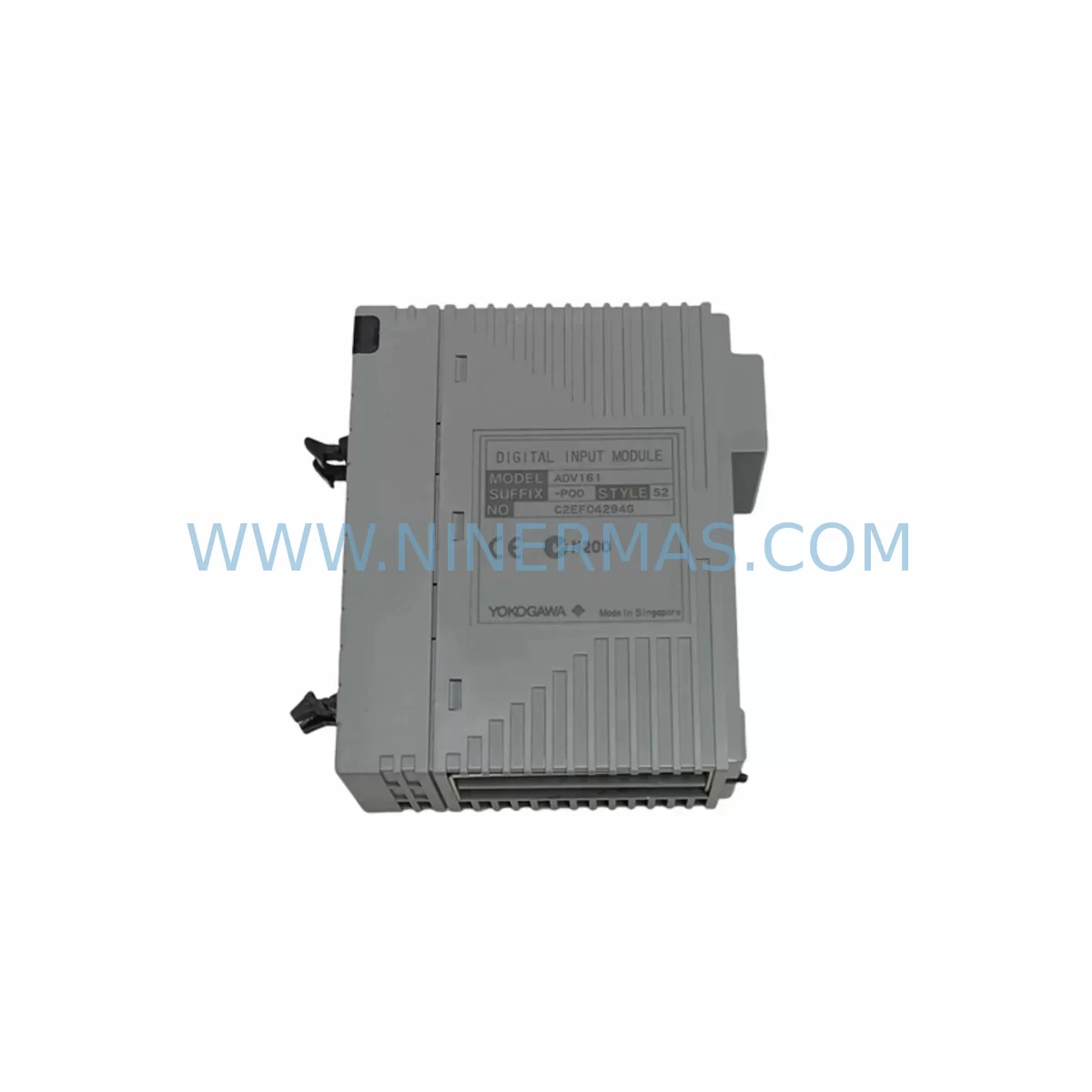
Yokogawa NFDV161-P51 S2 Service-Ready Spare Part
Verify the part, confirm the platform family, and move straight into quotation with the right commercial details.
RFQ Ready
- SKUNFDV161-P51 S2
- CategorySIS Safety & Redundancy Systems
- BrandYokogawa
- SupportAvailability, lead time, condition, and shipping coordination
How Buyers Usually Use This Page
- Confirm the exact part number and platform family before sending the quote request.
- Use direct email when quantity, condition, and destination are already defined internally.
- Switch to the broader brand or category archive when you need alternates nearby.
Series Navigation
Move through the most common platform families behind this part.
Product RFQ
Send this part directly for quotation.
Include quantity, required condition, destination country, and target delivery timing. Current reference: Yokogawa NFDV161-P51 S2 Service-Ready Spare Part with SKU NFDV161-P51 S2.
Yokogawa NFDV161-P51 S2 Service-Ready Spare Part for Industrial Maintenance
The Yokogawa NFDV161-P51 S2 is a ruggedized digital input module engineered for demanding industrial environments, including offshore platforms, chemical processing plants, power generation facilities, and heavy manufacturing lines. As a critical field I/O component within Yokogawa’s CENTUM VP distributed control system and ProSafe-RS safety instrumented system architectures, this module handles discrete signal acquisition from field devices such as limit switches, proximity sensors, push-button stations, and process interlocks.
When a digital input module fails or degrades in a live control cabinet, the consequences extend far beyond a single I/O point. Entire process loops can go blind, safety logic may be compromised, and unplanned shutdowns become unavoidable. Maintaining a verified, tested spare of the NFDV161-P51 S2 in your on-site inventory is one of the most cost-effective risk mitigation strategies available to maintenance and reliability engineers operating Yokogawa-based DCS or SIS platforms.
NINERMAS supplies this module as an original spare part with full functional testing prior to shipment, backed by a 12-month warranty. Our stock supports rapid deployment for emergency replacements, planned annual shutdowns, and long-term procurement programs for facilities committed to extended system lifecycles.
Spare Maintenance Table
| Part Number | NFDV161-P51 S2 |
| Brand | Yokogawa Electric Corporation |
| Module Type | Ruggedized Digital Input (DI) Module |
| Compatible Systems | Yokogawa CENTUM VP, ProSafe-RS SIS |
| Series | NFDV / Field Control Station (FCS) |
| Signal Type | Discrete / Digital Input (dry contact, wet contact) |
| Environmental Rating | Ruggedized — suitable for harsh industrial environments (vibration, humidity, temperature extremes) |
| Mounting | DCS backplane / field control station rack |
| Origin | Japan |
| Compatibility Verification | Confirm firmware revision and FCS node assignment before installation |
| Maintenance Interval | Inspect annually or upon alarm/fault indication on HIS engineering station |
| Warranty | 12 Months — NINERMAS Tested & Verified |
| Shipping | Global — EXW / DDP available; anti-static packaging with functional test report |
Maintenance Planning for Continuous Operation
Replacing the NFDV161-P51 S2 in a live CENTUM VP or ProSafe-RS cabinet is rarely an isolated task. Experienced maintenance engineers understand that a failing digital input module is often a symptom of broader cabinet stress — power fluctuations, connector fatigue, or environmental ingress. A disciplined replacement workflow should include inspection of the surrounding system components to prevent repeat failures and ensure full loop integrity.
Begin with the NFCP100 or equivalent field control station power supply module. Voltage instability at the backplane level is a leading cause of premature I/O module failure. Verify output voltage and ripple before inserting the replacement NFDV161-P51 S2. If the power supply is approaching its rated service life, schedule a parallel replacement during the same maintenance window.
Inspect the NFDV-series backplane and node connector for oxidation, bent pins, or mechanical stress. A compromised backplane slot will cause intermittent faults even with a new module installed. Clean contacts with approved contact cleaner and verify seating torque on all module retaining screws.
Review the field wiring termination at the terminal block assembly connected to this DI channel group. Loose terminations, corroded wire ends, or undersized conductors are common sources of false input signals. Re-torque all terminals and perform insulation resistance testing on field cables before restoring the loop to service.
For ProSafe-RS installations, cross-reference the NFSV-series safety output modules and associated relay output cards that act on the digital inputs processed by this module. A safety interlock chain is only as reliable as its weakest link — confirm that the downstream relay logic and final control elements are functioning within specification.
If the NFDV161-P51 S2 is part of a redundant I/O configuration, verify that the redundant DI module in the paired slot is active and healthy before removing the faulty unit. Yokogawa’s bumpless switchover architecture requires both modules to be in a known state prior to hot-swap operations.
Communication integrity between the field control station and the Vnet/IP control network should be confirmed via the HIS (Human Interface Station) engineering console. Check for any pending alarms on the NFCP-series communication modules or Vnet/IP switch ports associated with this FCS node. Network latency or packet loss at this layer can mask I/O faults and complicate root cause analysis.
For facilities running legacy CENTUM CS 3000 alongside CENTUM VP, ensure that any KFCS or RFCS field control stations sharing the same control network are not generating broadcast storms that could affect module initialization after replacement. Coordinate with the DCS system administrator before performing hot-swap operations during live production.
Finally, update your spare parts register and CMMS (Computerized Maintenance Management System) to reflect the module serial number, installation date, and firmware version of the replacement NFDV161-P51 S2. This data is essential for warranty tracking, lifecycle planning, and future procurement decisions.
Site Replacement Workflow
Step 1 — Pre-Replacement Verification: Log into the Yokogawa HIS engineering station and navigate to the FCS hardware configuration. Confirm the slot address, module type, and current fault status of the NFDV161-P51 S2 to be replaced. Document all active alarms and inhibit any safety logic that depends on this input channel group, following your site Management of Change (MOC) procedure.
Step 2 — Spare Confirmation: Verify that the replacement NFDV161-P51 S2 supplied by NINERMAS matches the suffix code (P51 S2) exactly. Suffix variants indicate differences in input voltage range, isolation class, or environmental rating. Installing an incorrect suffix variant may cause immediate faults or subtle signal errors that are difficult to diagnose under production pressure.
Step 3 — Safe Isolation: De-energize the field circuits connected to the affected DI channel group using the appropriate isolation switches or MCBs in the marshalling cabinet. Confirm zero voltage at the terminal block with a calibrated multimeter before disconnecting field wiring.
Step 4 — Module Swap: Release the module retaining latch, extract the faulty NFDV161-P51 S2, and insert the replacement unit firmly until the backplane connector is fully seated. Secure the retaining latch and verify that the module status LED initializes correctly within the expected boot sequence timeframe.
Step 5 — Loop Restoration and Testing: Re-energize field circuits and confirm that all digital input channels report correct status on the HIS faceplate. Perform a functional test by actuating each field device (limit switch, pushbutton, or sensor) connected to this module and verifying correct state change on the DCS display. Clear all maintenance inhibits and restore normal control mode.
Step 6 — Documentation: Record the replacement in your CMMS, attach the NINERMAS functional test report to the work order, and update the spare parts inventory to trigger reorder of a replacement unit. Maintaining a minimum of one verified spare per critical module type is the industry standard for facilities targeting 99.9%+ process availability.
Spare Parts Support FAQ
Q1: Is the NFDV161-P51 S2 supplied by NINERMAS an original Yokogawa component?
Yes. NINERMAS sources original Yokogawa spare parts through established industrial supply channels. Each unit undergoes functional testing before shipment, and a test report is included with delivery. The 12-month warranty covers manufacturing defects and functional failures under normal operating conditions.
Q2: How do I confirm compatibility with my existing CENTUM VP or ProSafe-RS system version?
Compatibility depends on your FCS hardware generation, system software revision, and the specific suffix code of the installed module. Provide your FCS model number, system software version (R5.xx or later), and existing module suffix to our technical team at sale@ninermas.com. We will confirm compatibility before shipment to eliminate installation risk.
Q3: Can NINERMAS support long-term supply agreements for the NFDV161-P51 S2?
Yes. NINERMAS offers long-term procurement programs for facilities managing extended Yokogawa system lifecycles. We can reserve stock, establish scheduled delivery intervals, and provide priority fulfillment for emergency orders. Contact us to discuss a spare parts support agreement tailored to your annual maintenance schedule and shutdown planning calendar.
Q4: What is included in the shipment and how is the module protected during transit?
Each NFDV161-P51 S2 is shipped in anti-static packaging with foam cushioning, a functional test report, and a certificate of conformance. Export documentation including commercial invoice, packing list, and country of origin certificate is provided for international shipments. DDP (Delivered Duty Paid) shipping is available for most destinations to simplify customs clearance.
| Product Series | CENTUM VP |
|---|---|
| Country of Origin | JP |
Catalog Continuation
More Yokogawa modules in the catalog.
Use the brand lane to compare nearby part numbers, platform-adjacent modules, and other inquiry-ready listings before sending your final RFQ.

Catalog Continuation
Alternative parts within SIS Safety & Redundancy Systems.
Stay inside the same system family when you need substitutes, adjacent modules, or a broader shortlist for procurement review.
SKU: CDB01.1C-SE-ENS-ENS-NNN-NNN-NN-S-NN-FW
Bosch Rexroth CDB01.1C-SE-ENS-ENS-NNN-NNN-NN-S-NN-FW Safety-Reliable Drive
SKU: KJ2201X1-BA1 12P3162X162 SLS1508
Emerson KJ2201X1-BA1 Retrofit-Compatible Logic I/O Module
SKU: Bridge Interface Mark VI
GE IS210AEDBH4AGD Safety-Reliable Bridge Interface for Critical Control