
Original Industrial Spare Part
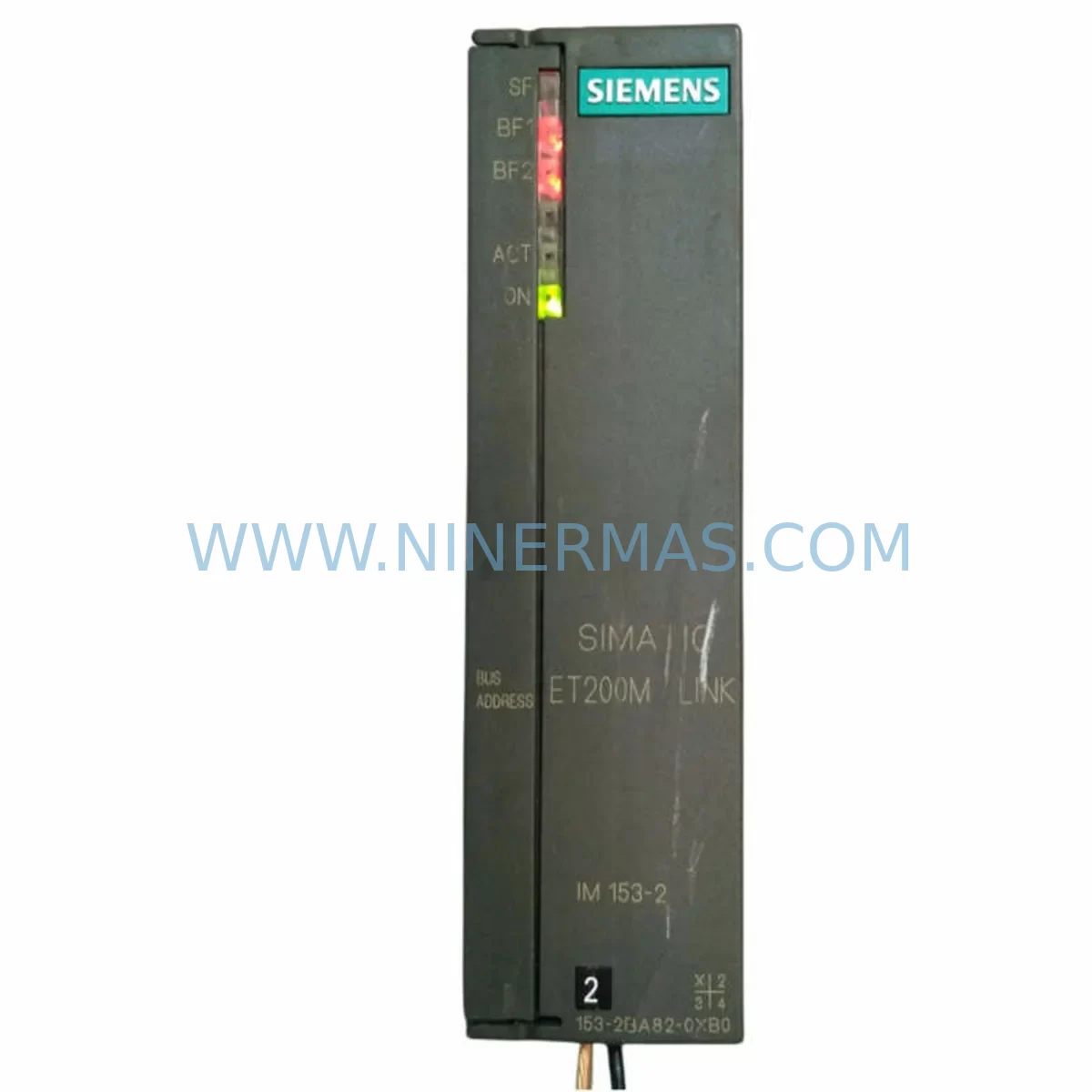
Siemens 6ES7153-2BA82-0XB0 Service-Ready Spare Part
Verify the part, confirm the platform family, and move straight into quotation with the right commercial details.
RFQ Ready
- SKU6ES7 153-2BA82-0XB0
- CategoryPLC & Industrial Automation Modules
- BrandSiemens
- SupportAvailability, lead time, condition, and shipping coordination
How Buyers Usually Use This Page
- Confirm the exact part number and platform family before sending the quote request.
- Use direct email when quantity, condition, and destination are already defined internally.
- Switch to the broader brand or category archive when you need alternates nearby.
Series Navigation
Move through the most common platform families behind this part.
Product RFQ
Send this part directly for quotation.
Include quantity, required condition, destination country, and target delivery timing. Current reference: Siemens 6ES7153-2BA82-0XB0 Service-Ready Spare Part with SKU 6ES7 153-2BA82-0XB0.
Siemens 6ES7153-2BA82-0XB0 Service-Ready Spare Part: Spare Replacement & Downtime Risk Control
The Siemens 6ES7153-2BA82-0XB0 is a ruggedized DP/PA Link interface module designed for demanding industrial environments. As a critical communication bridge between PROFIBUS DP and PROFIBUS PA segments, this module plays an essential role in process automation systems — particularly in chemical, oil & gas, water treatment, and heavy manufacturing plants where field device communication reliability is non-negotiable. Sourced as an original Siemens spare part, the 6ES7153-2BA82-0XB0 is stocked and tested at NINERMAS to support rapid deployment, emergency replacement, and planned maintenance cycles.
When a DP/PA Link module fails, the consequences extend far beyond a single field device going offline. An entire PA segment — potentially comprising dozens of HART or PROFIBUS PA instruments such as pressure transmitters, flow meters, and positioners — can become unreachable from the control system. This makes the 6ES7153-2BA82-0XB0 a high-priority item in any spare parts inventory strategy for plants running Siemens ET 200M distributed I/O stations or S7-300/S7-400 PLC architectures.
Spare Maintenance Table
| Part Number / SKU | 6ES7153-2BA82-0XB0 |
| Brand | Siemens |
| Series | SIMATIC ET 200M / S7-300 |
| Product Type | DP/PA Link Interface Module (Ruggedized) |
| Communication Interface | PROFIBUS DP (Master) / PROFIBUS PA (Segment) |
| Mounting | DIN Rail / ET 200M Backplane |
| Operating Temperature | -25°C to +60°C (Ruggedized variant) |
| Supply Voltage | 24 V DC (via backplane) |
| Compatibility | ET 200M IM 153-x series, S7-300, S7-400, PCS 7 |
| Protection Class | IP20 |
| Origin | Germany |
| Application Environment | Process automation, hazardous area control cabinets, field junction boxes |
| Maintenance Recommendation | Inspect PA segment wiring and termination resistors during replacement; verify DP baud rate settings post-installation |
| Warranty | 12 Months — NINERMAS Quality Guarantee |
| Condition | New / Original Siemens |
| Lead Time | In Stock — Ships within 1–3 business days |
Maintenance Planning for Continuous Operation
Replacing the 6ES7153-2BA82-0XB0 is rarely an isolated task. In a well-structured maintenance plan, swapping this DP/PA Link module should trigger a broader inspection of the surrounding control architecture to prevent cascading failures and ensure the restored PA segment operates reliably.
Begin with the ET 200M interface module (such as the IM 153-2 or IM 153-4 PN) seated on the same backplane. A faulty or aging interface module can cause intermittent communication errors that are often misdiagnosed as DP/PA Link failures. Verify the backplane bus connectors and confirm the IM module firmware is current. Next, inspect the 24 V DC power supply module feeding the ET 200M rack — voltage fluctuations or ripple on the supply rail are a common root cause of module resets and PA segment dropouts. Siemens PS 307 or PS 305 power supply modules in the same cabinet should be load-tested and their output capacitors checked if the unit has been in service for more than five years.
On the PA segment side, check the PA segment coupler or field barrier connected downstream of the 6ES7153-2BA82-0XB0. Devices such as the Siemens DP/PA Coupler 6ES7157-0AC83-0XA0 or equivalent segment couplers from other manufacturers should be inspected for correct termination and segment current budget. Overloaded PA segments — where the total current draw of connected field devices exceeds the coupler’s rated output — are a frequent cause of communication instability that resurfaces after a module replacement.
Within the control cabinet, examine the PROFIBUS DP cable routing and connectors. Damaged shielding, loose 9-pin Sub-D connectors, or incorrect termination at the segment ends can introduce noise that degrades DP communication quality. If the plant uses PROFIBUS repeaters to extend segment length, these should also be tested for signal integrity. For systems integrated with Siemens PCS 7 or STEP 7, review the hardware configuration in the engineering station to confirm the GSD file and module parameters match the replacement unit’s firmware version.
Additionally, maintenance engineers should inspect associated I/O modules in the ET 200M rack — particularly analog input modules (such as SM 331 series) connected to PA field devices — to ensure they are reading correctly after the PA segment is restored. Signal isolators or barriers used in intrinsically safe installations should be checked for drift or degradation. Finally, review the terminal blocks and cable entries on the PA junction box for corrosion or loose connections, which are especially common in outdoor or high-humidity installations.
Stocking a minimum of one spare 6ES7153-2BA82-0XB0 alongside a spare IM 153-2 interface module, a PA segment coupler, and a 24 V DC power supply module provides a robust first-response kit capable of addressing the most common ET 200M communication failures without waiting for international shipment.
Site Replacement Workflow
The 6ES7153-2BA82-0XB0 is a direct replacement for earlier DP/PA Link variants including the 6ES7153-2BA00-0XB0 and 6ES7153-2BA02-0XB0. The ruggedized (-0XB0) suffix indicates enhanced temperature tolerance and vibration resistance, making it suitable for use in environments where standard modules may have previously failed prematurely.
Pre-replacement steps: Before removing the faulty module, document the current PA segment configuration using STEP 7 or TIA Portal — export the hardware configuration and note all connected PA device addresses. Set the affected PA segment to safe state via the DCS or PLC if the process permits. Power down the ET 200M station or isolate the relevant rack slot using the appropriate safety procedure.
Installation: Insert the 6ES7153-2BA82-0XB0 into the designated slot on the ET 200M backplane. Reconnect the PROFIBUS DP cable to the module’s DP port and the PA segment cable to the PA port. Verify that the termination resistor on the PA segment is correctly positioned — only the last device on the PA segment should have termination active. Power up the rack and observe the module’s LED indicators: the BF (Bus Fault) LED should extinguish within 30 seconds as the module establishes communication with the DP master.
Post-replacement verification: In STEP 7 or TIA Portal, perform an online diagnostic of the ET 200M station. Confirm all PA field devices are visible and responding. Check the PA segment current budget in the diagnostic view. Run a short functional test of each PA device — read process values, check device status, and verify alarm thresholds are intact. Document the replacement in the plant’s maintenance management system (CMMS) and update the spare parts inventory accordingly.
This workflow minimizes downtime to typically under two hours for a prepared maintenance team, compared to days or weeks if the spare part must be sourced reactively from the open market.
Spare Parts Support FAQ
Q1: Is the 6ES7153-2BA82-0XB0 compatible with my existing ET 200M station running older firmware?
The 6ES7153-2BA82-0XB0 is designed for backward compatibility within the ET 200M family. However, if your IM 153-x interface module is running firmware older than V7.0, we recommend verifying compatibility using the Siemens compatibility tool or contacting our technical team before ordering. NINERMAS provides pre-shipment functional testing on request to confirm the module initializes correctly before it leaves our facility.
Q2: What is included in the 12-month warranty and how does it work?
Every 6ES7153-2BA82-0XB0 shipped by NINERMAS carries a 12-month warranty covering manufacturing defects and functional failures under normal operating conditions. If the module fails within the warranty period, we will arrange a replacement shipment or issue a refund after fault verification. Our warranty process is straightforward: contact sale@ninermas.com with your order number and a brief fault description, and our team will respond within one business day.
Q3: Can NINERMAS guarantee long-term supply of this module for multi-year maintenance contracts?
Yes. NINERMAS maintains strategic stock of high-demand Siemens SIMATIC modules, including the 6ES7153-2BA82-0XB0, to support customers with annual maintenance agreements and multi-year spare parts programs. For procurement engineers managing lifecycle plans for aging S7-300 or ET 200M installations, we offer volume pricing, reserved stock arrangements, and scheduled delivery programs. Contact our sales team to discuss a tailored supply agreement.
Q4: How do I verify the module is genuine before installation?
All modules supplied by NINERMAS are sourced through authorized channels and include original Siemens packaging, holographic labels, and traceable batch codes. Upon request, we can provide a certificate of conformity and pre-shipment test report. We strongly advise against installing modules from unverified sources in safety-critical PA segments, as counterfeit or refurbished units may pass initial power-on tests but fail under load or in high-temperature environments.
| Product Series | SIMATIC |
|---|---|
| Country of Origin | DE |
Catalog Continuation
More Siemens modules in the catalog.
Use the brand lane to compare nearby part numbers, platform-adjacent modules, and other inquiry-ready listings before sending your final RFQ.
SKU: 6SE7038-6EK84-1BH0
Siemens 6SE7038-6EK84-1BH0 Retrofit Drive Control Module
SKU: 6SL3055-0AA00-4CA5
Siemens 6SL3055-0AA00-4CA5 Retrofit-Compatible Operator Panel for Legacy Systems
Catalog Continuation
Alternative parts within PLC & Industrial Automation Modules.
Stay inside the same system family when you need substitutes, adjacent modules, or a broader shortlist for procurement review.

SKU: OZDPROFI12MG12
Hirschmann OZDPROFI12MG12 Spare Part for Industrial Maintenance



SKU: 07025-0000-70-1-04
KONTRON 07025-0000-70-1-04 Service-Ready Spare Part



