
Original Industrial Spare Part
Siemens 6SL3055-0AA00-4CA5 Retrofit-Compatible Operator Panel for Legacy Systems
Verify the part, confirm the platform family, and move straight into quotation with the right commercial details.
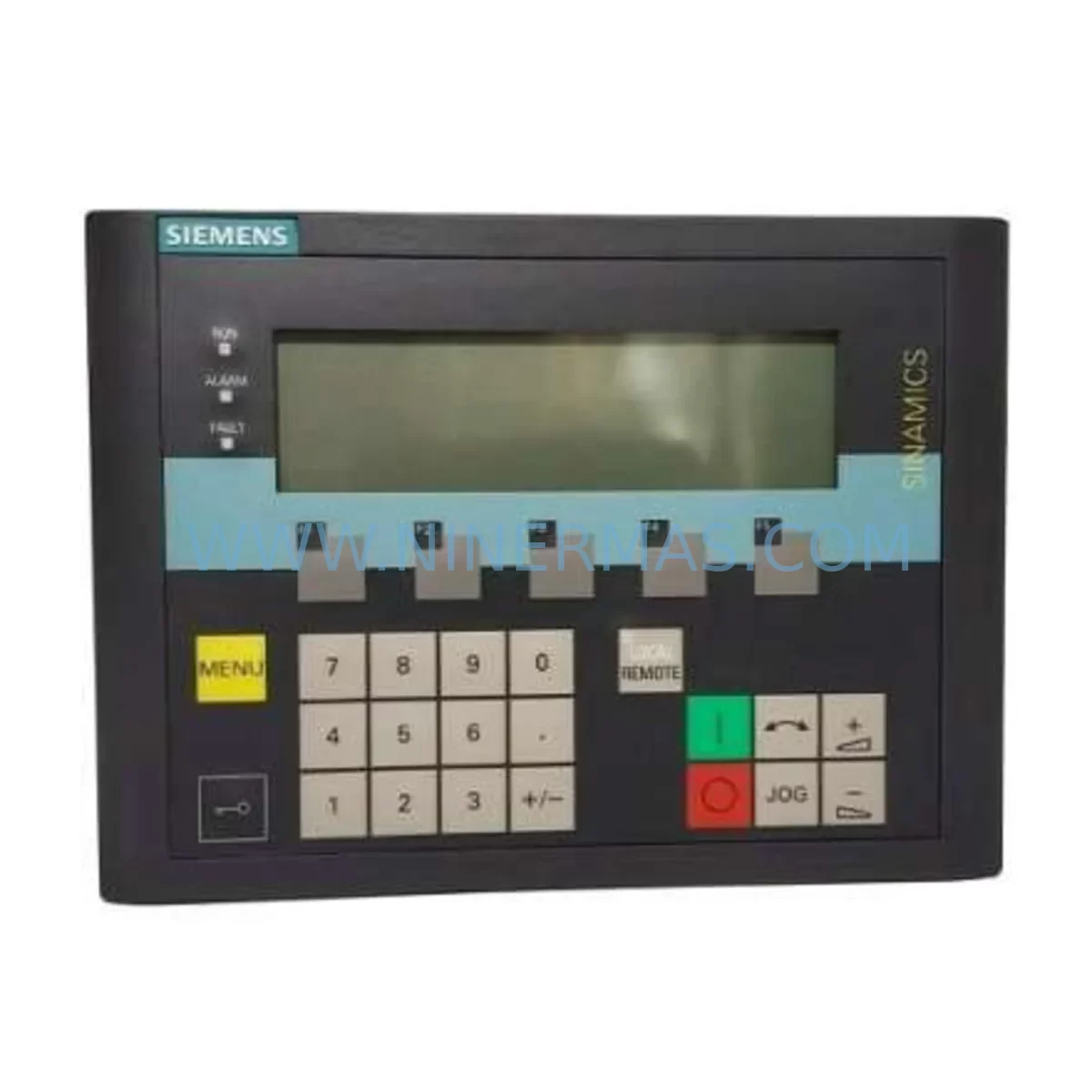
RFQ Ready
- SKU6SL3055-0AA00-4CA5
- CategoryPLC & Industrial Automation Modules
- BrandSiemens
- SupportAvailability, lead time, condition, and shipping coordination
How Buyers Usually Use This Page
- Confirm the exact part number and platform family before sending the quote request.
- Use direct email when quantity, condition, and destination are already defined internally.
- Switch to the broader brand or category archive when you need alternates nearby.
Series Navigation
Move through the most common platform families behind this part.
Product RFQ
Send this part directly for quotation.
Include quantity, required condition, destination country, and target delivery timing. Current reference: Siemens 6SL3055-0AA00-4CA5 Retrofit-Compatible Operator Panel for Legacy Systems with SKU 6SL3055-0AA00-4CA5.
Siemens 6SL3055-0AA00-4CA5 Retrofit-Compatible Operator Panel for Legacy Systems
The Siemens 6SL3055-0AA00-4CA5 is a ruggedized operator panel purpose-built for industrial retrofit and legacy system modernisation. Designed as a direct retrofit-compatible replacement for discontinued SINAMICS drive operator interfaces, this panel is the preferred choice for maintenance engineers and procurement teams managing end-of-life hardware transitions across SINAMICS S120, G120, G120C, G120D, and G120P drive platforms. Whether the objective is restoring production continuity after an unexpected panel failure, executing a planned control cabinet upgrade, or extending the operational life of an existing automation line, the 6SL3055-0AA00-4CA5 delivers the interface reliability, environmental resilience, and parameterisation compatibility required in demanding industrial environments.
This panel is widely deployed in retrofit projects where the original operator interface — typically an earlier-generation BOP-2 (6SL3255-0AA00-4CA1) or AOP30 (6SL3255-0AA00-4HA0) — has reached end of support or is no longer available through standard distribution channels. The 6SL3055-0AA00-4CA5 provides a mechanically and electrically compatible upgrade path, reducing the scope of cabinet rework and minimising the risk of program logic disruption during migration. All units supplied by NINERMAS are pre-tested prior to dispatch and covered by a 12-month warranty.
Upgrade Compatibility Table
| Parameter | Details |
|---|---|
| Compatible Drive Series | SINAMICS S120, G120, G120C, G120D, G120P |
| Replaces / Upgrades From | BOP-2 (6SL3255-0AA00-4CA1), AOP30 (6SL3255-0AA00-4HA0), legacy IOP panels |
| Host Control Unit Compatibility | CU320-2 DP, CU320-2 PN, CU240E-2, CU240E-2 DP, CU250S-2 |
| Interface / Connection | Direct plug-in to Control Unit front port; no additional wiring for CU-mount |
| Communication Compatibility | PROFIBUS DP, PROFINET IO (via host CU); panel communicates via local CU interface |
| Installation Space | Panel door cut-out or direct CU mount; no additional DIN rail space required |
| Terminal / Wiring Adaptation | No rewiring for direct CU mount; door-mount kit may require short cable extension |
| Parameter Migration | Supports upload/download via panel memory; compatible with STARTER and SINAMICS Startdrive (TIA Portal) |
| Commissioning Tools | SINAMICS Startdrive (TIA Portal), STARTER software, direct panel parameterisation |
| Retrofit Recommendation | Confirm CU firmware version before installation; update via Startdrive if required |
| Key Commissioning Checks | Motor rotation, speed reference tracking, fault/alarm display, STO/SS1 safety functions, PLC communication link |
| Warranty | 12-Month Warranty — all units pre-tested prior to dispatch |
Retrofit Planning for Existing Automation Systems
Successful integration of the 6SL3055-0AA00-4CA5 into an existing automation line requires a structured pre-retrofit assessment covering power capacity, terminal wiring, backplane interfaces, module addressing, program compatibility, HMI screens, communication links, installation space, and on-site commissioning sequence.
Engineers should begin by confirming the firmware version of the host Control Unit — typically a CU320-2 DP or CU320-2 PN — to ensure panel firmware compatibility. Mismatched firmware between the operator panel and the CU is one of the most common causes of commissioning delays in retrofit projects and can be resolved through a firmware update via SINAMICS Startdrive before the panel is physically installed.
Power supply capacity within the control cabinet must be verified before installation. The 6SL3055-0AA00-4CA5 draws power directly from the Control Unit’s front interface, but where the cabinet also hosts a SITOP PSU8600 or SITOP PSU100S 24 VDC power supply module, engineers should confirm that the aggregate load — including the CU, I/O modules, and any additional SM (Signal Module) or TM (Terminal Module) cards — remains within the rated output capacity of the supply. Overloaded 24 V rails are a frequent root cause of intermittent panel faults in legacy cabinets that have been incrementally expanded over time.
For systems that include SIMATIC ET 200SP or ET 200M distributed I/O racks connected to the drive control platform, the retrofit plan should document the existing I/O module addresses and confirm that no address conflicts arise after the panel replacement. Where the legacy system used a DP/DP Coupler or IE/PB Link PN IO for protocol bridging between PROFIBUS and PROFINET segments, these gateway devices should be retained and their configuration verified against the updated network topology. Communication protocol migration — for example, transitioning from a PROFIBUS-only architecture to a mixed PROFIBUS/PROFINET environment — should be planned as a separate workstream from the panel replacement itself to avoid compounding risk.
HMI screens — whether running on a SIMATIC HMI KTP700 Basic, KTP900 Basic, or a legacy OP177B — should be reviewed to confirm that all drive parameter tags mapped to the operator panel remain valid after the swap. In many retrofit scenarios, the HMI project requires a minor tag re-mapping exercise in TIA Portal or WinCC Flexible to align with the updated panel’s parameter structure, particularly where the legacy panel used custom parameter sets not present in the standard 6SL3055-0AA00-4CA5 default configuration. This review should be completed and validated in a simulation environment before the physical cutover is scheduled.
Where the drive system communicates upstream to a SIMATIC S7-1500 or S7-300 PLC via PROFINET or PROFIBUS, the communication link should be tested in offline simulation before the physical cutover. The GSD or GSDML device description file for the drive should be confirmed as current in the PLC hardware configuration, and any drive-specific function blocks in the PLC program — such as those using the SINA_SPEED or SINA_POS drive control blocks — should be validated against the updated drive firmware version. I/O expansion requirements should also be assessed at this stage: where additional TM31 Terminal Module or TM41 Terminal Module cards are present in the drive rack, their wiring and address assignments must be documented and preserved through the retrofit.
For applications involving safety-rated functions, engineers should verify the status of the Safety Integrated parameters (STO, SS1, SLS) within the CU configuration. Panel replacement does not affect Safety Integrated parameterisation, but the safety commissioning record should be updated to reflect the hardware change, and a functional safety test — including STO response time verification and SS1 ramp monitoring — should be performed as part of the post-retrofit acceptance procedure. Where a programming cable (PC adapter USB A2) or PROFIBUS PC adapter is used for on-site commissioning access, its compatibility with the updated CU firmware should be confirmed before the cutover date.
Downtime Control During System Migration
Minimising production downtime during a panel retrofit requires careful pre-staging and a clearly defined cutover sequence. The recommended approach is to upload the complete parameter set from the existing operator panel or CU to a PC running SINAMICS Startdrive or STARTER before any hardware is removed. This parameter backup — covering drive configuration, motor data, speed setpoints, ramp times, safety parameters, and I/O assignments — serves as the recovery baseline if the cutover encounters an unexpected issue.
Where the production line cannot tolerate an extended outage, a parallel commissioning strategy is advisable: the replacement 6SL3055-0AA00-4CA5 panel is pre-configured offline using the backed-up parameter file, and the physical swap is reduced to a plug-and-verify operation. This approach typically reduces the active cutover window to under 30 minutes for a single-drive replacement, compared to several hours for a full re-parameterisation from scratch. Pre-staging the panel at a workshop bench — using a spare CU240E-2 or CU320-2 unit for offline parameter loading — is strongly recommended for critical production assets where any unplanned extension of the maintenance window carries significant operational cost.
During the cutover, the existing PLC program logic should remain unchanged. The S7-1500 or S7-300 controller continues to execute its drive control sequences without modification; only the operator interface layer is being replaced. Field operators should be briefed on the updated panel layout and any changes to local jog, fault reset, or speed reference functions before the system is returned to automatic mode. Where the legacy panel included custom parameter shortcuts or user-defined menus, these should be recreated on the 6SL3055-0AA00-4CA5 during the pre-staging phase to minimise operator adjustment time at the point of cutover.
Post-installation, a structured commissioning check should confirm: motor rotation direction, speed reference tracking, fault and alarm display, safety function response (STO, SS1 if applicable), and communication link status to the upstream PLC and SCADA system. Signal isolators or SITOP safety relays in the safety circuit should be functionally tested as part of the post-retrofit acceptance run. All units supplied by NINERMAS are pre-tested prior to dispatch, and the 12-month warranty covers both component defects and early-life failures identified during the commissioning phase. Inventory is maintained for immediate dispatch, with typical lead times of 3–7 business days for in-stock units.
Retrofit Support FAQ
Q1: Is the 6SL3055-0AA00-4CA5 a direct drop-in replacement for the BOP-2 (6SL3255-0AA00-4CA1)?
The 6SL3055-0AA00-4CA5 connects to the same front-port interface on compatible SINAMICS Control Units and supports the same core parameterisation functions. It is mechanically and electrically compatible with CU320-2, CU240E-2, and CU250S-2 units. Minor differences in menu structure and display format may require brief operator familiarisation, but no wiring changes are required for direct CU-mount installations. For door-mount configurations, a short cable extension and mounting frame may be required.
Q2: Can I transfer parameters from the old panel to the new unit without a PC?
Yes. The 6SL3055-0AA00-4CA5 supports direct parameter upload from the Control Unit to the panel’s internal memory, and download from the panel back to a replacement CU. This function is accessible via the panel menu and does not require a PC or SINAMICS Startdrive connection, making it suitable for field replacement scenarios where laptop access is restricted or where the commissioning engineer is working alone on-site.
Q3: What commissioning steps are required after installation, and how long does the process take?
After physical installation, verify firmware compatibility between the panel and the host CU, restore the parameter set from backup, confirm motor identification data, test all safety-rated functions (STO, SS1 if applicable), and validate the communication link to the upstream PLC. A full test run at reduced speed is recommended before returning the drive to full production load. For a pre-staged replacement using a backed-up parameter file, the on-site commissioning process typically takes 20–45 minutes per drive axis.
Q4: What does the 12-month warranty cover, and what is the typical lead time for in-stock units?
All units are pre-tested prior to dispatch and covered by a 12-month warranty against manufacturing defects and component failures under normal operating conditions. Warranty coverage includes early-life failures identified during the commissioning phase. Stock is maintained for immediate dispatch; lead time for in-stock units is typically 3–7 business days depending on destination. For urgent requirements, bulk procurement, or long-term spare parts programme enquiries, contact NINERMAS directly to confirm availability and expedited shipping options.
| Product Series | SINAMICS |
|---|---|
| Country of Origin | DE |
Catalog Continuation
More Siemens modules in the catalog.
Use the brand lane to compare nearby part numbers, platform-adjacent modules, and other inquiry-ready listings before sending your final RFQ.
SKU: 6SE7038-6EK84-1BH0
Siemens 6SE7038-6EK84-1BH0 Retrofit Drive Control Module
SKU: 6SE7035-1EJ84-1BH0
Siemens 6SE7035-1EJ84-1BH0 Retrofit ABO Module Legacy VFD
Catalog Continuation
Alternative parts within PLC & Industrial Automation Modules.
Stay inside the same system family when you need substitutes, adjacent modules, or a broader shortlist for procurement review.

SKU: OZDPROFI12MG12
Hirschmann OZDPROFI12MG12 Spare Part for Industrial Maintenance



SKU: 07025-0000-70-1-04
KONTRON 07025-0000-70-1-04 Service-Ready Spare Part



