Original Industrial Spare Part
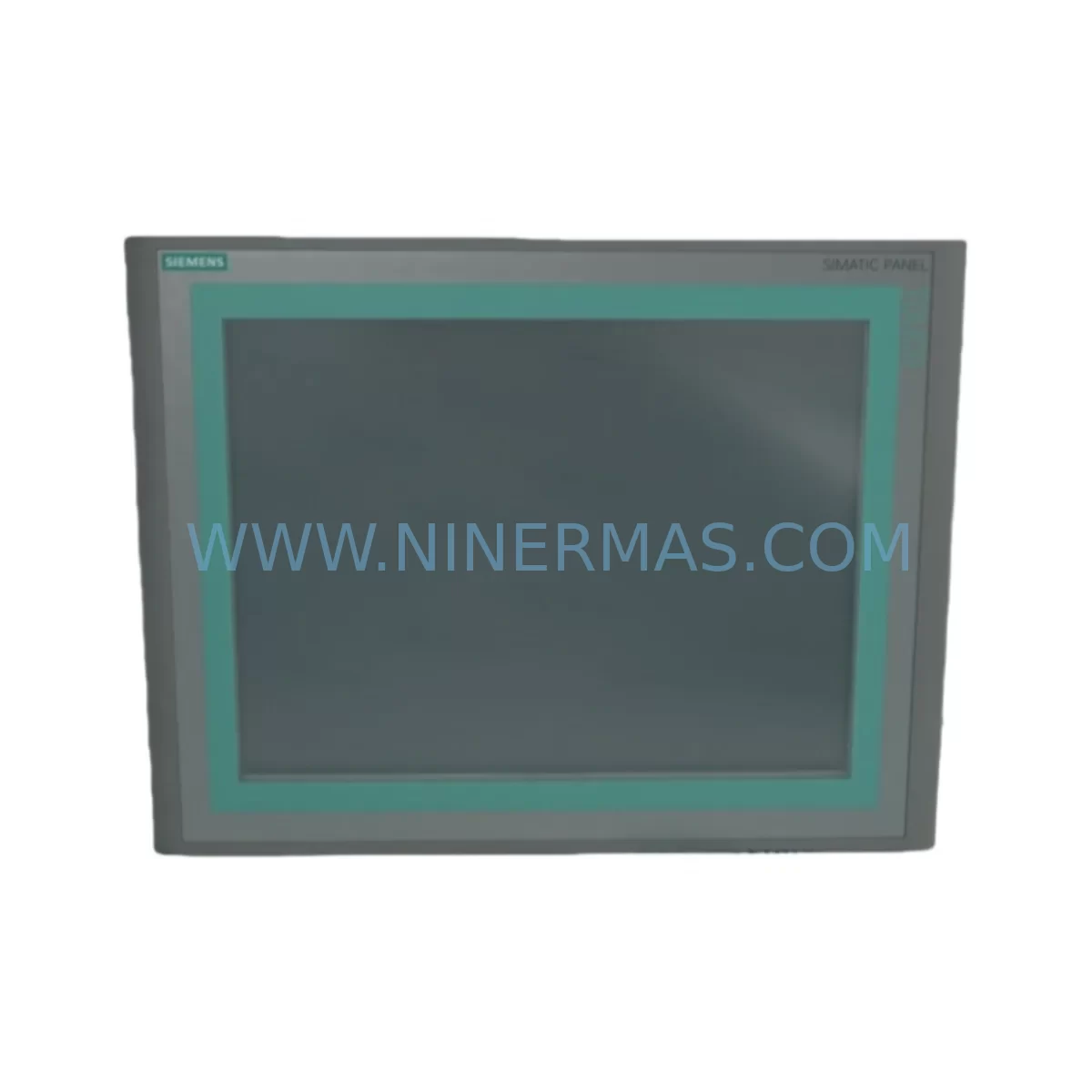
Siemens 6AV6647-0AG11-3AX0 Service-Ready Spare Part
Verify the part, confirm the platform family, and move straight into quotation with the right commercial details.
RFQ Ready
- SKU6AV6647-0AG11-3AX0
- CategoryPLC & Industrial Automation Modules
- BrandSiemens
- SupportAvailability, lead time, condition, and shipping coordination
How Buyers Usually Use This Page
- Confirm the exact part number and platform family before sending the quote request.
- Use direct email when quantity, condition, and destination are already defined internally.
- Switch to the broader brand or category archive when you need alternates nearby.
Series Navigation
Move through the most common platform families behind this part.
Product RFQ
Send this part directly for quotation.
Include quantity, required condition, destination country, and target delivery timing. Current reference: Siemens 6AV6647-0AG11-3AX0 Service-Ready Spare Part with SKU 6AV6647-0AG11-3AX0.
Siemens 6AV6647-0AG11-3AX0 Service-Ready Spare Part: Spare Replacement & Downtime Risk Control
The Siemens 6AV6647-0AG11-3AX0 is the original SIMATIC HMI TP1500 Basic PN — a 15-inch TFT touch panel designed for demanding industrial environments. As a service-ready spare part, this unit is essential for maintenance engineers managing SIMATIC S7-300, S7-1200, and S7-1500 PLC-based control systems where unplanned HMI failure can trigger costly production stoppages. Whether you are managing a food processing line, an automotive assembly cell, a water treatment facility, or a packaging machine, having a verified replacement unit of the 6AV6647-0AG11-3AX0 on the shelf is a fundamental pillar of any proactive maintenance strategy.
Sourced as an original Siemens component, this spare part is tested prior to shipment and backed by a 12-month warranty, giving procurement engineers the confidence to stock it as a long-term inventory asset rather than a one-time emergency purchase. NINERMAS maintains stable supply of this model to support both immediate replacement needs and planned annual overhaul schedules.
Spare Maintenance Table
| Parameter | Specification |
|---|---|
| Part Number / SKU | 6AV6647-0AG11-3AX0 |
| Series | SIMATIC HMI TP1500 Basic PN |
| Brand | Siemens |
| Display Size | 15″ TFT Widescreen Touch Panel |
| Interface / Communication | PROFINET (PN) — 1× RJ45 Ethernet port |
| Supply Voltage | 24 V DC (19.2 – 28.8 V DC) |
| Operating Temperature | 0 °C to +50 °C (horizontal installation) |
| Protection Rating | IP65 (front panel) / IP20 (rear) |
| Compatible PLC Systems | SIMATIC S7-300, S7-1200, S7-1500, WinCC |
| Configuration Software | WinCC Basic (TIA Portal V13 SP1 and above) |
| Origin | Germany |
| Product Type | HMI Panel — Industrial Spare Part |
| Warranty | 12 Months |
| Condition | Original, New-in-Box / Service-Ready |
| Pre-Shipment Testing | Power-on functional verification performed |
| Maintenance Recommendation | Replace immediately upon touchscreen failure, display blackout, or PROFINET communication loss; inspect panel gasket and mounting cutout during installation |
Maintenance Planning for Continuous Operation
When a TP1500 Basic PN panel fails in the field, the root cause is rarely isolated to the HMI unit alone. A thorough maintenance engineer will treat the 6AV6647-0AG11-3AX0 replacement as an opportunity to audit the entire control cabinet environment. Begin by inspecting the 24 V DC power supply feeding the panel — units such as the Siemens SITOP PSU100S or equivalent regulated DIN-rail power supplies should be load-tested to confirm stable output within the 19.2–28.8 V DC tolerance range. A marginal power supply is one of the most common causes of premature HMI failure and display flickering.
Next, verify the PROFINET network infrastructure. Check the RJ45 patch cable connecting the TP1500 to the managed switch or directly to the CPU’s PROFINET port. Degraded or improperly shielded Ethernet cables in high-EMI environments can cause intermittent communication faults that are often misdiagnosed as HMI hardware failure. If the cabinet includes a Siemens SCALANCE X series industrial Ethernet switch, inspect its port status LEDs and review the network topology in TIA Portal.
The SIMATIC S7-1500 CPU or S7-300 CPU paired with this HMI should also be checked for firmware compatibility with the WinCC Basic project loaded on the replacement panel. Confirm that the CPU’s PROFINET device name and IP address assignment match the project configuration before powering up the new unit. If the system uses a CP 343-1 or CP 443-1 communications processor, verify its configuration has not been altered during the fault investigation period.
For cabinets with distributed I/O, inspect the ET 200SP or ET 200M remote I/O stations connected via PROFINET. A failed HMI that was masking underlying I/O faults can leave undetected wiring issues on digital input or output modules. Terminal blocks and Phoenix Contact or Weidmüller push-in terminal strips should be visually inspected for loose connections, especially on 24 V signal lines that feed the HMI’s alarm inputs.
If the control system includes signal isolators or loop-powered transmitters on analog input channels displayed on the TP1500 screen, verify their output signals are within calibrated range after the HMI swap. Faulty 4–20 mA signals can cause the new panel to display erroneous process values, leading to unnecessary further troubleshooting. Similarly, any safety relay modules (such as Siemens 3SK series) wired to emergency stop circuits visible on the HMI should be function-tested after the replacement to confirm the safety logic is intact.
For older installations where the TP1500 Basic PN is being used to extend the life of a legacy S7-300 system, consider also stocking the Siemens 6ES7 315-2EH14-0AB0 CPU 315-2 PN/DP or equivalent CPU module as a companion spare. Aging CPUs with high operating hours are statistically more likely to fail within the same maintenance window as an HMI panel, and having both units available eliminates the risk of a second unplanned outage shortly after the first repair.
Finally, document the replacement in your CMMS (Computerized Maintenance Management System) and update the spare parts register to trigger a reorder of the 6AV6647-0AG11-3AX0 unit. NINERMAS supports long-term supply agreements for this model, ensuring your inventory is replenished before the next scheduled annual overhaul.
Site Replacement Workflow
Step 1 — Isolation & Backup: Before removing the failed TP1500 Basic PN, export the current WinCC Basic project from TIA Portal if a backup does not already exist. If the panel is unresponsive, retrieve the project from the engineering workstation or project archive. Power down the 24 V DC supply to the HMI circuit using the dedicated MCB (miniature circuit breaker) in the control cabinet.
Step 2 — Physical Removal: Disconnect the PROFINET RJ45 cable and the 24 V DC power connector from the rear of the failed 6AV6647-0AG11-3AX0 unit. Release the panel mounting clamps from the rear and carefully extract the unit from the cabinet cutout. Inspect the cutout gasket for damage and replace if necessary to maintain IP65 ingress protection on the new unit.
Step 3 — Installation of Replacement Unit: Insert the new 6AV6647-0AG11-3AX0 into the cutout, secure the mounting clamps evenly to ensure a proper seal, and reconnect the 24 V DC power and PROFINET cable. Restore power and confirm the panel boots to the Siemens startup screen.
Step 4 — Project Transfer & PROFINET Configuration: Using TIA Portal, assign the correct PROFINET device name and IP address to the new panel via the “Online & Diagnostics” function. Download the WinCC Basic project to the panel. Verify all screen pages, alarm displays, and trend views load correctly.
Step 5 — Functional Verification: Cycle through all HMI screens, trigger test alarms, and confirm operator inputs are correctly reflected in the PLC. Verify PROFINET communication status shows “OK” in TIA Portal’s network view. Log the replacement in the maintenance record and update the spare parts inventory.
This workflow minimizes downtime to typically under 2 hours for a prepared maintenance team, compared to 8–24 hours when spare parts are not pre-stocked. The 6AV6647-0AG11-3AX0 is a direct form-fit-function replacement for the original installed unit, requiring no hardware modification to the control cabinet.
Spare Parts Support FAQ
Q1: Is the 6AV6647-0AG11-3AX0 compatible with my existing TIA Portal project without modification?
Yes, provided your TIA Portal version is V13 SP1 or higher and the WinCC Basic project was originally configured for the TP1500 Basic PN device type. The replacement unit uses the same hardware configuration profile, so no device substitution or project migration is required. Simply download the existing project to the new panel after assigning the correct PROFINET device name.
Q2: What pre-shipment testing does NINERMAS perform on this spare part?
Every 6AV6647-0AG11-3AX0 unit undergoes a power-on functional test prior to shipment, verifying display operation, touchscreen response, and PROFINET port activity. Units are shipped in protective packaging with anti-static measures. A 12-month warranty covers any manufacturing defects or functional failures from the date of receipt.
Q3: Can NINERMAS support long-term or blanket purchase orders for this model?
Yes. NINERMAS maintains stable inventory of the 6AV6647-0AG11-3AX0 and supports long-term supply agreements for customers with recurring maintenance needs or multi-site operations. Contact our sales team to discuss volume pricing, reserved stock arrangements, and scheduled delivery programs that align with your annual maintenance calendar.
Q4: What should I do if the TP1500 Basic PN panel was discontinued or is no longer listed in the current Siemens catalog?
The 6AV6647-0AG11-3AX0 may be classified as a mature or phased-out product in Siemens’ current portfolio, but NINERMAS specializes in sourcing and supplying original spare parts for legacy and end-of-life industrial equipment. We can provide verified original units to extend the operational life of your existing system without requiring a costly HMI platform migration. Contact us to confirm current stock availability and lead times.
| Product Series | SIMATIC |
|---|---|
| Country of Origin | DE |
Catalog Continuation
More Siemens modules in the catalog.
Use the brand lane to compare nearby part numbers, platform-adjacent modules, and other inquiry-ready listings before sending your final RFQ.
SKU: 6SE7090-0XX84-3EH0
Siemens 6SE7090-0XX84-3EH0 Safety-Reliable Drive for Critical Control
SKU: 6GK5416-4GS00-2AM2
Siemens 6GK5416-4GS00-2AM2 Industrial Ethernet Switch
Catalog Continuation
Alternative parts within PLC & Industrial Automation Modules.
Stay inside the same system family when you need substitutes, adjacent modules, or a broader shortlist for procurement review.