
Original Industrial Spare Part
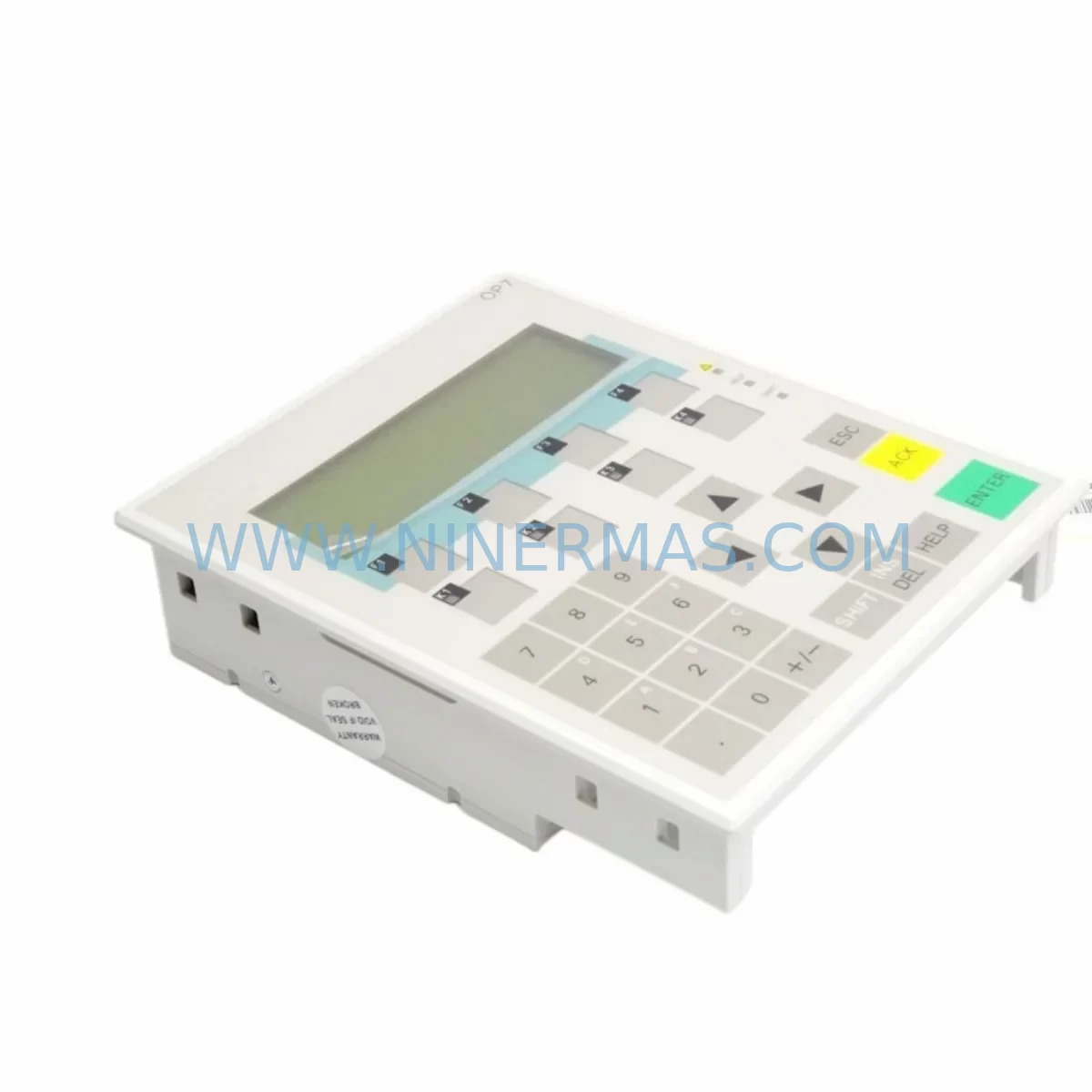
Siemens 6AV3607-1JC20-0AX1 Service-Ready Spare Part for Industrial Maintenance
Verify the part, confirm the platform family, and move straight into quotation with the right commercial details.
RFQ Ready
- SKU6AV3607-1JC20-0AX1
- CategoryPLC & Industrial Automation Modules
- BrandSiemens
- SupportAvailability, lead time, condition, and shipping coordination
How Buyers Usually Use This Page
- Confirm the exact part number and platform family before sending the quote request.
- Use direct email when quantity, condition, and destination are already defined internally.
- Switch to the broader brand or category archive when you need alternates nearby.
Series Navigation
Move through the most common platform families behind this part.
Product RFQ
Send this part directly for quotation.
Include quantity, required condition, destination country, and target delivery timing. Current reference: Siemens 6AV3607-1JC20-0AX1 Service-Ready Spare Part for Industrial Maintenance with SKU 6AV3607-1JC20-0AX1.
Siemens 6AV3607-1JC20-0AX1 Service-Ready Spare Part for Industrial Maintenance
The Siemens 6AV3607-1JC20-0AX1 is a proven operator panel (OP7) from the SIMATIC HMI series, widely deployed across manufacturing lines, process control cabinets, and legacy automation systems worldwide. As production environments age and OEM support windows close, maintaining a reliable stock of service-ready spare parts like the 6AV3607-1JC20-0AX1 becomes a critical pillar of any industrial maintenance strategy. Unplanned downtime caused by a failed HMI panel can cascade into hours of lost production, emergency engineering calls, and costly line stoppages — all of which are preventable with the right spare parts inventory in place.
At NINERMAS, every unit of the 6AV3607-1JC20-0AX1 is sourced from verified supply channels, individually inspected, function-tested, and shipped with a 12-month warranty. Whether you are a maintenance engineer executing a scheduled panel swap, a procurement engineer building a strategic spare parts buffer, or a plant manager racing to recover from an unplanned shutdown, this unit is ready to deploy.
Spare Maintenance Table
| Parameter | Specification |
|---|---|
| Part Number / SKU | 6AV3607-1JC20-0AX1 |
| Brand | Siemens |
| Series | SIMATIC HMI — OP7 |
| Product Type | HMI Operator Panel (Text-Based) |
| Display | LCD, 4-line text display |
| Interface / Communication | MPI / PROFIBUS-DP |
| Supply Voltage | 24 V DC |
| Protection Class | IP65 (front panel) |
| Operating Temperature | 0 °C to +50 °C |
| Compatibility | SIMATIC S5, S7-300, S7-400 PLC series |
| Installation | Panel cut-out mounting, standard DIN rail compatible enclosures |
| Origin | Germany |
| Condition | Original / Service-Ready |
| Testing | Function-tested before shipment |
| Warranty | 12 Months |
Maintenance Planning for Continuous Operation
When a 6AV3607-1JC20-0AX1 OP7 panel fails or is flagged during a routine control cabinet inspection, experienced maintenance engineers know that the HMI is rarely the only component under stress. A thorough site assessment should accompany every panel replacement to prevent repeat failures and ensure full system recovery.
Begin by verifying the 24 V DC power supply feeding the OP7. A degraded or undersized power supply module — such as a Siemens SITOP PSU100S or equivalent — can cause intermittent panel resets, display corruption, or communication dropouts that are often misdiagnosed as HMI faults. Inspect the power supply output voltage under load and replace if ripple or voltage sag is detected.
Next, audit the MPI or PROFIBUS-DP communication cable connecting the OP7 to the S7-300 or S7-400 CPU. Damaged shielding, loose connectors, or incorrect bus termination resistors on the PROFIBUS segment are common root causes of HMI communication errors. Replacing the OP7 without addressing a faulty bus cable will result in the same fault recurring on the new unit.
Check the CPU module itself — for example, a Siemens 6ES7315-2AG10-0AB0 or similar S7-300 CPU — for memory errors, battery warnings, or firmware mismatches that could affect HMI tag communication. If the CPU battery (6ES7971-0BA00) is due for replacement, this is the ideal time to perform that task concurrently.
Inspect all I/O modules in the rack. Digital input modules such as the 6ES7321-1BL00-0AA0 and digital output modules like the 6ES7322-1BL00-0AA0 should be checked for blown fuses, stuck outputs, or wiring faults that may have contributed to the original fault condition. Signal isolation barriers and relay output modules in the same electrical loop should also be tested for contact wear or insulation degradation.
For systems using PROFIBUS-DP field devices, verify that remote I/O stations, frequency inverters, or distributed peripherals connected on the same bus segment are operating correctly. A single faulty PROFIBUS slave can disrupt the entire network and cause the OP7 to display communication fault messages.
Terminal blocks and wiring within the control cabinet should be inspected for loose connections, corrosion, or thermal damage — particularly on 24 V DC supply rails and signal wiring to the HMI. Replacing the OP7 is also a good opportunity to clean the cabinet interior, check cooling fan operation, and verify that cabinet door seals are intact to maintain the IP65 protection rating of the panel.
If the system includes a Siemens TP270 or OP270 as a secondary HMI or supervisory panel, confirm that its project configuration and PLC variable mapping remain consistent after the OP7 swap. Maintaining a current backup of the HMI project file (ProTool or WinCC flexible project) on a dedicated engineering laptop or USB drive is strongly recommended as part of any annual maintenance plan.
Site Replacement Workflow
Replacing the 6AV3607-1JC20-0AX1 on-site is a straightforward process when the correct spare is available and the replacement procedure is followed systematically. Begin by downloading the existing OP7 project from the panel using ProTool or the appropriate Siemens HMI configuration tool, and save a verified backup before powering down the unit.
Isolate the 24 V DC supply to the panel at the circuit breaker or fuse terminal. Disconnect the MPI/PROFIBUS-DP communication cable and the power supply wiring, noting the terminal assignments for accurate reconnection. Remove the panel from the cabinet cut-out by releasing the mounting clamps.
Install the replacement 6AV3607-1JC20-0AX1 into the same cut-out, reconnect power and communication wiring per the original terminal diagram, and restore the 24 V DC supply. Download the saved HMI project to the new panel and perform a full communication test with the connected PLC to confirm all tags, alarms, and screen navigation functions are operating correctly.
Document the replacement in the site maintenance log, including the date, replaced unit serial number, and technician name. Update the spare parts inventory to trigger a replenishment order for the consumed unit, ensuring the buffer stock level is restored before the next maintenance cycle.
This systematic approach minimises downtime, eliminates configuration errors, and ensures the replacement unit is fully validated before the production line is restarted — reducing the risk of a secondary fault event during the recovery phase.
Spare Parts Support FAQ
Q1: Is the 6AV3607-1JC20-0AX1 compatible with both S7-300 and S7-400 PLC systems?
Yes. The OP7 communicates via MPI and PROFIBUS-DP, both of which are supported by the SIMATIC S7-300 and S7-400 CPU families. Compatibility with S5 systems via appropriate adapters is also well-documented. Always verify the communication protocol configured in your existing HMI project before installation.
Q2: What is the recommended spare parts buffer quantity for a production facility running multiple OP7 panels?
For facilities with three or more OP7 panels in active service, maintaining a minimum of one spare unit per five installed panels is a widely adopted industry practice. Given that the 6AV3607-1JC20-0AX1 is a legacy product with limited OEM availability, holding a slightly larger buffer — particularly for critical lines — is advisable to protect against extended lead times.
Q3: How is each unit tested before shipment?
Every 6AV3607-1JC20-0AX1 unit supplied by NINERMAS undergoes a function test covering power-on self-test, display verification, keypad response, and communication port integrity. Units that do not pass all test criteria are quarantined and not shipped. A test report is available upon request for quality-critical procurement processes.
Q4: What warranty and long-term supply support does NINERMAS provide?
All units are covered by a 12-month warranty from the date of shipment, covering manufacturing defects and functional failures under normal operating conditions. NINERMAS maintains ongoing sourcing relationships to support long-term supply of legacy Siemens HMI components, including the 6AV3607-1JC20-0AX1, for customers managing extended system lifecycles and old-system life extension programmes.
| Product Series | SIMATIC |
|---|---|
| Country of Origin | DE |
Catalog Continuation
More Siemens modules in the catalog.
Use the brand lane to compare nearby part numbers, platform-adjacent modules, and other inquiry-ready listings before sending your final RFQ.
SKU: 6SE7038-6EK84-1BH0
Siemens 6SE7038-6EK84-1BH0 Retrofit Drive Control Module
SKU: 6SL3055-0AA00-4CA5
Siemens 6SL3055-0AA00-4CA5 Retrofit-Compatible Operator Panel for Legacy Systems
Catalog Continuation
Alternative parts within PLC & Industrial Automation Modules.
Stay inside the same system family when you need substitutes, adjacent modules, or a broader shortlist for procurement review.

SKU: OZDPROFI12MG12
Hirschmann OZDPROFI12MG12 Spare Part for Industrial Maintenance



SKU: 07025-0000-70-1-04
KONTRON 07025-0000-70-1-04 Service-Ready Spare Part



