
Original Industrial Spare Part
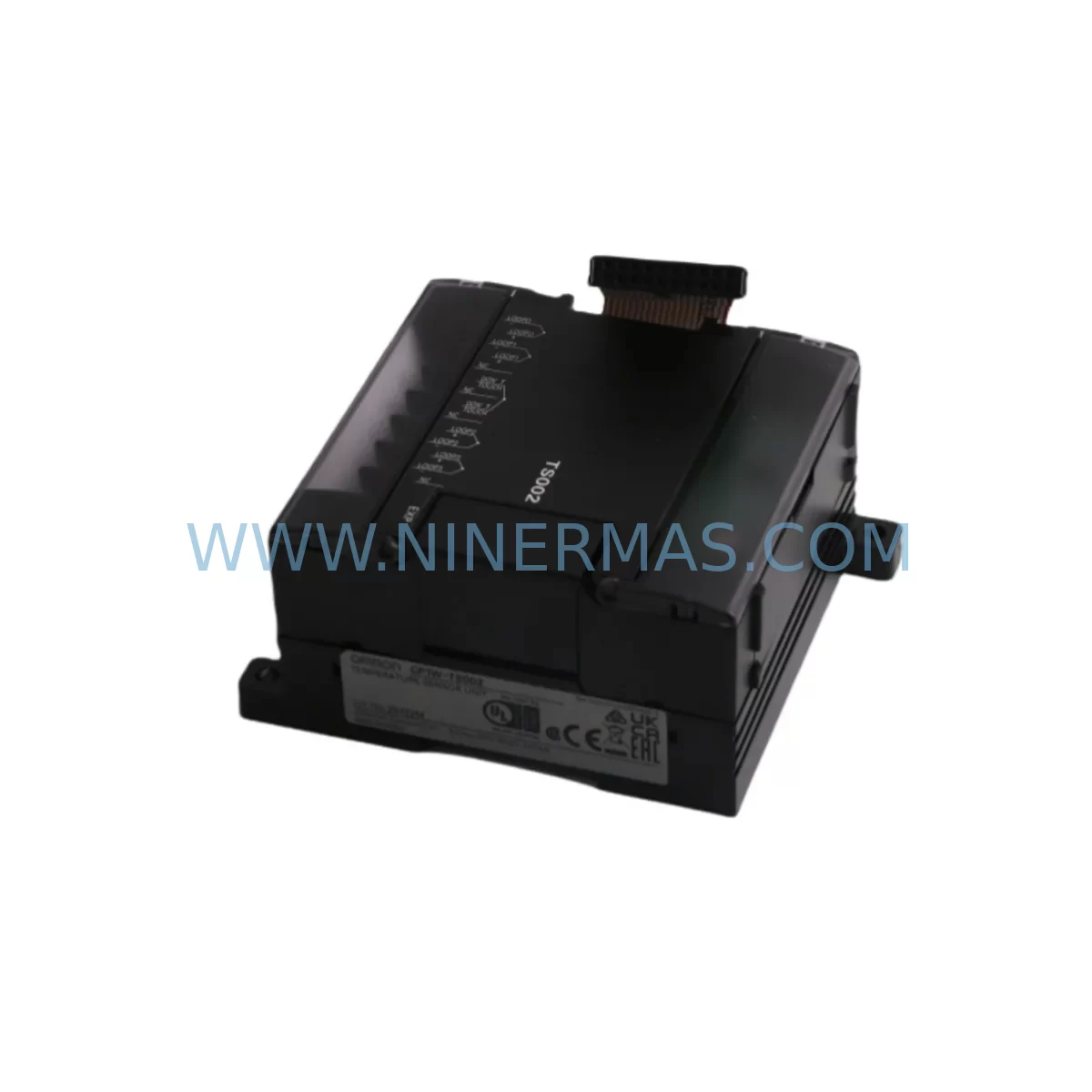
OMRON CP1W-TS002 Service-Ready Spare Part for Industrial Maintenance
Verify the part, confirm the platform family, and move straight into quotation with the right commercial details.
RFQ Ready
- SKUCP1W-TS002
- CategoryPLC & Industrial Automation Modules
- BrandOmron
- SupportAvailability, lead time, condition, and shipping coordination
How Buyers Usually Use This Page
- Confirm the exact part number and platform family before sending the quote request.
- Use direct email when quantity, condition, and destination are already defined internally.
- Switch to the broader brand or category archive when you need alternates nearby.
Series Navigation
Move through the most common platform families behind this part.
Product RFQ
Send this part directly for quotation.
Include quantity, required condition, destination country, and target delivery timing. Current reference: OMRON CP1W-TS002 Service-Ready Spare Part for Industrial Maintenance with SKU CP1W-TS002.
OMRON CP1W-TS002 Service-Ready Spare Part for Industrial Maintenance
The OMRON CP1W-TS002 is a 2-channel thermocouple temperature input module designed for integration with the OMRON CP1 series PLC platform, including the CP1H, CP1L, and CP1E CPU units. As a direct-fit expansion module, the CP1W-TS002 connects via the CP1W side bus and delivers real-time temperature measurement for process control, HVAC automation, furnace monitoring, and industrial drying systems. For maintenance engineers managing aging control cabinets or executing planned shutdowns, sourcing a verified, pre-tested CP1W-TS002 spare is a critical step in minimising unplanned downtime and protecting production continuity.
At NINERMAS, every CP1W-TS002 unit is subject to pre-shipment functional verification before dispatch. Each module is covered by a 12-month warranty from the date of delivery, providing procurement teams with a reliable, low-risk sourcing option for both emergency replacement and scheduled spare parts inventory replenishment.
Spare Maintenance Table
| Parameter | Specification |
|---|---|
| Model / SKU | CP1W-TS002 |
| Brand | OMRON |
| Series | CP1W (CP1 Expansion Module Series) |
| Module Type | Thermocouple Temperature Input Module |
| Number of Input Channels | 2 Channels |
| Thermocouple Types Supported | K, J, T, E, L, U, N, R, S, B, W (selectable per channel) |
| Temperature Range | -200°C to +2315°C (type-dependent) |
| Resolution | 0.1°C / 1°C (selectable) |
| Conversion Speed | 250 ms per channel |
| Compatible CPU Units | CP1H, CP1L, CP1E series |
| Bus Connection | CP1W side expansion bus |
| Power Consumption | 5 VDC, 80 mA (from CPU bus) |
| Operating Temperature | 0°C to +55°C |
| Storage Temperature | -20°C to +75°C |
| Humidity | 10% to 90% RH (non-condensing) |
| Origin | Japan |
| Warranty | 12 Months from date of delivery |
| Pre-Shipment Test | Yes — functional verification before dispatch |
| Compatibility Confirmation | CP1H-X40DR-A, CP1H-XA40DR-A, CP1L-M60DR-A, CP1E-N60DR-A and compatible variants |
| Application Environments | Process control, furnace monitoring, HVAC, food processing, drying systems |
Maintenance Planning for Continuous Operation
When a CP1W-TS002 temperature input module fails or is flagged during a routine control cabinet inspection, the fault rarely exists in isolation. Maintenance engineers should treat the replacement of this module as an opportunity to audit the surrounding electrical and control architecture to prevent cascading failures and reduce the risk of repeat shutdowns.
Begin by verifying the CP1W-PD025 or CP1W-PD022 power supply module that feeds the CP1W expansion bus. A degraded bus power supply can cause intermittent sensor read errors that mimic a faulty temperature input module. Confirm output voltage stability under load before installing the replacement CP1W-TS002.
Next, inspect the CP1W-DA041 or CP1W-DA021 analog output modules sharing the same expansion rack. In mixed-signal control cabinets, ground loops between thermocouple inputs and analog output channels are a common source of measurement drift. If signal isolation is not already in place, consider adding a signal isolator (such as a DIN-rail mounted loop isolator) between the thermocouple field wiring and the CP1W-TS002 input terminals.
Thermocouple field wiring should also be inspected at this stage. Degraded thermocouple extension cables — particularly those routed near high-voltage conductors or exposed to mechanical vibration — can introduce EMI noise that corrupts temperature readings. Replace any cables showing insulation wear, connector corrosion, or impedance drift.
For systems using the CP1W-CIF01 RS-232C communications module or the CP1W-CIF11 RS-422/485 module for SCADA or HMI connectivity, verify that communication parameters remain stable after the module swap. A CPU restart following expansion bus reconfiguration can reset communication settings if the program is not properly protected.
If the control system includes an NS-series HMI or a NB-series touch panel displaying temperature trend data, confirm that the PLC memory addresses mapped to the CP1W-TS002 channels are correctly re-established after replacement. Incorrect address mapping is a frequent post-maintenance error that delays production restart.
Relay output modules such as the CP1W-8ER or CP1W-16ER used for temperature-triggered alarms or heater control should be tested for contact integrity during the same maintenance window. Relay contacts in high-cycle thermal control applications are subject to accelerated wear and should be included in the annual spare parts checklist alongside the CP1W-TS002.
Finally, review the terminal block wiring at the CP1W-TS002 input connector. Loose or oxidised screw terminals are a leading cause of intermittent temperature faults in industrial environments. Re-torque all connections to the manufacturer’s specified values and apply anti-oxidation compound where appropriate for humid or coastal installations.
Site Replacement Workflow
Step 1 — Isolate and document: Before removing the faulty CP1W-TS002, record all current thermocouple type settings, channel configurations, and PLC program memory values associated with the temperature input channels. Use the OMRON CX-Programmer or Sysmac Studio backup function to save the full CPU program and parameter file.
Step 2 — Power down the expansion bus: Switch off the CP1W power supply module and confirm that the bus voltage has discharged before disconnecting the CP1W-TS002. Do not hot-swap expansion modules on the CP1W bus — this can corrupt CPU memory and damage adjacent modules.
Step 3 — Physical replacement: Remove the faulty module by releasing the expansion bus connector latch. Install the replacement CP1W-TS002, ensuring the bus connector is fully seated and the module latch is engaged. Reconnect thermocouple field wiring to the correct terminals, observing polarity for each thermocouple type.
Step 4 — Power-up and verification: Restore power to the CPU and expansion bus. Confirm that the CP1W-TS002 is recognised by the CPU (no expansion bus error flags). Verify that temperature readings on both channels are within the expected range for the connected thermocouples. Cross-check readings against a calibrated reference thermometer if available.
Step 5 — System handover: Update the maintenance log with the replacement date, module serial number, and post-replacement test results. Replenish the spare parts inventory with a new CP1W-TS002 unit to maintain readiness for the next maintenance cycle.
Spare Parts Support FAQ
Q1: Is the CP1W-TS002 a direct drop-in replacement for older CP1W temperature input modules?
Yes. The CP1W-TS002 is compatible with all CP1H, CP1L, and CP1E CPU units that support CP1W expansion modules. No firmware upgrade or hardware modification is required for direct replacement. Thermocouple type settings are configured via PLC software parameters and are retained in CPU memory, so the replacement module will adopt the correct configuration upon power-up if the CPU program is intact.
Q2: What is included in the pre-shipment test for the CP1W-TS002?
Each CP1W-TS002 unit dispatched by NINERMAS undergoes a functional verification test that confirms bus communication, channel input response, and power consumption within specification. Units that do not pass this test are not dispatched. A test record is available upon request for quality-critical procurement processes.
Q3: Can NINERMAS support long-term or repeat supply of the CP1W-TS002 for annual maintenance programmes?
Yes. NINERMAS supports scheduled procurement for maintenance teams managing multi-site or multi-unit CP1 series installations. Contact our sales team to discuss volume pricing, lead time commitments, and consignment stock arrangements for high-frequency spare parts such as the CP1W-TS002.
Q4: What does the 12-month warranty cover for the CP1W-TS002?
The 12-month warranty covers manufacturing defects and functional failures under normal operating conditions from the date of delivery. It does not cover damage resulting from incorrect installation, overvoltage, physical impact, or use outside the specified environmental parameters. Warranty claims are processed directly through NINERMAS with a target response time of 2 business days.
| Product Series | Other series |
|---|---|
| Country of Origin | JP |
Catalog Continuation
More Omron modules in the catalog.
Use the brand lane to compare nearby part numbers, platform-adjacent modules, and other inquiry-ready listings before sending your final RFQ.
Catalog Continuation
Alternative parts within PLC & Industrial Automation Modules.
Stay inside the same system family when you need substitutes, adjacent modules, or a broader shortlist for procurement review.
SKU: DS200SLCCG3ACC DS215DENQG3QZZ01A
GE DS200SLCCG3ACC Mark V Service-Ready Spare Part
SKU: MPP1500D 6FC5303-1AF30-0AA0
Siemens MPP1500D 6FC5303-1AF30-0AA0 Retrofit Operator Panel
SKU: 6SL3224-0BE31-5UA0
Siemens 6SL3224-0BE31-5UA0 Service-Ready Spare Part



