Original Industrial Spare Part
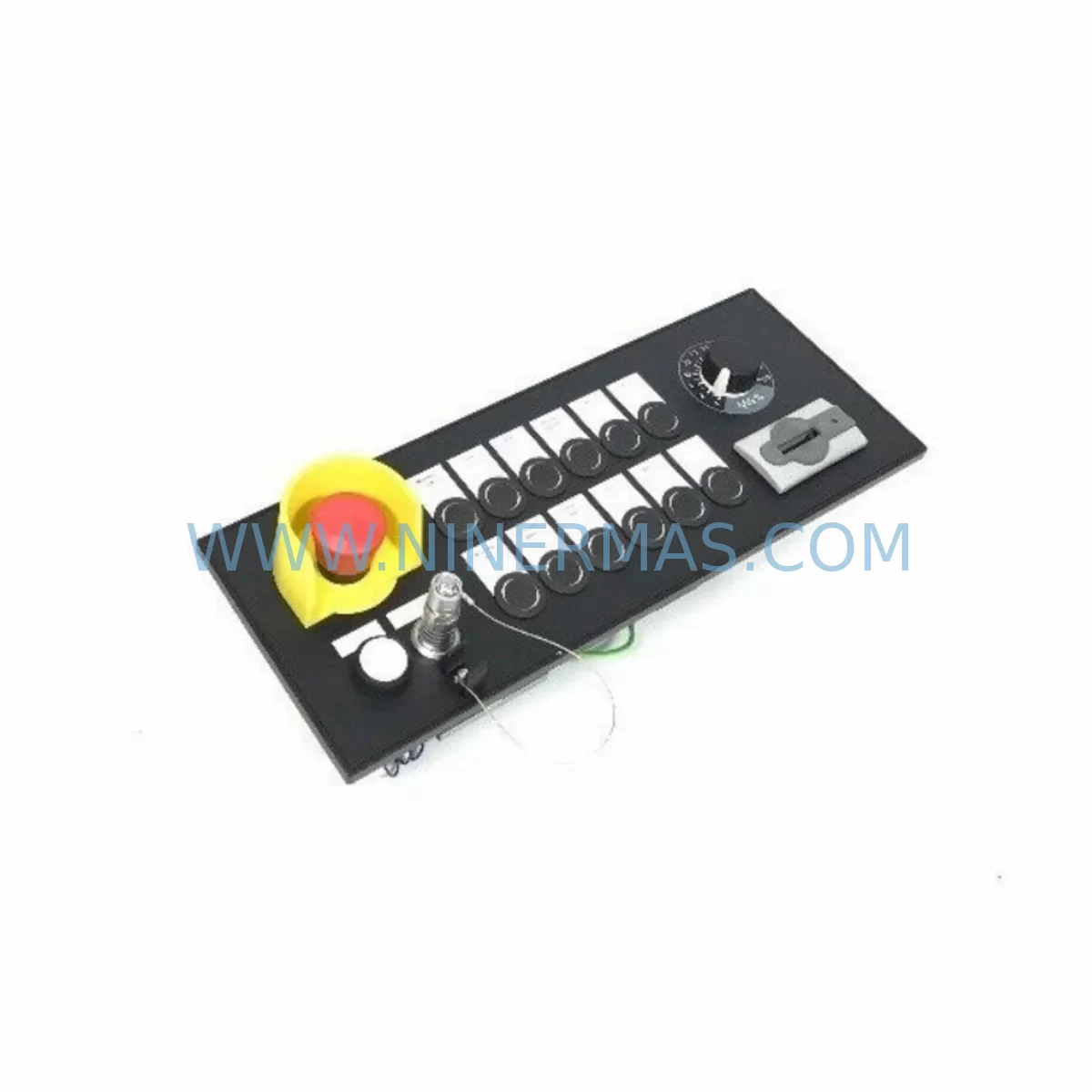
Siemens MPP1500D 6FC5303-1AF30-0AA0 Retrofit Operator Panel
Verify the part, confirm the platform family, and move straight into quotation with the right commercial details.
RFQ Ready
- SKUMPP1500D 6FC5303-1AF30-0AA0
- CategoryPLC & Industrial Automation Modules
- BrandSiemens
- SupportAvailability, lead time, condition, and shipping coordination
How Buyers Usually Use This Page
- Confirm the exact part number and platform family before sending the quote request.
- Use direct email when quantity, condition, and destination are already defined internally.
- Switch to the broader brand or category archive when you need alternates nearby.
Series Navigation
Move through the most common platform families behind this part.
Product RFQ
Send this part directly for quotation.
Include quantity, required condition, destination country, and target delivery timing. Current reference: Siemens MPP1500D 6FC5303-1AF30-0AA0 Retrofit Operator Panel with SKU MPP1500D 6FC5303-1AF30-0AA0.
Siemens MPP1500D 6FC5303-1AF30-0AA0 Retrofit Operator Panel: Legacy-Compatible CNC Upgrade for Existing Automation Systems
The Siemens MPP1500D, part number 6FC5303-1AF30-0AA0, is a 15-inch Machine Push-button Panel (MPP) designed for integration with SINUMERIK CNC control platforms. Originally deployed across a wide range of turning centers, machining centers, and multi-axis milling lines, this operator panel has become a critical retrofit target as production facilities modernize aging control cabinets without replacing the entire machine tool infrastructure. Whether you are replacing a failed unit, upgrading a discontinued panel, or migrating from an earlier SINUMERIK 840D sl configuration, the MPP1500D 6FC5303-1AF30-0AA0 provides a structurally compatible and functionally verified path forward.
This unit is supplied pre-shipment tested, backed by a 12-month warranty, and available from verified inventory — making it a reliable choice for maintenance teams managing long-cycle spare parts programs and unplanned downtime events.
Upgrade Compatibility Table
| Parameter | MPP1500D 6FC5303-1AF30-0AA0 | Retrofit Notes |
|---|---|---|
| Display Size | 15-inch TFT LCD | Verify cabinet cutout dimensions before installation |
| Compatible CNC Platform | SINUMERIK 840D sl / 828D | Confirm NCU firmware version compatibility |
| Communication Interface | PROFIBUS DP / Ethernet (MPI) | Match existing backplane bus protocol; MPI adapters may be required for older NCU 571/572 systems |
| Power Supply Input | 24 VDC (via PCU or standalone PSU) | Verify 24V rail capacity on existing control cabinet; minimum 6A recommended |
| Mounting Standard | Panel cutout, front-mount | Check depth clearance behind panel door; cable routing must allow for USB and Ethernet connectors |
| Operator Keys | Configurable machine function keys (MFK) | Key assignment must be re-mapped in HMI configuration if replacing a non-identical MPP variant |
| Replacement Recommendation | Direct replacement for MPP1500D variants; functional substitute for OP 015A in compatible configurations | Confirm part suffix matches required key layout and display resolution |
| Commissioning Focus | HMI screen layout, MFK assignment, PROFIBUS node address | Use SINUMERIK Operate commissioning wizard; back up existing HMI project before swap |
| Warranty | 12 Months | Covers hardware defects; pre-shipment functional test included |
Retrofit Planning for Existing Automation Systems
Integrating the MPP1500D 6FC5303-1AF30-0AA0 into an existing production line requires a structured approach that accounts for both hardware compatibility and software continuity. The panel connects to the SINUMERIK Numeric Control Unit (NCU) — typically an NCU 710.3, NCU 720.3, or NCU 730.3 — via the onboard PROFIBUS DP interface or Ethernet link, depending on the system generation. Before disconnecting the existing panel, engineers should document the current PROFIBUS node address assigned to the operator station and confirm that the replacement unit is configured to the same address to avoid communication faults on startup.
Power delivery is a common oversight during panel retrofits. The MPP1500D draws its 24 VDC supply from the control cabinet’s power supply module — often a Siemens SITOP PSU100S or equivalent regulated DC supply. If the existing PSU is already loaded near capacity due to additional I/O modules, distributed ET 200SP stations, or auxiliary relay circuits, a load audit should be performed before commissioning the new panel. Insufficient current headroom can cause intermittent resets or display flickering that is difficult to diagnose without a power rail measurement.
Terminal wiring at the rear of the panel must be verified against the existing cable harness. The MPP1500D uses a defined connector layout for USB, Ethernet, PROFIBUS, and 24V power — and while the physical connector types are standardized, cable lengths and routing paths may need adjustment when replacing an older OP 015A or MPP1200 unit that occupied a different footprint in the cabinet door. Installers should also confirm that the machine function key (MFK) wiring harness, if externally routed, matches the new panel’s key matrix pinout.
For facilities running SINUMERIK 840D sl with a PCU 50.5 computing unit, the HMI project stored on the PCU must be reviewed to ensure that screen layouts, softkey assignments, and alarm text files are compatible with the MPP1500D’s display resolution and key count. If the previous panel was an MPP1200 or a non-standard OEM variant, the HMI project may require partial reconfiguration using SINUMERIK Operate’s HMI configuration tool. Backing up the existing HMI project to a CF card or USB drive before any hardware swap is strongly recommended.
In systems where the operator panel communicates over MPI rather than PROFIBUS DP — common in older SINUMERIK 840D (non-sl) installations — an MPI-to-PROFIBUS protocol bridge or a direct NCU firmware upgrade may be necessary. This is particularly relevant when the retrofit is part of a broader migration from SINUMERIK 840D classic to 840D sl, where the NCU backplane interface and communication architecture differ significantly. In such cases, the MPP1500D retrofit is often accompanied by replacement of the NCU module itself, as well as updates to the drive bus configuration for connected SINAMICS S120 drive modules.
I/O expansion requirements should also be assessed during the planning phase. If the existing system relies on distributed I/O through a SIMATIC ET 200M or ET 200S rack connected to the same PROFIBUS segment as the operator panel, the node address map must be updated to reflect the new panel’s address assignment. Conflicts in the PROFIBUS address table will prevent the NCU from establishing communication with the panel on first boot. A GSD file import into STEP 7 or TIA Portal may be required if the panel is being added to a project that was not previously configured for this specific MPP variant.
Signal isolators installed between the panel’s digital outputs and the machine’s relay logic — particularly for emergency stop circuits and feed hold signals — should be inspected and tested as part of the retrofit validation. These isolators, often DIN-rail mounted units from the SIRIUS or Phoenix Contact range, can degrade over time and may introduce signal delays that affect the panel’s response characteristics. Replacing aged isolators during the same maintenance window reduces the risk of a secondary fault after the panel swap is complete.
Downtime Control During System Migration
Minimizing production downtime during an MPP1500D panel replacement requires advance preparation and a clearly defined swap sequence. The most effective approach is to pre-configure the replacement panel offline — assigning the correct PROFIBUS node address, loading the HMI project from a backup, and verifying key assignments — before the machine is taken out of service. This reduces the on-machine commissioning window to a physical swap, cable reconnection, and a functional verification test, typically achievable within two to four hours for a prepared team.
Protecting the existing program logic stored in the NCU is a non-negotiable step. The NC program archive, including part programs, tool offset tables, zero point offsets, and machine data sets, should be backed up to a USB drive or network share before any hardware is disconnected. The PCU 50.5 system partition should also be imaged if the HMI project is stored locally rather than on a network drive. This ensures that a full system restore is possible if the commissioning process encounters an unexpected compatibility issue.
Maintaining field control continuity during the swap window is particularly important in facilities where the machine is part of a connected production cell. If the CNC is linked to a SCADA system or MES platform via OPC-UA or a SINUMERIK Integrate gateway, the communication link should be formally suspended and logged before the panel is disconnected. Attempting to hot-swap the panel while the NCU is actively communicating with upstream systems can generate false alarms or data integrity errors in the production reporting system.
After the physical installation is complete, the commissioning sequence should follow the standard SINUMERIK startup procedure: power-on the NCU first, allow the drive bus to initialize, then power-on the operator panel and verify that the HMI establishes communication with the NCU within the expected timeout window. Any PROFIBUS fault LEDs on the NCU front panel should be resolved before attempting to run a test program. A dry-run cycle with the machine axes in simulation mode is recommended before returning the machine to production.
Retrofit Support FAQ
Q: Is the MPP1500D 6FC5303-1AF30-0AA0 a direct replacement for the OP 015A or MPP1200?
A: The MPP1500D is functionally compatible with OP 015A and MPP1200 installations in most SINUMERIK 840D sl configurations, but the physical mounting dimensions and connector layout differ. A panel cutout adapter plate may be required if the cabinet door was machined for the smaller MPP1200 footprint. Key layout and MFK assignments must be reconfigured in the HMI project to match the new panel’s key matrix.
Q: What commissioning steps are required after installation?
A: After physical installation and cable connection, assign the correct PROFIBUS node address via the panel’s service menu or NCU configuration. Load the HMI project from backup, verify softkey and MFK assignments, and confirm that the SINUMERIK Operate startup screen displays correctly. Run a full axis reference cycle and verify emergency stop and feed hold signal paths before returning to production.
Q: Is pre-shipment testing included, and what does it cover?
A: Yes. Each MPP1500D 6FC5303-1AF30-0AA0 unit undergoes a pre-shipment functional test covering display operation, key matrix response, communication interface continuity, and 24V power input verification. Test records are available upon request. The unit is covered by a 12-month warranty from the date of shipment, covering hardware defects under normal operating conditions.
Q: What is the typical lead time and inventory availability?
A: Units are available from verified stock with standard lead times of 3–7 business days for international shipments. For urgent replacement requirements, expedited shipping options are available. Contact our team to confirm current inventory levels and delivery schedules for your region.
| Product Series | SINUMERIK |
|---|---|
| Country of Origin | DE |
Catalog Continuation
More Siemens modules in the catalog.
Use the brand lane to compare nearby part numbers, platform-adjacent modules, and other inquiry-ready listings before sending your final RFQ.
Catalog Continuation
Alternative parts within PLC & Industrial Automation Modules.
Stay inside the same system family when you need substitutes, adjacent modules, or a broader shortlist for procurement review.