
Original Industrial Spare Part
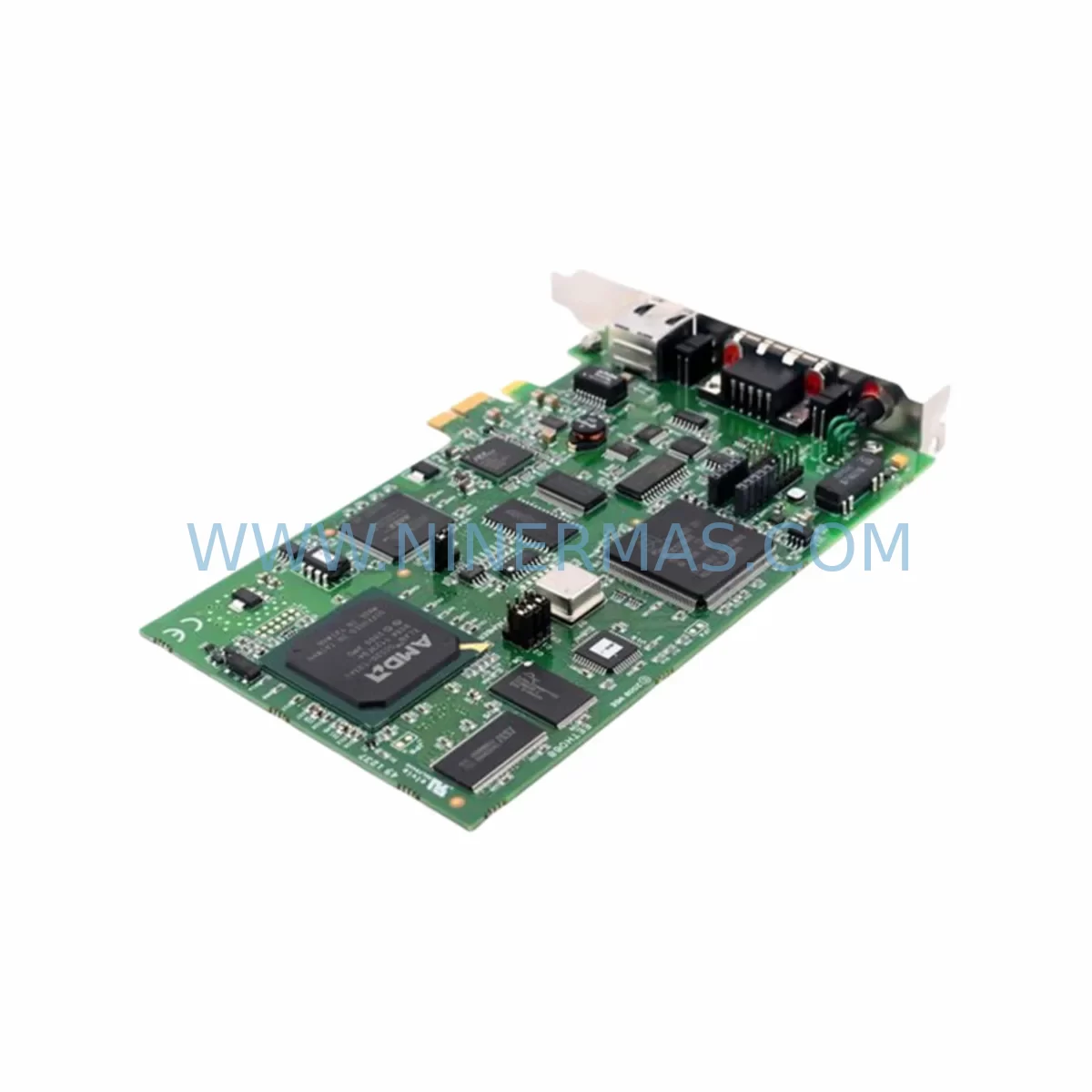
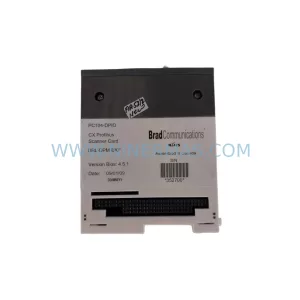
MOLEX PCIE2000ETH APP-EPB-PCIE Service-Ready Spare Part
Verify the part, confirm the platform family, and move straight into quotation with the right commercial details.
RFQ Ready
- SKUPCIE2000ETH APP-EPB-PCIE
- CategoryPLC & Industrial Automation Modules
- BrandMolex
- SupportAvailability, lead time, condition, and shipping coordination
How Buyers Usually Use This Page
- Confirm the exact part number and platform family before sending the quote request.
- Use direct email when quantity, condition, and destination are already defined internally.
- Switch to the broader brand or category archive when you need alternates nearby.
Series Navigation
Move through the most common platform families behind this part.
Product RFQ
Send this part directly for quotation.
Include quantity, required condition, destination country, and target delivery timing. Current reference: MOLEX PCIE2000ETH APP-EPB-PCIE Service-Ready Spare Part with SKU PCIE2000ETH APP-EPB-PCIE.
MOLEX PCIE2000ETH APP-EPB-PCIE Service-Ready Spare Part for Industrial Maintenance
The MOLEX PCIE2000ETH APP-EPB-PCIE is an original EtherNet/IP PCI communication card engineered for demanding industrial automation environments. Designed as a plug-in adapter for host PCs and industrial workstations, this card enables seamless EtherNet/IP scanner and adapter functionality within SCADA, DCS, and PLC-integrated control architectures. For maintenance engineers managing aging automation infrastructure, having a verified, service-ready spare on hand is the single most effective strategy to minimize unplanned downtime and protect production continuity.
At NINERMAS, every PCIE2000ETH APP-EPB-PCIE unit is sourced from authorized supply chains, individually inspected, and dispatch-tested prior to shipment. Our 12-month warranty covers all original spare parts, giving procurement engineers the confidence to commit to long-term inventory planning without quality risk.
Spare Maintenance Table
| Parameter | Specification / Detail |
|---|---|
| Part Number / SKU | PCIE2000ETH APP-EPB-PCIE |
| Brand | MOLEX |
| Series | PCIE2000ETH (EtherNet/IP PCI Communication Series) |
| Product Type | Industrial PCI EtherNet/IP Communication Card |
| Interface | PCI Bus (32-bit, 33/66 MHz) |
| Protocol | EtherNet/IP (Scanner & Adapter Mode) |
| Network Port | RJ45 10/100 Mbps Ethernet |
| Operating Voltage | 3.3V / 5V PCI Universal |
| Operating Temperature | 0°C to +60°C (Industrial Grade) |
| Compatibility | Allen-Bradley, Rockwell Automation EtherNet/IP ecosystems; compatible with industrial PCs and workstations with standard PCI slots |
| Origin | United States (MOLEX OEM) |
| Application Environment | Control cabinets, SCADA workstations, DCS host stations, PLC communication hubs |
| Maintenance Recommendation | Inspect card seating, RJ45 connector integrity, and driver version compatibility during annual cabinet overhaul |
| Warranty | 12 Months — All units dispatch-tested before shipment |
| Availability | In-stock; long-term supply commitment available for critical spares programs |
Maintenance Planning for Continuous Operation
When a MOLEX PCIE2000ETH APP-EPB-PCIE card fails or is flagged during a scheduled inspection, the replacement workflow rarely ends with the card alone. Experienced maintenance engineers understand that a communication fault at the PCI layer often signals stress across adjacent components in the same electrical circuit and control cabinet. A thorough site assessment should accompany every card swap.
Begin by verifying the 24VDC industrial power supply feeding the host workstation or IPC chassis — voltage sag or ripple is a leading cause of PCI card instability and premature failure. If the workstation is rack-mounted, inspect the DIN rail power supply modules and confirm output stability under load. Next, audit the EtherNet/IP network switch or managed industrial Ethernet switch connected to the card’s RJ45 port; a degraded switch port or faulty patch cable can mimic card failure symptoms and lead to misdiagnosis.
On the I/O side, check the remote I/O adapter modules and EtherNet/IP adapter devices that the PCIE2000ETH card scans. A single unresponsive adapter can cause the scanner to fault, triggering a false card-failure alarm. Review the I/O connection table in your RSLogix or Studio 5000 project to confirm all target IP addresses and RPI settings remain valid after the card replacement.
For control cabinet integrity, inspect terminal blocks and DIN rail wiring for loose connections, oxidation, or thermal damage — particularly on signal and communication circuits. Verify that surge protection devices (SPDs) on the Ethernet lines are functional, as transient voltage events are a common root cause of communication card degradation in industrial environments. If the cabinet includes signal isolators or data communication repeaters, test their output levels and confirm isolation resistance meets specification.
Where the host system interfaces with a broader PLC or DCS backplane, confirm that the processor module, communication bridge cards, and any ControlNet or DeviceNet interface modules sharing the same rack are operating within normal parameters. A card replacement is also an ideal opportunity to update firmware on adjacent HMI panels and verify that the operator interface correctly maps to the restored EtherNet/IP network topology. Finally, check fuse ratings and circuit breaker settings on the IPC power circuit to ensure protection devices are correctly sized for the restored communication load.
Proactive spare parts stocking — maintaining at least one verified PCIE2000ETH APP-EPB-PCIE unit alongside critical companion components — is the most cost-effective insurance against extended production outages in legacy automation systems.
Site Replacement Workflow
Step 1 — Pre-Replacement Verification: Before removing the existing card, document the current EtherNet/IP network configuration, IP address assignments, and RPI settings from the host software (e.g., RSLinx Classic or RSLinx Enterprise). Export the I/O tree and save a project backup. Confirm the replacement PCIE2000ETH APP-EPB-PCIE unit matches the original part number and firmware baseline.
Step 2 — Safe Isolation: Power down the host workstation or IPC following your site LOTO (Lockout/Tagout) procedure. Ground yourself with an ESD wrist strap before handling the PCI card. Remove the faulty card and inspect the PCI slot for debris, bent pins, or corrosion.
Step 3 — Card Installation: Seat the replacement card firmly into the PCI slot, secure the bracket screw, and reconnect the RJ45 Ethernet cable. Power up the system and allow the OS to detect the new hardware. Install or confirm the correct MOLEX EtherNet/IP driver version is loaded — driver mismatch is the most common cause of post-replacement communication failure.
Step 4 — Network Restoration: Re-import your saved RSLinx configuration or re-enter the EtherNet/IP scanner settings. Verify that all previously configured I/O connections re-establish within expected RPI cycles. Monitor the network for 15–30 minutes under live load before returning the system to full production.
Step 5 — Documentation & Spare Replenishment: Log the replacement event in your CMMS with the new card’s serial number, installation date, and firmware version. Immediately initiate a purchase order to replenish your spare parts inventory — a zero-stock position on a critical communication card is an unacceptable operational risk for any continuous-process facility.
This structured workflow reduces mean time to repair (MTTR), maintains system compatibility, and ensures full traceability for audit and compliance purposes.
Spare Parts Support FAQ
Q1: Is the MOLEX PCIE2000ETH APP-EPB-PCIE still available as a new original spare, and what is the lead time?
Yes. NINERMAS maintains stock of original MOLEX PCIE2000ETH APP-EPB-PCIE units. Standard orders ship within 3–5 business days after payment confirmation. For critical-priority orders, expedited dispatch is available — contact our sales team directly. Long-term supply agreements with committed stock allocation are available for customers managing multi-site spare parts programs.
Q2: How is compatibility verified before shipment?
Each unit undergoes a pre-shipment dispatch test that confirms PCI bus recognition, EtherNet/IP driver loading, and basic network communication functionality. The part number, firmware version, and serial number are recorded and included with the shipment documentation. Customers are advised to confirm their host OS version and MOLEX driver compatibility prior to ordering — our technical team can assist with compatibility verification at no charge.
Q3: What does the 12-month warranty cover, and how are warranty claims handled?
The 12-month warranty covers manufacturing defects and functional failures under normal operating conditions. It does not cover damage resulting from incorrect installation, ESD mishandling, overvoltage events, or unauthorized modification. To initiate a warranty claim, contact sale@ninermas.com with your order number, a description of the fault, and any available diagnostic logs. NINERMAS will arrange return shipping and provide a replacement or repair within an agreed service window.
Q4: Can NINERMAS support long-term spare parts inventory programs for legacy MOLEX EtherNet/IP products?
Yes. NINERMAS specializes in long-lifecycle spare parts supply for industrial automation components, including discontinued and hard-to-source MOLEX communication cards. We offer blanket purchase agreements, consignment stock arrangements, and annual supply commitments tailored to the maintenance schedules of manufacturing, energy, and process industries. Contact our procurement team to discuss a customized spare parts support plan for your facility.
| Product Series | Other series |
|---|
Catalog Continuation
More Molex modules in the catalog.
Use the brand lane to compare nearby part numbers, platform-adjacent modules, and other inquiry-ready listings before sending your final RFQ.
Catalog Continuation
Alternative parts within PLC & Industrial Automation Modules.
Stay inside the same system family when you need substitutes, adjacent modules, or a broader shortlist for procurement review.


SKU: 6FC5357-0BB12-0AE0
Siemens 6FC5357-0BB12-0AE0 Service-Ready Industrial Spare Part

SKU: 3BSE011790R1(PXHK401)
ABB 3BSE011790R1 PXHK401 Retrofit-Ready Communication Module




