Original Industrial Spare Part
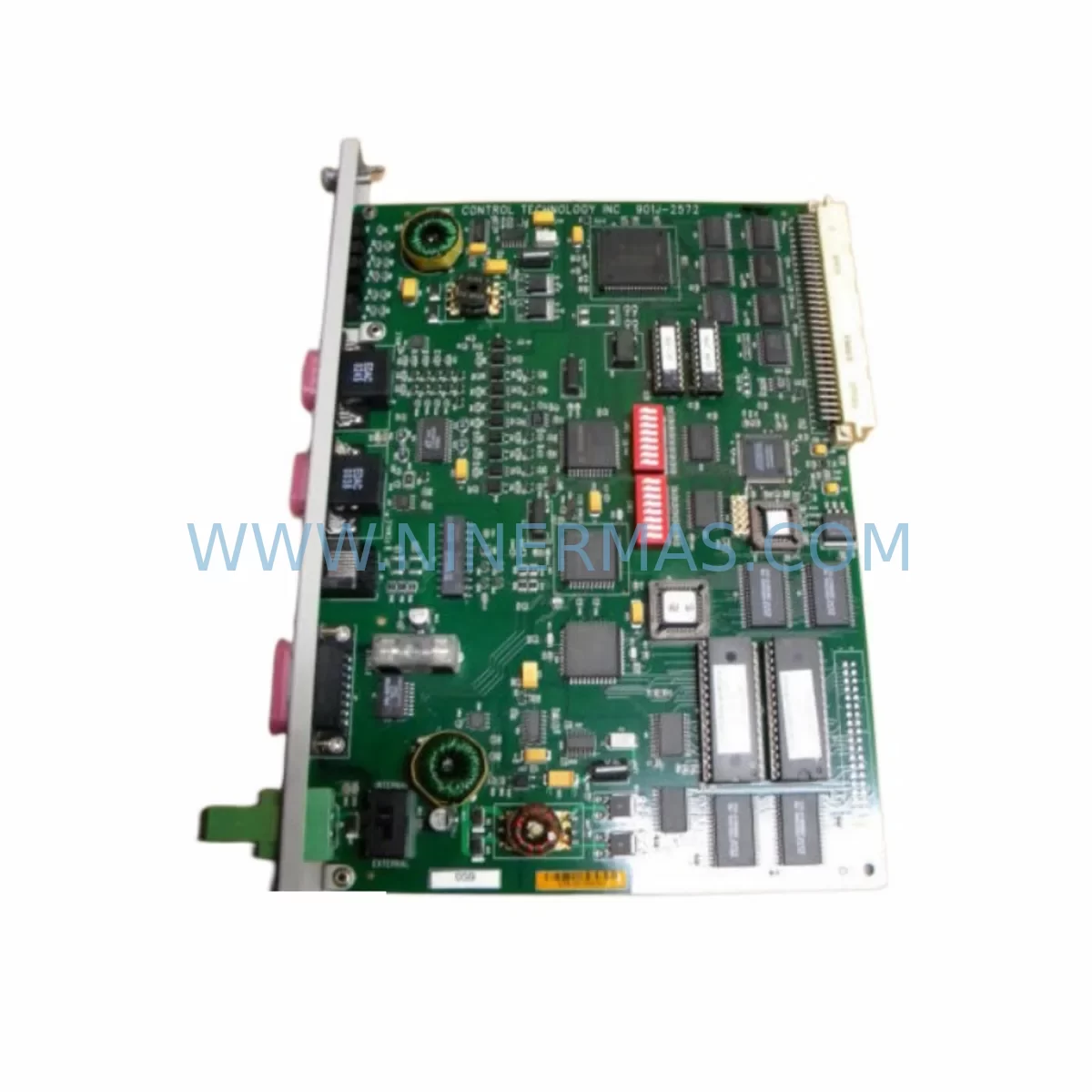
CTI 2572 Service-Ready Spare Part for Industrial Maintenance
Verify the part, confirm the platform family, and move straight into quotation with the right commercial details.
RFQ Ready
- SKUCTI 2572
- CategoryPLC & Industrial Automation Modules
- BrandCTI
- SupportAvailability, lead time, condition, and shipping coordination
How Buyers Usually Use This Page
- Confirm the exact part number and platform family before sending the quote request.
- Use direct email when quantity, condition, and destination are already defined internally.
- Switch to the broader brand or category archive when you need alternates nearby.
Series Navigation
Move through the most common platform families behind this part.
Product RFQ
Send this part directly for quotation.
Include quantity, required condition, destination country, and target delivery timing. Current reference: CTI 2572 Service-Ready Spare Part for Industrial Maintenance with SKU CTI 2572.
CTI 2572 Service-Ready Spare Part for Industrial Maintenance
The CTI 2572 is an original Ethernet TCP/IP communication adapter designed for use in CTI Series 505 and CTI 2500 programmable controller systems. As a direct-replacement industrial spare, the CTI 2572 enables high-speed Ethernet connectivity between the PLC backplane and plant-level SCADA, HMI, or DCS networks. For maintenance engineers managing aging control infrastructure, having a verified, service-ready CTI 2572 in stock is a critical element of any downtime-reduction strategy.
Communication failures in industrial control systems are among the most disruptive fault categories on the plant floor. When an Ethernet adapter such as the CTI 2572 fails, the controller may lose visibility to the supervisory network entirely — halting remote monitoring, blocking program uploads, and isolating the PLC from production data systems. A pre-qualified replacement unit on the shelf eliminates the lead time risk and allows maintenance teams to restore full network communication within a single shift.
At NINERMAS, every CTI 2572 unit is sourced from verified supply channels, inspected prior to dispatch, and backed by a 12-month warranty. We support procurement engineers and maintenance planners who require long-term supply continuity for legacy CTI platforms that may no longer be actively marketed by the OEM.
Spare Maintenance Table
| Parameter | Specification / Detail |
|---|---|
| Part Number | CTI 2572 |
| Brand | CTI (Control Technology Inc.) |
| Series Compatibility | CTI 2500 Series, Series 505 PLC Systems |
| Function | Ethernet TCP/IP Communication Adapter |
| Network Protocol | TCP/IP over 10/100 Ethernet |
| Backplane Interface | CTI 2500 / Series 505 compatible backplane slot |
| Installation Type | Rack-mount module, direct backplane insertion |
| Application Environment | Industrial control cabinets, PLC racks, automation panels |
| Condition | Original, service-ready spare |
| Pre-shipment Testing | Functional inspection and communication verification |
| Warranty | 12 Months |
| Supply Lead Time | Contact NINERMAS for current stock availability |
| Maintenance Recommendation | Replace immediately upon communication fault; inspect backplane connectors and Ethernet cabling during swap |
Maintenance Planning for Continuous Operation
Replacing the CTI 2572 in a live control cabinet is rarely an isolated task. Experienced maintenance engineers know that a communication adapter fault is often a symptom of broader electrical stress in the rack. When scheduling a CTI 2572 replacement, the following components and subsystems should be inspected or included in the same maintenance window:
Begin with the CTI 2500 CPU module — the processor that the 2572 serves. Verify firmware revision compatibility and check for any logged communication errors that may indicate the CPU itself has been affected. Alongside the CPU, inspect the CTI 2500 power supply module for output voltage stability; an under-voltage condition on the backplane bus is a common root cause of intermittent adapter faults.
The CTI 2572 backplane connector pins should be cleaned and visually inspected for oxidation or mechanical damage before inserting the replacement unit. If the rack houses additional communication modules — such as a CTI 2572-A variant or a CTI 2576 PROFIBUS adapter — these should be checked for similar fault indicators during the same visit.
On the network side, verify the Ethernet patch cable and managed switch port connected to the 2572. A degraded cable or a misconfigured switch port (duplex mismatch, VLAN assignment error) can cause the replacement module to exhibit the same symptoms as the failed unit. If the plant network uses industrial Ethernet switches with port diagnostics, pull the link statistics before and after the swap to confirm clean communication.
For systems where the CTI 2572 interfaces with an HMI panel — such as a legacy operator terminal running a SCADA client — confirm that the HMI communication driver is re-established after the module replacement and that tag polling resumes at the expected scan rate. In multi-rack configurations, also check the CTI 2500 remote I/O adapter modules to ensure that distributed I/O communication was not disrupted during the network outage caused by the failed 2572.
Procurement engineers building annual spare parts lists for CTI 2500-based lines should consider stocking at least one CTI 2572 per production zone, alongside a spare CTI 2500 power supply, a replacement CTI 2572 Ethernet cable assembly, and a set of terminal block connectors for the I/O modules in the same rack. This approach ensures that any single-point communication failure can be resolved without waiting for international freight.
Site Replacement Workflow
Step 1 — Fault Confirmation: Before pulling the CTI 2572, confirm the fault is isolated to the communication adapter. Check the module’s status LEDs (if accessible), review the CPU diagnostic buffer for communication error codes, and ping the module’s IP address from the engineering workstation. A non-responsive ping combined with a solid fault LED is a reliable indicator that the 2572 requires replacement rather than reconfiguration.
Step 2 — Safe Isolation: Follow your site’s lockout/tagout procedure. The CTI 2500 rack may remain powered during a hot-swap if the system design supports it — consult the CTI 2572 installation manual for hot-swap compatibility guidance specific to your firmware version. If in doubt, perform a controlled shutdown of the rack to avoid backplane damage.
Step 3 — Module Swap: Remove the faulty CTI 2572 by releasing the module latch and sliding it clear of the backplane. Insert the service-ready replacement unit, ensuring full seating of the backplane connector. Secure the module latch.
Step 4 — IP Configuration: The CTI 2572 stores its IP address in non-volatile memory on the module itself. If the replacement unit has not been pre-configured, use the CTI Workbench software or the module’s front-panel configuration port to assign the correct IP address, subnet mask, and gateway before powering the rack.
Step 5 — Communication Verification: Power the rack and confirm that the CPU establishes communication with the 2572. Verify that the HMI, SCADA, or DCS system resumes data exchange. Document the replacement in the site maintenance log, including the serial number of the removed unit and the replacement unit.
This workflow is designed to minimize mean time to repair (MTTR) and restore production communication within the shortest possible window — a key objective for any maintenance team managing CTI Series 505 or CTI 2500 infrastructure.
Spare Parts Support FAQ
Q1: Is the CTI 2572 supplied by NINERMAS an original part or a compatible replacement?
Every CTI 2572 listed on ninermas.com is an original CTI-branded unit sourced from verified industrial supply channels. We do not supply counterfeit, rebranded, or third-party compatible substitutes. Each unit undergoes pre-shipment inspection to confirm physical integrity and basic functional readiness.
Q2: What is the warranty coverage and what does it include?
All CTI 2572 units supplied by NINERMAS carry a 12-month warranty from the date of shipment. The warranty covers manufacturing defects and functional failures under normal operating conditions. It does not cover damage resulting from incorrect installation, overvoltage events, or physical mishandling on site. For warranty claims, contact sale@ninermas.com with the order reference and a description of the fault.
Q3: Can NINERMAS support long-term supply of the CTI 2572 for multi-year maintenance contracts?
Yes. NINERMAS specializes in long-term spare parts supply for legacy industrial automation platforms, including CTI Series 505 and CTI 2500 systems. We work with procurement engineers to establish blanket order arrangements, reserved stock agreements, and scheduled delivery programs that align with annual maintenance budgets and planned shutdown cycles.
Q4: How do I confirm compatibility before ordering if my system uses a modified Series 505 rack configuration?
Send your rack configuration details — including the CPU model, backplane type, firmware version, and current communication module part numbers — to sale@ninermas.com. Our technical team will confirm CTI 2572 compatibility with your specific system before the order is placed, eliminating the risk of receiving an incompatible unit.
| Product Series | Other series |
|---|
Catalog Continuation
More CTI modules in the catalog.
Use the brand lane to compare nearby part numbers, platform-adjacent modules, and other inquiry-ready listings before sending your final RFQ.
Catalog Continuation
Alternative parts within PLC & Industrial Automation Modules.
Stay inside the same system family when you need substitutes, adjacent modules, or a broader shortlist for procurement review.