Original Industrial Spare Part
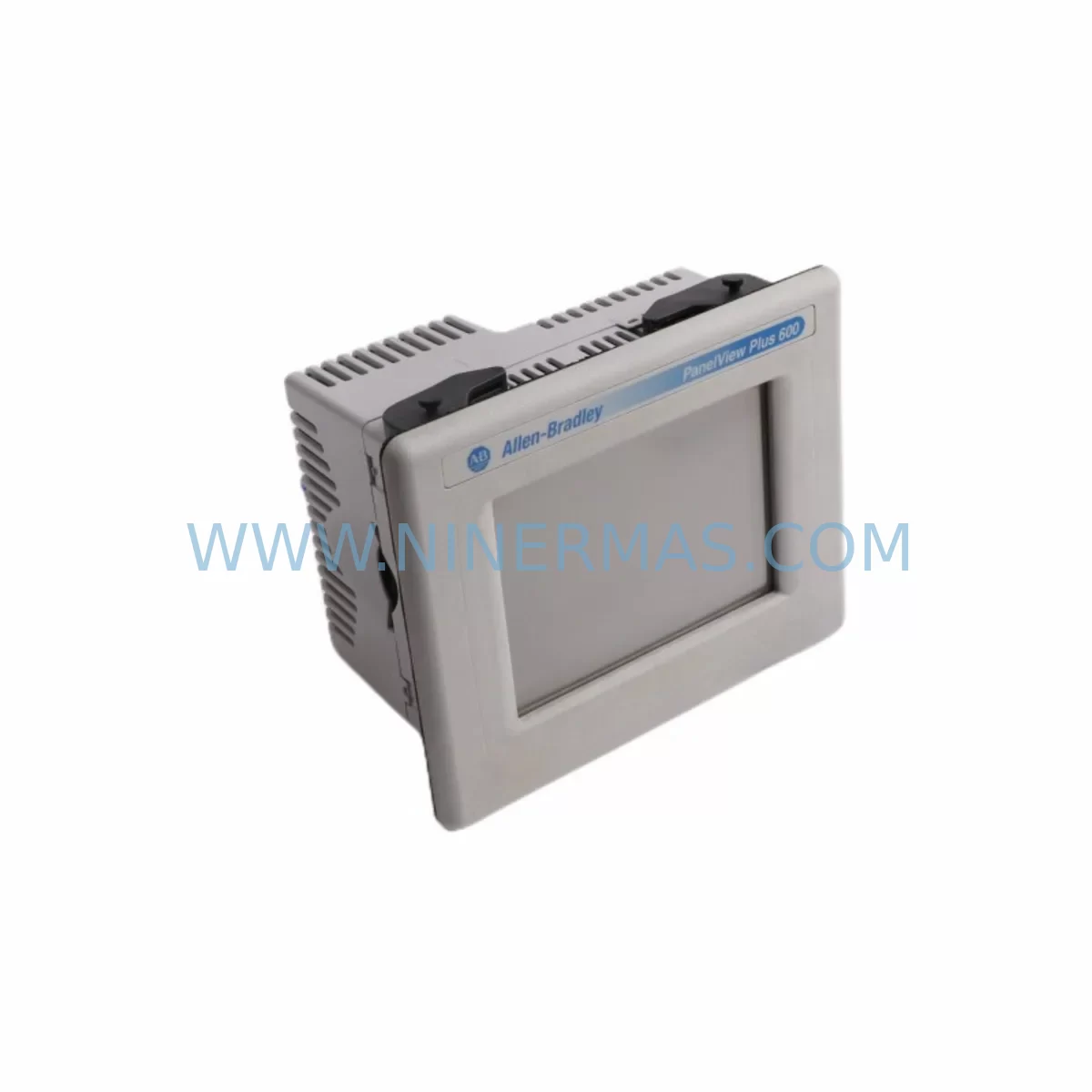
Allen-Bradley 2711P-T6C5D Retrofit-Compatible Touch Panel for Legacy Systems
Verify the part, confirm the platform family, and move straight into quotation with the right commercial details.
RFQ Ready
- SKU2711P-T6C5D
- CategoryPLC & Industrial Automation Modules
- BrandAllen-Bradley
- SupportAvailability, lead time, condition, and shipping coordination
How Buyers Usually Use This Page
- Confirm the exact part number and platform family before sending the quote request.
- Use direct email when quantity, condition, and destination are already defined internally.
- Switch to the broader brand or category archive when you need alternates nearby.
Series Navigation
Move through the most common platform families behind this part.
Product RFQ
Send this part directly for quotation.
Include quantity, required condition, destination country, and target delivery timing. Current reference: Allen-Bradley 2711P-T6C5D Retrofit-Compatible Touch Panel for Legacy Systems with SKU 2711P-T6C5D.
Allen-Bradley 2711P-T6C5D Retrofit-Compatible Touch Panel for Legacy Systems
The Allen-Bradley 2711P-T6C5D is a 6-inch WVGA color touch panel from the PanelView Plus 6 series, designed for operator interface applications in industrial automation environments. As legacy control systems age and original OEM units reach end-of-life, the 2711P-T6C5D has become a critical retrofit solution for facilities seeking to extend the operational life of their existing control infrastructure without committing to a full platform migration. This unit supports ControlNet, EtherNet/IP, and DH-485 communication protocols, making it compatible with a wide range of Allen-Bradley PLC platforms including the ControlLogix, CompactLogix, MicroLogix, and SLC 500 families.
For maintenance engineers and procurement teams managing aging production lines, sourcing a verified replacement for the 2711P-T6C5D is often time-critical. Unplanned HMI failures can halt production entirely, and the availability of a pre-tested, warranty-backed unit is essential to minimizing downtime. NINERMAS supplies the 2711P-T6C5D as a retrofit-compatible replacement with full pre-shipment functional testing, 12-month warranty coverage, and documented compatibility verification against the original application requirements.
Upgrade Compatibility Table
| Parameter | Details |
|---|---|
| SKU / Part Number | 2711P-T6C5D |
| Series | PanelView Plus 6 |
| Display Size | 6-inch WVGA Color Touch Screen |
| Communication Protocols | EtherNet/IP, ControlNet, DH-485 |
| Compatible PLC Platforms | ControlLogix, CompactLogix, MicroLogix 1100/1400, SLC 500 |
| Power Supply Requirement | 24V DC nominal (verify existing panel supply capacity before installation) |
| Mounting / Installation | Panel cutout mount; verify cutout dimensions match legacy unit footprint |
| Terminal / Connector Interface | Rear-panel communication ports; confirm cable type (Cat5e/Cat6 for EtherNet/IP, RG-6 for ControlNet) |
| Application File Compatibility | FactoryTalk View ME application files (.mer); verify runtime version compatibility |
| HMI Screen Migration | Existing .mer files can be reloaded via USB or FactoryTalk View Studio; screen resolution adjustment may be required |
| Replacement Recommendation | Direct replacement for 2711P-T6C5D; cross-reference 2711P-T6C5A8 and 2711P-T6M5D for alternate configurations |
| Commissioning Notes | Confirm IP address assignment, node address (DH-485), and FactoryTalk ME runtime version prior to startup |
| Warranty | 12 Months from shipment date |
| Pre-Shipment Testing | Full functional test performed; power-on, display, touch calibration, and communication port verification |
Retrofit Planning for Existing Automation Systems
Replacing the 2711P-T6C5D within an existing control cabinet requires a structured approach to avoid configuration errors and extended downtime. Before the replacement unit arrives on-site, maintenance teams should document the existing network topology, confirm the 24V DC power supply rail has sufficient current capacity for the new panel, and back up the active FactoryTalk View ME application file (.mer) from the original unit using a USB drive or FactoryTalk View Studio connected via EtherNet/IP.
In systems where the 2711P-T6C5D communicates with a ControlLogix L7x or L8x controller via EtherNet/IP, the replacement panel must be assigned the same IP address as the original unit, or the ControlLogix program’s HMI path must be updated accordingly. For legacy installations using DH-485 with a MicroLogix 1100 or SLC 5/03, the node address configured in the original panel must be replicated exactly to avoid communication faults on startup.
Control cabinets running mixed I/O architectures often pair the PanelView Plus 6 with a 1756-EN2T EtherNet/IP communication module or a 1747-AIC DH-485 link coupler. These modules should be inspected for firmware currency during the same maintenance window. If the cabinet includes a 1756-PA75 or 1756-PB75 power supply module, verify that the total load budget accommodates the replacement HMI without tripping the supply’s overcurrent protection.
For facilities running older SCADA integrations, the 2711P-T6C5D replacement may also coincide with a review of the 1761-NET-ENI Serial-to-EtherNet/IP adapter or the 1784-U2DHP USB-to-DH+ interface cable used for programming access. These components are frequently overlooked during HMI replacements but are critical to maintaining communication continuity between the operator panel, the PLC, and any upstream historian or DCS integration.
Where the original panel was mounted in a NEMA 4/4X-rated enclosure, confirm that the replacement unit’s IP65 front-panel rating is compatible with the environmental requirements of the installation. Panel cutout dimensions for the 2711P-T6C5D are standardized within the PanelView Plus 6 family, but gasket condition and mounting hardware should be inspected and replaced if degraded. Signal isolators such as the MTL5041 or P+F KFD2-STC4-Ex1 may be present in the I/O wiring harness and should be verified for correct loop power during recommissioning.
Downtime Control During System Migration
Minimizing production downtime during an HMI replacement begins with pre-staging the replacement 2711P-T6C5D before the maintenance window opens. Load the backed-up .mer application file onto the replacement unit in the workshop, configure the IP address or DH-485 node address offline, and perform a touch calibration cycle. This pre-configuration approach reduces on-site commissioning time to a physical swap and a communication verification check — typically achievable within a 30–60 minute planned outage window.
Where the control system cannot tolerate even a brief loss of operator interface, consider temporarily routing critical process status to an upstream SCADA display or a secondary PanelView terminal while the primary 2711P-T6C5D is being replaced. ControlLogix systems with redundant communication paths via a 1756-EN2TR ring topology can maintain PLC-to-SCADA communication even when the local HMI is offline, protecting the integrity of the control loop and alarm management functions.
After physical installation, the commissioning sequence should follow this order: power-on verification, display and touch function check, communication link establishment (ping test for EtherNet/IP; node scan for DH-485), application file load confirmation, and a full alarm and setpoint review against the original HMI configuration. Any discrepancies in tag mapping or screen navigation should be resolved in FactoryTalk View Studio before returning the panel to production service. Document the completed commissioning steps and retain the backup .mer file as part of the site’s spare parts and maintenance records.
Retrofit Support FAQ
Q1: Is the 2711P-T6C5D a direct drop-in replacement for the original unit?
Yes, the 2711P-T6C5D is a direct form-factor replacement within the PanelView Plus 6 family. The panel cutout dimensions, mounting hardware pattern, and rear-panel communication port layout are consistent with the original specification. The existing FactoryTalk View ME application file (.mer) can be reloaded without modification in most cases, provided the FactoryTalk ME runtime version on the replacement unit matches or exceeds the version used to compile the original application. If the runtime version differs, a minor application re-compile in FactoryTalk View Studio may be required.
Q2: What communication protocols does the 2711P-T6C5D support, and are they compatible with my existing PLC?
The 2711P-T6C5D supports EtherNet/IP, ControlNet, and DH-485. This covers the majority of Allen-Bradley PLC platforms in active service, including ControlLogix, CompactLogix, MicroLogix 1100/1400, SLC 5/03, and SLC 5/05. For installations using ControlNet, confirm that the ControlNet network schedule (SMAX/UMAX parameters) is documented before replacing the panel, as the replacement unit will need to be re-scheduled into the network using RSNetWorx for ControlNet.
Q3: Does NINERMAS perform pre-shipment testing on the 2711P-T6C5D before dispatch?
Yes. Every 2711P-T6C5D unit supplied by NINERMAS undergoes a full pre-shipment functional test covering power-on verification, display quality and backlight check, touch screen calibration, and communication port integrity. A test report is available upon request. All units are shipped with 12-month warranty coverage from the date of shipment, with direct technical support available for commissioning queries.
Q4: What is the typical lead time, and can NINERMAS support urgent replacement requirements?
NINERMAS maintains stock of the 2711P-T6C5D to support urgent replacement requirements. Standard lead time for in-stock units is 3–7 business days for international shipments. For critical production downtime situations, expedited dispatch options are available — contact sale@ninermas.com or call +0086 187 5021 5667 to confirm current stock availability and arrange priority shipment.
| Product Series | 2711 |
|---|---|
| Country of Origin | US |
Catalog Continuation
More Allen-Bradley modules in the catalog.
Use the brand lane to compare nearby part numbers, platform-adjacent modules, and other inquiry-ready listings before sending your final RFQ.
Catalog Continuation
Alternative parts within PLC & Industrial Automation Modules.
Stay inside the same system family when you need substitutes, adjacent modules, or a broader shortlist for procurement review.
SKU: PCE-2 LIF-1 K15MB000 671-5532-02
Tektronix PCE-2 LIF-1 K15MB000 671-5532-02 Service-Ready Spare Part