Original Industrial Spare Part
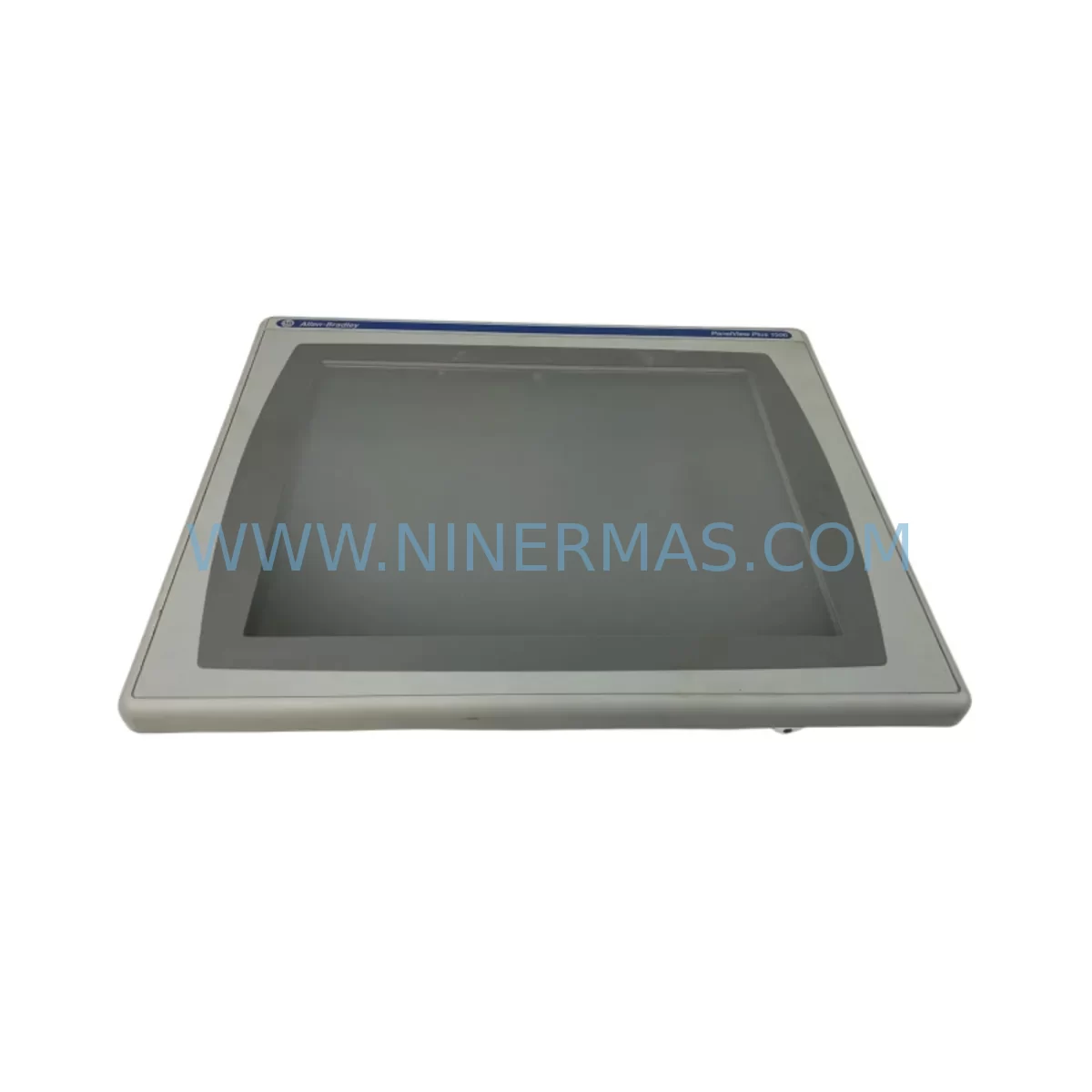
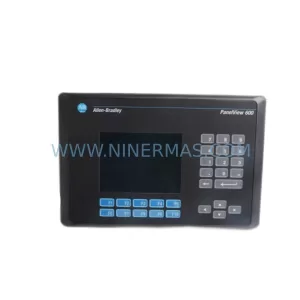
Allen-Bradley 2711P-RDT15C SER B Industrial Spare Part
Verify the part, confirm the platform family, and move straight into quotation with the right commercial details.
RFQ Ready
- SKU2711P-RDT15C SER B
- CategoryPLC & Industrial Automation Modules
- BrandAllen-Bradley
- SupportAvailability, lead time, condition, and shipping coordination
How Buyers Usually Use This Page
- Confirm the exact part number and platform family before sending the quote request.
- Use direct email when quantity, condition, and destination are already defined internally.
- Switch to the broader brand or category archive when you need alternates nearby.
Series Navigation
Move through the most common platform families behind this part.
Product RFQ
Send this part directly for quotation.
Include quantity, required condition, destination country, and target delivery timing. Current reference: Allen-Bradley 2711P-RDT15C SER B Industrial Spare Part with SKU 2711P-RDT15C SER B.
Allen-Bradley 2711P-RDT15C SER B Industrial Spare Part: Spare Replacement & Downtime Risk Control
The Allen-Bradley 2711P-RDT15C SER B is a ruggedized 15-inch touch display module designed for the PanelView Plus 7 series, engineered to operate reliably in harsh industrial environments including high-vibration, high-dust, and wide-temperature-range applications. As a direct service-ready spare part, this unit supports rapid field replacement to minimize unplanned downtime in manufacturing lines, process control cabinets, and utility automation systems.
Maintenance engineers and procurement teams managing legacy Allen-Bradley PanelView Plus 7 installations rely on the 2711P-RDT15C SER B as a critical stocking item. Its ruggedized construction — featuring sealed front panel, NEMA 4/4X/12 and IP65 ingress protection — makes it suitable for food processing, chemical, automotive, and heavy industry environments where standard HMI displays would fail prematurely. Stocking a verified spare eliminates the risk of extended lead times during emergency breakdowns.
Spare Maintenance Table
| SKU / Part Number | 2711P-RDT15C SER B |
| Brand | Allen-Bradley (Rockwell Automation) |
| Series | PanelView Plus 7 |
| Display Size | 15-inch Widescreen Touch |
| Display Type | Color TFT LCD, Resistive Touch |
| Input Voltage | 24V DC Nominal |
| Ingress Protection | NEMA 4/4X/12, IP65 (front panel) |
| Operating Temperature | 0°C to 55°C (32°F to 131°F) |
| Communication Interface | EtherNet/IP, USB, SD Card Slot |
| Compatibility | PanelView Plus 7 Standard & Performance terminals; FactoryTalk View ME software |
| Mounting | Panel cutout mount, standard 2711P series footprint |
| Revision | Series B |
| Origin | USA (Rockwell Automation) |
| Warranty | 12 Months from shipment date |
| Pre-Shipment Testing | Yes — power-on and functional verification performed before dispatch |
| Condition | Original spare, new or refurbished-to-spec |
Maintenance Planning for Continuous Operation
When replacing the 2711P-RDT15C SER B in the field, a thorough inspection of the surrounding control cabinet components is essential to prevent repeat failures and ensure system stability. Maintenance engineers should begin by verifying the 24V DC power supply feeding the HMI terminal — units such as the Allen-Bradley 2711P-RP8D logic module or equivalent power supply rails should be checked for voltage stability and ripple within specification. A degraded power supply is a common root cause of HMI display failures that goes undetected until the display unit itself is replaced.
Next, inspect the EtherNet/IP communication cabling and managed switch ports connected to the PanelView terminal. Loose RJ45 connectors, damaged Cat5e/Cat6 cables, or misconfigured switch VLANs can cause intermittent communication faults that mimic display hardware failures. If the installation uses a 2711P-RN15S or similar remote I/O adapter, verify its firmware version is compatible with the replacement Series B display module.
The control cabinet backplane and terminal block wiring should also be inspected during the replacement window. Check for loose 24V DC input terminals, corroded wire ferrules, and any signs of heat damage near the HMI mounting cutout. Terminal blocks such as Allen-Bradley 1492-series or equivalent DIN-rail mounted types should be torqued to specification and visually inspected for discoloration.
For installations where the PanelView Plus 7 communicates with a ControlLogix or CompactLogix PLC — such as the 1756-L71 or 1769-L33ER — confirm that the FactoryTalk View ME application file (.MER) stored on the replacement unit’s SD card or internal memory is the correct revision. An outdated or mismatched application file will cause the display to boot but fail to establish a valid tag connection, resulting in a blank or error-state screen that can be mistaken for a hardware fault.
Additionally, review the status of any signal isolators or surge protection devices installed on the I/O wiring entering the cabinet. Industrial environments with high electromagnetic interference — such as those with variable frequency drives (VFDs) or large motor starters — can induce transient voltages that damage HMI communication ports over time. Installing or replacing DIN-rail surge protectors on the EtherNet/IP line is a recommended preventive measure during any HMI replacement event.
Procurement engineers should consider maintaining a minimum stock of one 2711P-RDT15C SER B unit per production line, particularly in facilities running 24/7 operations where HMI downtime directly impacts output. Pairing this spare with a stocked 2711P-RP8D logic module and a spare 24V DC power supply creates a complete HMI replacement kit that can restore operator interface functionality within one shift.
Site Replacement Workflow
Step 1 — Isolation & Lockout: Follow site LOTO (Lockout/Tagout) procedures. Isolate 24V DC power to the HMI terminal. Do not disconnect EtherNet/IP cabling until power is confirmed off.
Step 2 — Application Backup: If the existing display is still partially functional, use FactoryTalk View ME Transfer Utility to back up the .MER application file to a USB drive or network share before removal.
Step 3 — Physical Removal: Remove the panel mounting hardware (typically 4–8 panel clamps on the 2711P-RDT15C series). Carefully disconnect the 24V DC power connector and EtherNet/IP cable from the rear of the unit.
Step 4 — Replacement Installation: Mount the 2711P-RDT15C SER B replacement unit into the existing panel cutout. The Series B footprint is dimensionally compatible with earlier Series A units, allowing direct swap without panel modification in most installations.
Step 5 — Application Restore: Transfer the backed-up .MER file to the replacement unit via USB or SD card. Configure the EtherNet/IP IP address to match the original unit’s network settings using the terminal’s startup configuration menu.
Step 6 — Functional Verification: Restore 24V DC power. Confirm the display boots to the correct application screen, all PLC tag values are updating correctly, and touchscreen calibration is within acceptable tolerance. Log the replacement in the site maintenance record.
This workflow supports a target replacement time of under 2 hours for a trained maintenance technician, minimizing production line downtime and avoiding the need for specialist commissioning engineers on-site.
Spare Parts Support FAQ
Q1: Is the 2711P-RDT15C SER B compatible with earlier Series A PanelView Plus 7 installations?
Yes. The Series B revision maintains backward compatibility with the same panel cutout dimensions and EtherNet/IP communication protocol as Series A. The FactoryTalk View ME application file from a Series A installation can be loaded directly onto a Series B replacement unit without modification in the majority of cases. Always verify the ME software version matches the application file revision before go-live.
Q2: What is the warranty coverage and what does pre-shipment testing include?
Every 2711P-RDT15C SER B unit supplied by NINERMAS carries a 12-month warranty from the date of shipment. Pre-shipment testing includes power-on verification, touchscreen response check, display backlight and color uniformity inspection, and EtherNet/IP port connectivity test. A test report is available upon request.
Q3: Can NINERMAS support long-term or blanket purchase orders for this spare part?
Yes. NINERMAS maintains ongoing sourcing relationships to support long-term supply agreements for the 2711P-RDT15C SER B and related PanelView Plus 7 components. Blanket orders with scheduled delivery windows are available for facilities managing annual maintenance budgets or multi-site spare parts programs. Contact our team to discuss volume pricing and lead time commitments.
Q4: What should I do if the replacement unit displays a communication fault after installation?
First, verify the EtherNet/IP IP address is correctly configured to match the original unit. Check that the FactoryTalk View ME application file revision matches the PLC program’s HMI tag database. Confirm the managed switch port is set to the correct VLAN and that no firewall rules are blocking EtherNet/IP traffic (UDP/TCP port 44818 and 2222). If the fault persists, contact NINERMAS technical support with the unit serial number and fault code for remote diagnostic assistance.
| Product Series | 2711 |
|---|---|
| Country of Origin | US |
Catalog Continuation
More Allen-Bradley modules in the catalog.
Use the brand lane to compare nearby part numbers, platform-adjacent modules, and other inquiry-ready listings before sending your final RFQ.
Catalog Continuation
Alternative parts within PLC & Industrial Automation Modules.
Stay inside the same system family when you need substitutes, adjacent modules, or a broader shortlist for procurement review.