
Original Industrial Spare Part
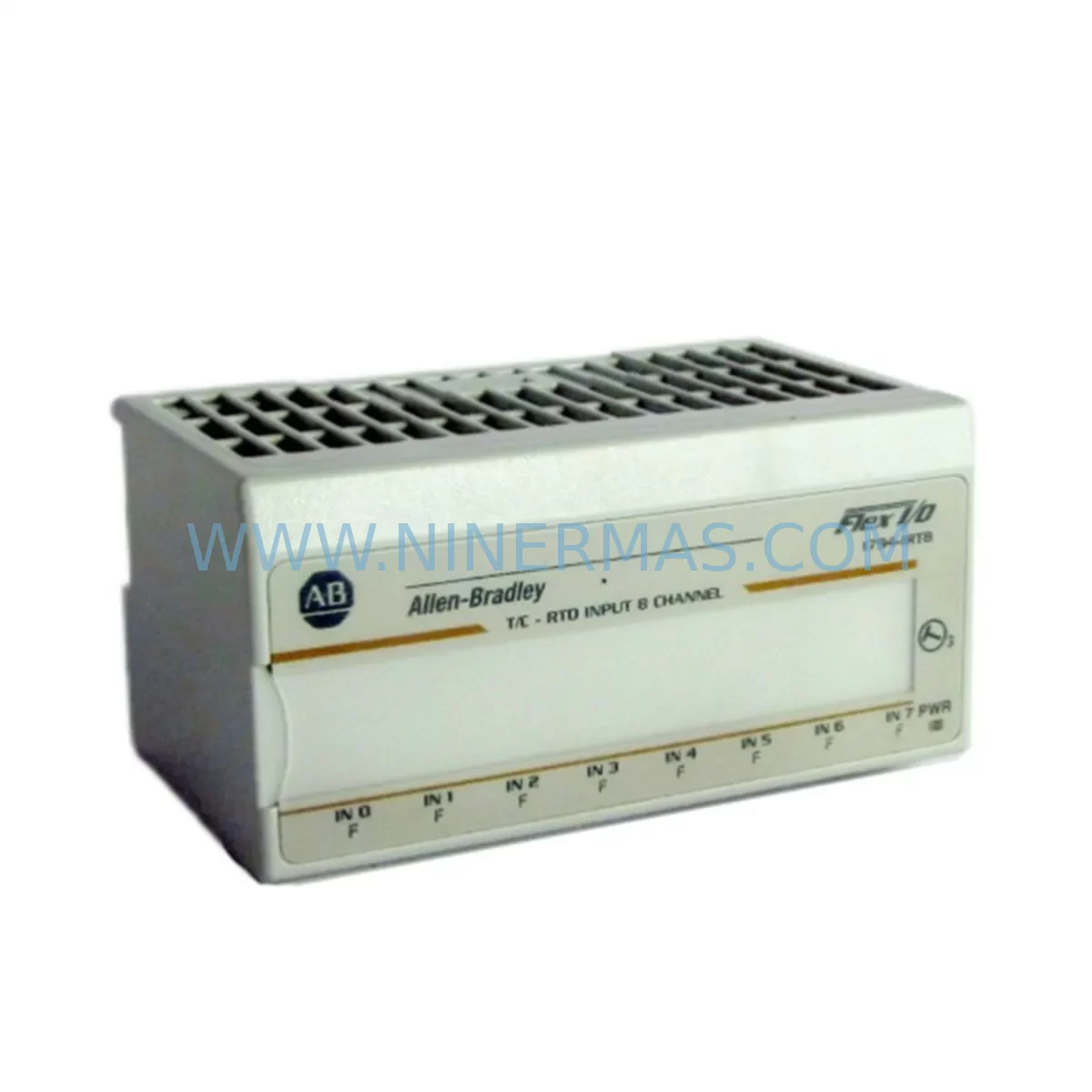
Allen-Bradley 1794-IRTB Service-Ready Spare Part for Industrial Maintenance
Verify the part, confirm the platform family, and move straight into quotation with the right commercial details.
RFQ Ready
- SKU1794-IRTB
- CategoryPLC & Industrial Automation Modules
- BrandAllen-Bradley
- SupportAvailability, lead time, condition, and shipping coordination
How Buyers Usually Use This Page
- Confirm the exact part number and platform family before sending the quote request.
- Use direct email when quantity, condition, and destination are already defined internally.
- Switch to the broader brand or category archive when you need alternates nearby.
Series Navigation
Move through the most common platform families behind this part.
Product RFQ
Send this part directly for quotation.
Include quantity, required condition, destination country, and target delivery timing. Current reference: Allen-Bradley 1794-IRTB Service-Ready Spare Part for Industrial Maintenance with SKU 1794-IRTB.
Allen-Bradley 1794-IRTB Service-Ready Spare Part for Industrial Maintenance
The Allen-Bradley 1794-IRTB is an original FLEX I/O RTD/Thermocouple Input Module engineered for demanding industrial automation environments. Designed as a direct replacement spare part, the 1794-IRTB supports rapid field substitution to minimize unplanned downtime and restore production continuity. Whether you are managing a scheduled annual overhaul, responding to an emergency fault, or building a proactive spare parts inventory, the 1794-IRTB delivers the signal integrity, compatibility, and reliability that maintenance and procurement engineers depend on.
As part of the Allen-Bradley 1794 FLEX I/O platform, this module integrates seamlessly into existing ControlLogix, CompactLogix, and SLC 500 control architectures. Its compact DIN-rail form factor and standardized backplane interface allow technicians to execute a verified replacement in minimal time, reducing mean time to repair (MTTR) and protecting production KPIs.
NINERMAS maintains ready stock of the 1794-IRTB with full pre-shipment functional testing, ensuring every unit shipped meets original factory specifications. Each module is covered by a 12-month warranty from the date of delivery, giving procurement teams confidence in long-term supply continuity and total cost of ownership.
Spare Maintenance Table
| Parameter | Specification |
|---|---|
| Part Number / SKU | 1794-IRTB |
| Brand | Allen-Bradley (Rockwell Automation) |
| Series | FLEX I/O (1794 Series) |
| Module Type | RTD / Thermocouple Input Module |
| Input Channels | 8 Differential RTD or Thermocouple Inputs |
| Supported Sensor Types | PT100, PT1000, Ni120, J, K, T, E, R, S, B Thermocouples |
| Backplane Compatibility | 1794 FLEX I/O Adapter & Backplane (e.g. 1794-TB3, 1794-TB3S) |
| Communication Interface | Via FLEX I/O Adapter (DeviceNet, EtherNet/IP, ControlNet, PROFIBUS) |
| Operating Temperature | 0°C to 60°C (32°F to 140°F) |
| Storage Temperature | -40°C to 85°C |
| Power Supply | Supplied via 1794 backplane (24V DC nominal) |
| Mounting | DIN Rail / Panel Mount via 1794 backplane |
| Origin | USA (Rockwell Automation) |
| Condition | Original / New Surplus / Tested Refurbished (as specified at order) |
| Application Environment | Industrial process control, temperature monitoring, PLC/DCS integration |
| Maintenance Recommendation | Inspect terminal block wiring annually; verify sensor calibration; check backplane seating |
| Warranty | 12 Months from date of shipment |
Maintenance Planning for Continuous Operation
When a 1794-IRTB module is flagged during routine control cabinet inspection or triggers a diagnostic fault in Studio 5000 / RSLogix 5000, the replacement workflow should extend beyond the module itself. Experienced maintenance engineers know that a single failed RTD input module is often a symptom of broader stress across the I/O rack and associated field wiring.
Begin by verifying the integrity of the 1794-TB3 or 1794-TB3S terminal base — the wiring interface that mates directly with the 1794-IRTB. Corroded or loose terminal connections are a leading cause of intermittent RTD signal faults and should be inspected and re-torqued before commissioning the replacement module. Simultaneously, check the 1794 FLEX I/O adapter (such as the 1794-AENT EtherNet/IP adapter or 1794-ADN DeviceNet adapter) for firmware currency and communication health — a degraded adapter can cause the new module to report false faults immediately after installation.
The 24V DC power supply feeding the FLEX I/O backplane deserves close attention. Voltage sag or ripple on the backplane supply rail can corrupt RTD conversion accuracy and shorten module service life. If the existing power supply is approaching its rated service hours, consider stocking a replacement unit — Allen-Bradley 1606-XLP series or equivalent industrial DIN-rail power supplies are commonly paired with FLEX I/O installations.
For installations where the 1794-IRTB feeds temperature data into a ControlLogix L-series processor via a 1756 backplane, also inspect the 1756-EN2T or 1756-ENBT EtherNet/IP communication module for connection health and packet loss statistics. In older SLC 500 architectures, verify the 1747-SN Remote I/O Scanner link integrity if the FLEX I/O rack is connected via Remote I/O.
Signal isolation is another critical consideration. Where the 1794-IRTB interfaces with field sensors in electrically noisy environments — near variable frequency drives (VFDs), large motor starters, or welding equipment — signal isolators or signal conditioners (such as those from the Phoenix Contact MINI Analog series or equivalent) should be inspected for drift or failure. A compromised isolator can introduce ground loops that damage the new RTD input module prematurely.
Procurement engineers building annual maintenance budgets should also consider stocking the 1794-IE8 analog input module and 1794-OE4 analog output module alongside the 1794-IRTB, as these modules share the same backplane and are frequently replaced together during major overhauls. Additionally, 1794-IB16 digital input modules and 1794-OB16 digital output modules in the same rack should be included in the spare parts list to cover full I/O rack restoration scenarios.
For sites running PanelView Plus HMI terminals that display temperature trends sourced from the 1794-IRTB, confirm that the HMI tag database and alarm setpoints remain valid after module replacement, particularly if the new module is configured with a different channel mapping or engineering unit scaling.
Site Replacement Workflow
Step 1 — Isolation & Safety: Follow site LOTO (Lockout/Tagout) procedures. De-energize the FLEX I/O rack and confirm zero-energy state before removing the 1794-IRTB module from the terminal base.
Step 2 — Documentation: Record the existing module configuration using RSLogix 5000 / Studio 5000 or export the I/O configuration file. Note channel assignments, sensor types, engineering unit ranges, and filter settings. This data is essential for configuring the replacement module identically.
Step 3 — Physical Replacement: Remove the 1794-IRTB from the 1794-TB3 terminal base by releasing the module locking tab. Insert the replacement 1794-IRTB and confirm positive backplane engagement. Do not re-wire the terminal base — the wiring remains on the terminal base, which stays in place.
Step 4 — Configuration Restore: Re-energize the rack and download the saved I/O configuration to the controller. Verify that the new module is recognized by the controller and that all channel diagnostics report healthy status in the controller tag browser.
Step 5 — Functional Verification: Apply known reference temperatures to each RTD or thermocouple input and confirm that the controller reads values within the module’s specified accuracy band. Document the verification results in the site maintenance log.
Step 6 — Return to Service: Release the system from LOTO, restore normal operation, and monitor the first 30 minutes of production for any residual alarms. Update the spare parts inventory record to reflect the consumed 1794-IRTB unit and initiate a replenishment order to maintain minimum stock levels.
Spare Parts Support FAQ
Q1: Is the 1794-IRTB available for long-term supply, and what is the lead time?
NINERMAS maintains active stock of the 1794-IRTB and can confirm availability and lead time upon inquiry. For critical production sites, we recommend establishing a blanket order or consignment stock arrangement to guarantee supply continuity regardless of global component market conditions. Contact sale@ninermas.com for volume pricing and lead time confirmation.
Q2: How is the 1794-IRTB tested before shipment?
Every 1794-IRTB unit shipped by NINERMAS undergoes pre-shipment functional testing that verifies backplane communication, channel input response, and diagnostic reporting. Test records are available upon request. Units are shipped in anti-static packaging with appropriate physical protection to prevent transit damage.
Q3: Can the 1794-IRTB replace older or discontinued Allen-Bradley RTD modules in legacy systems?
The 1794-IRTB is the current production RTD/thermocouple input module for the 1794 FLEX I/O platform and is backward compatible with existing 1794 terminal bases and adapters. For legacy SLC 500 or PLC-5 systems using older FLEX I/O configurations, compatibility should be verified against the installed adapter firmware version and controller I/O tree configuration before ordering. NINERMAS technical support can assist with compatibility verification.
Q4: What does the 12-month warranty cover?
The 12-month warranty covers manufacturing defects, functional failures under normal operating conditions, and any deviation from published Allen-Bradley specifications. It does not cover damage resulting from incorrect installation, overvoltage events, physical impact, or operation outside the module’s rated environmental conditions. Warranty claims are processed promptly with replacement or repair at NINERMAS’s discretion.
| Product Series | Flex I/O |
|---|---|
| Country of Origin | US |
Catalog Continuation
More Allen-Bradley modules in the catalog.
Use the brand lane to compare nearby part numbers, platform-adjacent modules, and other inquiry-ready listings before sending your final RFQ.




Catalog Continuation
Alternative parts within PLC & Industrial Automation Modules.
Stay inside the same system family when you need substitutes, adjacent modules, or a broader shortlist for procurement review.



SKU: HDD02.2-W040N-HS12-01-FW FWA-DIAX04-ELS-05VRS-MS
Rexroth HDD02.2-W040N-HS12-01-FW Service-Ready Spare Part

SKU: I5DAE375F10010000S
Lenze I5DAE375F10010000S Service-Ready Spare Part for Industrial Maintenance



