Original Industrial Spare Part
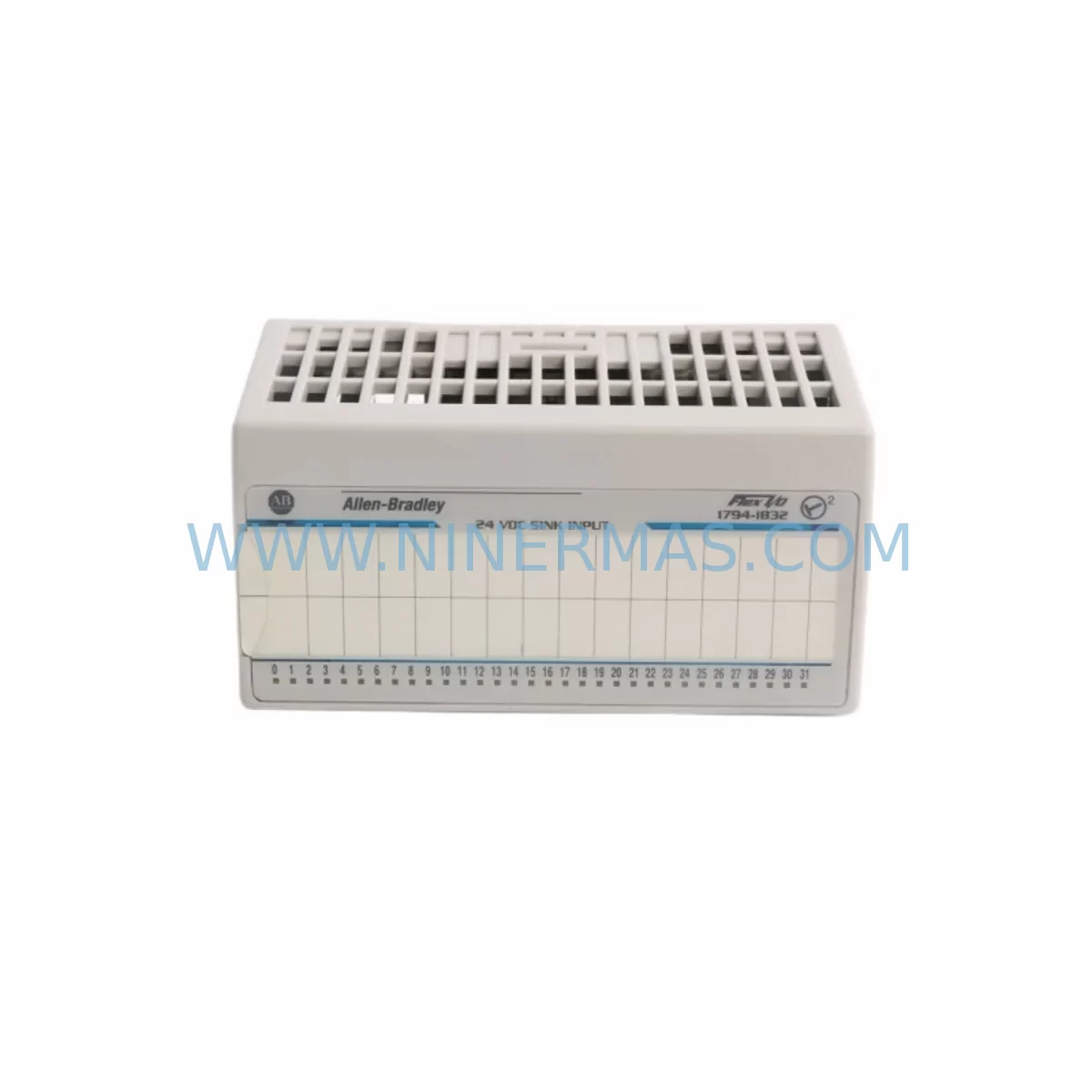
Allen-Bradley 1794-IB32 Service-Ready Spare Part for Industrial Maintenance
Verify the part, confirm the platform family, and move straight into quotation with the right commercial details.
RFQ Ready
- SKU1794-IB32
- CategoryPLC & Industrial Automation Modules
- BrandAllen-Bradley
- SupportAvailability, lead time, condition, and shipping coordination
How Buyers Usually Use This Page
- Confirm the exact part number and platform family before sending the quote request.
- Use direct email when quantity, condition, and destination are already defined internally.
- Switch to the broader brand or category archive when you need alternates nearby.
Series Navigation
Move through the most common platform families behind this part.
Product RFQ
Send this part directly for quotation.
Include quantity, required condition, destination country, and target delivery timing. Current reference: Allen-Bradley 1794-IB32 Service-Ready Spare Part for Industrial Maintenance with SKU 1794-IB32.
Allen-Bradley 1794-IB32 Service-Ready Spare Part for Industrial Maintenance
The Allen-Bradley 1794-IB32 is a 32-point 24V DC digital input module designed for the Flex I/O platform — one of Rockwell Automation’s most widely deployed distributed I/O architectures in discrete manufacturing, process control, and material handling environments. When a 1794-IB32 fails or reaches end-of-service life, the downstream impact is immediate: the affected I/O node goes offline, the PLC loses visibility into field signals, and production halts. Sourcing a verified, service-ready replacement unit is the fastest path to restoring normal operation.
At NINERMAS, every 1794-IB32 unit is sourced from authorized supply channels, inspected against original Allen-Bradley specifications, and dispatched with a 12-month warranty. Whether you are responding to an unplanned breakdown, building a preventive spare parts buffer, or decommissioning an aging control cabinet, our inventory is maintained to support rapid fulfillment for MRO buyers and maintenance engineers worldwide.
Spare Maintenance Table
| Parameter | Specification |
|---|---|
| Part Number / SKU | 1794-IB32 |
| Brand | Allen-Bradley (Rockwell Automation) |
| Series | Flex I/O (1794 Series) |
| Module Type | 32-Point Digital Input Module |
| Input Voltage | 24V DC |
| Input Points | 32 (Sink/Source configurable) |
| Backplane Interface | Flex I/O Adapter (1794-AENT, 1794-ACN15, 1794-ACNR15, etc.) |
| Communication Compatibility | EtherNet/IP, ControlNet, DeviceNet (adapter-dependent) |
| Operating Temperature | 0°C to 55°C |
| Relative Humidity | 5% to 95% (non-condensing) |
| Mounting | DIN rail via Flex I/O terminal base (1794-TB32 or 1794-TB32S) |
| Certifications | UL, CE, cUL |
| Country of Origin | United States |
| Warranty | 12 Months (NINERMAS) |
| Condition | Original / New Surplus / Tested Refurbished (as labeled) |
| Lead Time | In-stock: ships within 1–3 business days |
Maintenance Planning for Continuous Operation
Replacing a 1794-IB32 in the field is rarely an isolated task. Experienced maintenance engineers know that a failed digital input module is often a symptom of broader stress in the I/O node or control cabinet. Before returning the system to service, a structured inspection of adjacent components is strongly recommended.
Start with the 1794 terminal base — either the 1794-TB32 or 1794-TB32S — which physically connects the 1794-IB32 to field wiring. Terminal bases accumulate oxidation and loose connections over time, especially in high-vibration or high-humidity environments. If the terminal base shows signs of discoloration, cracked housing, or intermittent contact, replace it alongside the input module to prevent repeat failures.
Next, inspect the Flex I/O adapter powering the node. Common adapters in 1794-series installations include the 1794-AENT (EtherNet/IP), 1794-ACN15 (ControlNet), and 1794-ACNR15 (redundant ControlNet). A degraded adapter can cause intermittent I/O faults that mimic module failures. Verify firmware version, check for diagnostic LEDs indicating communication errors, and confirm the adapter’s IP or node address configuration is intact after any power cycle.
The 24V DC power supply feeding the I/O node deserves close attention. Voltage sag, ripple, or transient spikes are leading causes of premature digital input module failure. Use a calibrated multimeter or power quality analyzer to confirm the supply rail is stable within ±10% of nominal. If the existing power supply is more than five years old or shows signs of capacitor aging (output voltage drift, audible hum), consider stocking a replacement unit — Allen-Bradley’s 1606-XLP series power supplies are a common fit for Flex I/O panels.
For installations where the 1794-IB32 interfaces with safety-critical field devices, verify the integrity of the input wiring harness and field terminal blocks. Loose ferrules, corroded conductors, or undersized wire gauges can introduce signal noise that causes false input states. Phoenix Contact and Weidmüller terminal blocks are frequently used alongside Allen-Bradley I/O in mixed-vendor panels and should be inspected as part of the same maintenance window.
If the control system uses a 1756 ControlLogix or 1769 CompactLogix PLC as the host controller, confirm that the I/O tree configuration in Studio 5000 Logix Designer accurately reflects the replacement module. After swapping the 1794-IB32, download the updated project to the controller and verify all 32 input points map correctly to their respective rungs in the ladder logic. Pay particular attention to any 1756-EN2T or 1756-EN3TR EtherNet/IP communication modules that bridge the ControlLogix backplane to the Flex I/O network — a firmware mismatch between the bridge module and the new adapter can prevent the node from coming online.
In facilities running mixed I/O architectures, it is common to find 1794-OB32 digital output modules, 1794-IE8 analog input modules, and 1794-OE4 analog output modules installed in the same Flex I/O rack as the 1794-IB32. During any planned maintenance window, perform a visual inspection of these adjacent modules for LED fault indicators, and use the controller’s diagnostic routines to log any accumulated fault counts before clearing them. This data is invaluable for root-cause analysis and for justifying spare parts budget to procurement management.
Finally, for older installations where the 1794-IB32 has been in continuous service for more than seven years, consider a proactive lifecycle review. Rockwell Automation’s product lifecycle status for legacy Flex I/O modules may have moved to Active Mature or End of Life, meaning long-term supply availability is not guaranteed. Stocking one or two additional 1794-IB32 units — along with compatible 1794-TB32 terminal bases and a spare 1794-AENT adapter — is a cost-effective hedge against future supply disruptions and extended lead times.
Site Replacement Workflow
Step 1 — Isolate and de-energize. Before removing the 1794-IB32, isolate the affected I/O node by placing the Flex I/O adapter into inhibit mode via the controller software, or by physically disconnecting the adapter from the network. De-energize the 24V DC supply rail feeding the terminal base. Follow your site’s lockout/tagout (LOTO) procedure.
Step 2 — Document field wiring. Photograph or sketch the existing wiring connections on the 1794-TB32 terminal base before disconnecting any conductors. Label each wire with its corresponding input point number. This step is critical for accurate reconnection and eliminates the risk of miswiring during reassembly.
Step 3 — Remove the failed module. Slide the 1794-IB32 out of the terminal base by releasing the module locking tab. Inspect the terminal base connector pins for damage or contamination. If the pins are bent or corroded, replace the terminal base before installing the new module.
Step 4 — Install the replacement 1794-IB32. Align the new module with the terminal base and slide it firmly into place until the locking tab engages. Re-energize the 24V DC supply rail and restore the adapter’s network connection.
Step 5 — Verify I/O mapping in the controller. Go online with the PLC using Studio 5000 Logix Designer. Navigate to the I/O tree and confirm the 1794-IB32 node shows a green status. Force-test a representative sample of input points by actuating the corresponding field devices and verifying the correct bit state changes in the controller tag database.
Step 6 — Clear faults and restore production. Clear any accumulated I/O fault logs in the controller. Remove any inhibit conditions applied during the replacement procedure. Return the system to automatic mode and monitor the first production cycle for anomalies. Document the replacement in your CMMS with the new module’s serial number and installation date.
Spare Parts Support FAQ
Q1: Is the 1794-IB32 supplied by NINERMAS an original Allen-Bradley product?
Yes. NINERMAS sources 1794-IB32 units from authorized distribution channels and verified surplus inventories. Each unit is inspected for authenticity, physical condition, and functional integrity before dispatch. A 12-month warranty is included with every shipment, covering defects in materials and workmanship under normal operating conditions.
Q2: How do I confirm compatibility between the 1794-IB32 and my existing Flex I/O adapter?
The 1794-IB32 is compatible with all standard 1794-series Flex I/O adapters, including the 1794-AENT (EtherNet/IP), 1794-ACN15 (ControlNet), and 1794-ADN (DeviceNet). Compatibility is determined by the adapter, not the input module itself. Confirm your adapter’s firmware revision supports the number of I/O points configured in your Studio 5000 project. If you are unsure, provide your adapter catalog number and firmware version to our technical team at sale@ninermas.com for pre-purchase verification.
Q3: What pre-shipment testing does NINERMAS perform on the 1794-IB32?
Each 1794-IB32 unit undergoes a functional bench test that verifies all 32 input channels respond correctly to 24V DC input signals, the backplane communication interface is intact, and the module’s diagnostic LEDs operate as specified. Units that fail any test criterion are quarantined and not dispatched. A test report is available upon request for critical MRO orders.
Q4: Can NINERMAS support long-term or blanket purchase orders for the 1794-IB32?
Yes. NINERMAS maintains a dedicated MRO inventory program for industrial automation spare parts, including the 1794-IB32 and related Flex I/O components. We support blanket purchase orders, scheduled releases, and consignment stocking arrangements for facilities with recurring maintenance requirements. Contact our procurement team at sale@ninermas.com or +0086 187 5021 5667 to discuss volume pricing and long-term supply agreements.
| Product Series | Flex I/O |
|---|---|
| Country of Origin | US |
Catalog Continuation
More Allen-Bradley modules in the catalog.
Use the brand lane to compare nearby part numbers, platform-adjacent modules, and other inquiry-ready listings before sending your final RFQ.




Catalog Continuation
Alternative parts within PLC & Industrial Automation Modules.
Stay inside the same system family when you need substitutes, adjacent modules, or a broader shortlist for procurement review.


SKU: 00-176-037 00-176-037 00-262-652 00-262-652 00-178-888 00-178-888
KUKA 00-176-037 Retrofit Reducer Module for Legacy Systems

SKU: 6SE7027-2TD84-6HF3
SIEMENS 6SE7027-2TD84-6HF3 Service-Ready Spare Part