Original Industrial Spare Part
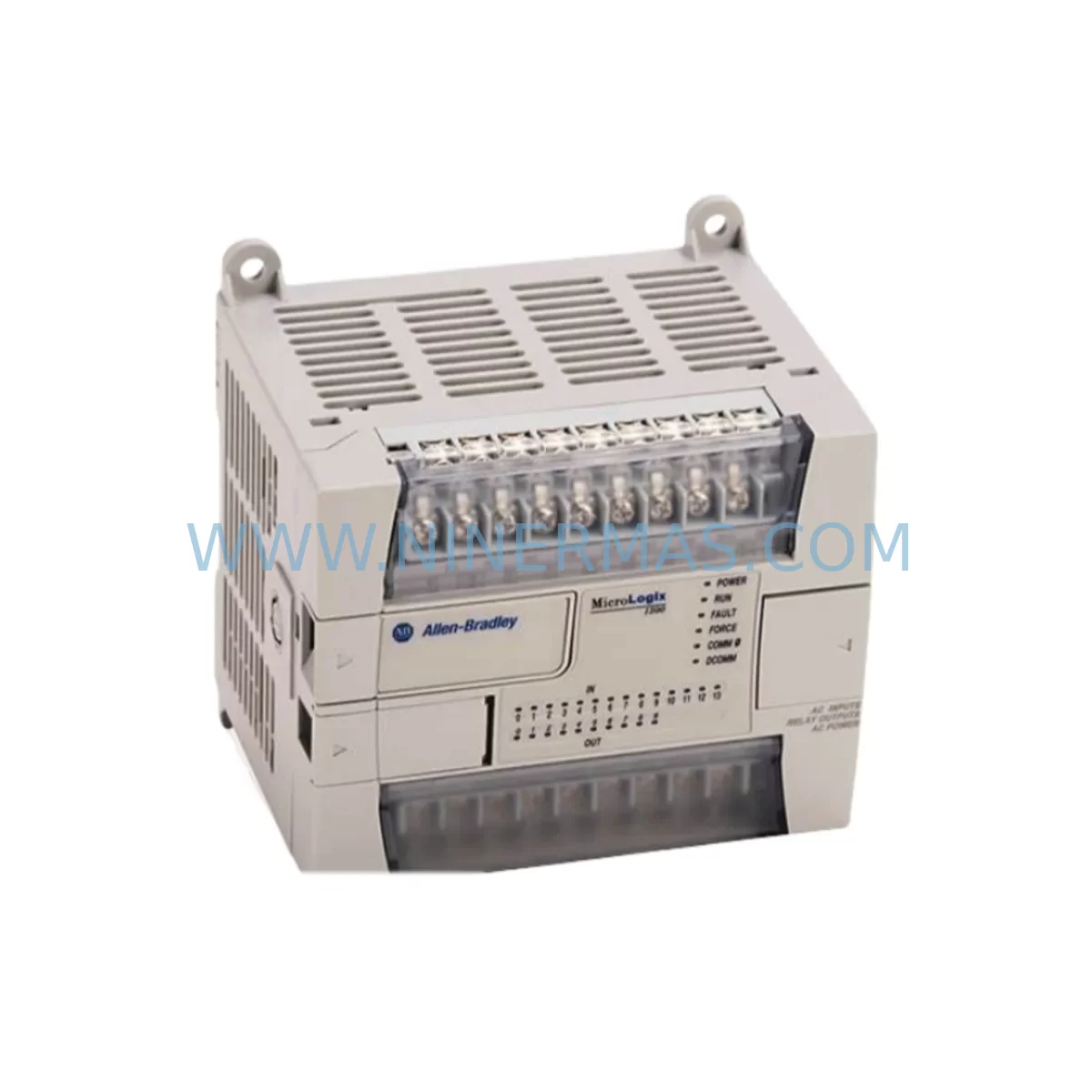
Allen-Bradley 1762-L24BXBR Service-Ready Spare Part
Verify the part, confirm the platform family, and move straight into quotation with the right commercial details.
RFQ Ready
- SKU1762-L24BXBR
- CategoryPLC & Industrial Automation Modules
- BrandAllen-Bradley
- SupportAvailability, lead time, condition, and shipping coordination
How Buyers Usually Use This Page
- Confirm the exact part number and platform family before sending the quote request.
- Use direct email when quantity, condition, and destination are already defined internally.
- Switch to the broader brand or category archive when you need alternates nearby.
Series Navigation
Move through the most common platform families behind this part.
Product RFQ
Send this part directly for quotation.
Include quantity, required condition, destination country, and target delivery timing. Current reference: Allen-Bradley 1762-L24BXBR Service-Ready Spare Part with SKU 1762-L24BXBR.
Allen-Bradley 1762-L24BXBR Service-Ready Spare Part for Industrial Maintenance
The Allen-Bradley 1762-L24BXBR is a MicroLogix 1100 series programmable logic controller (PLC) featuring 24 I/O points in a compact, ruggedized housing designed for demanding industrial environments. As a service-ready spare part sourced through NINERMAS, this unit is tested, inspected, and ready for immediate deployment to minimize unplanned downtime and accelerate production line recovery. Whether you are managing a scheduled annual overhaul, responding to an emergency fault, or building a strategic spare parts inventory for aging control systems, the 1762-L24BXBR is a critical component to keep on hand.
Maintenance engineers working with Allen-Bradley MicroLogix 1100 systems recognize the 1762-L24BXBR as the backbone of many small-to-mid-scale automation cells. Its onboard 14 DC inputs and 10 relay outputs, combined with embedded Ethernet communications, make it a versatile controller for conveyors, packaging lines, pump stations, HVAC control panels, and process skids. When this controller fails or reaches end-of-life, the impact on production is immediate — making rapid access to a verified replacement essential for any maintenance or procurement team.
Spare Maintenance Table
| Parameter | Specification |
|---|---|
| Model / SKU | 1762-L24BXBR |
| Series | MicroLogix 1100 |
| Brand | Allen-Bradley / Rockwell Automation |
| Product Type | PLC Controller (Compact) |
| Total I/O Points | 24 (14 DC In / 10 Relay Out) |
| Input Voltage | 24V DC |
| Output Type | Relay (Normally Open) |
| Communication | Ethernet/IP, RS-232 (DF1/DH-485) |
| Memory | 8 KB User Program |
| Operating Temperature | 0°C to 55°C (32°F to 131°F) |
| Enclosure Rating | IP20 (panel mount) |
| Mounting | DIN Rail or Panel Mount |
| Compatibility | MicroLogix 1100 expansion modules (1762 series) |
| Origin | United States |
| Condition | Original / Service-Ready |
| Warranty | 12 Months |
| Application | Industrial automation, OEM machinery, process control, building automation |
| Maintenance Recommendation | Inspect firmware version before installation; verify I/O wiring map against existing program; test in offline simulation before live deployment |
Maintenance Planning for Continuous Operation
When replacing a 1762-L24BXBR in the field, a thorough maintenance engineer does not stop at swapping the controller. The surrounding electrical ecosystem must be evaluated to prevent repeat failures and ensure system stability. Begin by inspecting the 24V DC power supply feeding the controller — units such as the Allen-Bradley 1606-XLP power supply series are commonly paired with MicroLogix 1100 systems, and a degraded power supply is a frequent root cause of controller faults. Verify output voltage under load and check for ripple or voltage sag before commissioning the replacement unit.
Next, examine the expansion I/O modules connected via the 1762 backplane. Common companions include the 1762-IQ8 digital input module, the 1762-OW8 relay output module, and the 1762-IF4 analog input module. Loose backplane connectors or damaged ribbon cables between the base unit and expansion modules can cause intermittent I/O faults that are often misdiagnosed as controller failures. Inspect each module seating and check for corrosion on the backplane connector pins.
The RS-232 communication port on the 1762-L24BXBR is frequently used for HMI connectivity — often to a PanelView Component or third-party operator panel. Inspect the communication cable (typically a 1761-CBL-PM02 or equivalent) for insulation damage, bent pins, or loose locking screws. If the system uses Ethernet/IP for SCADA or MES integration, verify the network switch port, patch cable integrity, and IP address configuration to avoid communication loss after controller replacement.
For control cabinets housing the 1762-L24BXBR, also inspect the terminal blocks on the I/O wiring side. Loose or corroded terminal connections on brands such as Phoenix Contact or Weidmüller terminal strips are a common source of intermittent input signals. Check fuse holders protecting the 24V DC input circuits — blown or weakened fuses can cause partial I/O loss that mimics controller faults. Surge protection devices on digital input lines should also be tested, particularly in environments with frequent motor starts or welding operations nearby.
Procurement engineers building a spare parts inventory for MicroLogix 1100-based systems should consider stocking at least one 1762-L24BXBR alongside key expansion modules, a spare 24V DC power supply, communication cables, and a set of replacement fuses. This approach ensures that a complete control cabinet restoration can be completed within a single maintenance window, avoiding the delays associated with emergency procurement of multiple components.
Site Replacement Workflow
Replacing the 1762-L24BXBR on-site follows a structured process to minimize downtime and ensure system compatibility. Before removing the failed unit, document the existing I/O wiring using photographs or a wiring diagram, and export the current PLC program from the controller using RSLogix 500 or Studio 5000 Logix Designer if the controller is still partially responsive. If the controller is completely unresponsive, retrieve the program backup from your maintenance management system or from the last known-good backup stored on a USB drive or network share.
Power down the control cabinet following your site’s lockout/tagout (LOTO) procedure. Remove the I/O wiring from the terminal blocks, label each wire if not already labeled, and disconnect the expansion modules from the backplane. Remove the failed 1762-L24BXBR from the DIN rail or panel mount. Install the service-ready replacement unit, reconnect the expansion modules, and re-terminate the I/O wiring according to your documented wiring map.
Before powering up, verify that the replacement unit’s firmware version is compatible with your existing program. If a firmware update is required, perform it using ControlFLASH before loading the application program. Restore power, download the program via RSLogix 500, and perform a full I/O checkout — verifying each input and output against the process to confirm correct operation. This systematic approach reduces the risk of commissioning errors and ensures the replacement controller performs identically to the original, maintaining system compatibility and production continuity.
For older systems where the 1762-L24BXBR is approaching obsolescence, NINERMAS maintains long-term supply of service-ready units to support extended system life. This is particularly valuable for facilities operating legacy automation infrastructure where a full system upgrade is not yet feasible, allowing maintenance teams to extend the operational life of existing control systems cost-effectively.
Spare Parts Support FAQ
Q1: Is the 1762-L24BXBR you supply an original Allen-Bradley unit?
Yes. All units supplied by NINERMAS are original Allen-Bradley / Rockwell Automation products. Each unit undergoes pre-shipment inspection and functional testing to confirm it meets OEM specifications before dispatch. A 12-month warranty is included with every unit.
Q2: How do I confirm compatibility with my existing MicroLogix 1100 system?
The 1762-L24BXBR is a direct replacement for existing MicroLogix 1100 base units with the same SKU. Verify the series letter on your existing unit’s nameplate — if the series matches, the replacement is a drop-in fit. For cross-series compatibility questions, contact our technical team at sale@ninermas.com with your existing unit’s full nameplate information.
Q3: What is your lead time and can you support long-term supply for ongoing maintenance contracts?
Most in-stock units ship within 1–3 business days. NINERMAS supports long-term supply agreements for maintenance contractors and facility operators managing multiple MicroLogix 1100 installations. Contact us to discuss scheduled delivery, reserved stock arrangements, and volume pricing.
Q4: What does the 12-month warranty cover?
The 12-month warranty covers manufacturing defects and functional failures under normal operating conditions. Each unit is tested prior to shipment. In the event of a warranty claim, NINERMAS will provide a replacement unit or repair service. Warranty does not cover damage resulting from incorrect installation, overvoltage, or physical mishandling on-site.
| Product Series | MicroLogix |
|---|---|
| Country of Origin | US |
Catalog Continuation
More Allen-Bradley modules in the catalog.
Use the brand lane to compare nearby part numbers, platform-adjacent modules, and other inquiry-ready listings before sending your final RFQ.
Catalog Continuation
Alternative parts within PLC & Industrial Automation Modules.
Stay inside the same system family when you need substitutes, adjacent modules, or a broader shortlist for procurement review.