Original Industrial Spare Part
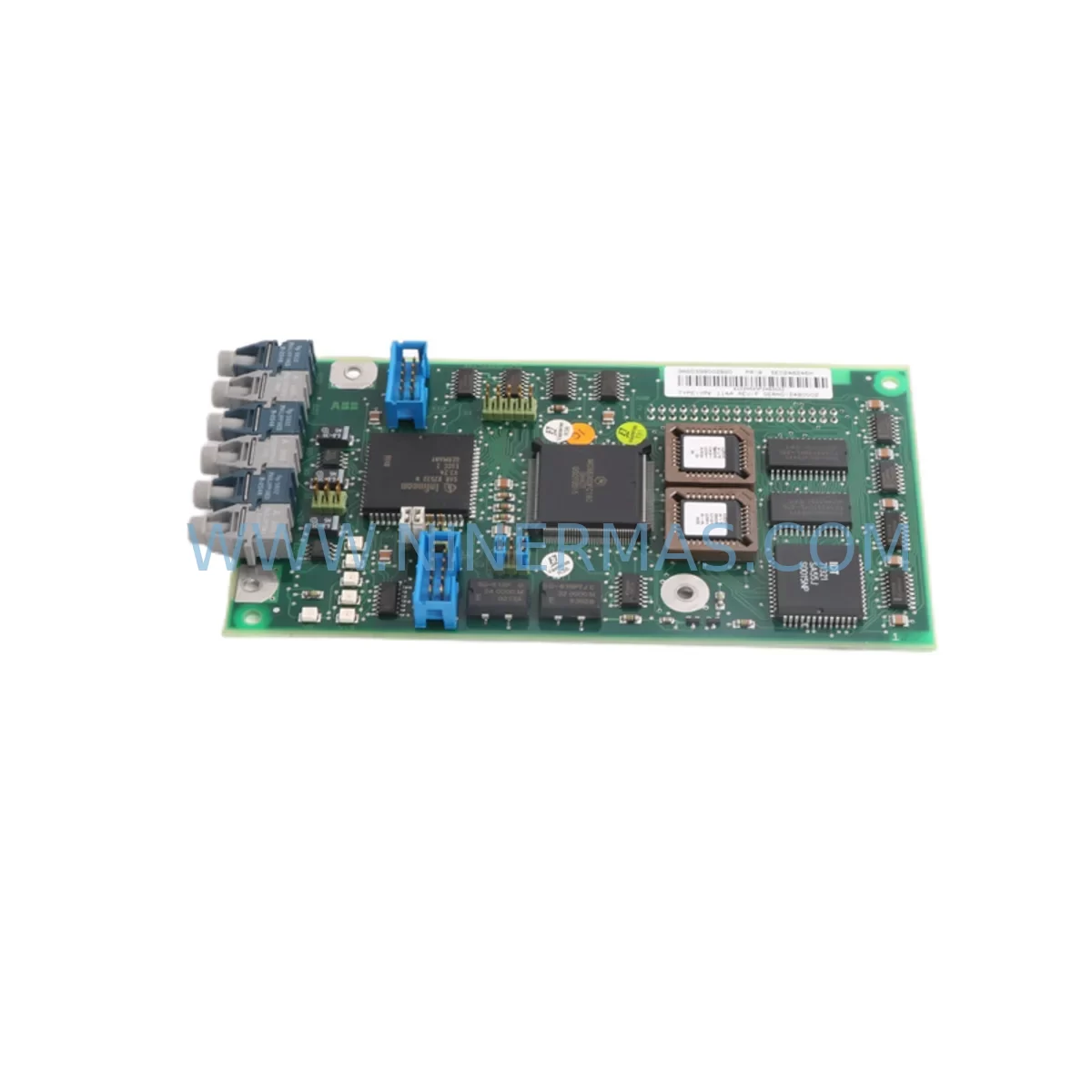
ABB YPK114A 3ASD399002B20 Spare Part for Industrial Maintenance
Verify the part, confirm the platform family, and move straight into quotation with the right commercial details.
RFQ Ready
- SKUYPK114A 3ASD399002B20 3ASD399002B2
- CategoryPLC & Industrial Automation Modules
- BrandABB
- SupportAvailability, lead time, condition, and shipping coordination
How Buyers Usually Use This Page
- Confirm the exact part number and platform family before sending the quote request.
- Use direct email when quantity, condition, and destination are already defined internally.
- Switch to the broader brand or category archive when you need alternates nearby.
Series Navigation
Move through the most common platform families behind this part.
Product RFQ
Send this part directly for quotation.
Include quantity, required condition, destination country, and target delivery timing. Current reference: ABB YPK114A 3ASD399002B20 Spare Part for Industrial Maintenance with SKU YPK114A 3ASD399002B20 3ASD399002B2.
ABB YPK114A 3ASD399002B20 Spare Part for Industrial Maintenance
The ABB YPK114A (order references 3ASD399002B20 and 3ASD399002B2) is an original communications module designed for the ABB AC500 PLC series — one of the most widely deployed programmable logic controller platforms in process automation, machine control, and critical infrastructure applications worldwide. As a service-ready spare part, the YPK114A is stocked and tested by NINERMAS to support maintenance engineers and procurement teams who require fast, reliable replacement components to minimize unplanned downtime and protect production continuity.
In industrial environments where the AC500 PLC governs motor drives, safety interlocks, SCADA communication, or distributed I/O networks, a failed or degraded communications module can cascade into full line stoppages. The YPK114A serves as the fieldbus and serial communications interface within the AC500 CPU rack, enabling data exchange between the PLC and upstream/downstream systems. Maintaining a verified spare on the shelf is the single most effective strategy for reducing mean time to repair (MTTR) when this module fails.
Spare Maintenance Table
| Parameter | Specification |
|---|---|
| Part Number | YPK114A |
| Reference Numbers | 3ASD399002B20 / 3ASD399002B2 |
| Brand | ABB |
| Series | AC500 / S500 PLC |
| Module Type | Communications Module (Fieldbus / Serial Interface) |
| Compatible Platform | ABB AC500 CPU modules (PM5xx, PM5xxV2 series) |
| Mounting | DIN rail, AC500 backplane slot |
| Operating Voltage | Supplied via AC500 backplane (3.3 V / 5 V internal bus) |
| Operating Temperature | -25°C to +60°C |
| Protection Rating | IP20 |
| Origin | Germany (ABB Automation Products) |
| Application | Process automation, machine control, building automation, energy management |
| Maintenance Recommendation | Inspect every 12 months; replace immediately on communication fault or LED error indication |
| Warranty | 12 Months — NINERMAS quality guarantee, tested before shipment |
Maintenance Planning for Continuous Operation
When a maintenance or procurement engineer schedules replacement of the YPK114A communications module, a thorough inspection of the surrounding AC500 control cabinet is essential to prevent repeat failures and ensure full system restoration. Begin with the AC500 CPU module (such as the PM554-T-ETH or PM564-T-ETH) to confirm firmware compatibility and verify that the CPU backplane bus is delivering clean power to all expansion slots. A degraded CPU or corrupted firmware image can cause a replacement communications module to report faults immediately after installation.
Next, inspect the AC500 power supply module (for example the PS501-PROG or PS560) for output voltage stability. Ripple or undervoltage on the 24 VDC rail is a common root cause of intermittent communications errors that are incorrectly attributed to the module itself. Use a calibrated multimeter or power quality analyzer before condemning the YPK114A.
The AC500 I/O expansion modules connected downstream — including digital input modules such as the DI524 and analog output modules such as the AO523 — should be checked for correct addressing and communication handshake after the YPK114A is replaced. If the system uses PROFIBUS DP or Modbus RTU fieldbus, inspect the fieldbus termination resistors and shielded twisted-pair cables for continuity and correct impedance (typically 120 Ω at each bus end). Damaged or improperly terminated fieldbus cables are a frequent cause of communication instability that a new module alone cannot resolve.
For cabinets integrating ABB CP600 HMI panels or third-party operator interfaces communicating via Ethernet or serial RS-485, verify that IP addressing, baud rate settings, and communication parameters are correctly re-entered after module swap — these settings are not always retained in the CPU program and may require manual reconfiguration. Additionally, inspect terminal blocks (such as ABB’s ENTRELEC or Phoenix Contact series) for loose connections, corrosion, or thermal discoloration, particularly on signal and power commons. Loose terminals are a leading cause of intermittent faults in aging control cabinets.
Where signal isolators or surge protection modules are installed on fieldbus lines entering the cabinet from field instruments, verify that these devices are functioning correctly and have not been damaged by transient events — a common occurrence in plants with frequent motor starts or lightning exposure. Finally, check any 24 VDC fuse holders or miniature circuit breakers protecting the PLC rack supply for signs of thermal stress or nuisance tripping history.
Site Replacement Workflow
Step 1 — Pre-replacement verification: Before removing the YPK114A, document all active communication parameters, node addresses, baud rates, and fieldbus topology using the AC500 engineering tool (Automation Builder or PS501 Control Builder). Export and back up the current PLC program to a laptop or USB drive.
Step 2 — Safe isolation: Follow site LOTO (Lockout/Tagout) procedures. De-energize the AC500 rack via the cabinet main isolator. Confirm zero voltage on the backplane supply before handling modules.
Step 3 — Module removal and inspection: Remove the faulty YPK114A by releasing the DIN rail latch and sliding the module from its backplane slot. Inspect the backplane connector pins for bent contacts, corrosion, or debris. Clean with dry compressed air if necessary.
Step 4 — Install the replacement YPK114A (3ASD399002B20): Seat the new module firmly into the correct slot position as defined by the original hardware configuration. Ensure the backplane connector is fully engaged. Re-energize the rack and observe the module status LEDs — a solid green RUN LED confirms successful initialization.
Step 5 — Communication re-commissioning: Restore the backed-up PLC program and verify all fieldbus nodes are online. Test I/O response, HMI communication, and SCADA data integrity before returning the line to production. Log the replacement in the site maintenance management system (CMMS) with the new module serial number and installation date.
This structured workflow reduces average replacement time to under 60 minutes for experienced maintenance teams and eliminates the most common post-replacement commissioning errors.
Spare Parts Support FAQ
Q1: Is the YPK114A 3ASD399002B20 compatible with all AC500 CPU versions?
The YPK114A is designed for the ABB AC500 PLC platform and is compatible with PM5xx and PM5xxV2 series CPU modules. For older PM5xx-DP or PM5xx-ETH variants, confirm the hardware revision of your existing CPU against ABB’s compatibility matrix before ordering. NINERMAS technical support can assist with compatibility verification prior to purchase.
Q2: What pre-shipment testing does NINERMAS perform on the YPK114A?
Every YPK114A unit shipped by NINERMAS undergoes functional power-on testing and visual inspection for connector integrity, LED operation, and physical condition. Units are packed in anti-static ESD-safe packaging with a test-passed label. A 12-month warranty is included from the date of shipment.
Q3: How should I manage long-term spare parts inventory for AC500 communications modules?
For production lines with high uptime requirements, NINERMAS recommends holding a minimum of one YPK114A per AC500 rack in your critical spares inventory. Given that ABB periodically revises or discontinues module variants, procuring 2–3 units during a planned maintenance cycle provides insurance against future availability gaps. NINERMAS maintains long-term stock and can fulfill repeat orders with consistent part references.
Q4: Can the YPK114A replace older 3ASD399002B2 units directly?
Yes. The 3ASD399002B20 is the current order reference for the YPK114A, superseding the earlier 3ASD399002B2 designation. Both references refer to the same module generation and are form-fit-function compatible for direct field replacement without hardware or software modification in standard AC500 configurations.
| Product Series | AC500 |
|---|---|
| Country of Origin | SE |
Catalog Continuation
More ABB modules in the catalog.
Use the brand lane to compare nearby part numbers, platform-adjacent modules, and other inquiry-ready listings before sending your final RFQ.

SKU: 3BSE011790R1(PXHK401)
ABB 3BSE011790R1 PXHK401 Retrofit-Ready Communication Module
SKU: DI890 3BSC690073R1
ABB DI890 3BSC690073R1 Retrofit-Compatible Digital Input for Legacy S800
SKU: DSQC611 3HAC13389-2
ABB DSQC611 3HAC13389-2 Service-Ready Spare for IRC5
SKU: HESG447440R0001 70BK03C-E
ABB HESG447440R0001 70BK03C-E Safety-Reliable I/O Module
Catalog Continuation
Alternative parts within PLC & Industrial Automation Modules.
Stay inside the same system family when you need substitutes, adjacent modules, or a broader shortlist for procurement review.