Original Industrial Spare Part
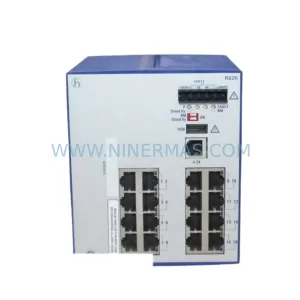
Hirschmann MS2108-2 Retrofit-Compatible Managed Switch
Verify the part, confirm the platform family, and move straight into quotation with the right commercial details.
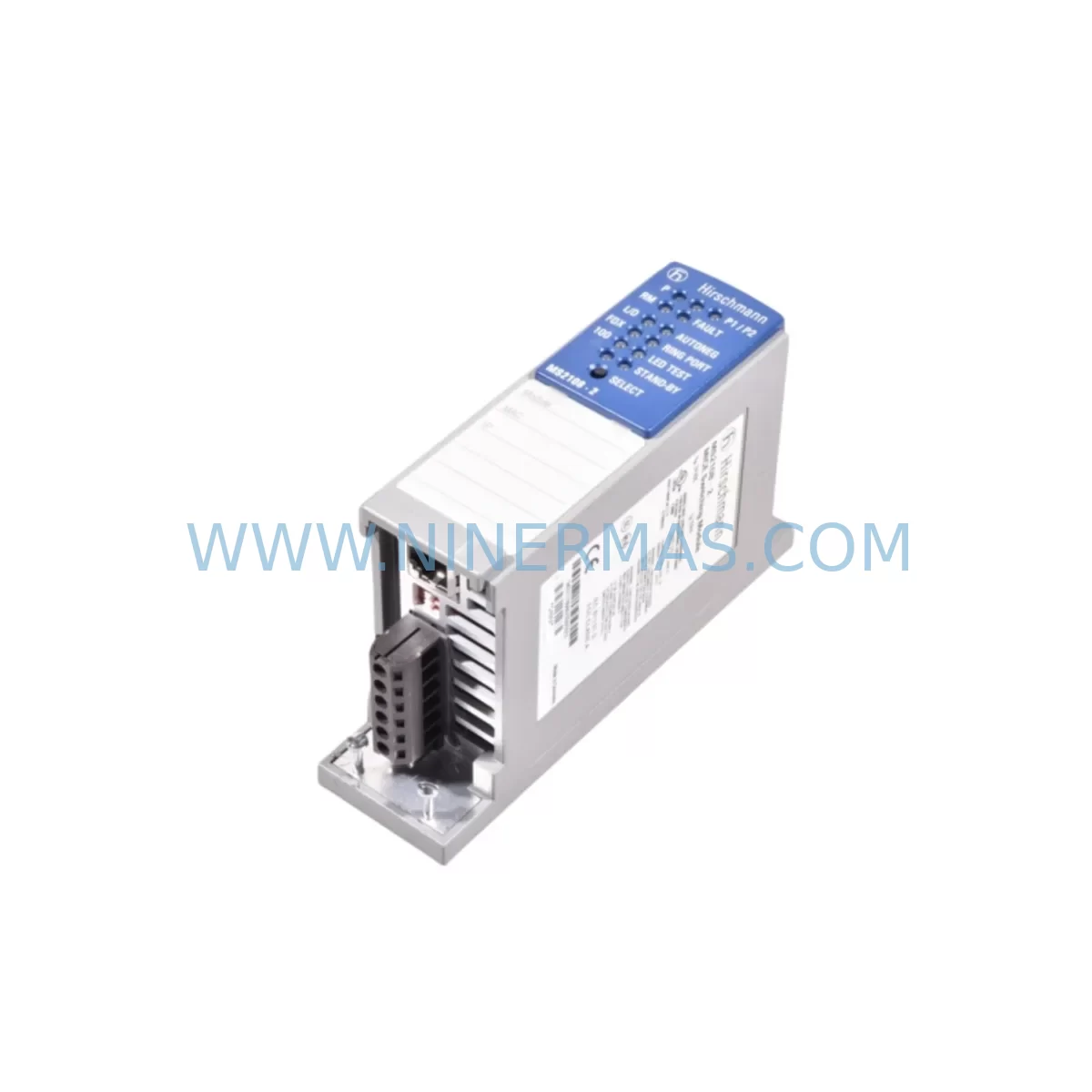
RFQ Ready
- SKUMS2108-2
- CategoryPLC & Industrial Automation Modules
- BrandHirschmann
- SupportAvailability, lead time, condition, and shipping coordination
How Buyers Usually Use This Page
- Confirm the exact part number and platform family before sending the quote request.
- Use direct email when quantity, condition, and destination are already defined internally.
- Switch to the broader brand or category archive when you need alternates nearby.
Series Navigation
Move through the most common platform families behind this part.
Product RFQ
Send this part directly for quotation.
Include quantity, required condition, destination country, and target delivery timing. Current reference: Hirschmann MS2108-2 Retrofit-Compatible Managed Switch with SKU MS2108-2.
Hirschmann MS2108-2 Retrofit-Compatible Managed Switch for Legacy Industrial Systems
The Hirschmann MS2108-2 is a managed industrial Ethernet switch from the proven MS21 Series, purpose-built for deployment in harsh industrial environments. As legacy automation networks face increasing pressure to modernize, the MS2108-2 has become a critical component in retrofit and upgrade projects across process manufacturing, discrete assembly lines, and utility control systems. Whether you are replacing an end-of-life switch in a PROFINET ring, migrating from an unmanaged network backbone, or expanding I/O communication paths in an aging control cabinet, the MS2108-2 delivers the port density, redundancy protocols, and DIN-rail form factor required for seamless integration into existing infrastructure.
Industrial automation engineers frequently encounter the MS2108-2 when upgrading control architectures originally built around older Hirschmann SPIDER and MACH series platforms. The MS2108-2 supports RSTP and HiPER-Ring redundancy, making it directly compatible with ring topologies that were previously managed by discontinued Hirschmann RS2-16/RS2-8 switches. Its 100 Mbps copper and fiber port configuration allows engineers to retain existing fiber trunk cabling while adding copper drops to new field devices — a significant advantage when minimizing installation downtime is a project priority.
Upgrade Compatibility Table
| Parameter | MS2108-2 Specification | Retrofit Notes |
|---|---|---|
| Form Factor | DIN-Rail Mount | Compatible with standard 35mm DIN rail; verify cabinet depth ≥ 65mm |
| Port Configuration | 8× 10/100BASE-TX + 2× 100BASE-FX | Replaces RS2-8 and RS2-16 in fiber-ring topologies; check SFP vs. fixed fiber |
| Redundancy Protocol | RSTP / HiPER-Ring | Confirm ring protocol matches existing MACH or SPIDER switch configuration |
| Power Supply Input | 24 VDC (18–32 VDC range) | Verify existing PSU output; Hirschmann PS24 or equivalent 24VDC rail supply recommended |
| Terminal Wiring | Screw-type terminal block | Re-use existing 24VDC wiring; confirm polarity and ground bonding |
| Management Interface | Web GUI / SNMP v1/v2c / CLI | Export config from legacy switch before replacement; re-apply VLAN and port settings |
| Communication Protocol | PROFINET-compatible (transparent) | No PLC program changes required for transparent Ethernet switching |
| Operating Temperature | -10°C to +60°C | Confirm cabinet ambient temperature; add ventilation if replacing fanless legacy units |
| Certifications | CE, UL, ATEX (zone-dependent) | Verify site classification before installation in hazardous areas |
| Warranty | 12-Month Warranty | Covered from date of shipment; pre-shipment functional test included |
Retrofit Planning for Existing Automation Systems
A successful MS2108-2 retrofit begins well before the switch arrives on site. Engineers should start by auditing the existing network topology — documenting which devices connect to each port of the legacy switch, the VLAN assignments in use, and whether the ring redundancy protocol is RSTP, MRP, or Hirschmann’s proprietary HiPER-Ring. This audit is especially important when the MS2108-2 is replacing a Hirschmann RS2-16 or RS2-8 in a ring segment that also includes Hirschmann MACH 1040 or MACH 4002 backbone switches, as ring protocol mismatches can cause network storms during commissioning.
Power supply compatibility is the next critical checkpoint. The MS2108-2 operates on 24 VDC, and most legacy control cabinets already carry a 24VDC rail from a Siemens SITOP PSU100S, Phoenix Contact QUINT-PS, or equivalent DIN-rail power supply. Confirm that the existing PSU has sufficient residual capacity — typically at least 3–5W headroom — before adding the MS2108-2 to the load. If the cabinet PSU is already at capacity, a supplementary Hirschmann PS24 or a compact 24VDC/3A DIN-rail supply should be added to the retrofit BOM.
Terminal wiring for the MS2108-2 follows a straightforward two-wire 24VDC input with a functional earth terminal. When replacing an older switch that used a different connector format — such as the barrel-jack power input found on some early Hirschmann SPIDER 5-2 units — a short adapter harness to the screw terminal block will be required. Label all wires before disconnection and photograph the original wiring layout to support post-installation verification.
For sites running Siemens S7-300 or S7-400 PLCs with PROFINET I/O, the MS2108-2 operates as a transparent Ethernet switch and does not require a new GSD file or device configuration in STEP 7 or TIA Portal. However, if the legacy switch was configured as a PROFINET IO device itself — as is the case with some Hirschmann GECKO variants — the replacement process will require updating the PROFINET device name and IP address in the PLC project before going live. Coordinate this change with the HMI team, as Siemens WinCC or iFIX tag connections referencing the old device name may need to be updated in parallel.
I/O expansion scenarios often accompany MS2108-2 retrofits. When a production line is being upgraded to add new Beckhoff EtherCAT terminals, Phoenix Contact Axioline I/O modules, or additional Siemens ET 200SP distributed I/O stations, the MS2108-2 provides the additional copper ports needed to accommodate these new nodes without requiring a larger chassis switch. This makes it an efficient solution for incremental capacity expansion within an existing control cabinet footprint.
Signal isolation should also be reviewed during the retrofit. Where legacy field wiring runs long distances or crosses electrical noise sources, Phoenix Contact MCR signal isolators or equivalent galvanic isolation modules should be inserted between the field device and the new Ethernet segment to protect the MS2108-2’s ports from induced transients. This is particularly relevant in retrofit projects involving older motor drive panels where ABB ACS550 or Siemens SINAMICS G120 drives share the same cabinet.
Downtime Control During System Migration
Minimizing production downtime is the primary constraint in any live-system switch replacement. The recommended approach for MS2108-2 retrofits is a pre-staged swap: configure the new switch on the bench using the exported configuration from the legacy unit, verify all VLAN, port, and redundancy settings, then execute the physical swap during a planned maintenance window — ideally during a scheduled shift changeover or weekend shutdown.
Before disconnecting the legacy switch, confirm that the PLC program logic does not include any network-watchdog timers that would trigger an emergency stop or safe-state transition if the Ethernet link drops for more than a few seconds. On Siemens S7-300 systems, check the PROFINET IO supervisor timeout settings in the hardware configuration. On Allen-Bradley ControlLogix or CompactLogix platforms, review the Requested Packet Interval (RPI) and connection timeout parameters for any EtherNet/IP devices connected through the switch being replaced.
The physical swap sequence should follow this order: disconnect power to the legacy switch first, then transfer fiber and copper patch cables one port at a time using the pre-documented port map, connect the MS2108-2 power terminals, and restore power. In a HiPER-Ring topology, the ring will automatically reconfigure within milliseconds once the new switch comes online, restoring full redundancy without operator intervention. Verify ring status via the MS2108-2 web GUI before releasing the system back to production.
Post-swap verification should include a ping sweep of all connected devices, a review of the PROFINET diagnostic buffer in the PLC, and a confirmation that HMI alarm pages are not showing any communication faults. Document the completed swap in the site’s maintenance log, including the MS2108-2 serial number, firmware version, and the date of the 12-month warranty start.
Retrofit Support FAQ
Q1: Is the MS2108-2 a direct drop-in replacement for the Hirschmann RS2-8 or RS2-16?
The MS2108-2 is functionally compatible with RS2-series switches in most ring and star topologies. The port count and fiber interface type should be verified against the existing installation. The DIN-rail mounting footprint is similar, but confirm cabinet rail spacing before ordering. All units are pre-shipment tested to confirm port-level functionality before dispatch.
Q2: Will I need to modify my PLC program after installing the MS2108-2?
In most cases, no. The MS2108-2 operates as a transparent managed switch and does not appear as a PROFINET IO device in the PLC project. If the legacy switch was configured as a PROFINET device, a device name and IP update in TIA Portal or STEP 7 will be required. Consult your PLC program documentation before the swap.
Q3: What is included with the MS2108-2 shipment, and how is it tested?
Each MS2108-2 is functionally tested prior to shipment, covering power-up, port link establishment, and management interface access. The unit ships with terminal block connectors and mounting hardware. A 12-month warranty is provided from the date of shipment, covering manufacturing defects and functional failures under normal operating conditions.
Q4: Can you supply the MS2108-2 for long-term spare parts programs?
Yes. We support bulk and scheduled-delivery spare parts programs for the MS2108-2 and related MS21 Series components. Inventory is maintained to support lifecycle extension programs for plants running legacy Hirschmann network infrastructure. Contact our team to discuss committed stock agreements, lead time guarantees, and multi-year supply terms.
| Product Series | Other series |
|---|---|
| Country of Origin | DE |
Catalog Continuation
More Hirschmann modules in the catalog.
Use the brand lane to compare nearby part numbers, platform-adjacent modules, and other inquiry-ready listings before sending your final RFQ.
SKU: RS2-3TX'2FX EEC
Hirschmann RS2-3TX/2FX EEC Safety-Reliable Switch Control Sites
SKU: RS20-1600T1T1SDAEHH09.0.00
Hirschmann RS20-1600T1T1SDAEHH09.0.00 Safety-Reliable Managed Rail Switch
Catalog Continuation
Alternative parts within PLC & Industrial Automation Modules.
Stay inside the same system family when you need substitutes, adjacent modules, or a broader shortlist for procurement review.